No matching examples. Try another query or clear the filters.
Copy link A visual reference · sed
sed,
Transform text by following one input line, one command and one output at a time.
One small input. One focused change. Its actual result.
The canonical Org file owns the programs and synthetic fixtures. Each complete
standalone Bash script recreates its exact inputs in an owned temporary
directory. The final PDF is versioned at the repository root.
Last changes: 2026-11-01. First edition: 96 deliberately small examples, complete inputs, authored expected outcomes, BSD/GNU comparisons and a separate GNU-extension chapter.
96 worked examples
16 topic families
1 canonical Org source
Browse by code and result
All sed examples at a glance 96 examples · 16 topics
Choose a preview to open the complete program and captured result. Search examples or select a topic to narrow the gallery. An ellipsis marks shortened code or output.
01 - Understand normal output 6 examples
02 - Address lines by number 6 examples
03 - Address lines by content 6 examples
04 - Make small substitutions 6 examples
05 - Choose the regex notation 6 examples
06 - Reuse matched and captured text 6 examples
07 - Combine addresses and substitution flags 6 examples
08 - Delete, insert and append lines 6 examples
09 - Change text, translate characters and quit 6 examples
10 - Scope a group of instructions 6 examples
11 - Move text through hold space 6 examples
12 - Read and print multiline pattern space 6 examples
13 - Branch after a transformation 6 examples
14 - Read scripts and write owned files 6 examples
15 - Compose small cleanup recipes 6 examples
16 - GNU sed extensions 6 examples Copy link Reading the tour
Follow one change
Read the input
All files consumed by a command are shown completely. Small inputs make every selected, changed or omitted line visible.
Change one feature
Follow the comparison link. Read the focused command and its named switch or instruction before adding another feature.
Check the actual result
Stdout and the complete driver status are checked against independently authored expectations. Empty stdout is displayed explicitly.
The gallery, search, topic filter and stable SED IDs support quick lookup.
Copy the focused command while using the shown fixture, or download the complete
script to recreate that fixture. The complete script runs with LC_ALL=C in a
fresh directory and removes that owned directory on exit. In file-editing
examples, only those reconstructed local copies are changed.
Copy link SED-01-001 Copy input with an empty program The empty program changes nothing. Automatic printing still emits each input line.
Back to example gallery Actual output Captured run · exit 0
Parameter Meaning in this example ImplementationBSD/GNU common ''Run no editing command; keep the normal output cycle.
Complete runnable example set -euo pipefail
export LC_ALL = C
sed_work = $( mktemp -d " ${ TMPDIR :- /tmp } /sed-example.XXXXXX" )
trap 'rm -rf -- "$sed_work"' EXIT
cd " $sed_work "
mkdir -p data
cat > data/letters.txt <<'SED_INPUT_1'
red
blue
green
SED_INPUT_1
sed '' data/letters.txt
Download: SED-01-001.sh
Copy link SED-01-002 Suppress automatic printing Add -n to the same empty program. A successful run now emits zero bytes.
Back to example gallery Compare with SED-01-001 · Copy input with an empty program .
Code -n '' data/letters.txt
Actual output Captured run · exit 0
Parameter Meaning in this example ImplementationBSD/GNU common -nSuppress automatic printing, not input reading.
Complete runnable example set -euo pipefail
export LC_ALL = C
sed_work = $( mktemp -d " ${ TMPDIR :- /tmp } /sed-example.XXXXXX" )
trap 'rm -rf -- "$sed_work"' EXIT
cd " $sed_work "
mkdir -p data
cat > data/letters.txt <<'SED_INPUT_1'
red
blue
green
SED_INPUT_1
sed -n '' data/letters.txt
Download: SED-01-002.sh
Copy link SED-01-003 Print explicitly while automatic output is active The p command and normal printing both run, so each line appears twice.
Back to example gallery Compare with SED-01-001 · Copy input with an empty program .
Actual output Captured run · exit 0
Parameter Meaning in this example ImplementationBSD/GNU common pPrint the current pattern space immediately.
Complete runnable example set -euo pipefail
export LC_ALL = C
sed_work = $( mktemp -d " ${ TMPDIR :- /tmp } /sed-example.XXXXXX" )
trap 'rm -rf -- "$sed_work"' EXIT
cd " $sed_work "
mkdir -p data
cat > data/letters.txt <<'SED_INPUT_1'
red
blue
green
SED_INPUT_1
sed 'p' data/letters.txt
Download: SED-01-003.sh
Copy link SED-01-004 Use one explicit output path Add -n to p, leaving only the explicit output.
Back to example gallery Compare with SED-01-003 · Print explicitly while automatic output is active .
Code -n 'p' data/letters.txt
Actual output Captured run · exit 0
Parameter Meaning in this example ImplementationBSD/GNU common -n pSuppress the automatic copy and keep the explicit one.
Complete runnable example set -euo pipefail
export LC_ALL = C
sed_work = $( mktemp -d " ${ TMPDIR :- /tmp } /sed-example.XXXXXX" )
trap 'rm -rf -- "$sed_work"' EXIT
cd " $sed_work "
mkdir -p data
cat > data/letters.txt <<'SED_INPUT_1'
red
blue
green
SED_INPUT_1
sed -n 'p' data/letters.txt
Download: SED-01-004.sh
Copy link SED-01-005 Pass a program with -e Use an explicit program argument before adding more programs later.
Back to example gallery Compare with SED-01-004 · Use one explicit output path .
Code -e 's/red/RED/' data/letters.txt
Actual output Captured run · exit 0
Parameter Meaning in this example ImplementationBSD/GNU common -eSupply one sed program on the command line.
Complete runnable example set -euo pipefail
export LC_ALL = C
sed_work = $( mktemp -d " ${ TMPDIR :- /tmp } /sed-example.XXXXXX" )
trap 'rm -rf -- "$sed_work"' EXIT
cd " $sed_work "
mkdir -p data
cat > data/letters.txt <<'SED_INPUT_1'
red
blue
green
SED_INPUT_1
sed -e 's/red/RED/' data/letters.txt
Download: SED-01-005.sh
Copy link SED-01-006 Read the same program from a file The script fixture contains the exact substitution used in the preceding example.
Back to example gallery Code -f data/edit.sed data/letters.txt
Actual output Captured run · exit 0
Parameter Meaning in this example ImplementationBSD/GNU common -fRead editing instructions from the named script file.
Complete runnable example set -euo pipefail
export LC_ALL = C
sed_work = $( mktemp -d " ${ TMPDIR :- /tmp } /sed-example.XXXXXX" )
trap 'rm -rf -- "$sed_work"' EXIT
cd " $sed_work "
mkdir -p data
cat > data/edit.sed <<'SED_INPUT_1'
s/red/RED/
SED_INPUT_1
cat > data/letters.txt <<'SED_INPUT_2'
red
blue
green
SED_INPUT_2
sed -f data/edit.sed data/letters.txt
Download: SED-01-006.sh
Copy link SED-02-001 Print the first input line An address restricts the explicit print instruction.
Back to example gallery Code -n '1p' data/lines.txt
Actual output Captured run · exit 0
Parameter Meaning in this example ImplementationBSD/GNU common 1Run p only at the first line.
Complete runnable example set -euo pipefail
export LC_ALL = C
sed_work = $( mktemp -d " ${ TMPDIR :- /tmp } /sed-example.XXXXXX" )
trap 'rm -rf -- "$sed_work"' EXIT
cd " $sed_work "
mkdir -p data
cat > data/lines.txt <<'SED_INPUT_1'
one
two
three
four
five
six
SED_INPUT_1
sed -n '1p' data/lines.txt
Download: SED-02-001.sh
Copy link SED-02-002 Print the second input line Change only the address number.
Back to example gallery Compare with SED-02-001 · Print the first input line .
Code -n '2p' data/lines.txt
Actual output Captured run · exit 0
Parameter Meaning in this example ImplementationBSD/GNU common 2Select a different single line.
Complete runnable example set -euo pipefail
export LC_ALL = C
sed_work = $( mktemp -d " ${ TMPDIR :- /tmp } /sed-example.XXXXXX" )
trap 'rm -rf -- "$sed_work"' EXIT
cd " $sed_work "
mkdir -p data
cat > data/lines.txt <<'SED_INPUT_1'
one
two
three
four
five
six
SED_INPUT_1
sed -n '2p' data/lines.txt
Download: SED-02-002.sh
Copy link SED-02-003 Print the final input line The final-line address avoids needing the input length in advance.
Back to example gallery Compare with SED-02-002 · Print the second input line .
Code -n '$p' data/lines.txt
Actual output Captured run · exit 0
Parameter Meaning in this example ImplementationBSD/GNU common $Address the last input line.
Complete runnable example set -euo pipefail
export LC_ALL = C
sed_work = $( mktemp -d " ${ TMPDIR :- /tmp } /sed-example.XXXXXX" )
trap 'rm -rf -- "$sed_work"' EXIT
cd " $sed_work "
mkdir -p data
cat > data/lines.txt <<'SED_INPUT_1'
one
two
three
four
five
six
SED_INPUT_1
sed -n '$p' data/lines.txt
Download: SED-02-003.sh
Copy link SED-02-004 Print an inclusive numeric range Both endpoint lines are included.
Back to example gallery Compare with SED-02-003 · Print the final input line .
Code -n '2,4p' data/lines.txt
Actual output Captured run · exit 0
Parameter Meaning in this example ImplementationBSD/GNU common 2,4Select lines two through four inclusively.
Complete runnable example set -euo pipefail
export LC_ALL = C
sed_work = $( mktemp -d " ${ TMPDIR :- /tmp } /sed-example.XXXXXX" )
trap 'rm -rf -- "$sed_work"' EXIT
cd " $sed_work "
mkdir -p data
cat > data/lines.txt <<'SED_INPUT_1'
one
two
three
four
five
six
SED_INPUT_1
sed -n '2,4p' data/lines.txt
Download: SED-02-004.sh
Copy link SED-02-005 Continue the range through the end Replace the numeric endpoint with the final-line address.
Back to example gallery Compare with SED-02-004 · Print an inclusive numeric range .
Code -n '2,$p' data/lines.txt
Actual output Captured run · exit 0
Parameter Meaning in this example ImplementationBSD/GNU common 2,$Select from the second line through the final input line.
Complete runnable example set -euo pipefail
export LC_ALL = C
sed_work = $( mktemp -d " ${ TMPDIR :- /tmp } /sed-example.XXXXXX" )
trap 'rm -rf -- "$sed_work"' EXIT
cd " $sed_work "
mkdir -p data
cat > data/lines.txt <<'SED_INPUT_1'
one
two
three
four
five
six
SED_INPUT_1
sed -n '2,$p' data/lines.txt
Download: SED-02-005.sh
Copy link SED-02-006 Invert a single address The exclamation applies the instruction everywhere outside that address.
Back to example gallery Compare with SED-02-002 · Print the second input line .
Code -n '2!p' data/lines.txt
Actual output Captured run · exit 0
Parameter Meaning in this example ImplementationBSD/GNU common !Negate the selected address.
Complete runnable example set -euo pipefail
export LC_ALL = C
sed_work = $( mktemp -d " ${ TMPDIR :- /tmp } /sed-example.XXXXXX" )
trap 'rm -rf -- "$sed_work"' EXIT
cd " $sed_work "
mkdir -p data
cat > data/lines.txt <<'SED_INPUT_1'
one
two
three
four
five
six
SED_INPUT_1
sed -n '2!p' data/lines.txt
Download: SED-02-006.sh
Copy link SED-03-001 Print lines matching an address The regex selects where p runs; it is not itself a substitution.
Back to example gallery Code -n '/WARN/p' data/log.txt
Actual output Captured run · exit 0
Parameter Meaning in this example ImplementationBSD/GNU common /regex/Address lines containing the regex.
Complete runnable example set -euo pipefail
export LC_ALL = C
sed_work = $( mktemp -d " ${ TMPDIR :- /tmp } /sed-example.XXXXXX" )
trap 'rm -rf -- "$sed_work"' EXIT
cd " $sed_work "
mkdir -p data
cat > data/log.txt <<'SED_INPUT_1'
INFO start
WARN retry
ERROR disk
INFO ready
SED_INPUT_1
sed -n '/WARN/p' data/log.txt
Download: SED-03-001.sh
Copy link SED-03-002 Anchor the address at the start Make the expected log-level position explicit.
Back to example gallery Compare with SED-03-001 · Print lines matching an address .
Code -n '/^WARN/p' data/log.txt
Actual output Captured run · exit 0
Parameter Meaning in this example ImplementationBSD/GNU common ^Require the matching level at the beginning of the line.
Complete runnable example set -euo pipefail
export LC_ALL = C
sed_work = $( mktemp -d " ${ TMPDIR :- /tmp } /sed-example.XXXXXX" )
trap 'rm -rf -- "$sed_work"' EXIT
cd " $sed_work "
mkdir -p data
cat > data/log.txt <<'SED_INPUT_1'
INFO start
WARN retry
ERROR disk
INFO ready
SED_INPUT_1
sed -n '/^WARN/p' data/log.txt
Download: SED-03-002.sh
Copy link SED-03-003 Print a delimited inclusive region Both marker lines and the content between them are selected.
Back to example gallery Code -n '/^BEGIN$/,/^END$/p' data/block.txt
Actual output Captured run · exit 0
Parameter Meaning in this example ImplementationBSD/GNU common Two regex addressesEnter at BEGIN and include the first later END.
Complete runnable example set -euo pipefail
export LC_ALL = C
sed_work = $( mktemp -d " ${ TMPDIR :- /tmp } /sed-example.XXXXXX" )
trap 'rm -rf -- "$sed_work"' EXIT
cd " $sed_work "
mkdir -p data
cat > data/block.txt <<'SED_INPUT_1'
before
BEGIN
red
blue
END
after
SED_INPUT_1
sed -n '/^BEGIN$/,/^END$/p' data/block.txt
Download: SED-03-003.sh
Copy link SED-03-004 Continue from a marker to the input end Change only the ending address of the preceding region.
Back to example gallery Compare with SED-03-003 · Print a delimited inclusive region .
Code -n '/^BEGIN$/,$p' data/block.txt
Actual output Captured run · exit 0
Parameter Meaning in this example ImplementationBSD/GNU common /BEGIN/,$Keep all lines from the starting marker onward.
Complete runnable example set -euo pipefail
export LC_ALL = C
sed_work = $( mktemp -d " ${ TMPDIR :- /tmp } /sed-example.XXXXXX" )
trap 'rm -rf -- "$sed_work"' EXIT
cd " $sed_work "
mkdir -p data
cat > data/block.txt <<'SED_INPUT_1'
before
BEGIN
red
blue
END
after
SED_INPUT_1
sed -n '/^BEGIN$/,$p' data/block.txt
Download: SED-03-004.sh
Copy link SED-03-005 Inspect a range whose first line matches its end regex For this two-address range, the ending regex is tested from the next line, so the first matching line does not immediately close the range.
Back to example gallery Code -n '1,/^START$/p' data/starts.txt
Actual output Captured run · exit 0
Parameter Meaning in this example ImplementationBSD/GNU common 1,/regex/Observe when the second address begins being tested.
Complete runnable example set -euo pipefail
export LC_ALL = C
sed_work = $( mktemp -d " ${ TMPDIR :- /tmp } /sed-example.XXXXXX" )
trap 'rm -rf -- "$sed_work"' EXIT
cd " $sed_work "
mkdir -p data
cat > data/starts.txt <<'SED_INPUT_1'
START
middle
START
end
SED_INPUT_1
sed -n '1,/^START$/p' data/starts.txt
Download: SED-03-005.sh
Copy link SED-03-006 Print the complement of an addressed set Address negation applies to complete lines, just as with a numeric address.
Back to example gallery Compare with SED-03-001 · Print lines matching an address .
Code -n '/^INFO/!p' data/log.txt
Actual output Captured run · exit 0
Parameter Meaning in this example ImplementationBSD/GNU common /regex/!Run p only when the line does not match the address.
Complete runnable example set -euo pipefail
export LC_ALL = C
sed_work = $( mktemp -d " ${ TMPDIR :- /tmp } /sed-example.XXXXXX" )
trap 'rm -rf -- "$sed_work"' EXIT
cd " $sed_work "
mkdir -p data
cat > data/log.txt <<'SED_INPUT_1'
INFO start
WARN retry
ERROR disk
INFO ready
SED_INPUT_1
sed -n '/^INFO/!p' data/log.txt
Download: SED-03-006.sh
Copy link SED-04-001 Replace the first occurrence on a line A substitution without an occurrence flag changes only the first match in each pattern space.
Back to example gallery Code 's/red/RED/' data/repeated.txt
Actual output Captured run · exit 0
Parameter Meaning in this example ImplementationBSD/GNU common s/old/new/Replace the first matching substring.
Complete runnable example set -euo pipefail
export LC_ALL = C
sed_work = $( mktemp -d " ${ TMPDIR :- /tmp } /sed-example.XXXXXX" )
trap 'rm -rf -- "$sed_work"' EXIT
cd " $sed_work "
mkdir -p data
cat > data/repeated.txt <<'SED_INPUT_1'
red red red
blue blue
SED_INPUT_1
sed 's/red/RED/' data/repeated.txt
Download: SED-04-001.sh
Copy link SED-04-002 Replace every nonoverlapping occurrence Add only the global flag.
Back to example gallery Compare with SED-04-001 · Replace the first occurrence on a line .
Code 's/red/RED/g' data/repeated.txt
Actual output Captured run · exit 0
Parameter Meaning in this example ImplementationBSD/GNU common gRepeat the substitution across this line.
Complete runnable example set -euo pipefail
export LC_ALL = C
sed_work = $( mktemp -d " ${ TMPDIR :- /tmp } /sed-example.XXXXXX" )
trap 'rm -rf -- "$sed_work"' EXIT
cd " $sed_work "
mkdir -p data
cat > data/repeated.txt <<'SED_INPUT_1'
red red red
blue blue
SED_INPUT_1
sed 's/red/RED/g' data/repeated.txt
Download: SED-04-002.sh
Copy link SED-04-003 Replace only the second occurrence Use an occurrence number instead of g.
Back to example gallery Compare with SED-04-002 · Replace every nonoverlapping occurrence .
Code 's/red/RED/2' data/repeated.txt
Actual output Captured run · exit 0
Parameter Meaning in this example ImplementationBSD/GNU common 2Replace the second matching occurrence on each line.
Complete runnable example set -euo pipefail
export LC_ALL = C
sed_work = $( mktemp -d " ${ TMPDIR :- /tmp } /sed-example.XXXXXX" )
trap 'rm -rf -- "$sed_work"' EXIT
cd " $sed_work "
mkdir -p data
cat > data/repeated.txt <<'SED_INPUT_1'
red red red
blue blue
SED_INPUT_1
sed 's/red/RED/2' data/repeated.txt
Download: SED-04-003.sh
Copy link SED-04-004 Replace a match with an empty string An empty replacement removes the matched text, not the whole input line.
Back to example gallery Compare with SED-04-001 · Replace the first occurrence on a line .
Code 's/red//' data/repeated.txt
Actual output Captured run · exit 0
Parameter Meaning in this example ImplementationBSD/GNU common Empty replacementRemove only the first matched substring.
Complete runnable example set -euo pipefail
export LC_ALL = C
sed_work = $( mktemp -d " ${ TMPDIR :- /tmp } /sed-example.XXXXXX" )
trap 'rm -rf -- "$sed_work"' EXIT
cd " $sed_work "
mkdir -p data
cat > data/repeated.txt <<'SED_INPUT_1'
red red red
blue blue
SED_INPUT_1
sed 's/red//' data/repeated.txt
Download: SED-04-004.sh
Copy link SED-04-005 Choose a delimiter that fits the data Pipe delimiters make the path slashes ordinary pattern characters.
Back to example gallery Code 's|/srv/data|/opt/data|' data/paths.txt
Actual output Captured run · exit 0
Parameter Meaning in this example ImplementationBSD/GNU common Alternate delimiterKeep slash-heavy strings readable.
Complete runnable example set -euo pipefail
export LC_ALL = C
sed_work = $( mktemp -d " ${ TMPDIR :- /tmp } /sed-example.XXXXXX" )
trap 'rm -rf -- "$sed_work"' EXIT
cd " $sed_work "
mkdir -p data
cat > data/paths.txt <<'SED_INPUT_1'
old=/srv/data
new=/srv/cache
SED_INPUT_1
sed 's|/srv/data|/opt/data|' data/paths.txt
Download: SED-04-005.sh
Copy link SED-04-006 Write the same change with slash delimiters Only the delimiter escaping changes; the result stays identical.
Back to example gallery Compare with SED-04-005 · Choose a delimiter that fits the data .
Code 's/\/srv\/data/\/opt\/data/' data/paths.txt
Actual output Captured run · exit 0
Parameter Meaning in this example ImplementationBSD/GNU common \/Escape a slash when slash is the substitution delimiter.
Complete runnable example set -euo pipefail
export LC_ALL = C
sed_work = $( mktemp -d " ${ TMPDIR :- /tmp } /sed-example.XXXXXX" )
trap 'rm -rf -- "$sed_work"' EXIT
cd " $sed_work "
mkdir -p data
cat > data/paths.txt <<'SED_INPUT_1'
old=/srv/data
new=/srv/cache
SED_INPUT_1
sed 's/\/srv\/data/\/opt\/data/' data/paths.txt
Download: SED-04-006.sh
Copy link SED-05-001 Observe a wildcard period An unescaped period matches one character in the middle of both records.
Back to example gallery Code 's/a.b/MATCH/' data/dots.txt
Actual output Captured run · exit 0
Parameter Meaning in this example ImplementationBSD/GNU common .Match one character rather than a literal period.
Complete runnable example set -euo pipefail
export LC_ALL = C
sed_work = $( mktemp -d " ${ TMPDIR :- /tmp } /sed-example.XXXXXX" )
trap 'rm -rf -- "$sed_work"' EXIT
cd " $sed_work "
mkdir -p data
cat > data/dots.txt <<'SED_INPUT_1'
a.b
aXb
SED_INPUT_1
sed 's/a.b/MATCH/' data/dots.txt
Download: SED-05-001.sh
Copy link SED-05-002 Require a literal period A bracket expression restricts the substitution to literal punctuation.
Back to example gallery Compare with SED-05-001 · Observe a wildcard period .
Code 's/a[.]b/MATCH/' data/dots.txt
Actual output Captured run · exit 0
Parameter Meaning in this example ImplementationBSD/GNU common [.]Treat the period as data.
Complete runnable example set -euo pipefail
export LC_ALL = C
sed_work = $( mktemp -d " ${ TMPDIR :- /tmp } /sed-example.XXXXXX" )
trap 'rm -rf -- "$sed_work"' EXIT
cd " $sed_work "
mkdir -p data
cat > data/dots.txt <<'SED_INPUT_1'
a.b
aXb
SED_INPUT_1
sed 's/a[.]b/MATCH/' data/dots.txt
Download: SED-05-002.sh
Copy link SED-05-003 Choose characters with a class Select c-words with either a or o in the vowel position.
Back to example gallery Code 's/c[ao]t/PET/' data/animals.txt
Actual output Captured run · exit 0
Parameter Meaning in this example ImplementationBSD/GNU common [ao]Accept a or o at that one position.
Complete runnable example set -euo pipefail
export LC_ALL = C
sed_work = $( mktemp -d " ${ TMPDIR :- /tmp } /sed-example.XXXXXX" )
trap 'rm -rf -- "$sed_work"' EXIT
cd " $sed_work "
mkdir -p data
cat > data/animals.txt <<'SED_INPUT_1'
cat
cot
cut
dog
SED_INPUT_1
sed 's/c[ao]t/PET/' data/animals.txt
Download: SED-05-003.sh
Copy link SED-05-004 Repeat a BRE atom The star belongs to the preceding bracket expression and consumes the complete digit run.
Back to example gallery Code 's/[0-9][0-9]*/#/' data/ids.txt
Actual output Captured run · exit 0
Parameter Meaning in this example ImplementationBSD/GNU common [0-9][0-9]*Require one ASCII digit and then zero or more additional digits.
Complete runnable example set -euo pipefail
export LC_ALL = C
sed_work = $( mktemp -d " ${ TMPDIR :- /tmp } /sed-example.XXXXXX" )
trap 'rm -rf -- "$sed_work"' EXIT
cd " $sed_work "
mkdir -p data
cat > data/ids.txt <<'SED_INPUT_1'
ID-7
ID-42
ID-123
SED_INPUT_1
sed 's/[0-9][0-9]*/#/' data/ids.txt
Download: SED-05-004.sh
Copy link SED-05-005 Use a BRE interval Backslashed braces express an exact count in BRE.
Back to example gallery Compare with SED-05-004 · Repeat a BRE atom .
Code 's/[0-9]\{3\}/#/' data/ids.txt
Actual output Captured run · exit 0
Parameter Meaning in this example ImplementationBSD/GNU common \{3\}Require three digits in the matched substring.
Complete runnable example set -euo pipefail
export LC_ALL = C
sed_work = $( mktemp -d " ${ TMPDIR :- /tmp } /sed-example.XXXXXX" )
trap 'rm -rf -- "$sed_work"' EXIT
cd " $sed_work "
mkdir -p data
cat > data/ids.txt <<'SED_INPUT_1'
ID-7
ID-42
ID-123
SED_INPUT_1
sed 's/[0-9]\{3\}/#/' data/ids.txt
Download: SED-05-005.sh
Copy link SED-05-006 Switch to ERE for the same interval Add -E and remove the BRE brace escapes. The selected text stays the same.
Back to example gallery Compare with SED-05-005 · Use a BRE interval .
Code -E 's/[0-9]{3}/#/' data/ids.txt
Actual output Captured run · exit 0
Parameter Meaning in this example ImplementationBSD/GNU common -ESelect extended regex syntax explicitly.
Complete runnable example set -euo pipefail
export LC_ALL = C
sed_work = $( mktemp -d " ${ TMPDIR :- /tmp } /sed-example.XXXXXX" )
trap 'rm -rf -- "$sed_work"' EXIT
cd " $sed_work "
mkdir -p data
cat > data/ids.txt <<'SED_INPUT_1'
ID-7
ID-42
ID-123
SED_INPUT_1
sed -E 's/[0-9]{3}/#/' data/ids.txt
Download: SED-05-006.sh
Copy link SED-06-001 Insert the whole match into replacement text Ampersand expands to the complete matched name assignment.
Back to example gallery Code -n 's/^name=.*/[&]/p' data/values.txt
Actual output Captured run · exit 0
Parameter Meaning in this example ImplementationBSD/GNU common &Insert the whole match in the replacement.
Complete runnable example set -euo pipefail
export LC_ALL = C
sed_work = $( mktemp -d " ${ TMPDIR :- /tmp } /sed-example.XXXXXX" )
trap 'rm -rf -- "$sed_work"' EXIT
cd " $sed_work "
mkdir -p data
cat > data/values.txt <<'SED_INPUT_1'
name=alice
name=bob
port=8080
SED_INPUT_1
sed -n 's/^name=.*/[&]/p' data/values.txt
Download: SED-06-001.sh
Copy link SED-06-002 Insert a literal ampersand Escape the replacement ampersand when it should not expand.
Back to example gallery Compare with SED-06-001 · Insert the whole match into replacement text .
Code -n 's/^name=.*/A\&B/p' data/values.txt
Actual output Captured run · exit 0
Parameter Meaning in this example ImplementationBSD/GNU common \&Write a literal ampersand in replacement text.
Complete runnable example set -euo pipefail
export LC_ALL = C
sed_work = $( mktemp -d " ${ TMPDIR :- /tmp } /sed-example.XXXXXX" )
trap 'rm -rf -- "$sed_work"' EXIT
cd " $sed_work "
mkdir -p data
cat > data/values.txt <<'SED_INPUT_1'
name=alice
name=bob
port=8080
SED_INPUT_1
sed -n 's/^name=.*/A\&B/p' data/values.txt
Download: SED-06-002.sh
Copy link SED-06-003 Capture a name using BRE groups Backslashed parentheses capture the part after name=.
Back to example gallery Compare with SED-06-002 · Insert a literal ampersand .
Code -n 's/^name=\([a-z][a-z]*\)$/user:\1/p' data/values.txt
Actual output Captured run · exit 0
Parameter Meaning in this example ImplementationBSD/GNU common \(...\) and \1Capture a name and insert the first captured string.
Complete runnable example set -euo pipefail
export LC_ALL = C
sed_work = $( mktemp -d " ${ TMPDIR :- /tmp } /sed-example.XXXXXX" )
trap 'rm -rf -- "$sed_work"' EXIT
cd " $sed_work "
mkdir -p data
cat > data/values.txt <<'SED_INPUT_1'
name=alice
name=bob
port=8080
SED_INPUT_1
sed -n 's/^name=\([a-z][a-z]*\)$/user:\1/p' data/values.txt
Download: SED-06-003.sh
Copy link SED-06-004 Use ERE groups for the same capture Change the grouping and repetition notation along with -E.
Back to example gallery Compare with SED-06-003 · Capture a name using BRE groups .
Code -En 's/^name=([a-z]+)$/user:\1/p' data/values.txt
Actual output Captured run · exit 0
Parameter Meaning in this example ImplementationBSD/GNU common ERE groupsKeep replacement backreference syntax while changing the pattern dialect.
Complete runnable example set -euo pipefail
export LC_ALL = C
sed_work = $( mktemp -d " ${ TMPDIR :- /tmp } /sed-example.XXXXXX" )
trap 'rm -rf -- "$sed_work"' EXIT
cd " $sed_work "
mkdir -p data
cat > data/values.txt <<'SED_INPUT_1'
name=alice
name=bob
port=8080
SED_INPUT_1
sed -En 's/^name=([a-z]+)$/user:\1/p' data/values.txt
Download: SED-06-004.sh
Copy link SED-06-005 Reorder two captured fields The replacement puts the captured digit string first.
Back to example gallery Code -En 's/^([a-z]+):([0-9]+)$/\2 \1/p' data/names.txt
Actual output Captured run · exit 0
Parameter Meaning in this example ImplementationBSD/GNU common \2 then \1Insert captures in a different order.
Complete runnable example set -euo pipefail
export LC_ALL = C
sed_work = $( mktemp -d " ${ TMPDIR :- /tmp } /sed-example.XXXXXX" )
trap 'rm -rf -- "$sed_work"' EXIT
cd " $sed_work "
mkdir -p data
cat > data/names.txt <<'SED_INPUT_1'
alice:17
bob:204
SED_INPUT_1
sed -En 's/^([a-z]+):([0-9]+)$/\2 \1/p' data/names.txt
Download: SED-06-005.sh
Copy link SED-06-006 Reuse the same capture twice A replacement can insert captured text several times without matching the input again.
Back to example gallery Compare with SED-06-005 · Reorder two captured fields .
Code -En 's/^([a-z]+):([0-9]+)$/\1=\2; owner=\1/p' data/names.txt
Actual output Captured run · exit 0
Parameter Meaning in this example ImplementationBSD/GNU common Repeated backreferenceReuse an already captured string in the replacement.
Complete runnable example set -euo pipefail
export LC_ALL = C
sed_work = $( mktemp -d " ${ TMPDIR :- /tmp } /sed-example.XXXXXX" )
trap 'rm -rf -- "$sed_work"' EXIT
cd " $sed_work "
mkdir -p data
cat > data/names.txt <<'SED_INPUT_1'
alice:17
bob:204
SED_INPUT_1
sed -En 's/^([a-z]+):([0-9]+)$/\1=\2; owner=\1/p' data/names.txt
Download: SED-06-006.sh
Copy link SED-07-001 Print only successful substitutions Suppress automatic output and use the substitution p flag.
Back to example gallery Code -n 's/old/NEW/p' data/settings.txt
Actual output Captured run · exit 0
Parameter Meaning in this example ImplementationBSD/GNU common s///pPrint a line only when that substitution succeeds.
Complete runnable example set -euo pipefail
export LC_ALL = C
sed_work = $( mktemp -d " ${ TMPDIR :- /tmp } /sed-example.XXXXXX" )
trap 'rm -rf -- "$sed_work"' EXIT
cd " $sed_work "
mkdir -p data
cat > data/settings.txt <<'SED_INPUT_1'
# title
mode=old
note=old
# end
SED_INPUT_1
sed -n 's/old/NEW/p' data/settings.txt
Download: SED-07-001.sh
Copy link SED-07-002 See p and automatic printing together Remove only -n. Successful lines now appear both explicitly and automatically.
Back to example gallery Compare with SED-07-001 · Print only successful substitutions .
Code 's/old/NEW/p' data/settings.txt
Actual output Captured run · exit 0
Parameter Meaning in this example ImplementationBSD/GNU common Automatic plus explicit outputDo not interpret duplicated output as two input records.
Complete runnable example set -euo pipefail
export LC_ALL = C
sed_work = $( mktemp -d " ${ TMPDIR :- /tmp } /sed-example.XXXXXX" )
trap 'rm -rf -- "$sed_work"' EXIT
cd " $sed_work "
mkdir -p data
cat > data/settings.txt <<'SED_INPUT_1'
# title
mode=old
note=old
# end
SED_INPUT_1
sed 's/old/NEW/p' data/settings.txt
Download: SED-07-002.sh
Copy link SED-07-003 Combine global substitution with conditional printing -n suppresses unchanged lines, while g changes all occurrences before p prints the result.
Back to example gallery Compare with SED-04-002 · Replace every nonoverlapping occurrence .
Code -n 's/red/RED/gp' data/repeated.txt
Actual output Captured run · exit 0
Parameter Meaning in this example ImplementationBSD/GNU common gpChange all occurrences and print a successful result.
Complete runnable example set -euo pipefail
export LC_ALL = C
sed_work = $( mktemp -d " ${ TMPDIR :- /tmp } /sed-example.XXXXXX" )
trap 'rm -rf -- "$sed_work"' EXIT
cd " $sed_work "
mkdir -p data
cat > data/repeated.txt <<'SED_INPUT_1'
red red red
blue blue
SED_INPUT_1
sed -n 's/red/RED/gp' data/repeated.txt
Download: SED-07-003.sh
Copy link SED-07-004 Print only if a second occurrence exists The occurrence selector controls whether substitution succeeds at all.
Back to example gallery Compare with SED-07-003 · Combine global substitution with conditional printing .
Code -n 's/red/RED/2p' data/repeated.txt
Actual output Captured run · exit 0
Parameter Meaning in this example ImplementationBSD/GNU common 2pReplace the second match and print only on success.
Complete runnable example set -euo pipefail
export LC_ALL = C
sed_work = $( mktemp -d " ${ TMPDIR :- /tmp } /sed-example.XXXXXX" )
trap 'rm -rf -- "$sed_work"' EXIT
cd " $sed_work "
mkdir -p data
cat > data/repeated.txt <<'SED_INPUT_1'
red red red
blue blue
SED_INPUT_1
sed -n 's/red/RED/2p' data/repeated.txt
Download: SED-07-004.sh
Copy link SED-07-005 Restrict substitution with a regex address The address selects the record; the substitution then changes its value.
Back to example gallery Code '/^mode=/s/old/NEW/' data/settings.txt
Actual output Captured run · exit 0
Parameter Meaning in this example ImplementationBSD/GNU common Address before sKeep the edit confined to a selected record.
Complete runnable example set -euo pipefail
export LC_ALL = C
sed_work = $( mktemp -d " ${ TMPDIR :- /tmp } /sed-example.XXXXXX" )
trap 'rm -rf -- "$sed_work"' EXIT
cd " $sed_work "
mkdir -p data
cat > data/settings.txt <<'SED_INPUT_1'
# title
mode=old
note=old
# end
SED_INPUT_1
sed '/^mode=/s/old/NEW/' data/settings.txt
Download: SED-07-005.sh
Copy link SED-07-006 Restrict substitution with a numeric address Use the equivalent known line position for this fixed fixture.
Back to example gallery Compare with SED-07-005 · Restrict substitution with a regex address .
Code '2s/old/NEW/' data/settings.txt
Actual output Captured run · exit 0
Parameter Meaning in this example ImplementationBSD/GNU common 2sApply the same edit only to line two.
Complete runnable example set -euo pipefail
export LC_ALL = C
sed_work = $( mktemp -d " ${ TMPDIR :- /tmp } /sed-example.XXXXXX" )
trap 'rm -rf -- "$sed_work"' EXIT
cd " $sed_work "
mkdir -p data
cat > data/settings.txt <<'SED_INPUT_1'
# title
mode=old
note=old
# end
SED_INPUT_1
sed '2s/old/NEW/' data/settings.txt
Download: SED-07-006.sh
Copy link SED-08-001 Delete one addressed line d ends this cycle without automatic printing of the deleted line.
Back to example gallery Code '2d' data/letters.txt
Actual output Captured run · exit 0
Parameter Meaning in this example ImplementationBSD/GNU common dDiscard this pattern space and advance input.
Complete runnable example set -euo pipefail
export LC_ALL = C
sed_work = $( mktemp -d " ${ TMPDIR :- /tmp } /sed-example.XXXXXX" )
trap 'rm -rf -- "$sed_work"' EXIT
cd " $sed_work "
mkdir -p data
cat > data/letters.txt <<'SED_INPUT_1'
red
blue
green
SED_INPUT_1
sed '2d' data/letters.txt
Download: SED-08-001.sh
Copy link SED-08-002 Delete an inclusive range Expand the selected region without changing the deletion instruction.
Back to example gallery Compare with SED-08-001 · Delete one addressed line .
Code '2,3d' data/letters.txt
Actual output Captured run · exit 0
Parameter Meaning in this example ImplementationBSD/GNU common 2,3dDiscard both selected input lines.
Complete runnable example set -euo pipefail
export LC_ALL = C
sed_work = $( mktemp -d " ${ TMPDIR :- /tmp } /sed-example.XXXXXX" )
trap 'rm -rf -- "$sed_work"' EXIT
cd " $sed_work "
mkdir -p data
cat > data/letters.txt <<'SED_INPUT_1'
red
blue
green
SED_INPUT_1
sed '2,3d' data/letters.txt
Download: SED-08-002.sh
Copy link SED-08-003 Delete only empty lines An empty-line expression does not match the line containing three spaces.
Back to example gallery Code '/^$/d' data/blanks.txt
Actual output Captured run · exit 0
Parameter Meaning in this example ImplementationBSD/GNU common ^$Recognize a zero-character line.
Complete runnable example set -euo pipefail
export LC_ALL = C
sed_work = $( mktemp -d " ${ TMPDIR :- /tmp } /sed-example.XXXXXX" )
trap 'rm -rf -- "$sed_work"' EXIT
cd " $sed_work "
mkdir -p data
cat > data/blanks.txt <<'SED_INPUT_1'
first

last
SED_INPUT_1
sed '/^$/d' data/blanks.txt
Download: SED-08-003.sh
Copy link SED-08-004 Delete whitespace-only lines too Widen the address while keeping the same deletion command.
Back to example gallery Compare with SED-08-003 · Delete only empty lines .
Code '/^[[:space:]]*$/d' data/blanks.txt
Actual output Captured run · exit 0
Parameter Meaning in this example ImplementationBSD/GNU common Whitespace classRecognize empty and whitespace-only lines.
Complete runnable example set -euo pipefail
export LC_ALL = C
sed_work = $( mktemp -d " ${ TMPDIR :- /tmp } /sed-example.XXXXXX" )
trap 'rm -rf -- "$sed_work"' EXIT
cd " $sed_work "
mkdir -p data
cat > data/blanks.txt <<'SED_INPUT_1'
first
last
SED_INPUT_1
sed '/^[[:space:]]*$/d' data/blanks.txt
Download: SED-08-004.sh
Copy link SED-08-005 Insert text before a selected line The portable text-command form uses a backslash followed by a literal program newline.
Back to example gallery Code '2i\
extra
' data/letters.txt
Actual output Captured run · exit 0
Parameter Meaning in this example ImplementationBSD/GNU common i followed by textWrite inserted text before the addressed input line.
Complete runnable example set -euo pipefail
export LC_ALL = C
sed_work = $( mktemp -d " ${ TMPDIR :- /tmp } /sed-example.XXXXXX" )
trap 'rm -rf -- "$sed_work"' EXIT
cd " $sed_work "
mkdir -p data
cat > data/letters.txt <<'SED_INPUT_1'
red
blue
green
SED_INPUT_1
sed '2i\
extra
' data/letters.txt
Download: SED-08-005.sh
Copy link SED-08-006 Append text after a selected line Change only the text command from i to a; the inserted text stays the same.
Back to example gallery Compare with SED-08-005 · Insert text before a selected line .
Code '2a\
extra
' data/letters.txt
Actual output Captured run · exit 0
Parameter Meaning in this example ImplementationBSD/GNU common a followed by textQueue text after the addressed input line.
Complete runnable example set -euo pipefail
export LC_ALL = C
sed_work = $( mktemp -d " ${ TMPDIR :- /tmp } /sed-example.XXXXXX" )
trap 'rm -rf -- "$sed_work"' EXIT
cd " $sed_work "
mkdir -p data
cat > data/letters.txt <<'SED_INPUT_1'
red
blue
green
SED_INPUT_1
sed '2a\
extra
' data/letters.txt
Download: SED-08-006.sh
Copy link SED-09-001 Replace one complete line c replaces the entire selected line rather than matching a substring inside it.
Back to example gallery Code '2c\
replacement
' data/letters.txt
Actual output Captured run · exit 0
Parameter Meaning in this example ImplementationBSD/GNU common c followed by textChange the complete addressed input line.
Complete runnable example set -euo pipefail
export LC_ALL = C
sed_work = $( mktemp -d " ${ TMPDIR :- /tmp } /sed-example.XXXXXX" )
trap 'rm -rf -- "$sed_work"' EXIT
cd " $sed_work "
mkdir -p data
cat > data/letters.txt <<'SED_INPUT_1'
red
blue
green
SED_INPUT_1
sed '2c\
replacement
' data/letters.txt
Download: SED-09-001.sh
Copy link SED-09-002 Replace a whole addressed range once The common range form emits one replacement when the selected range ends.
Back to example gallery Compare with SED-09-001 · Replace one complete line .
Code '2,3c\
replacement
' data/letters.txt
Actual output Captured run · exit 0
Parameter Meaning in this example ImplementationBSD/GNU common Range cCollapse the addressed region to one replacement text.
Complete runnable example set -euo pipefail
export LC_ALL = C
sed_work = $( mktemp -d " ${ TMPDIR :- /tmp } /sed-example.XXXXXX" )
trap 'rm -rf -- "$sed_work"' EXIT
cd " $sed_work "
mkdir -p data
cat > data/letters.txt <<'SED_INPUT_1'
red
blue
green
SED_INPUT_1
sed '2,3c\
replacement
' data/letters.txt
Download: SED-09-002.sh
Copy link SED-09-003 Translate one character everywhere y maps characters position by position; it does not interpret a regex.
Back to example gallery Compare with SED-09-002 · Replace a whole addressed range once .
Code 'y/r/R/' data/letters.txt
Actual output Captured run · exit 0
Parameter Meaning in this example ImplementationBSD/GNU common y/from/to/Replace every r character with R.
Complete runnable example set -euo pipefail
export LC_ALL = C
sed_work = $( mktemp -d " ${ TMPDIR :- /tmp } /sed-example.XXXXXX" )
trap 'rm -rf -- "$sed_work"' EXIT
cd " $sed_work "
mkdir -p data
cat > data/letters.txt <<'SED_INPUT_1'
red
blue
green
SED_INPUT_1
sed 'y/r/R/' data/letters.txt
Download: SED-09-003.sh
Copy link SED-09-004 Print input line numbers The equals command emits the current line number; -n suppresses the normal line text.
Back to example gallery Compare with SED-09-003 · Translate one character everywhere .
Code -n '=' data/letters.txt
Actual output Captured run · exit 0
Parameter Meaning in this example ImplementationBSD/GNU common =Print a one-based input line number.
Complete runnable example set -euo pipefail
export LC_ALL = C
sed_work = $( mktemp -d " ${ TMPDIR :- /tmp } /sed-example.XXXXXX" )
trap 'rm -rf -- "$sed_work"' EXIT
cd " $sed_work "
mkdir -p data
cat > data/letters.txt <<'SED_INPUT_1'
red
blue
green
SED_INPUT_1
sed -n '=' data/letters.txt
Download: SED-09-004.sh
Copy link SED-09-005 Quit after a selected line q stops before reading later lines. Normal printing still emits the current selected line.
Back to example gallery Compare with SED-09-004 · Print input line numbers .
Code '2q' data/letters.txt
Actual output Captured run · exit 0
Parameter Meaning in this example ImplementationBSD/GNU common qStop after this cycle instead of processing the rest of the stream.
Complete runnable example set -euo pipefail
export LC_ALL = C
sed_work = $( mktemp -d " ${ TMPDIR :- /tmp } /sed-example.XXXXXX" )
trap 'rm -rf -- "$sed_work"' EXIT
cd " $sed_work "
mkdir -p data
cat > data/letters.txt <<'SED_INPUT_1'
red
blue
green
SED_INPUT_1
sed '2q' data/letters.txt
Download: SED-09-005.sh
Copy link SED-09-006 Inspect pattern space with visible line endings The l command lists the current pattern space and marks its end with a dollar sign. That marker is display output, not part of the input.
Back to example gallery Compare with SED-09-005 · Quit after a selected line .
Code -n 'l' data/letters.txt
Actual output Captured run · exit 0
Parameter Meaning in this example ImplementationBSD/GNU common lMake line endings and escaped characters visible for inspection.
Complete runnable example set -euo pipefail
export LC_ALL = C
sed_work = $( mktemp -d " ${ TMPDIR :- /tmp } /sed-example.XXXXXX" )
trap 'rm -rf -- "$sed_work"' EXIT
cd " $sed_work "
mkdir -p data
cat > data/letters.txt <<'SED_INPUT_1'
red
blue
green
SED_INPUT_1
sed -n 'l' data/letters.txt
Download: SED-09-006.sh
Copy link SED-10-001 Give one command a regex scope The group and its address determine where the enclosed edit runs.
Back to example gallery Code '/^WARN/{s/WARN/NOTE/;}' data/log.txt
Actual output Captured run · exit 0
Parameter Meaning in this example ImplementationBSD/GNU common { ... }Run a scoped command group.
Complete runnable example set -euo pipefail
export LC_ALL = C
sed_work = $( mktemp -d " ${ TMPDIR :- /tmp } /sed-example.XXXXXX" )
trap 'rm -rf -- "$sed_work"' EXIT
cd " $sed_work "
mkdir -p data
cat > data/log.txt <<'SED_INPUT_1'
INFO start
WARN retry
ERROR disk
INFO ready
SED_INPUT_1
sed '/^WARN/{s/WARN/NOTE/;}' data/log.txt
Download: SED-10-001.sh
Copy link SED-10-002 Add a second instruction to that scope Both changes are confined to the WARN record and run in written order.
Back to example gallery Compare with SED-10-001 · Give one command a regex scope .
Code '/^WARN/{s/WARN/NOTE/;s/retry/again/;}' data/log.txt
Actual output Captured run · exit 0
Parameter Meaning in this example ImplementationBSD/GNU common Two scoped instructionsApply the second edit to the already modified pattern space.
Complete runnable example set -euo pipefail
export LC_ALL = C
sed_work = $( mktemp -d " ${ TMPDIR :- /tmp } /sed-example.XXXXXX" )
trap 'rm -rf -- "$sed_work"' EXIT
cd " $sed_work "
mkdir -p data
cat > data/log.txt <<'SED_INPUT_1'
INFO start
WARN retry
ERROR disk
INFO ready
SED_INPUT_1
sed '/^WARN/{s/WARN/NOTE/;s/retry/again/;}' data/log.txt
Download: SED-10-002.sh
Copy link SED-10-003 Negate the scope of a group Only records outside the INFO address receive a prefix.
Back to example gallery Compare with SED-10-002 · Add a second instruction to that scope .
Code '/^INFO/!{s/^/[other] /;}' data/log.txt
Actual output Captured run · exit 0
Parameter Meaning in this example ImplementationBSD/GNU common Address ! groupApply the complete group only to nonmatching records.
Complete runnable example set -euo pipefail
export LC_ALL = C
sed_work = $( mktemp -d " ${ TMPDIR :- /tmp } /sed-example.XXXXXX" )
trap 'rm -rf -- "$sed_work"' EXIT
cd " $sed_work "
mkdir -p data
cat > data/log.txt <<'SED_INPUT_1'
INFO start
WARN retry
ERROR disk
INFO ready
SED_INPUT_1
sed '/^INFO/!{s/^/[other] /;}' data/log.txt
Download: SED-10-003.sh
Copy link SED-10-004 Share a numeric range across a group One range selects where both substitutions may run.
Back to example gallery Code '2,3{s/^/[selected] /;s/$/!/;}' data/letters.txt
Actual output Captured run · exit 0
Parameter Meaning in this example ImplementationBSD/GNU common Range before bracesGive several instructions the same inclusive line range.
Complete runnable example set -euo pipefail
export LC_ALL = C
sed_work = $( mktemp -d " ${ TMPDIR :- /tmp } /sed-example.XXXXXX" )
trap 'rm -rf -- "$sed_work"' EXIT
cd " $sed_work "
mkdir -p data
cat > data/letters.txt <<'SED_INPUT_1'
red
blue
green
SED_INPUT_1
sed '2,3{s/^/[selected] /;s/$/!/;}' data/letters.txt
Download: SED-10-004.sh
Copy link SED-10-005 Print and then end the selected cycle Explicit p emits the addressed line; d prevents a second automatic copy.
Back to example gallery Compare with SED-10-004 · Share a numeric range across a group .
Code '2{p;d;}' data/letters.txt
Actual output Captured run · exit 0
Parameter Meaning in this example ImplementationBSD/GNU common p then dEmit once and skip the rest of this cycle.
Complete runnable example set -euo pipefail
export LC_ALL = C
sed_work = $( mktemp -d " ${ TMPDIR :- /tmp } /sed-example.XXXXXX" )
trap 'rm -rf -- "$sed_work"' EXIT
cd " $sed_work "
mkdir -p data
cat > data/letters.txt <<'SED_INPUT_1'
red
blue
green
SED_INPUT_1
sed '2{p;d;}' data/letters.txt
Download: SED-10-005.sh
Copy link SED-10-006 Observe that deletion skips later instructions After d, the replacement command in the same group cannot run on that line.
Back to example gallery Compare with SED-10-005 · Print and then end the selected cycle .
Code '2{d;s/.*/unreachable/;}' data/letters.txt
Actual output Captured run · exit 0
Parameter Meaning in this example ImplementationBSD/GNU common Cycle terminationd immediately advances to a fresh input cycle.
Complete runnable example set -euo pipefail
export LC_ALL = C
sed_work = $( mktemp -d " ${ TMPDIR :- /tmp } /sed-example.XXXXXX" )
trap 'rm -rf -- "$sed_work"' EXIT
cd " $sed_work "
mkdir -p data
cat > data/letters.txt <<'SED_INPUT_1'
red
blue
green
SED_INPUT_1
sed '2{d;s/.*/unreachable/;}' data/letters.txt
Download: SED-10-006.sh
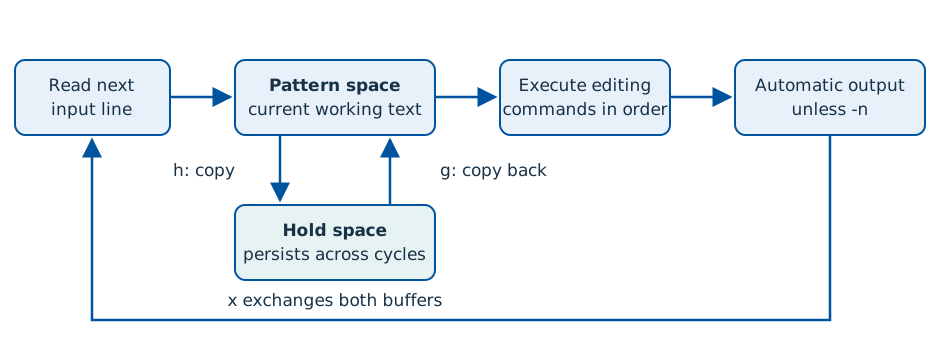
Copy link SED-11-001 Save a line and retrieve it later h copies the first line to hold space. g on the third line replaces that pattern space with the saved text.
Back to example gallery Code -n '1h;3g;p' data/letters.txt
Actual output Captured run · exit 0
Parameter Meaning in this example ImplementationBSD/GNU common h and gHold keeps red across later input cycles.
Complete runnable example set -euo pipefail
export LC_ALL = C
sed_work = $( mktemp -d " ${ TMPDIR :- /tmp } /sed-example.XXXXXX" )
trap 'rm -rf -- "$sed_work"' EXIT
cd " $sed_work "
mkdir -p data
cat > data/letters.txt <<'SED_INPUT_1'
red
blue
green
SED_INPUT_1
sed -n '1h;3g;p' data/letters.txt
Download: SED-11-001.sh
Copy link SED-11-002 Retrieve without changing the saved buffer Add g on the second line too. Both later retrievals read the same saved red.
Back to example gallery Compare with SED-11-001 · Save a line and retrieve it later .
Code -n '1h;2g;3g;p' data/letters.txt
Actual output Captured run · exit 0
Parameter Meaning in this example ImplementationBSD/GNU common gReplace pattern space; leave hold space unchanged.
Complete runnable example set -euo pipefail
export LC_ALL = C
sed_work = $( mktemp -d " ${ TMPDIR :- /tmp } /sed-example.XXXXXX" )
trap 'rm -rf -- "$sed_work"' EXIT
cd " $sed_work "
mkdir -p data
cat > data/letters.txt <<'SED_INPUT_1'
red
blue
green
SED_INPUT_1
sed -n '1h;2g;3g;p' data/letters.txt
Download: SED-11-002.sh
Copy link SED-11-003 Exchange pattern space and hold space Change the second-line g to x. That exchanges red and blue, so the final g now retrieves blue.
Back to example gallery Compare with SED-11-002 · Retrieve without changing the saved buffer .
Code -n '1h;2x;3g;p' data/letters.txt
Actual output Captured run · exit 0
Parameter Meaning in this example ImplementationBSD/GNU common xAfter line two: pattern=red, hold=blue.
Complete runnable example set -euo pipefail
export LC_ALL = C
sed_work = $( mktemp -d " ${ TMPDIR :- /tmp } /sed-example.XXXXXX" )
trap 'rm -rf -- "$sed_work"' EXIT
cd " $sed_work "
mkdir -p data
cat > data/letters.txt <<'SED_INPUT_1'
red
blue
green
SED_INPUT_1
sed -n '1h;2x;3g;p' data/letters.txt
Download: SED-11-003.sh
Copy link SED-11-004 Append a line to hold space H keeps the saved text and appends a newline plus the current line. The final retrieval therefore prints two lines.
Back to example gallery Compare with SED-11-003 · Exchange pattern space and hold space .
Code -n '1h;2H;3g;p' data/letters.txt
Actual output Captured run · exit 0
Parameter Meaning in this example ImplementationBSD/GNU common HAfter line two: hold contains red, newline, blue.
Complete runnable example set -euo pipefail
export LC_ALL = C
sed_work = $( mktemp -d " ${ TMPDIR :- /tmp } /sed-example.XXXXXX" )
trap 'rm -rf -- "$sed_work"' EXIT
cd " $sed_work "
mkdir -p data
cat > data/letters.txt <<'SED_INPUT_1'
red
blue
green
SED_INPUT_1
sed -n '1h;2H;3g;p' data/letters.txt
Download: SED-11-004.sh
Copy link SED-11-005 Append hold space to the current pattern Change only H to G. G appends to pattern space, leaving the saved red available for the third-line g.
Back to example gallery Compare with SED-11-004 · Append a line to hold space .
Code -n '1h;2G;3g;p' data/letters.txt
Actual output Captured run · exit 0
Parameter Meaning in this example ImplementationBSD/GNU common GThe second pattern becomes blue, newline, red; hold stays red.
Complete runnable example set -euo pipefail
export LC_ALL = C
sed_work = $( mktemp -d " ${ TMPDIR :- /tmp } /sed-example.XXXXXX" )
trap 'rm -rf -- "$sed_work"' EXIT
cd " $sed_work "
mkdir -p data
cat > data/letters.txt <<'SED_INPUT_1'
red
blue
green
SED_INPUT_1
sed -n '1h;2G;3g;p' data/letters.txt
Download: SED-11-005.sh
Copy link SED-11-006 Retrieve the initially empty hold space Before h or H has stored anything, hold space is empty. Add 1g to the earlier l example and observe the first empty record as a visible dollar marker.
Back to example gallery Compare with SED-09-006 · Inspect pattern space with visible line endings .
Code -n '1g;l' data/letters.txt
Actual output Captured run · exit 0
Parameter Meaning in this example ImplementationBSD/GNU common Initial hold stateDistinguish an empty pattern space from zero output bytes.
Complete runnable example set -euo pipefail
export LC_ALL = C
sed_work = $( mktemp -d " ${ TMPDIR :- /tmp } /sed-example.XXXXXX" )
trap 'rm -rf -- "$sed_work"' EXIT
cd " $sed_work "
mkdir -p data
cat > data/letters.txt <<'SED_INPUT_1'
red
blue
green
SED_INPUT_1
sed -n '1g;l' data/letters.txt
Download: SED-11-006.sh
Copy link SED-12-001 Advance with lowercase n Without -n, n prints the current pattern space, reads the next line and resumes the program there.
Back to example gallery Actual output Captured run · exit 0
Parameter Meaning in this example ImplementationBSD/GNU common nStart the next input line within the current program pass.
Complete runnable example set -euo pipefail
export LC_ALL = C
sed_work = $( mktemp -d " ${ TMPDIR :- /tmp } /sed-example.XXXXXX" )
trap 'rm -rf -- "$sed_work"' EXIT
cd " $sed_work "
mkdir -p data
cat > data/pairs.txt <<'SED_INPUT_1'
a1
a2
b1
b2
SED_INPUT_1
sed 'n' data/pairs.txt
Download: SED-12-001.sh
Copy link SED-12-002 Print the line read by n explicitly With -n, n does not print the previous pattern. The following p prints each second line.
Back to example gallery Compare with SED-12-001 · Advance with lowercase n .
Code -n 'n;p' data/pairs.txt
Actual output Captured run · exit 0
Parameter Meaning in this example ImplementationBSD/GNU common -n with nSeparate advancing input from deciding what to output.
Complete runnable example set -euo pipefail
export LC_ALL = C
sed_work = $( mktemp -d " ${ TMPDIR :- /tmp } /sed-example.XXXXXX" )
trap 'rm -rf -- "$sed_work"' EXIT
cd " $sed_work "
mkdir -p data
cat > data/pairs.txt <<'SED_INPUT_1'
a1
a2
b1
b2
SED_INPUT_1
sed -n 'n;p' data/pairs.txt
Download: SED-12-002.sh
Copy link SED-12-003 Append the next line with uppercase N N retains the current pattern and appends a newline plus the next input line. p prints each resulting pair.
Back to example gallery Compare with SED-12-002 · Print the line read by n explicitly .
Code -n 'N;p' data/pairs.txt
Actual output Captured run · exit 0
Parameter Meaning in this example ImplementationBSD/GNU common NBuild a two-line pattern space without an intermediate output.
Complete runnable example set -euo pipefail
export LC_ALL = C
sed_work = $( mktemp -d " ${ TMPDIR :- /tmp } /sed-example.XXXXXX" )
trap 'rm -rf -- "$sed_work"' EXIT
cd " $sed_work "
mkdir -p data
cat > data/pairs.txt <<'SED_INPUT_1'
a1
a2
b1
b2
SED_INPUT_1
sed -n 'N;p' data/pairs.txt
Download: SED-12-003.sh
Copy link SED-12-004 Print only the first part with P Change p to P. The second line remains in pattern space but is not emitted by P.
Back to example gallery Compare with SED-12-003 · Append the next line with uppercase N .
Code -n 'N;P' data/pairs.txt
Actual output Captured run · exit 0
Parameter Meaning in this example ImplementationBSD/GNU common PPrint through the first embedded newline only.
Complete runnable example set -euo pipefail
export LC_ALL = C
sed_work = $( mktemp -d " ${ TMPDIR :- /tmp } /sed-example.XXXXXX" )
trap 'rm -rf -- "$sed_work"' EXIT
cd " $sed_work "
mkdir -p data
cat > data/pairs.txt <<'SED_INPUT_1'
a1 a2
b1 b2
SED_INPUT_1
sed -n 'N;P' data/pairs.txt
Download: SED-12-004.sh
Copy link SED-12-005 Restart after dropping the first part with D D keeps the remaining part and restarts the program. The final lone line reaches N at EOF under -n and emits nothing.
Back to example gallery Compare with SED-12-004 · Print only the first part with P .
Code -n 'N;P;D' data/pairs.txt
Actual output Captured run · exit 0
Parameter Meaning in this example ImplementationBSD/GNU common DDrop the first part and restart without reading a fresh cycle immediately.
Complete runnable example set -euo pipefail
export LC_ALL = C
sed_work = $( mktemp -d " ${ TMPDIR :- /tmp } /sed-example.XXXXXX" )
trap 'rm -rf -- "$sed_work"' EXIT
cd " $sed_work "
mkdir -p data
cat > data/pairs.txt <<'SED_INPUT_1'
a1
a2
b1
b2
SED_INPUT_1
sed -n 'N;P;D' data/pairs.txt
Download: SED-12-005.sh
Copy link SED-12-006 Join each complete pair with a space Replace the embedded newline produced by N. The fixture deliberately contains two complete pairs.
Back to example gallery Compare with SED-12-003 · Append the next line with uppercase N .
Code 'N;s/\n/ /' data/pairs.txt
Actual output Captured run · exit 0
Parameter Meaning in this example ImplementationBSD/GNU common \n in the patternMatch the embedded newline in a multiline pattern space.
Complete runnable example set -euo pipefail
export LC_ALL = C
sed_work = $( mktemp -d " ${ TMPDIR :- /tmp } /sed-example.XXXXXX" )
trap 'rm -rf -- "$sed_work"' EXIT
cd " $sed_work "
mkdir -p data
cat > data/pairs.txt <<'SED_INPUT_1'
a1
a2
b1
b2
SED_INPUT_1
sed 'N;s/\n/ /' data/pairs.txt
Download: SED-12-006.sh
Copy link SED-13-001 Branch to the end of a program An unlabelled b skips the remaining instructions; normal end-of-cycle output remains active. End b with a program newline for BSD/GNU compatibility.
Back to example gallery Code 'b
s/red/RED/' data/letters.txt
Actual output Captured run · exit 0
Parameter Meaning in this example ImplementationBSD/GNU common bSkip to the end of this program pass.
Complete runnable example set -euo pipefail
export LC_ALL = C
sed_work = $( mktemp -d " ${ TMPDIR :- /tmp } /sed-example.XXXXXX" )
trap 'rm -rf -- "$sed_work"' EXIT
cd " $sed_work "
mkdir -p data
cat > data/letters.txt <<'SED_INPUT_1'
red
blue
green
SED_INPUT_1
sed 'b
s/red/RED/' data/letters.txt
Download: SED-13-001.sh
Copy link SED-13-002 Branch only on a selected record Other records can still reach the substitution after the addressed branch.
Back to example gallery Compare with SED-13-001 · Branch to the end of a program .
Code '/^blue$/b
s/r/R/g' data/letters.txt
Actual output Captured run · exit 0
Parameter Meaning in this example ImplementationBSD/GNU common Addressed bSkip the rest of this pass only on the selected blue line.
Complete runnable example set -euo pipefail
export LC_ALL = C
sed_work = $( mktemp -d " ${ TMPDIR :- /tmp } /sed-example.XXXXXX" )
trap 'rm -rf -- "$sed_work"' EXIT
cd " $sed_work "
mkdir -p data
cat > data/letters.txt <<'SED_INPUT_1'
red
blue
green
SED_INPUT_1
sed '/^blue$/b
s/r/R/g' data/letters.txt
Download: SED-13-002.sh
Copy link SED-13-003 Jump to a named label The labelled branch skips one edit but continues at the following labelled section.
Back to example gallery Compare with SED-13-002 · Branch only on a selected record .
Code 'b done
s/red/RED/
:done
s/blue/BLUE/' data/letters.txt
Actual output Captured run · exit 0
Parameter Meaning in this example ImplementationBSD/GNU common :labelName a later program location for b to jump to.
Complete runnable example set -euo pipefail
export LC_ALL = C
sed_work = $( mktemp -d " ${ TMPDIR :- /tmp } /sed-example.XXXXXX" )
trap 'rm -rf -- "$sed_work"' EXIT
cd " $sed_work "
mkdir -p data
cat > data/letters.txt <<'SED_INPUT_1'
red
blue
green
SED_INPUT_1
sed 'b done
s/red/RED/
:done
s/blue/BLUE/' data/letters.txt
Download: SED-13-003.sh
Copy link SED-13-004 Branch after a successful substitution t branches only if a substitution succeeded since input was read or the preceding t was evaluated.
Back to example gallery Compare with SED-13-003 · Jump to a named label .
Code 's/red/RED/
t done
s/blue/BLUE/
:done' data/letters.txt
Actual output Captured run · exit 0
Parameter Meaning in this example ImplementationBSD/GNU common tTest whether a preceding substitution succeeded.
Complete runnable example set -euo pipefail
export LC_ALL = C
sed_work = $( mktemp -d " ${ TMPDIR :- /tmp } /sed-example.XXXXXX" )
trap 'rm -rf -- "$sed_work"' EXIT
cd " $sed_work "
mkdir -p data
cat > data/letters.txt <<'SED_INPUT_1'
red
blue
green
SED_INPUT_1
sed 's/red/RED/
t done
s/blue/BLUE/
:done' data/letters.txt
Download: SED-13-004.sh
Copy link SED-13-005 Skip a fallback edit after success A selected replacement branches past the fallback; all other records receive the fallback prefix.
Back to example gallery Compare with SED-13-004 · Branch after a successful substitution .
Code 's/red/RED/
t done
s/^/other: /
:done' data/letters.txt
Actual output Captured run · exit 0
Parameter Meaning in this example ImplementationBSD/GNU common Conditional fallbackKeep successful and fallback transformations separate.
Complete runnable example set -euo pipefail
export LC_ALL = C
sed_work = $( mktemp -d " ${ TMPDIR :- /tmp } /sed-example.XXXXXX" )
trap 'rm -rf -- "$sed_work"' EXIT
cd " $sed_work "
mkdir -p data
cat > data/letters.txt <<'SED_INPUT_1'
red
blue
green
SED_INPUT_1
sed 's/red/RED/
t done
s/^/other: /
:done' data/letters.txt
Download: SED-13-005.sh
Copy link SED-13-006 Repeat a substitution while it makes progress Each successful replacement shortens a run of spaces. t returns to the label until no double space remains.
Back to example gallery Code ':again
s/ / /
t again' data/spaces.txt
Actual output Captured run · exit 0
Parameter Meaning in this example ImplementationBSD/GNU common Progressing loopEvery iteration removes one extra space from this finite input.
Complete runnable example set -euo pipefail
export LC_ALL = C
sed_work = $( mktemp -d " ${ TMPDIR :- /tmp } /sed-example.XXXXXX" )
trap 'rm -rf -- "$sed_work"' EXIT
cd " $sed_work "
mkdir -p data
cat > data/spaces.txt <<'SED_INPUT_1'
a b c
keep
SED_INPUT_1
sed ':again
s/  / /
t again' data/spaces.txt
Download: SED-13-006.sh
Copy link SED-14-001 Preview an edit before writing a file Normal sed output leaves the input copy unchanged. Display it afterwards to show the distinction.
Back to example gallery Code 's/red/RED/' data/letters.txt
printf 'input remains:\n'
cat data/letters.txt
Actual output Captured run · exit 0
Parameter Meaning in this example ImplementationBSD/GNU common Stdout previewTransform output without editing even the local input copy.
Complete runnable example set -euo pipefail
export LC_ALL = C
sed_work = $( mktemp -d " ${ TMPDIR :- /tmp } /sed-example.XXXXXX" )
trap 'rm -rf -- "$sed_work"' EXIT
cd " $sed_work "
mkdir -p data
cat > data/letters.txt <<'SED_INPUT_1'
red
blue
green
SED_INPUT_1
sed 's/red/RED/' data/letters.txt
printf 'input remains:\n'
cat data/letters.txt
Download: SED-14-001.sh
Copy link SED-14-002 Save transformed output to another file Shell redirection writes a different path in the owned directory.
Back to example gallery Compare with SED-14-001 · Preview an edit before writing a file .
Code 's/red/RED/' data/letters.txt > edited.txt
cat edited.txt
Actual output Captured run · exit 0
Parameter Meaning in this example ImplementationBSD/GNU common > OTHER_FILEWrite a distinct output path instead of overwriting the file being read.
Complete runnable example set -euo pipefail
export LC_ALL = C
sed_work = $( mktemp -d " ${ TMPDIR :- /tmp } /sed-example.XXXXXX" )
trap 'rm -rf -- "$sed_work"' EXIT
cd " $sed_work "
mkdir -p data
cat > data/letters.txt <<'SED_INPUT_1'
red
blue
green
SED_INPUT_1
sed 's/red/RED/' data/letters.txt > edited.txt
cat edited.txt
Download: SED-14-002.sh
Copy link SED-14-003 Read extra text after an addressed line The r command queues the named file content after the selected line.
Back to example gallery Code '2r data/banner.txt' data/letters.txt
Actual output Captured run · exit 0
Parameter Meaning in this example ImplementationBSD/GNU common r FILEAppend the external text at the addressed output position.
Complete runnable example set -euo pipefail
export LC_ALL = C
sed_work = $( mktemp -d " ${ TMPDIR :- /tmp } /sed-example.XXXXXX" )
trap 'rm -rf -- "$sed_work"' EXIT
cd " $sed_work "
mkdir -p data
cat > data/banner.txt <<'SED_INPUT_1'
NOTICE
SED_INPUT_1
cat > data/letters.txt <<'SED_INPUT_2'
red
blue
green
SED_INPUT_2
sed '2r data/banner.txt' data/letters.txt
Download: SED-14-003.sh
Copy link SED-14-004 Write selected pattern spaces to a file -n suppresses normal stdout; the following cat displays the file written by w.
Back to example gallery Code -n '/^blue$/w selected.txt' data/letters.txt
cat selected.txt
Actual output Captured run · exit 0
Parameter Meaning in this example ImplementationBSD/GNU common w FILEWrite selected pattern spaces to the named owned output file.
Complete runnable example set -euo pipefail
export LC_ALL = C
sed_work = $( mktemp -d " ${ TMPDIR :- /tmp } /sed-example.XXXXXX" )
trap 'rm -rf -- "$sed_work"' EXIT
cd " $sed_work "
mkdir -p data
cat > data/letters.txt <<'SED_INPUT_1'
red
blue
green
SED_INPUT_1
sed -n '/^blue$/w selected.txt' data/letters.txt
cat selected.txt
Download: SED-14-004.sh
Copy link SED-14-005 Write only successfully changed lines The substitution w flag records successful results while -n suppresses normal output.
Back to example gallery Compare with SED-14-004 · Write selected pattern spaces to a file .
Code -n 's/red/RED/w changed.txt' data/letters.txt
cat changed.txt
Actual output Captured run · exit 0
Parameter Meaning in this example ImplementationBSD/GNU common s///w FILEWrite a pattern space only after that substitution succeeds.
Complete runnable example set -euo pipefail
export LC_ALL = C
sed_work = $( mktemp -d " ${ TMPDIR :- /tmp } /sed-example.XXXXXX" )
trap 'rm -rf -- "$sed_work"' EXIT
cd " $sed_work "
mkdir -p data
cat > data/letters.txt <<'SED_INPUT_1'
red
blue
green
SED_INPUT_1
sed -n 's/red/RED/w changed.txt' data/letters.txt
cat changed.txt
Download: SED-14-005.sh
Copy link SED-14-006 Edit an owned copy with a backup The common BSD/GNU -i.bak form changes only the reconstructed input inside the temporary directory. Display the backup too.
Back to example gallery Compare with SED-14-005 · Write only successfully changed lines .
Code -i.bak 's/red/RED/' data/letters.txt
printf 'edited:\n'
cat data/letters.txt
printf 'backup:\n'
cat data/letters.txt.bak
Actual output Captured run · exit 0
Parameter Meaning in this example ImplementationBSD/GNU common -i.bakKeep a backup when editing the owned copy; this option is not POSIX.
Complete runnable example set -euo pipefail
export LC_ALL = C
sed_work = $( mktemp -d " ${ TMPDIR :- /tmp } /sed-example.XXXXXX" )
trap 'rm -rf -- "$sed_work"' EXIT
cd " $sed_work "
mkdir -p data
cat > data/letters.txt <<'SED_INPUT_1'
red
blue
green
SED_INPUT_1
sed -i.bak 's/red/RED/' data/letters.txt
printf 'edited:\n'
cat data/letters.txt
printf 'backup:\n'
cat data/letters.txt.bak
Download: SED-14-006.sh
Copy link SED-15-001 Trim leading whitespace Change only the beginning of each line; leave trailing spaces intact.
Back to example gallery Code 's/^[[:space:]]*//' data/padded.txt
Actual output Captured run · exit 0
Parameter Meaning in this example ImplementationBSD/GNU common Leading anchorRemove leading whitespace from this line-oriented input.
Complete runnable example set -euo pipefail
export LC_ALL = C
sed_work = $( mktemp -d " ${ TMPDIR :- /tmp } /sed-example.XXXXXX" )
trap 'rm -rf -- "$sed_work"' EXIT
cd " $sed_work "
mkdir -p data
cat > data/padded.txt <<'SED_INPUT_1'
red
blue
END
SED_INPUT_1
sed 's/^[[:space:]]*//' data/padded.txt
Download: SED-15-001.sh
Copy link SED-15-002 Trim trailing whitespace Anchor at the other end and preserve the indentation.
Back to example gallery Compare with SED-15-001 · Trim leading whitespace .
Code 's/[[:space:]]*$//' data/padded.txt
Actual output Captured run · exit 0
Parameter Meaning in this example ImplementationBSD/GNU common Trailing anchorRemove trailing whitespace, not leading indentation.
Complete runnable example set -euo pipefail
export LC_ALL = C
sed_work = $( mktemp -d " ${ TMPDIR :- /tmp } /sed-example.XXXXXX" )
trap 'rm -rf -- "$sed_work"' EXIT
cd " $sed_work "
mkdir -p data
cat > data/padded.txt <<'SED_INPUT_1'
red
blue
END
SED_INPUT_1
sed 's/[[:space:]]*$//' data/padded.txt
Download: SED-15-002.sh
Copy link SED-15-003 Compose both trim operations Use two -e programs in the intended order.
Back to example gallery Compare with SED-15-002 · Trim trailing whitespace .
Code -e 's/^[[:space:]]*//' -e 's/[[:space:]]*$//' data/padded.txt
Actual output Captured run · exit 0
Parameter Meaning in this example ImplementationBSD/GNU common Two small editsExpress leading and trailing cleanup as separate operations.
Complete runnable example set -euo pipefail
export LC_ALL = C
sed_work = $( mktemp -d " ${ TMPDIR :- /tmp } /sed-example.XXXXXX" )
trap 'rm -rf -- "$sed_work"' EXIT
cd " $sed_work "
mkdir -p data
cat > data/padded.txt <<'SED_INPUT_1'
red
blue
END
SED_INPUT_1
sed -e 's/^[[:space:]]*//' -e 's/[[:space:]]*$//' data/padded.txt
Download: SED-15-003.sh
Copy link SED-15-004 Remove complete comment records The fixture has a tiny unquoted format; only whole comment lines are removed.
Back to example gallery Code '/^[[:space:]]*#/d' data/settings.txt
Actual output Captured run · exit 0
Parameter Meaning in this example ImplementationBSD/GNU common Comment addressDo not treat this as a parser for every configuration syntax.
Complete runnable example set -euo pipefail
export LC_ALL = C
sed_work = $( mktemp -d " ${ TMPDIR :- /tmp } /sed-example.XXXXXX" )
trap 'rm -rf -- "$sed_work"' EXIT
cd " $sed_work "
mkdir -p data
cat > data/settings.txt <<'SED_INPUT_1'
# title
mode=old
note=old
# end
SED_INPUT_1
sed '/^[[:space:]]*#/d' data/settings.txt
Download: SED-15-004.sh
Copy link SED-15-005 Update one exact setting key The address keeps the same value on a different key unchanged.
Back to example gallery Compare with SED-15-004 · Remove complete comment records .
Code '/^mode=/s/=old$/=new/' data/settings.txt
Actual output Captured run · exit 0
Parameter Meaning in this example ImplementationBSD/GNU common Key plus value shapeConstrain both the record selected and the part replaced.
Complete runnable example set -euo pipefail
export LC_ALL = C
sed_work = $( mktemp -d " ${ TMPDIR :- /tmp } /sed-example.XXXXXX" )
trap 'rm -rf -- "$sed_work"' EXIT
cd " $sed_work "
mkdir -p data
cat > data/settings.txt <<'SED_INPUT_1'
# title
mode=old
note=old
# end
SED_INPUT_1
sed '/^mode=/s/=old$/=new/' data/settings.txt
Download: SED-15-005.sh
Copy link SED-15-006 Collapse horizontal space runs An ERE repetition maps every run of two or more spaces to one.
Back to example gallery Compare with SED-13-006 · Repeat a substitution while it makes progress .
Code -E 's/ {2,}/ /g' data/spaces.txt
Actual output Captured run · exit 0
Parameter Meaning in this example ImplementationBSD/GNU common Run normalizationUse a direct repetition rule instead of a substitution loop.
Complete runnable example set -euo pipefail
export LC_ALL = C
sed_work = $( mktemp -d " ${ TMPDIR :- /tmp } /sed-example.XXXXXX" )
trap 'rm -rf -- "$sed_work"' EXIT
cd " $sed_work "
mkdir -p data
cat > data/spaces.txt <<'SED_INPUT_1'
a b c
keep
SED_INPUT_1
sed -E 's/ {2,}/ /g' data/spaces.txt
Download: SED-15-006.sh
Copy link SED-16-001 Let a regex range end on the first line GNU address zero permits the ending regex to match line one immediately.
Back to example gallery Compare with SED-03-005 · Inspect a range whose first line matches its end regex .
Code -n '0,/^START$/p' data/starts.txt
Actual output Captured run · exit 0
Parameter Meaning in this example ImplementationGNU sed 0,/regex/Begin before line one so the first line can close this GNU range.
Complete runnable example set -euo pipefail
export LC_ALL = C
sed_work = $( mktemp -d " ${ TMPDIR :- /tmp } /sed-example.XXXXXX" )
trap 'rm -rf -- "$sed_work"' EXIT
cd " $sed_work "
mkdir -p data
cat > data/starts.txt <<'SED_INPUT_1'
START
middle
START
end
SED_INPUT_1
sed_gnu_binary = $( command -v gsed || command -v sed)
sed_gnu_version = $( " $sed_gnu_binary " --version 2 >/dev/null || :)
case " $sed_gnu_version " in
*"GNU sed" *) ;;
*) printf 'This example requires GNU sed.\n' >& 2 ; exit 69 ;;
esac
gsed() { " $sed_gnu_binary " " $@ " ; }
gsed -n '0,/^START$/p' data/starts.txt
Download: SED-16-001.sh
Copy link SED-16-002 Select lines by a step address GNU step addresses can select every other line without a hold-space program.
Back to example gallery Code -n '1~2p' data/lines.txt
Actual output Captured run · exit 0
Parameter Meaning in this example ImplementationGNU sed 1~2Start at line one and select every second line.
Complete runnable example set -euo pipefail
export LC_ALL = C
sed_work = $( mktemp -d " ${ TMPDIR :- /tmp } /sed-example.XXXXXX" )
trap 'rm -rf -- "$sed_work"' EXIT
cd " $sed_work "
mkdir -p data
cat > data/lines.txt <<'SED_INPUT_1'
one
two
three
four
five
six
SED_INPUT_1
sed_gnu_binary = $( command -v gsed || command -v sed)
sed_gnu_version = $( " $sed_gnu_binary " --version 2 >/dev/null || :)
case " $sed_gnu_version " in
*"GNU sed" *) ;;
*) printf 'This example requires GNU sed.\n' >& 2 ; exit 69 ;;
esac
gsed() { " $sed_gnu_binary " " $@ " ; }
gsed -n '1~2p' data/lines.txt
Download: SED-16-002.sh
Copy link SED-16-003 Convert replacement text to uppercase The GNU replacement escape changes the matched text to uppercase.
Back to example gallery Code 's/.*/\U&/' data/letters.txt
Actual output Captured run · exit 0
Parameter Meaning in this example ImplementationGNU sed \UApply GNU uppercase conversion to the following replacement text.
Complete runnable example set -euo pipefail
export LC_ALL = C
sed_work = $( mktemp -d " ${ TMPDIR :- /tmp } /sed-example.XXXXXX" )
trap 'rm -rf -- "$sed_work"' EXIT
cd " $sed_work "
mkdir -p data
cat > data/letters.txt <<'SED_INPUT_1'
red
blue
green
SED_INPUT_1
sed_gnu_binary = $( command -v gsed || command -v sed)
sed_gnu_version = $( " $sed_gnu_binary " --version 2 >/dev/null || :)
case " $sed_gnu_version " in
*"GNU sed" *) ;;
*) printf 'This example requires GNU sed.\n' >& 2 ; exit 69 ;;
esac
gsed() { " $sed_gnu_binary " " $@ " ; }
gsed 's/.*/\U&/' data/letters.txt
Download: SED-16-003.sh
Copy link SED-16-004 Quit without automatically printing the current line GNU Q stops immediately without the current automatic output. Earlier lines already printed remain.
Back to example gallery Compare with SED-09-005 · Quit after a selected line .
Code '2Q' data/letters.txt
Actual output Captured run · exit 0
Parameter Meaning in this example ImplementationGNU sed QContrast quiet GNU quit with the common q instruction.
Complete runnable example set -euo pipefail
export LC_ALL = C
sed_work = $( mktemp -d " ${ TMPDIR :- /tmp } /sed-example.XXXXXX" )
trap 'rm -rf -- "$sed_work"' EXIT
cd " $sed_work "
mkdir -p data
cat > data/letters.txt <<'SED_INPUT_1'
red
blue
green
SED_INPUT_1
sed_gnu_binary = $( command -v gsed || command -v sed)
sed_gnu_version = $( " $sed_gnu_binary " --version 2 >/dev/null || :)
case " $sed_gnu_version " in
*"GNU sed" *) ;;
*) printf 'This example requires GNU sed.\n' >& 2 ; exit 69 ;;
esac
gsed() { " $sed_gnu_binary " " $@ " ; }
gsed '2Q' data/letters.txt
Download: SED-16-004.sh
Copy link SED-16-005 Restart line numbering for separate files GNU -s processes these files as separate streams, so address one selects the first line of each.
Back to example gallery Code -sn '1p' data/first.txt data/second.txt
Actual output Captured run · exit 0
Parameter Meaning in this example ImplementationGNU sed -sUse separate-file address and numbering scope.
Complete runnable example set -euo pipefail
export LC_ALL = C
sed_work = $( mktemp -d " ${ TMPDIR :- /tmp } /sed-example.XXXXXX" )
trap 'rm -rf -- "$sed_work"' EXIT
cd " $sed_work "
mkdir -p data
cat > data/first.txt <<'SED_INPUT_1'
one
two
SED_INPUT_1
cat > data/second.txt <<'SED_INPUT_2'
three
four
SED_INPUT_2
sed_gnu_binary = $( command -v gsed || command -v sed)
sed_gnu_version = $( " $sed_gnu_binary " --version 2 >/dev/null || :)
case " $sed_gnu_version " in
*"GNU sed" *) ;;
*) printf 'This example requires GNU sed.\n' >& 2 ; exit 69 ;;
esac
gsed() { " $sed_gnu_binary " " $@ " ; }
gsed -sn '1p' data/first.txt data/second.txt
Download: SED-16-005.sh
Copy link SED-16-006 Treat NUL as the record separator GNU -z sees two records. The final tr only turns their terminators into visible output lines.
Back to example gallery Code printf 'alpha\000beta\000' | gsed -z 's/^/item=/' | tr '\000' '\n'
Actual output Captured run · exit 0
Parameter Meaning in this example ImplementationGNU sed -zApply the substitution once to each NUL-delimited record.
Complete runnable example set -euo pipefail
export LC_ALL = C
sed_work = $( mktemp -d " ${ TMPDIR :- /tmp } /sed-example.XXXXXX" )
trap 'rm -rf -- "$sed_work"' EXIT
cd " $sed_work "
sed_gnu_binary = $( command -v gsed || command -v sed)
sed_gnu_version = $( " $sed_gnu_binary " --version 2 >/dev/null || :)
case " $sed_gnu_version " in
*"GNU sed" *) ;;
*) printf 'This example requires GNU sed.\n' >& 2 ; exit 69 ;;
esac
gsed() { " $sed_gnu_binary " " $@ " ; }
printf 'alpha\000beta\000' | gsed -z 's/^/item=/' | tr '\000' '\n'
Download: SED-16-006.sh
Example and command index