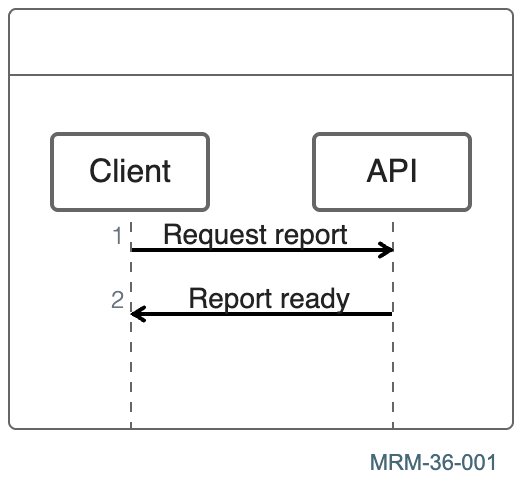
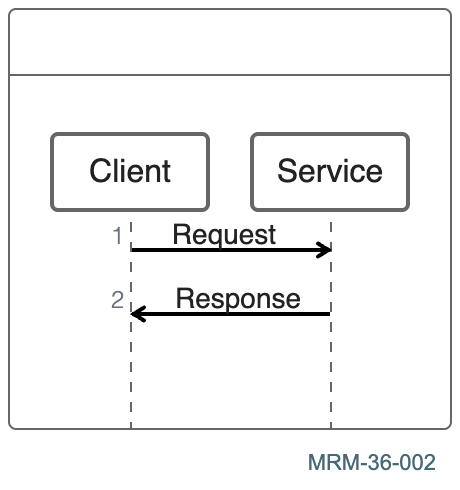
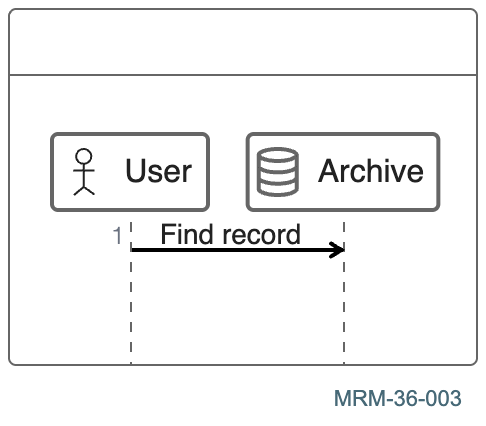
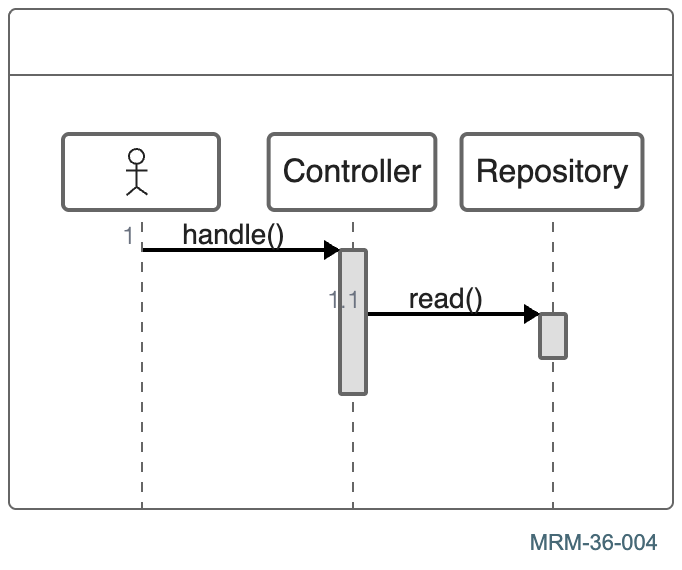
No matching examples. Try another query or clear the filters.
Copy link A visual reference · Mermaid
Mermaid,
From a first arrow to workflows, data models, architecture, project plans and analytical diagrams drawn with text.
200 complete examples cover all 31 diagram families listed in the Mermaid 12.3 documentation. Explore software architecture, data models, processes, research, project planning and technical documentation. Git has twelve examples covering branches, merges, releases, maintenance and cherry-picks. Every example pairs editable source with its actual rendered result and an explanation. Quantities are illustrative.
The Org file is the canonical source. Read the HTML guide beside your work,
or download its PDF and source for offline reading.
Last changes: 2026-11-10. Added a visible rendering setup with the exact shared JSON configuration, pinned dependency downloads and a reproducibility bundle for all 200 examples.
200 worked examples
36 topic families
1 canonical Org source
Copy link Rendering setup
Reproduce the diagrams
Every example uses the same rendering configuration. Inspect the complete JSON,
copy it, or download it together with the diagram sources and pinned dependencies.
Change one label or connection, then render again using the same setup.
The complete HTML embeds its diagrams and works offline. Keep the companion
folders for individual downloads. Experimental families are labeled; a Markdown
host with an older Mermaid version may not support every example.
These examples use Mermaid 12.3.0 and Mermaid CLI 12.2.0 . Use Node.js 22.13 or newer and a compatible Chromium browser.
Download the reproducibility bundle with all 200 Mermaid sources, the shared configuration and dependency manifests. Extract it into a working directory and run the following commands there. For a locally built tour, the example paths are relative to build/.
1. Install the pinned renderer ci
npx --no-install puppeteer browsers install chrome
mkdir -p figures
npm ci uses the included lock file. If you already have a compatible Chromium browser, select it with PUPPETEER_EXECUTABLE_PATH instead of installing one.
2. Save or inspect the shared configuration examples/mermaid-config.json sets the theme, colors, fonts and diagram options. The complete JSON below is the configuration stored with these rendered figures.
{
"theme" : "base" ,
"look" : "classic" ,
"securityLevel" : "strict" ,
"htmlLabels" : false ,
"fontFamily" : "Arial, sans-serif" ,
"themeVariables" : {
"primaryColor" : "#e0f2f1" ,
"primaryTextColor" : "#12343b" ,
"primaryBorderColor" : "#0b6775" ,
"lineColor" : "#476977" ,
"secondaryColor" : "#fff1d6" ,
"tertiaryColor" : "#edf2fa" ,
"fontFamily" : "Arial, sans-serif" ,
"fontSize" : "16px"
},
"flowchart" : {
"htmlLabels" : false ,
"curve" : "basis"
},
"sequence" : {
"useMaxWidth" : false
},
"journey" : {
"textPlacement" : "svg" ,
"sectionColours" : [
"#12343b"
]
},
"timeline" : {
"textPlacement" : "svg"
},
"themeCSS" : "text { font-family: Arial, sans-serif; } text.journey-section, text.task { fill: #12343b !important; }"
}
Download mermaid-config.json · Download package.json · Download package-lock.json
3. Render a diagram --no-install mmdc -i examples/MRM-03-001.mmd -o figures/MRM-03-001.svg -c examples/mermaid-config.json -I MRM-03-001 --no-font-embed
Argument Meaning -iRead the downloaded .mmd diagram source. -oWrite the SVG to the figures/ directory. -cApply the shared JSON configuration shown above. -ISet the SVG ID to the example ID. --no-font-embedUse installed fonts, as in this tour.
Change the example ID to render another diagram. The tour also adds a visible ID footer and fits the figure bounds after rendering. Font availability and browser versions can affect spacing; generated bytes may differ.
To regenerate the tour’s footer, fitted SVGs and PDF/PNG companions, clone the shared publisher beside the tour repository and follow the repository build instructions.
Choose by appearance
All diagrams at a glance 200 diagrams · 36 chapters
Choose a diagram to open its complete Mermaid source, explanation and downloads. Search examples or select a topic to narrow this gallery.
01 · Flowchart fundamentals 8 diagrams Start with one connection, then change orientation, labels and node identity.
02 · Decisions and feedback 4 diagrams Decisions, return paths, fan-out and recognizable shapes.
03 · Subgraphs and ownership 4 diagrams Group related nodes without confusing ownership with sequence.
04 · Visual styling 4 diagrams Use reusable classes, meaningful emphasis and restrained styling.
05 · Sequence fundamentals 8 diagrams Participants, responses, activation and notes in sequence diagrams.
06 · Sequence control structures 4 diagrams Alternatives, repetition, parallel work and bounded failures.
07 · State machines 6 diagrams Initial states, transitions, composite states and decision points.
08 · Class diagrams 6 diagrams Members, inheritance, composition and multiplicity.
09 · Entity relationships 6 diagrams Entities, keys, cardinality and associative records.
10 · User journeys 6 diagrams Journey scores and actors reveal the experience behind a workflow.
11 · Gantt scheduling 6 diagrams Dates, dependencies, milestones and task status on a Gantt chart.
12 · Mindmaps 6 diagrams Mindmaps organize ideas by indentation and a single central question.
13 · Timelines 4 diagrams Timelines arrange labeled periods and events into sections.
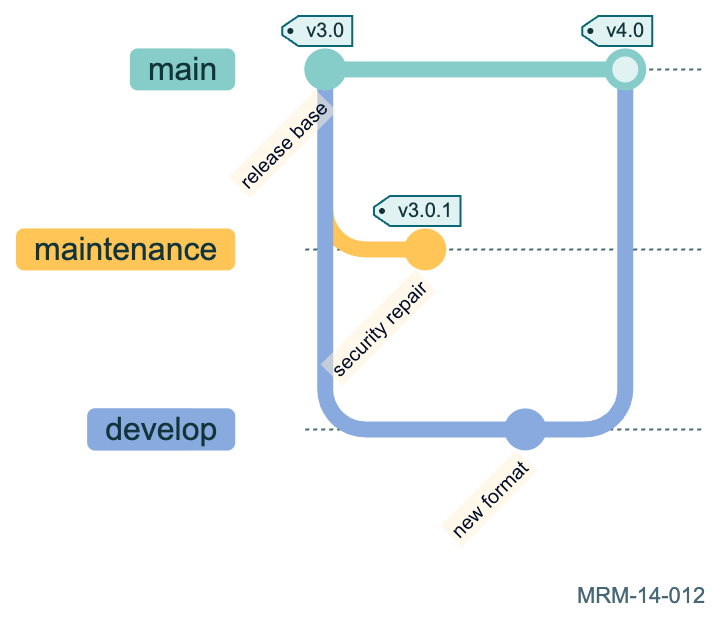
14 · Git histories 12 diagrams Commits, branches, merges and selected changes as a visual history.
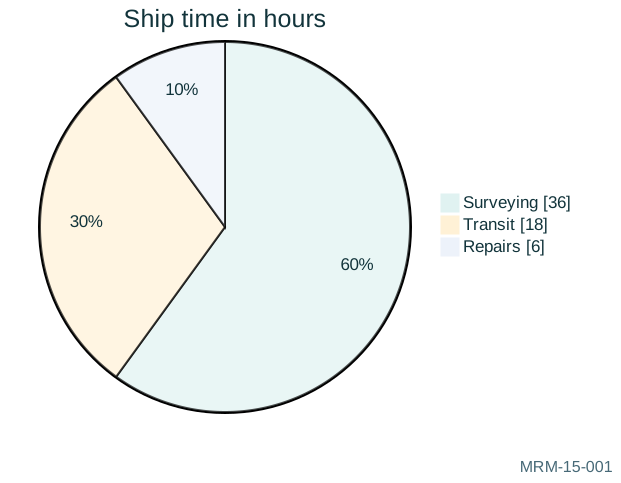
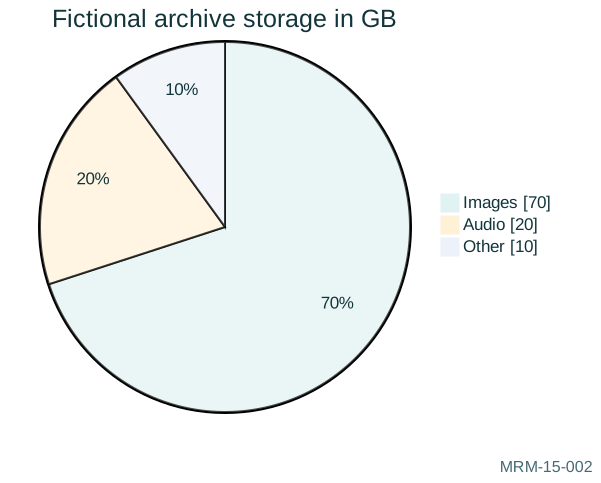
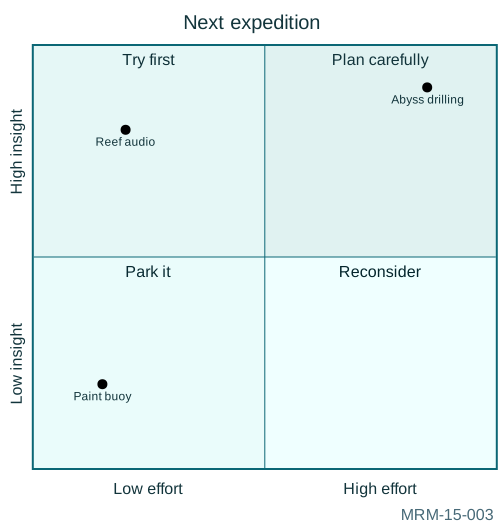
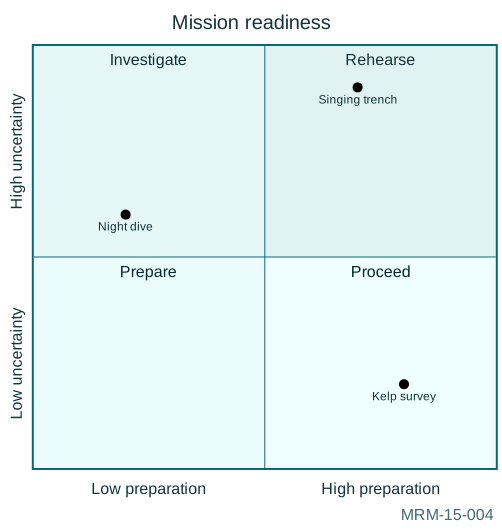
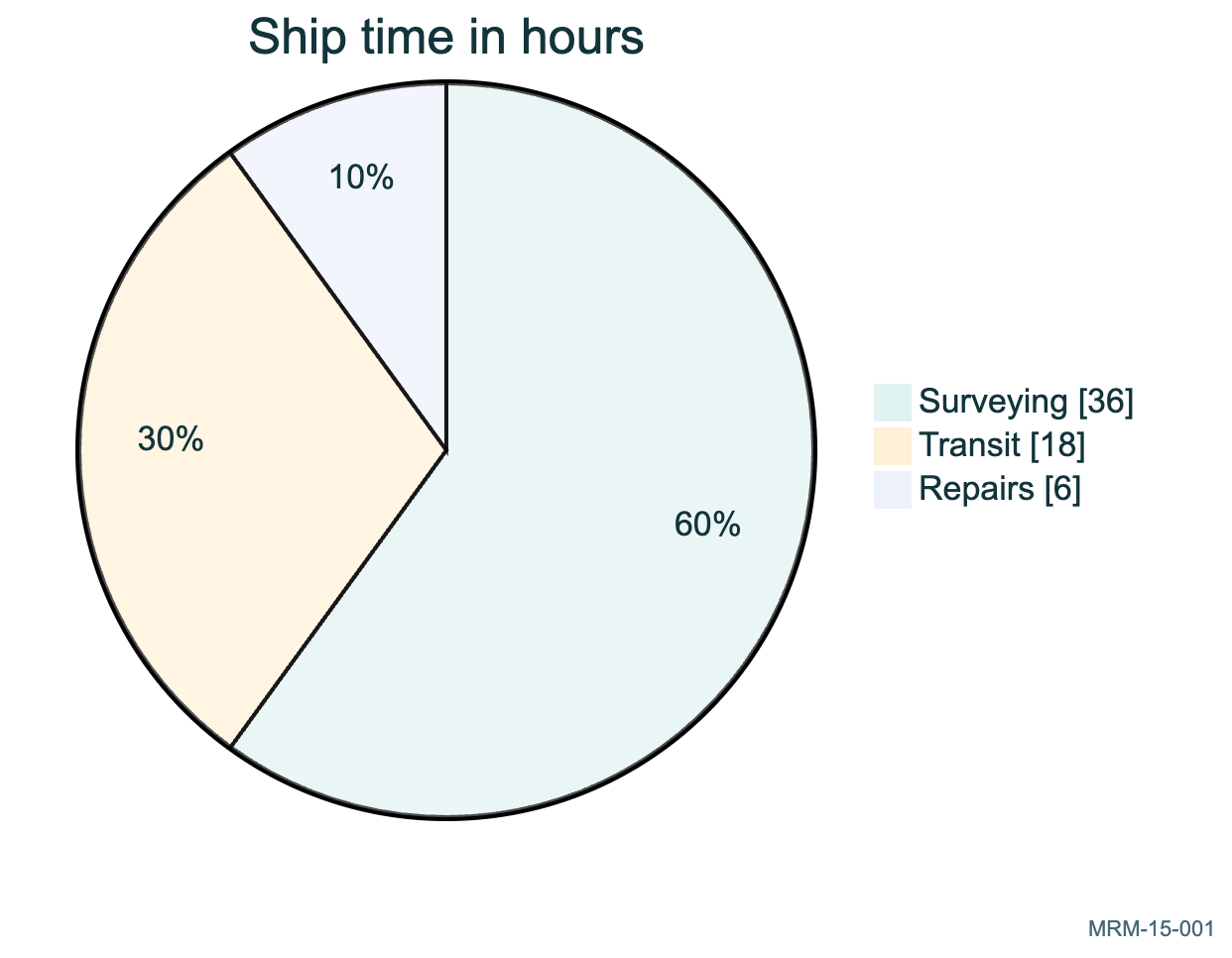
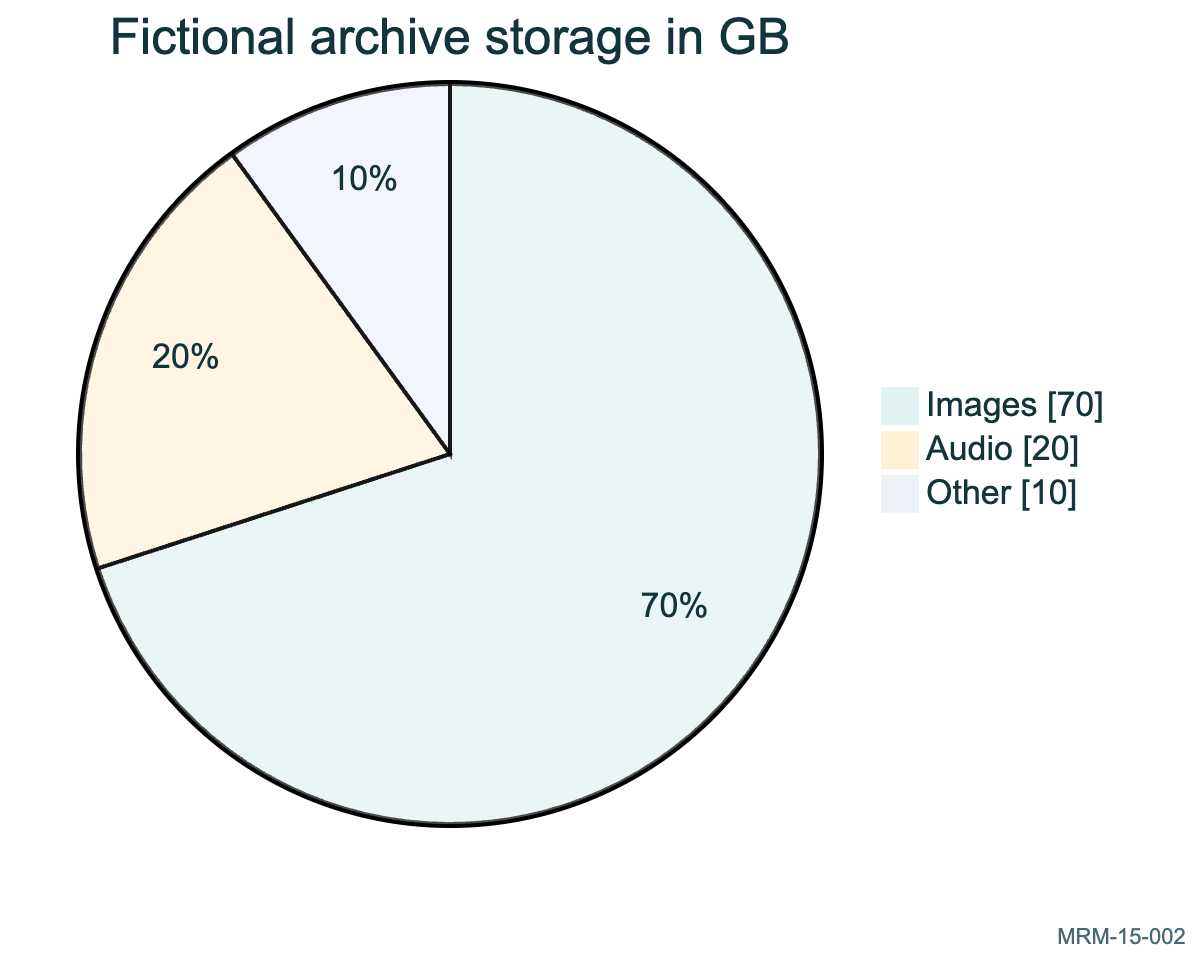
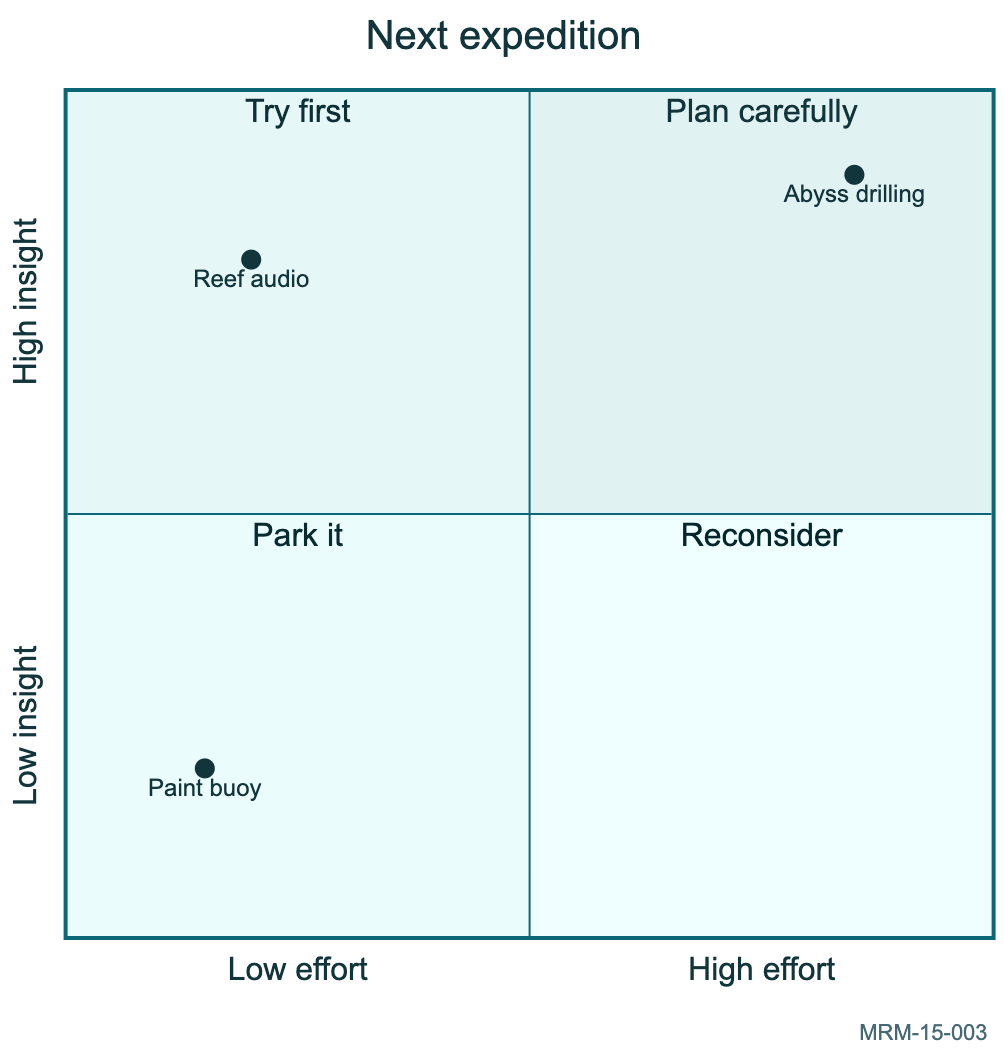
15 · Pie and quadrant charts 4 diagrams Pie charts show parts of a whole; quadrants compare two independent judgments.
16 · XY charts 6 diagrams XY charts combine explicit categories, numeric scales, bars and lines.
17 · Sankey flows 4 diagrams Sankey diagrams encode quantities on links; authors remain responsible for totals and units.
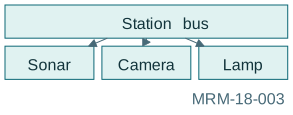
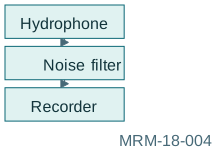
18 · Block layouts 4 diagrams Block diagrams give explicit grid placement when automatic graph layout is not enough.
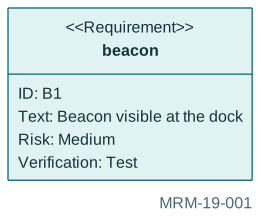
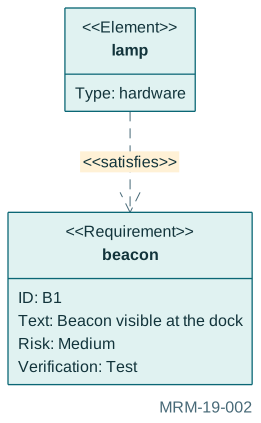
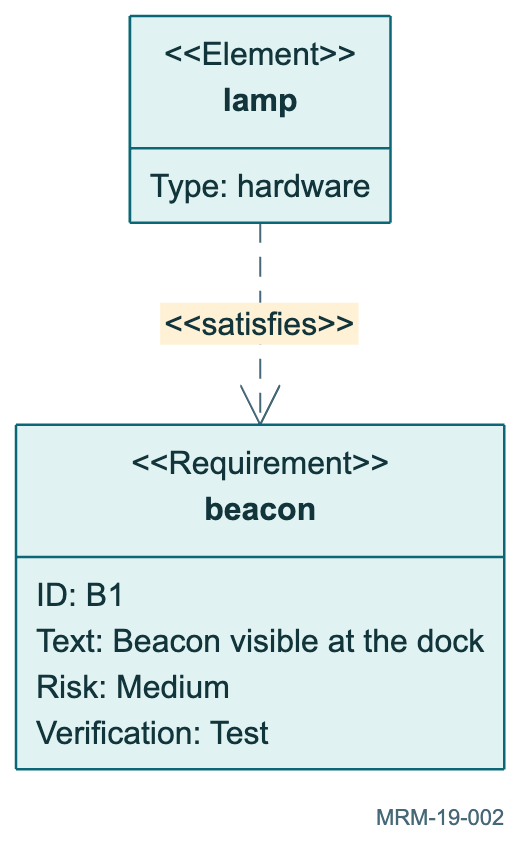
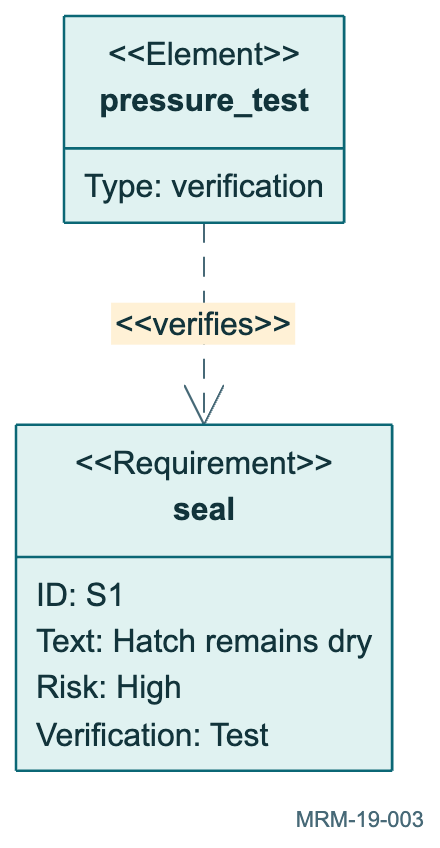
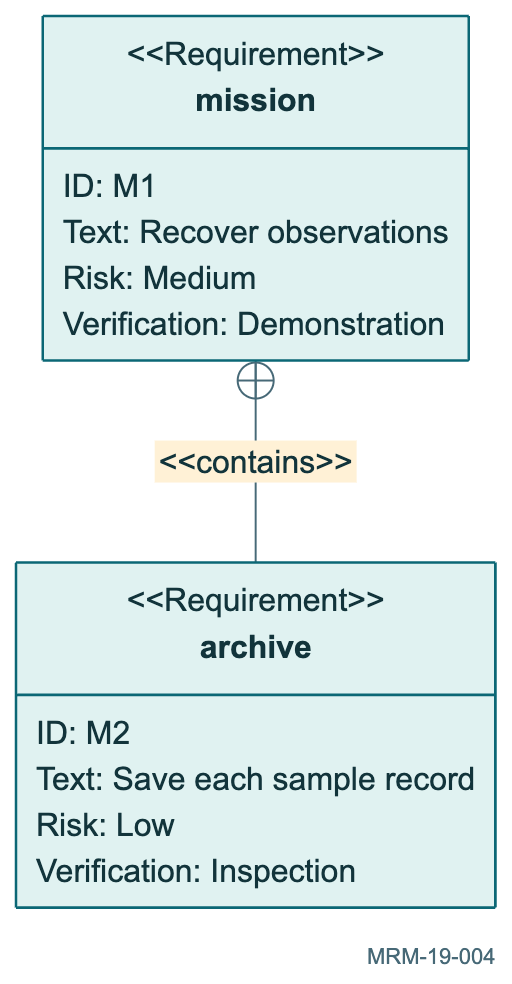
19 · Requirements 4 diagrams Requirement diagrams connect statements, implementation elements and verification evidence.
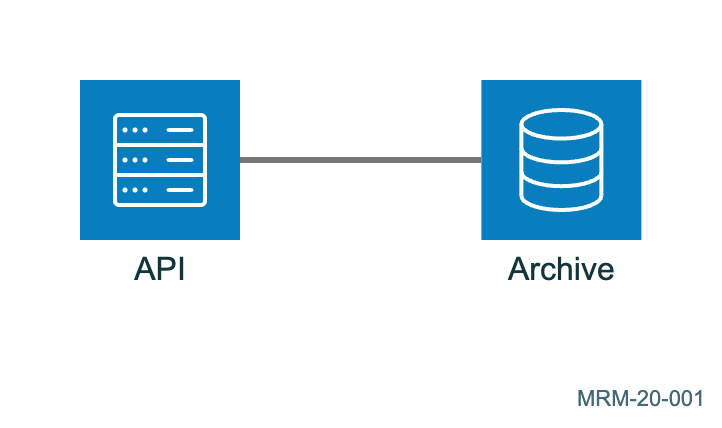
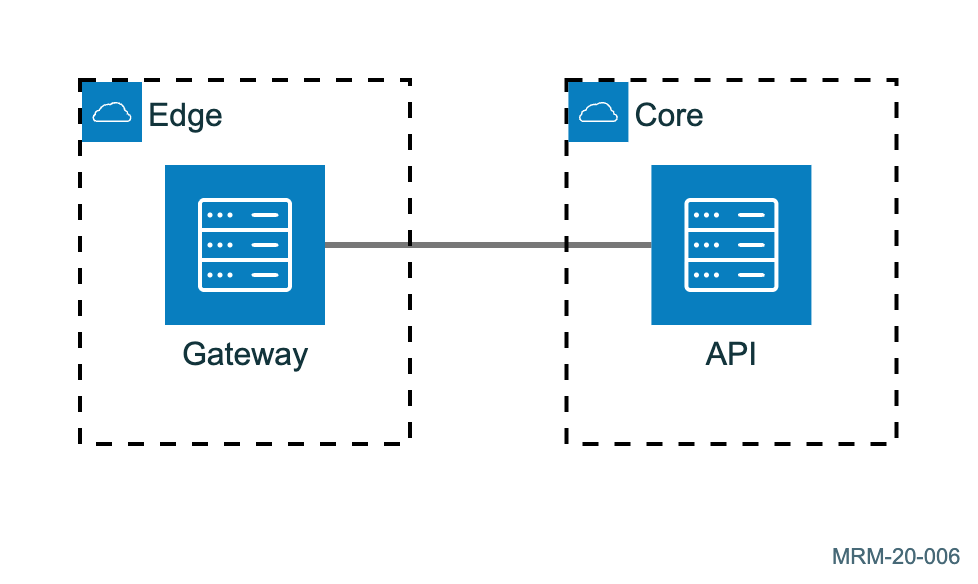
20 · Architecture diagrams 6 diagrams Architecture beta diagrams use built-in icons and named connection ports; no remote icon packs are needed.
21 · Packet layouts 4 diagrams Packet beta diagrams show inclusive bit ranges in fictional wire formats.
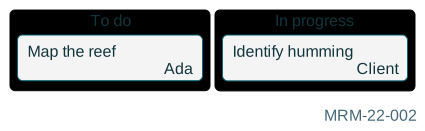
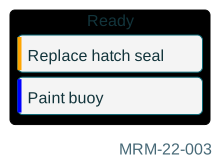
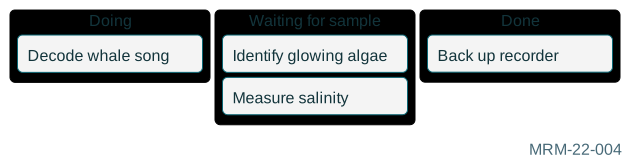
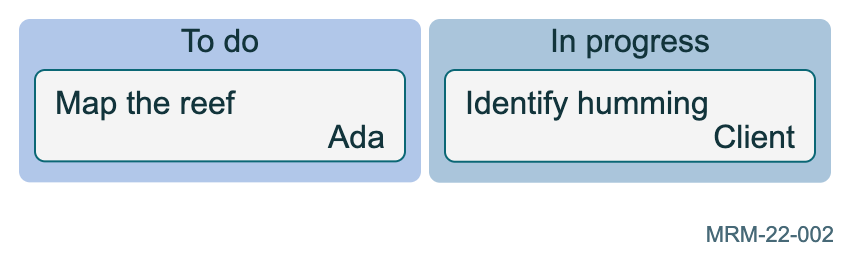
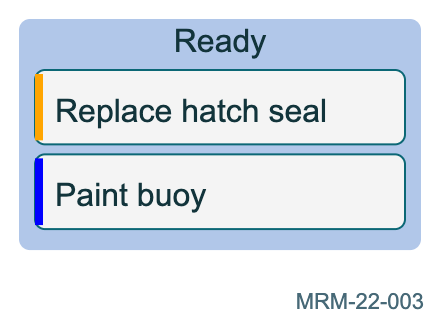
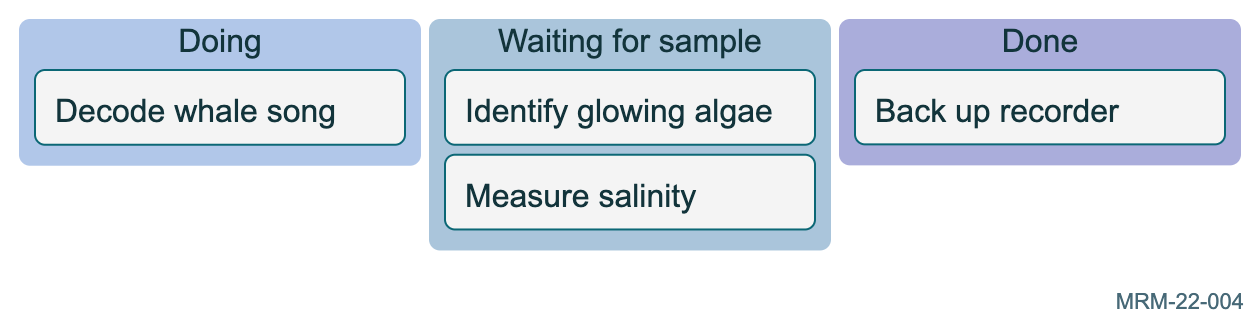
22 · Kanban boards 4 diagrams Kanban indentation places tasks under workflow columns.
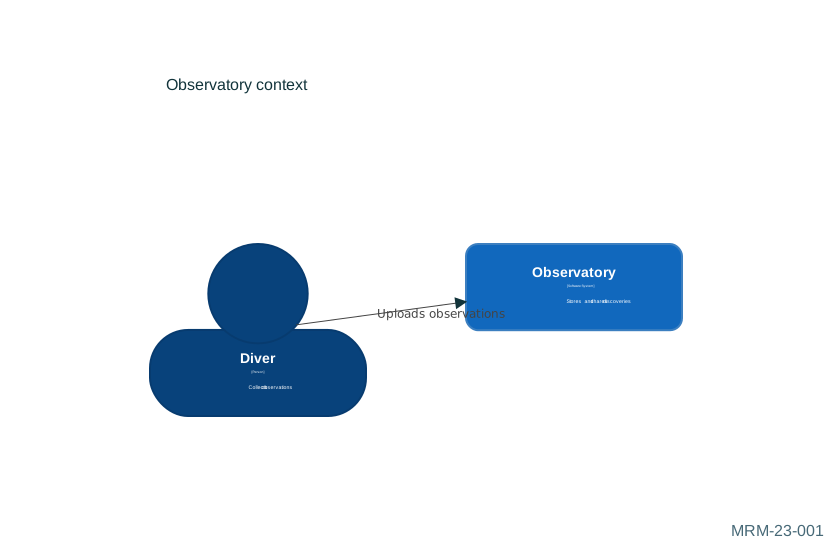
23 · C4 views 6 diagrams C4 context and container diagrams show people, systems and relationships at distinct scales. C4 syntax is experimental.
24 · Accessible and portable diagrams 4 diagrams Accessibility, frontmatter, readable labels and deliberately chosen themes.
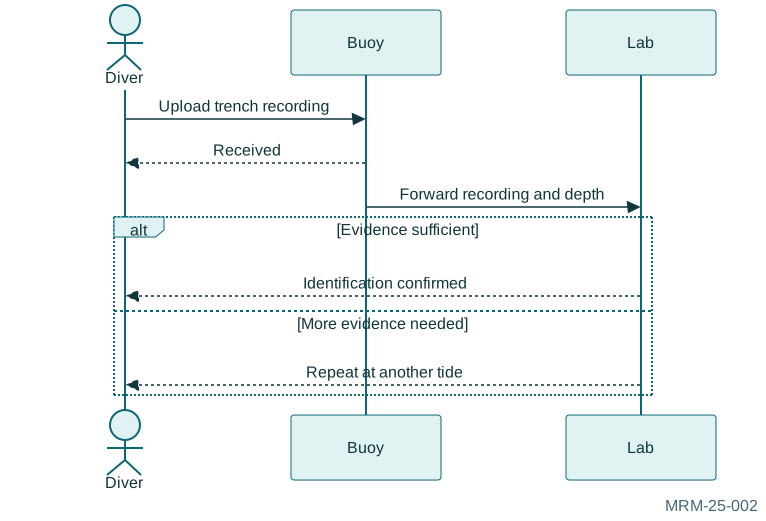
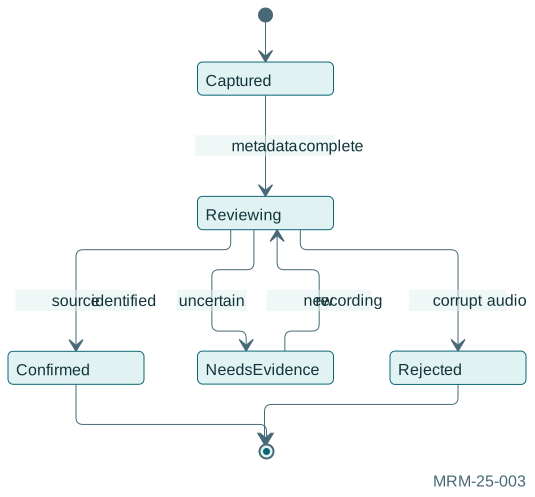
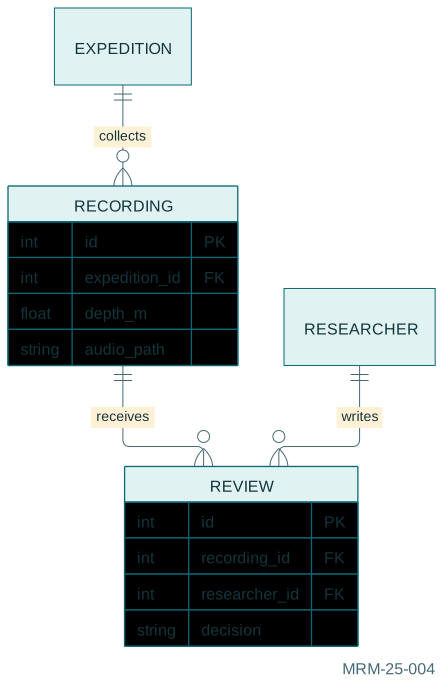
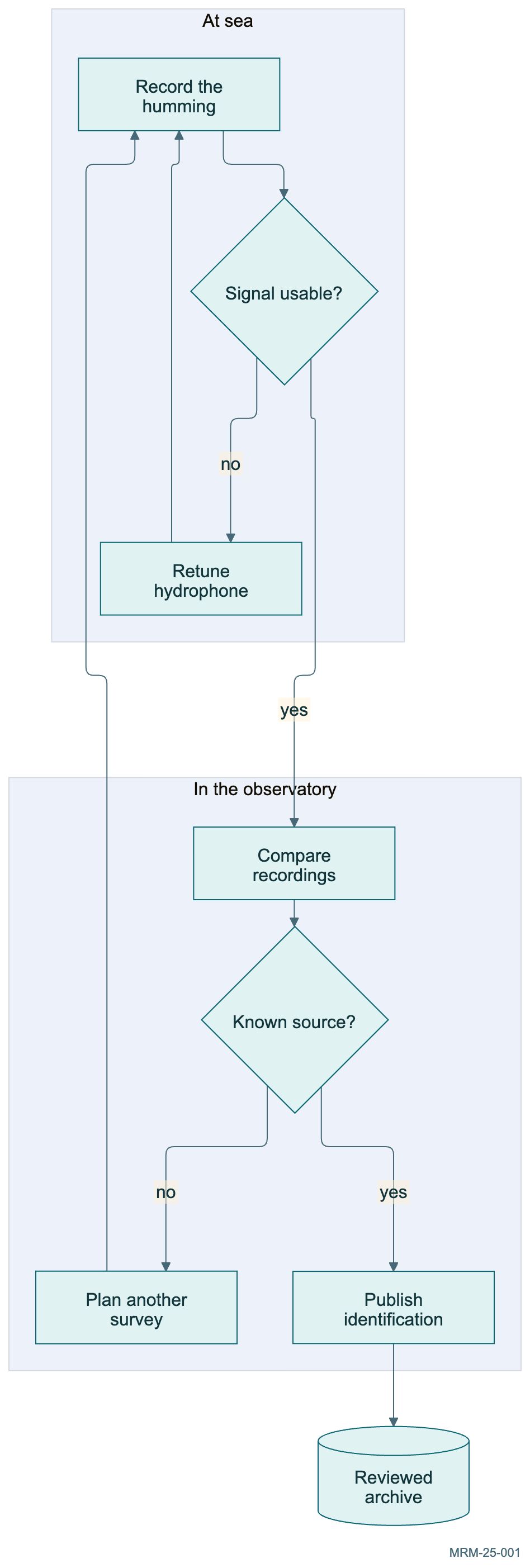
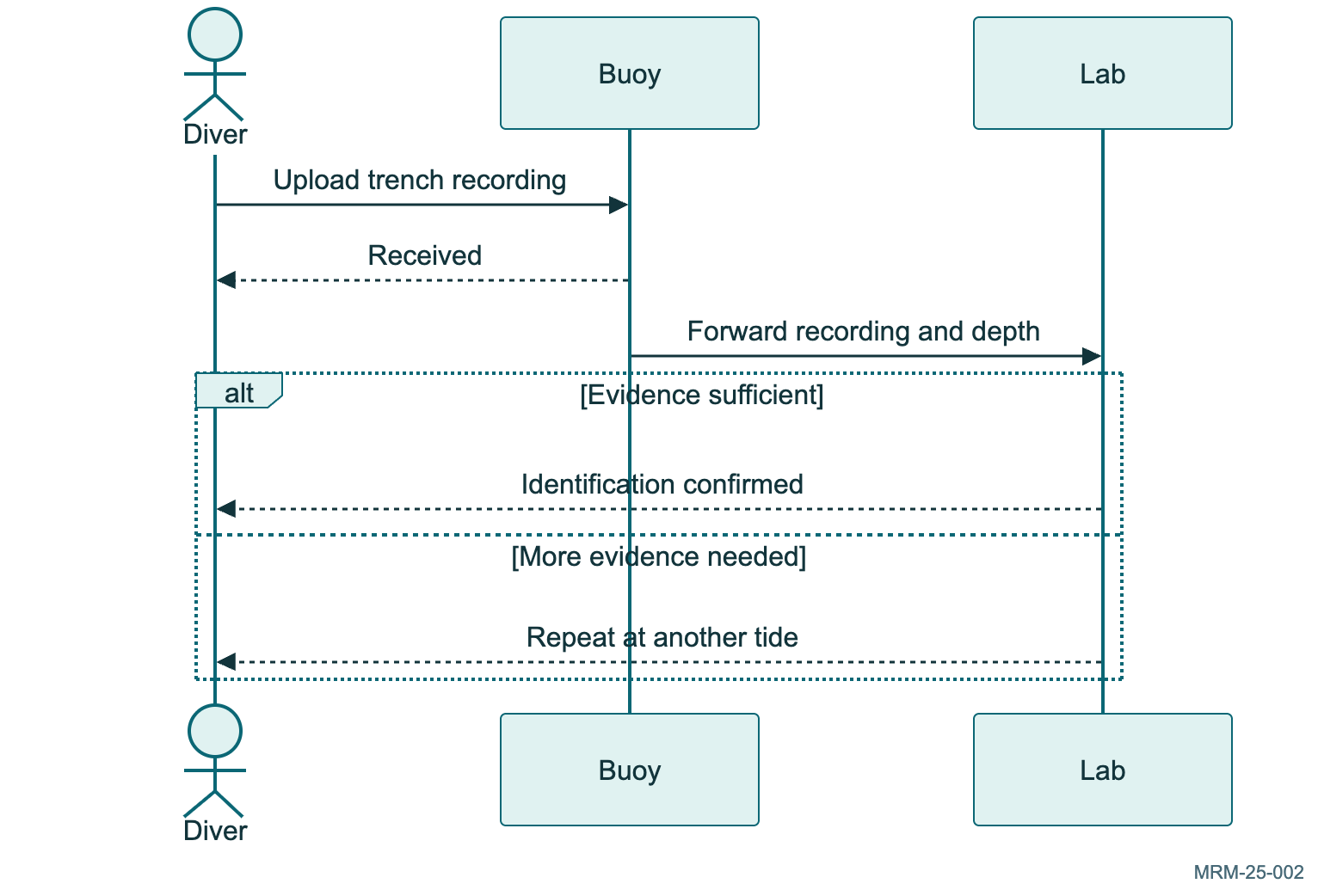
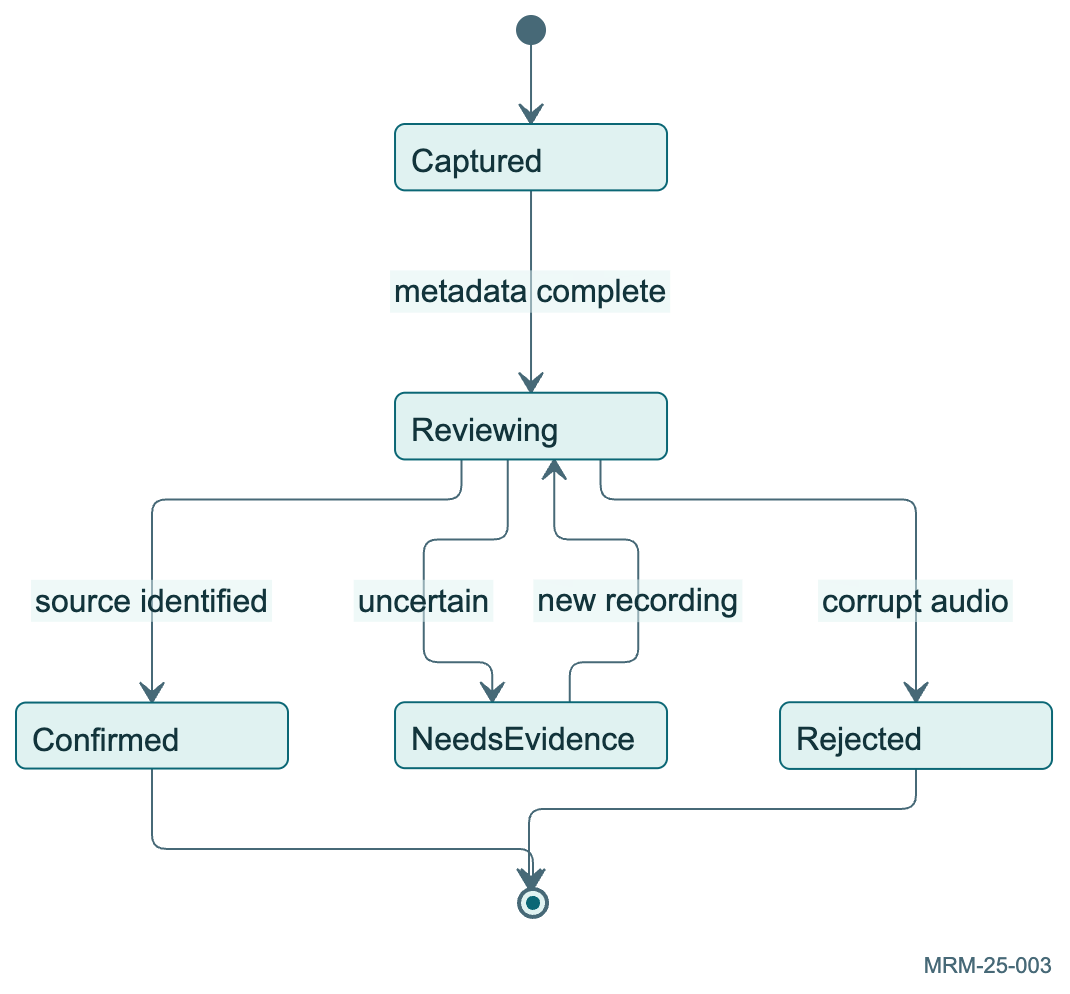
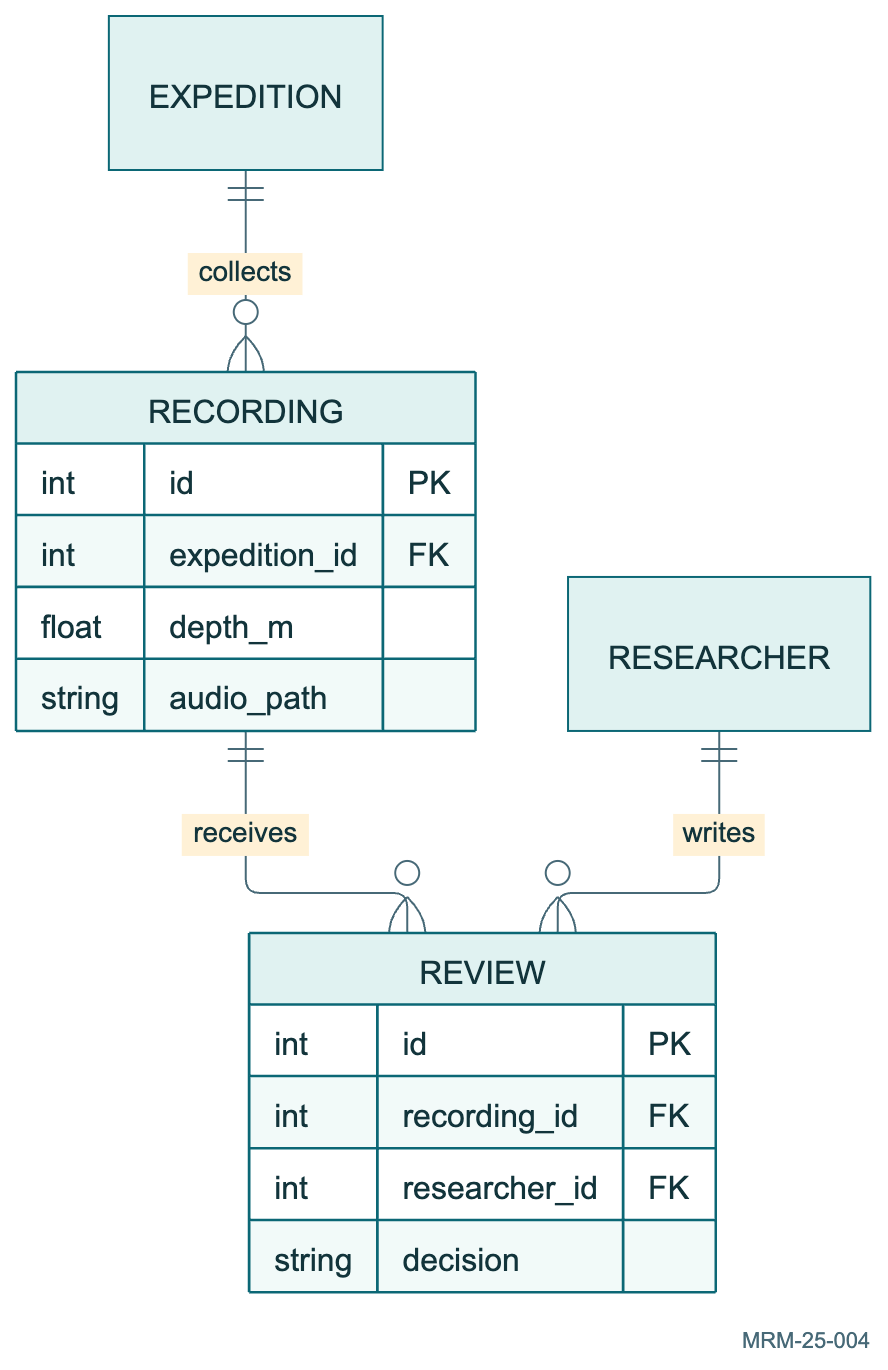
25 · A project in four complementary views 4 diagrams Four views of one fictional expedition: process, interaction, lifecycle and stored evidence.
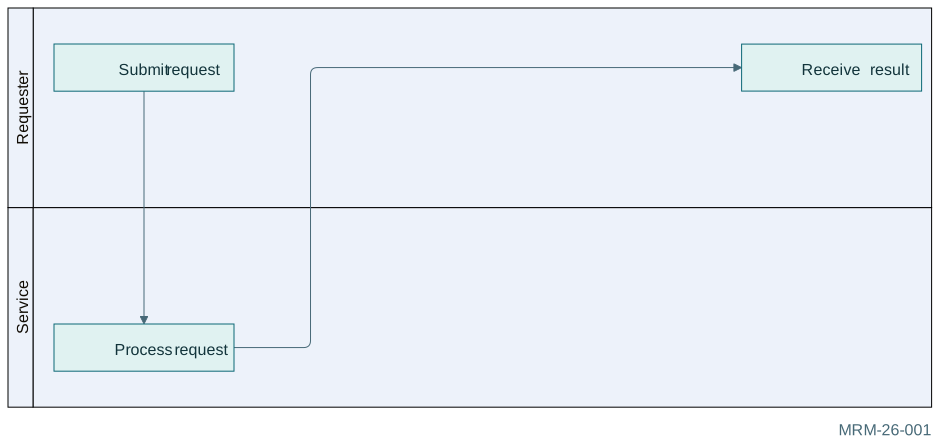
26 · Swimlanes: responsibility and handoffs 6 diagrams Six process views that make ownership explicit. Swimlane syntax is beta.
27 · Use cases: actors and goals 6 diagrams Actors, boundaries, include, extend and multiple systems. This family is beta.
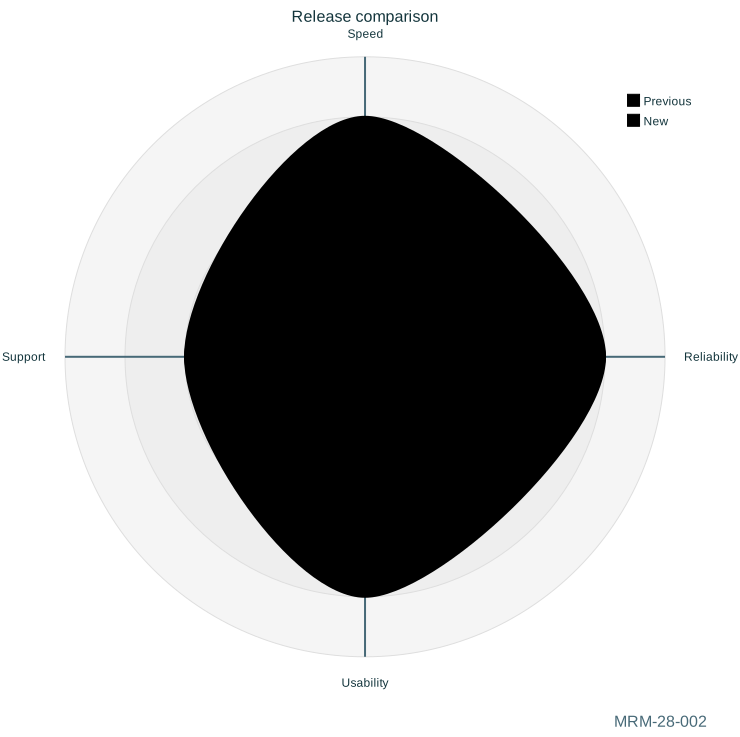
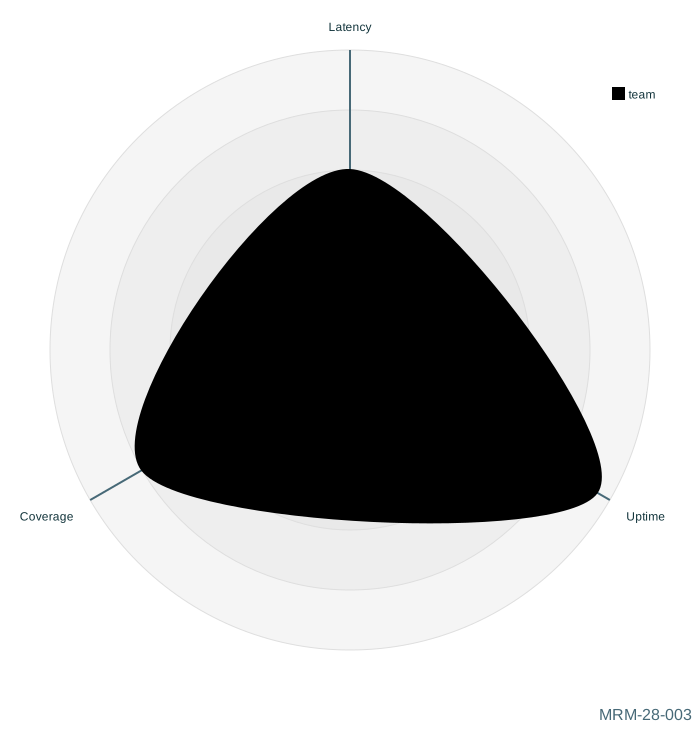
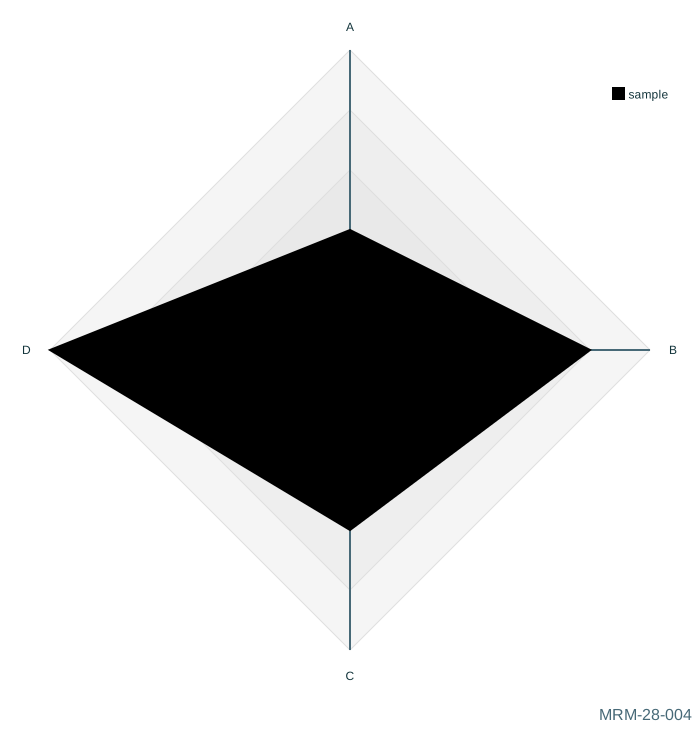
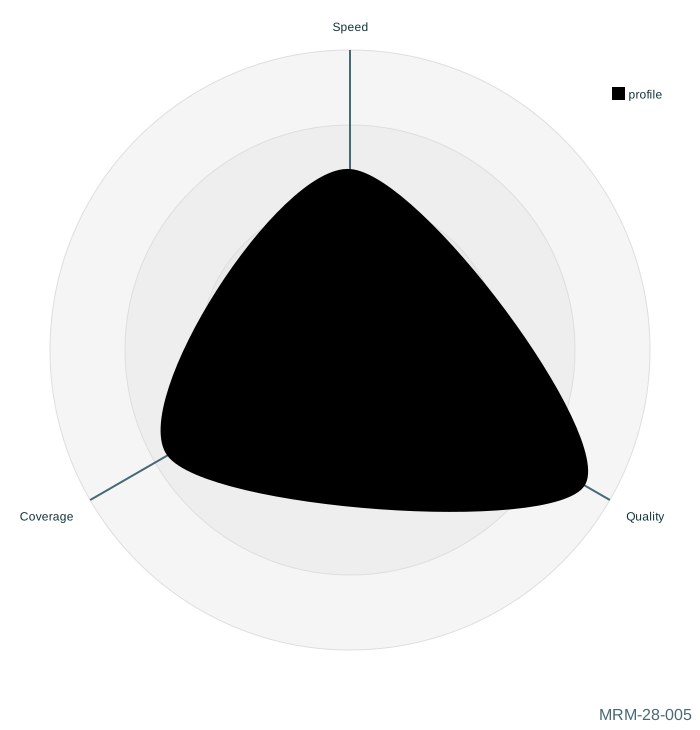
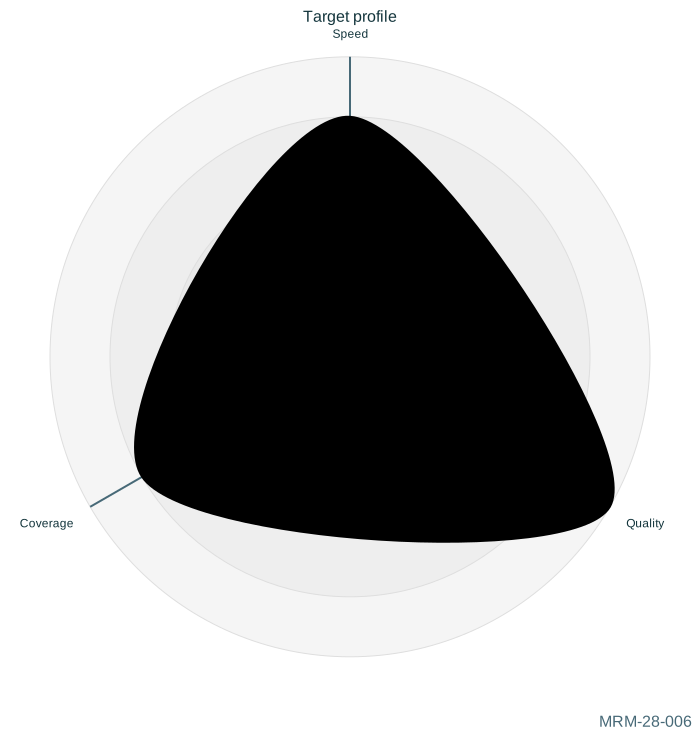
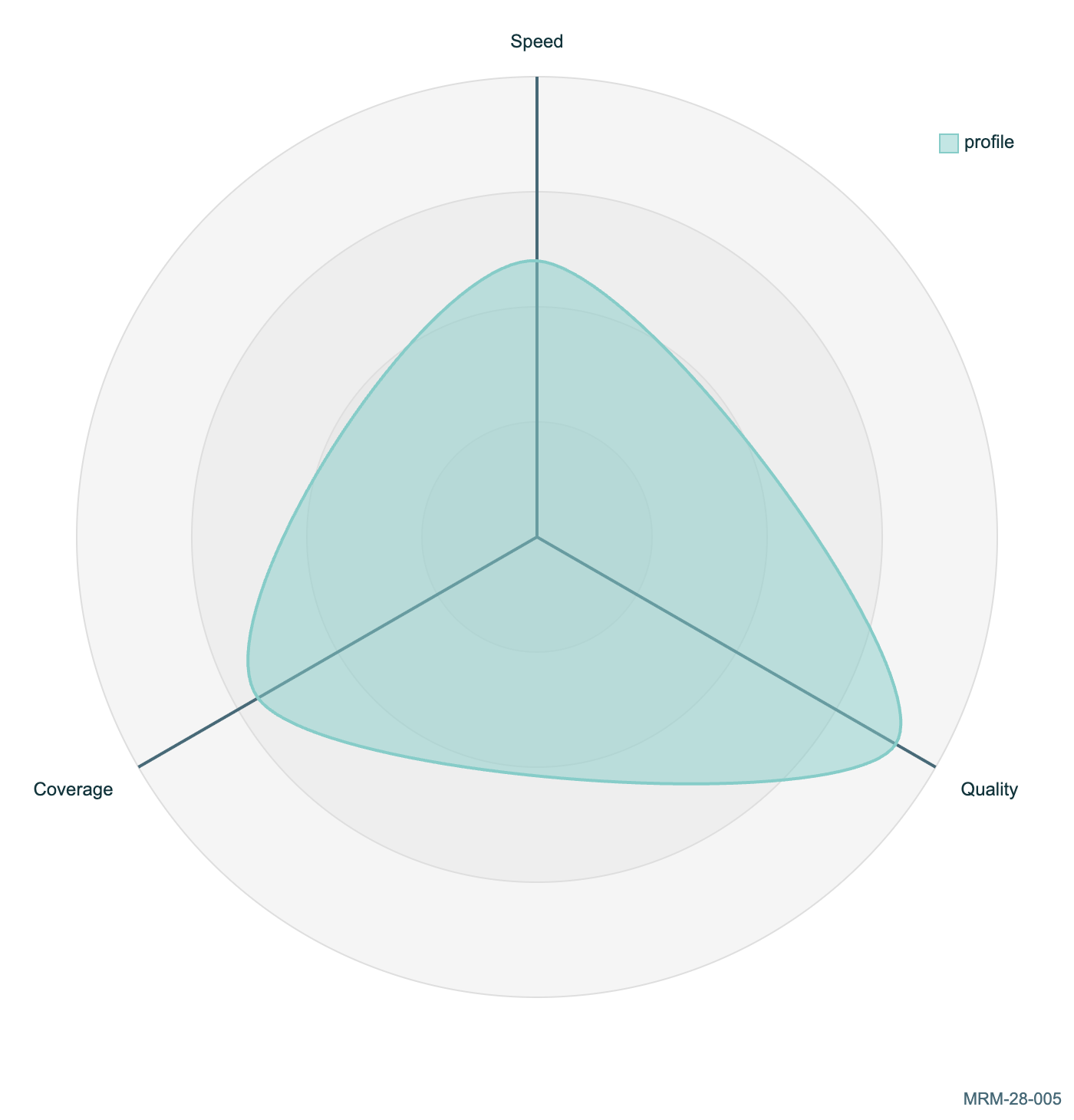
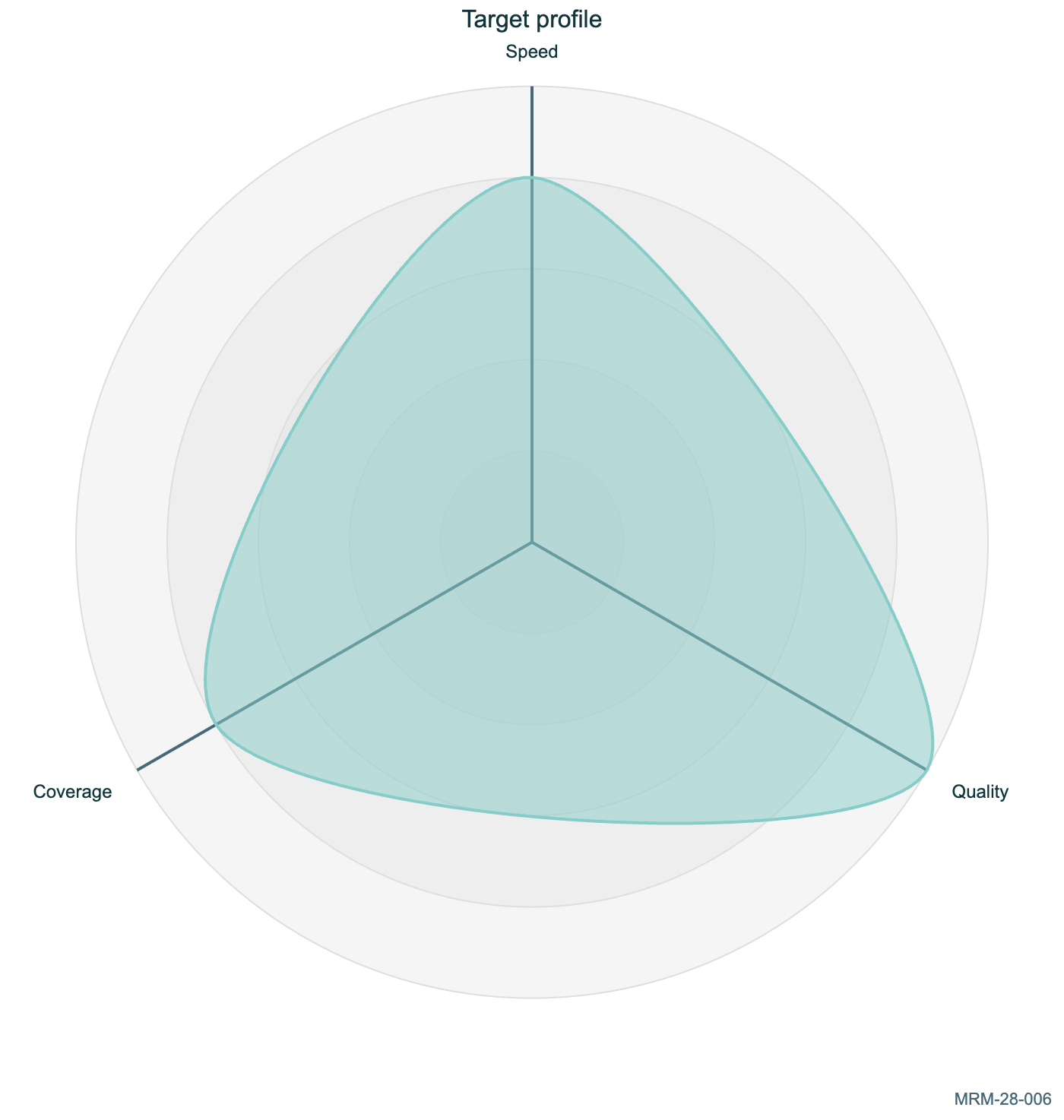
28 · Radar charts 6 diagrams Compare profiles on explicitly shared scales. Values are illustrative; axis order changes the polygon. Radar syntax is beta.
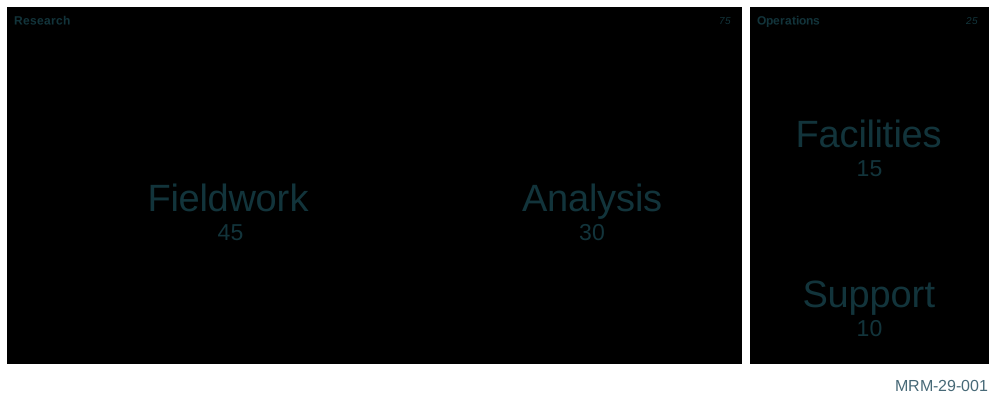
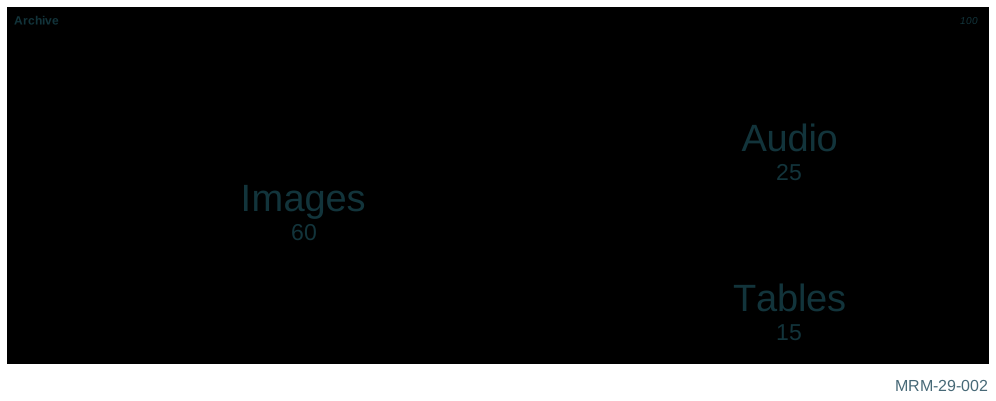
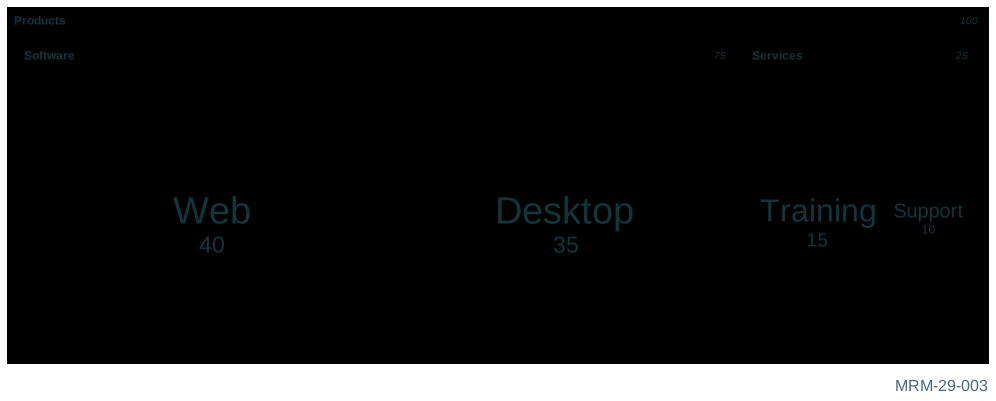
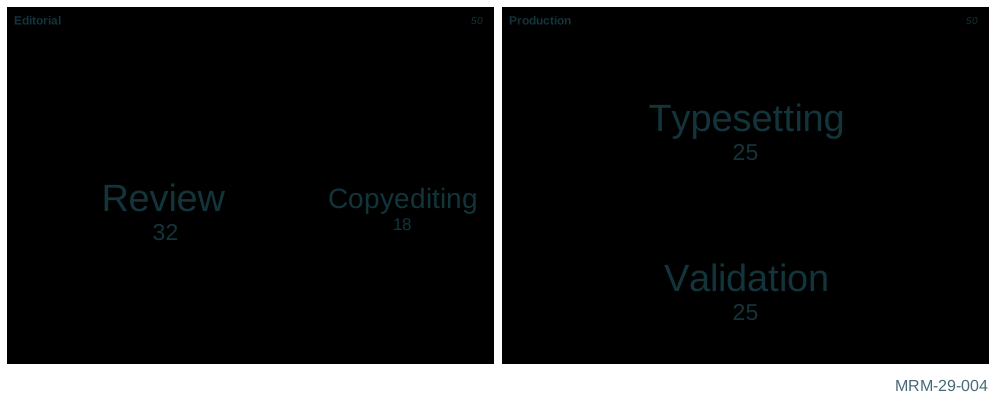
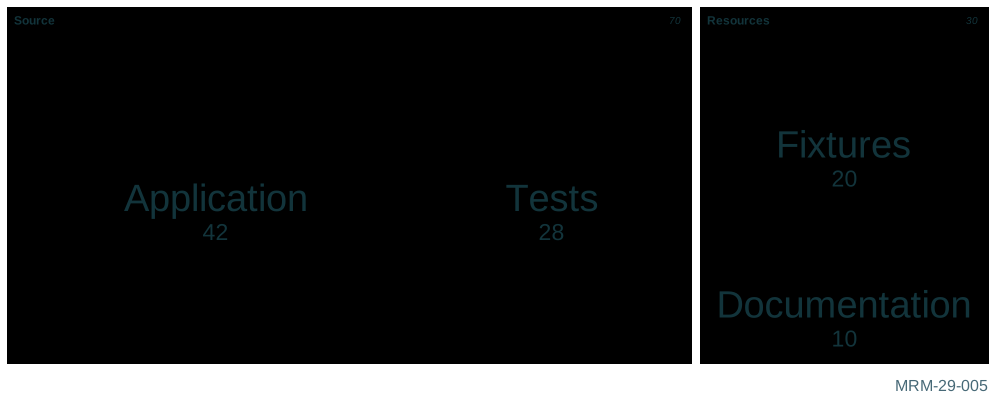
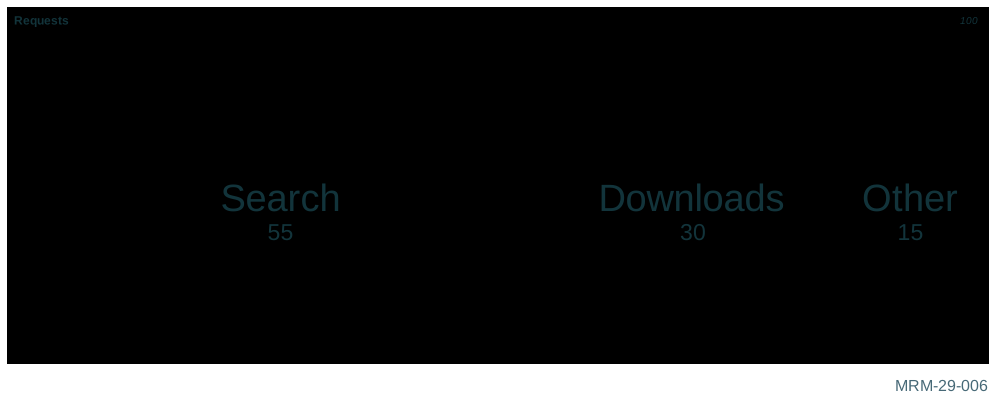
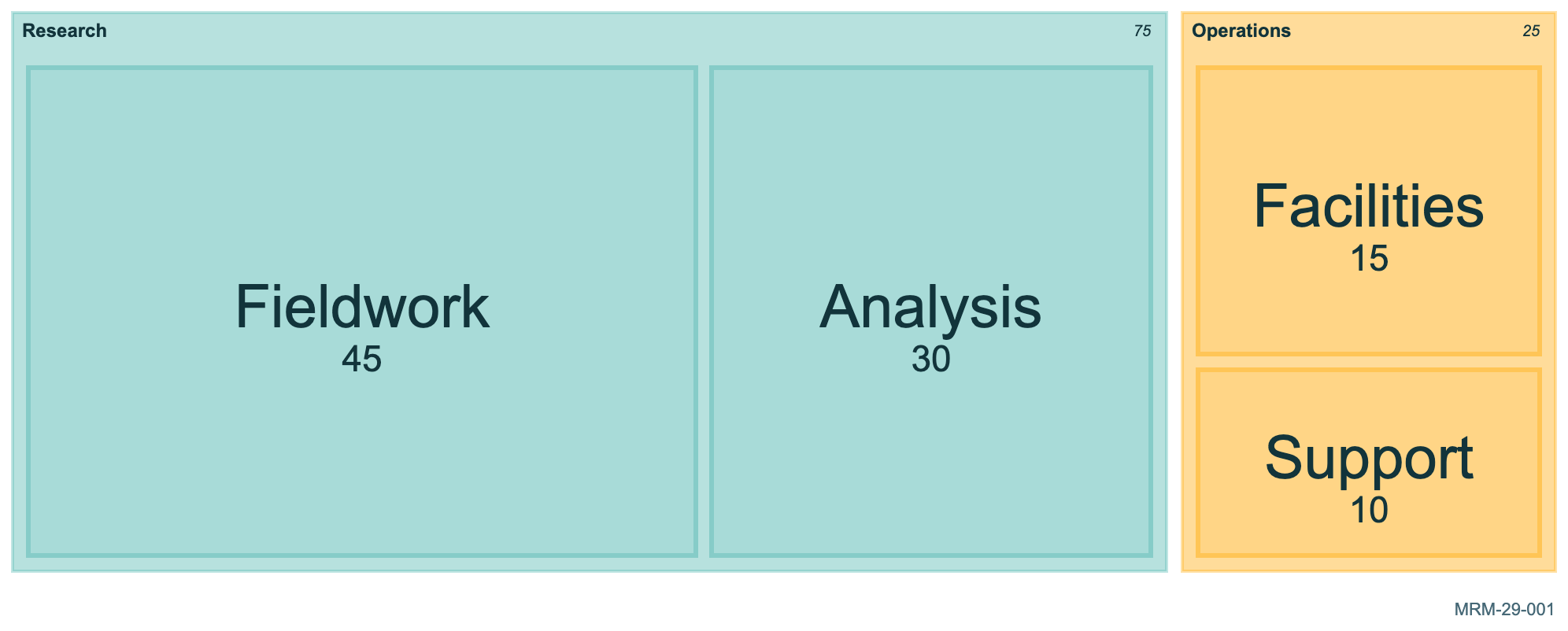
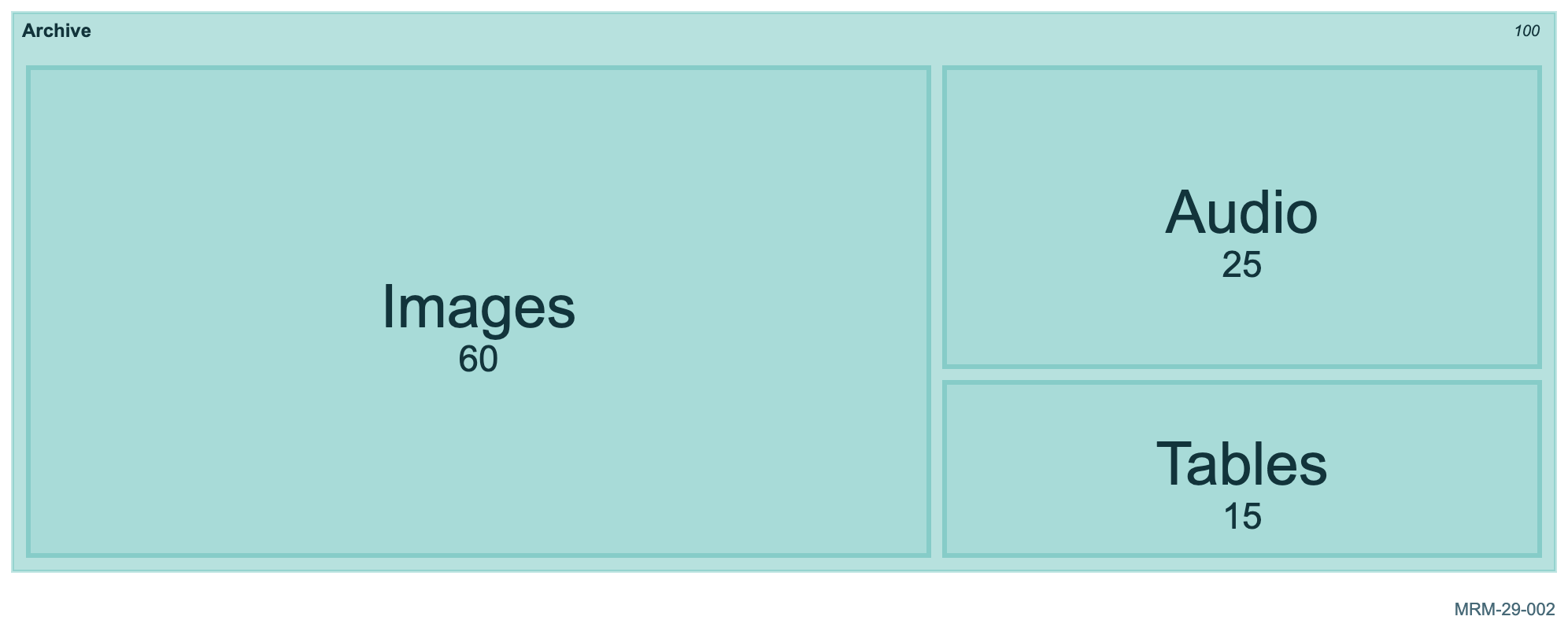
29 · Treemaps 6 diagrams Areas encode nonnegative quantities within a hierarchy. Keep units consistent across leaves.
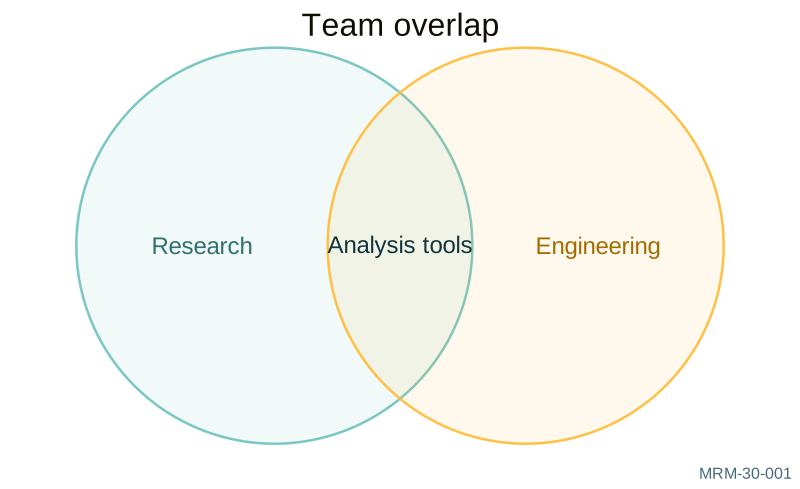
30 · Venn diagrams 6 diagrams Set membership and overlap, including weighted and three-set views. This family is beta.
31 · Ishikawa cause analysis 6 diagrams Fishbone diagrams organize possible causes. They do not establish that a cause has been demonstrated. Syntax is beta.
32 · Wardley maps 6 diagrams Visibility and evolution describe a value chain; positions are modeling judgments. This family is beta.
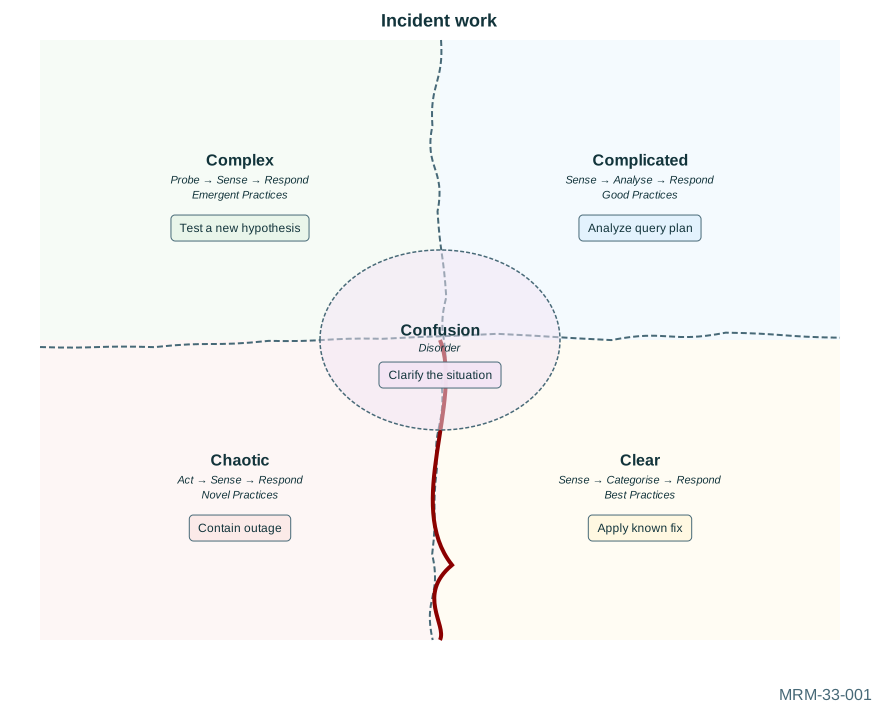
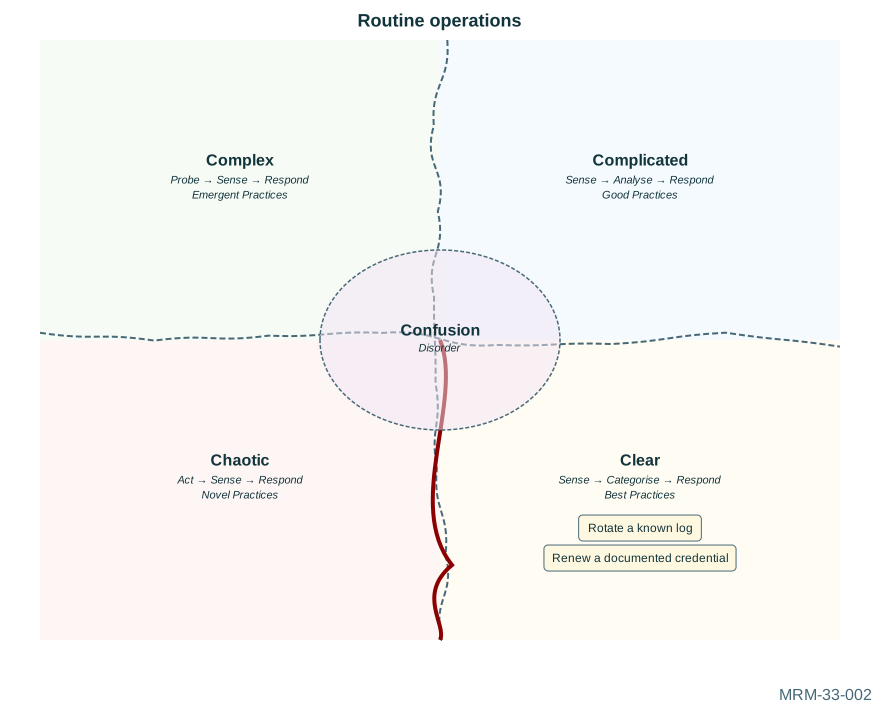
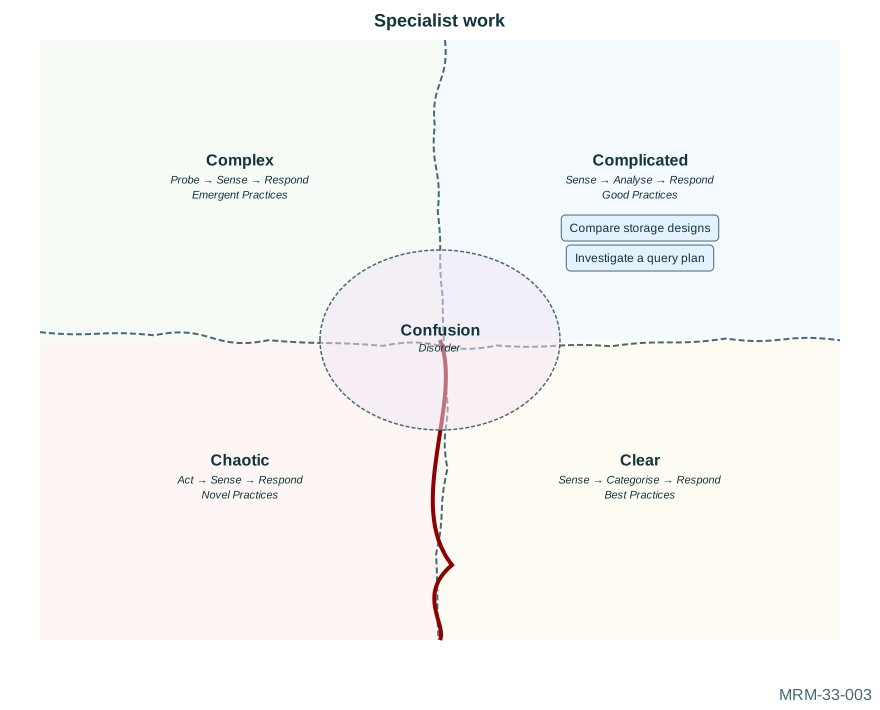
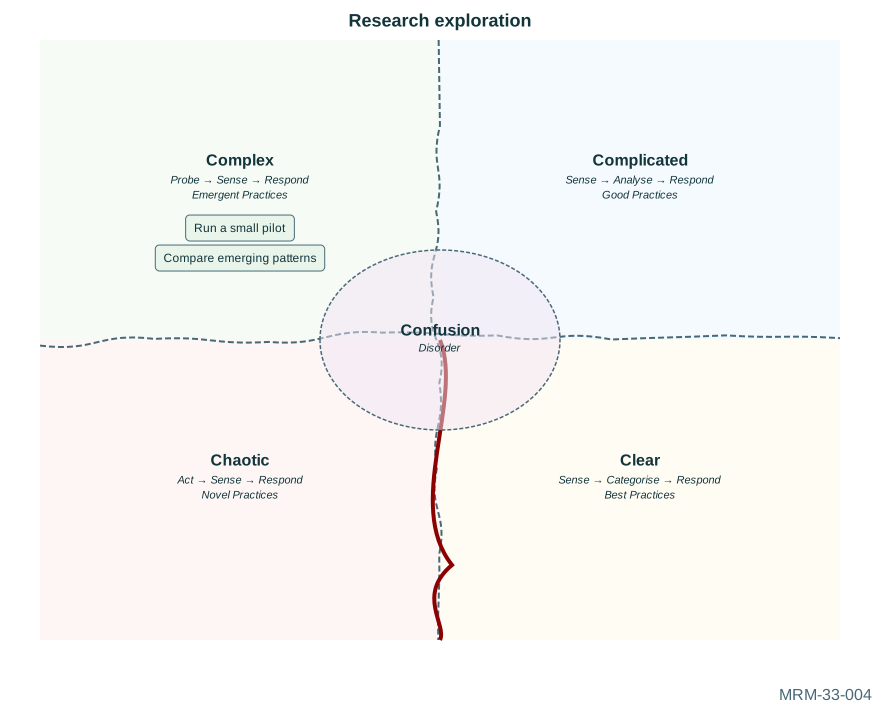
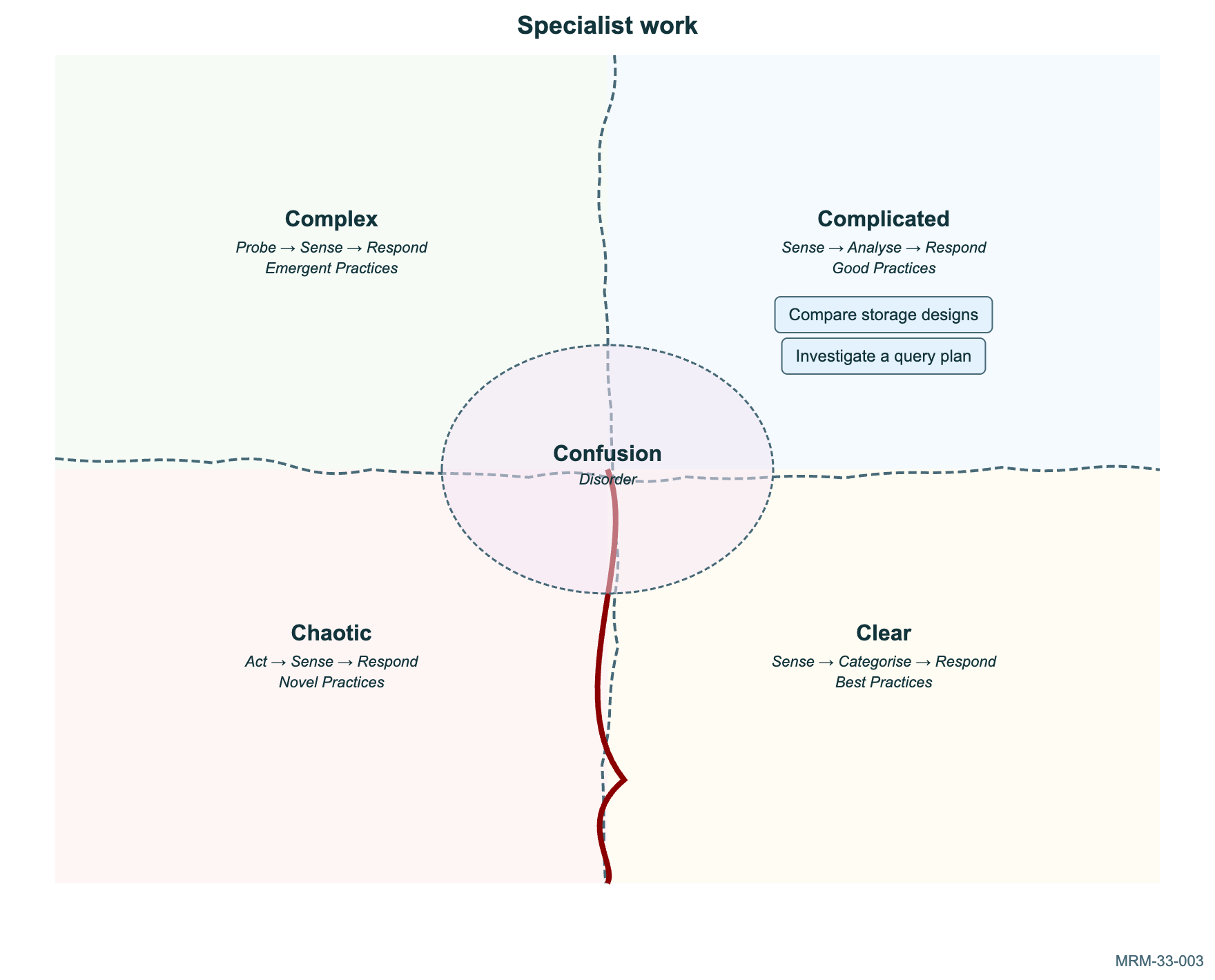
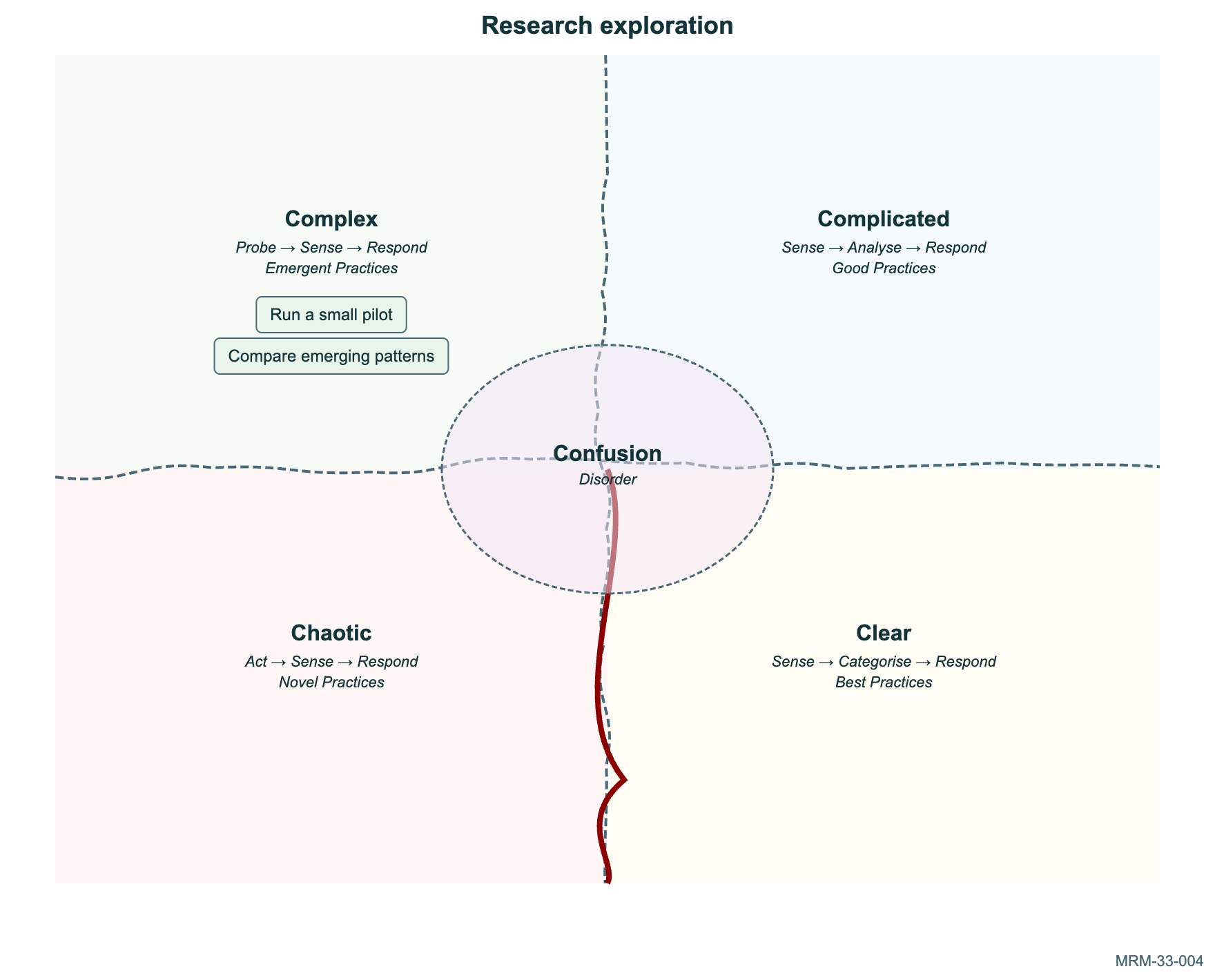
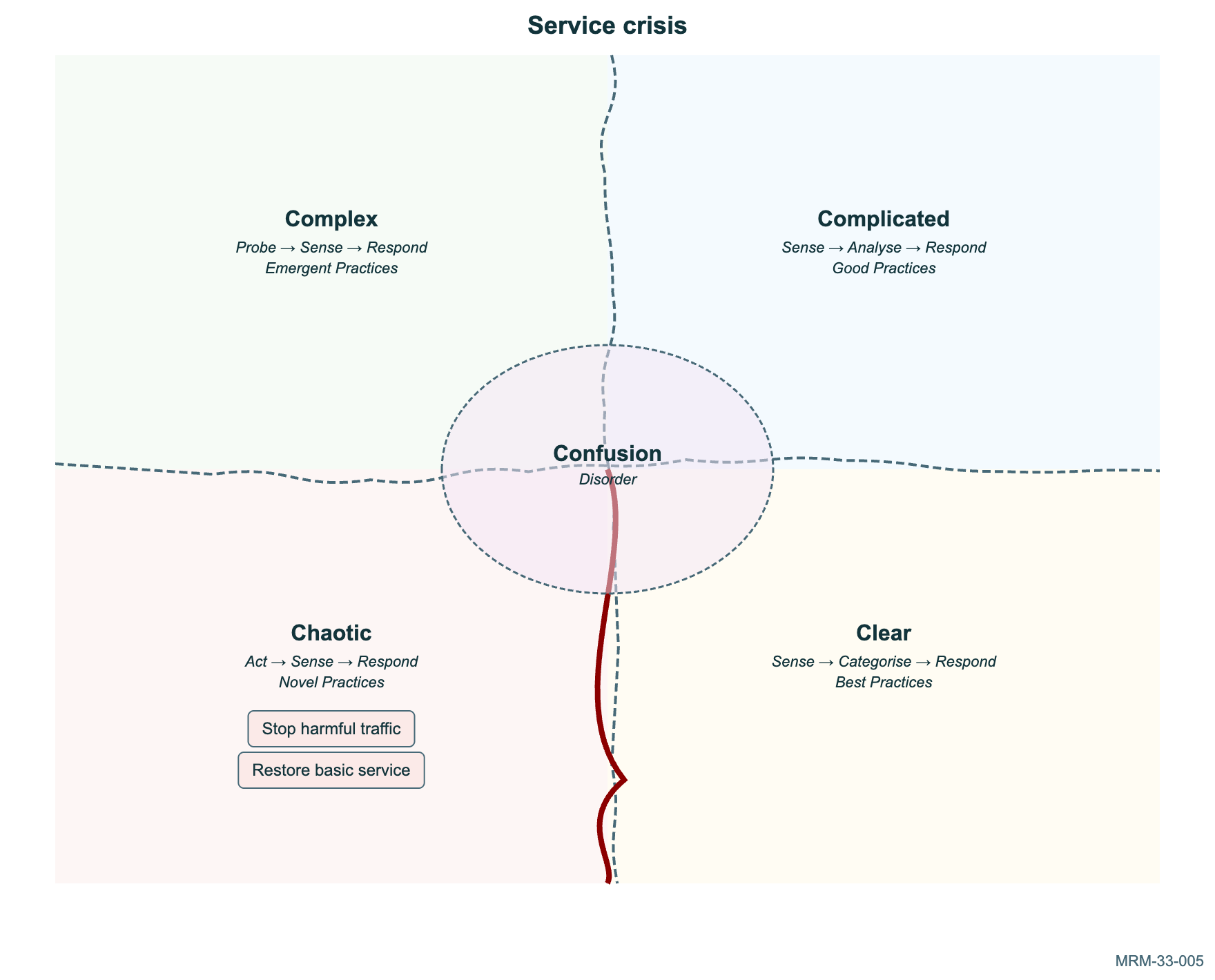
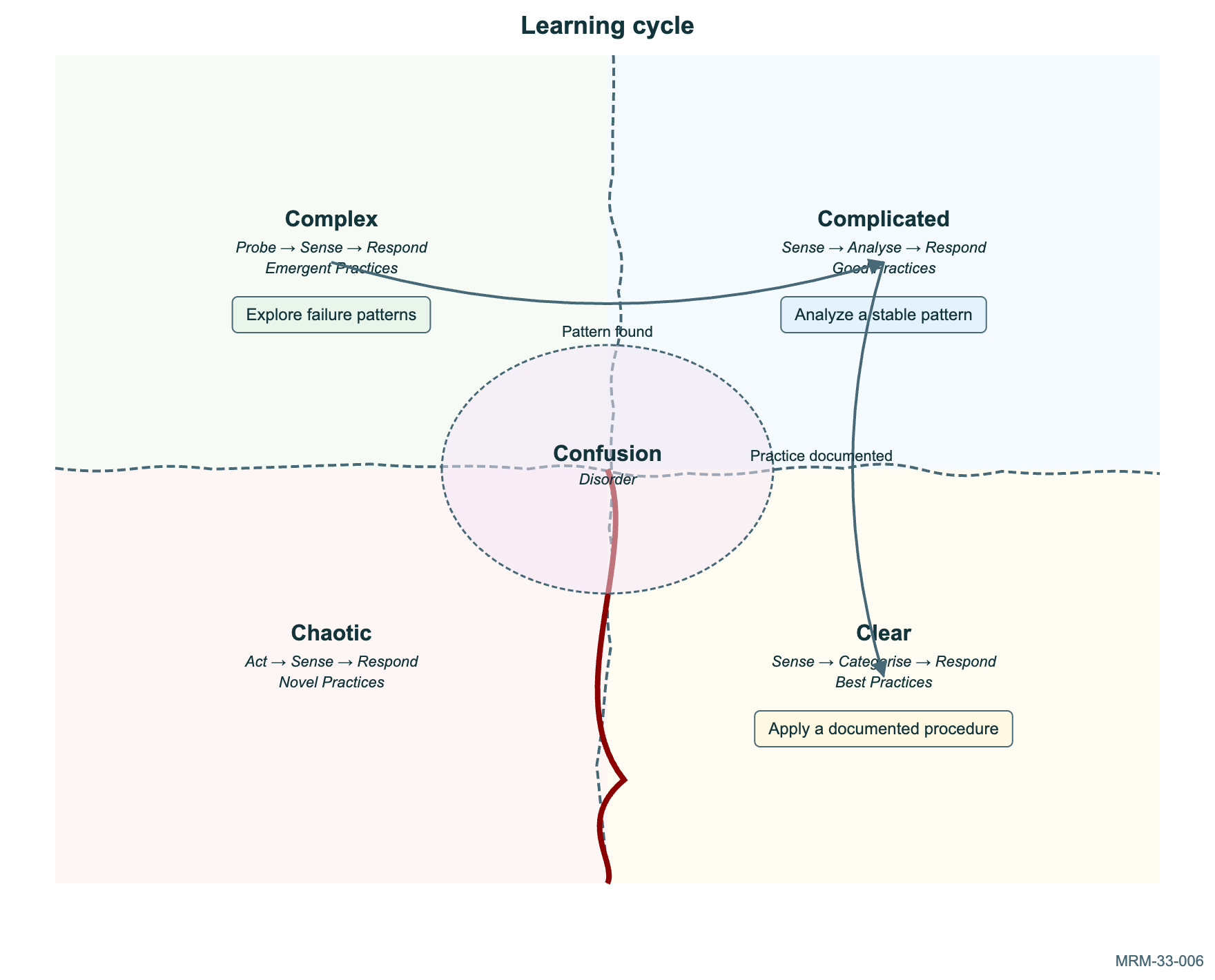
33 · Cynefin decision contexts 6 diagrams Classify situations by the kind of response they need. These judgments are contextual, not objective rankings. Syntax is beta.
34 · TreeView hierarchies 6 diagrams Repository and document trees use indentation or familiar tree characters. This family is beta.
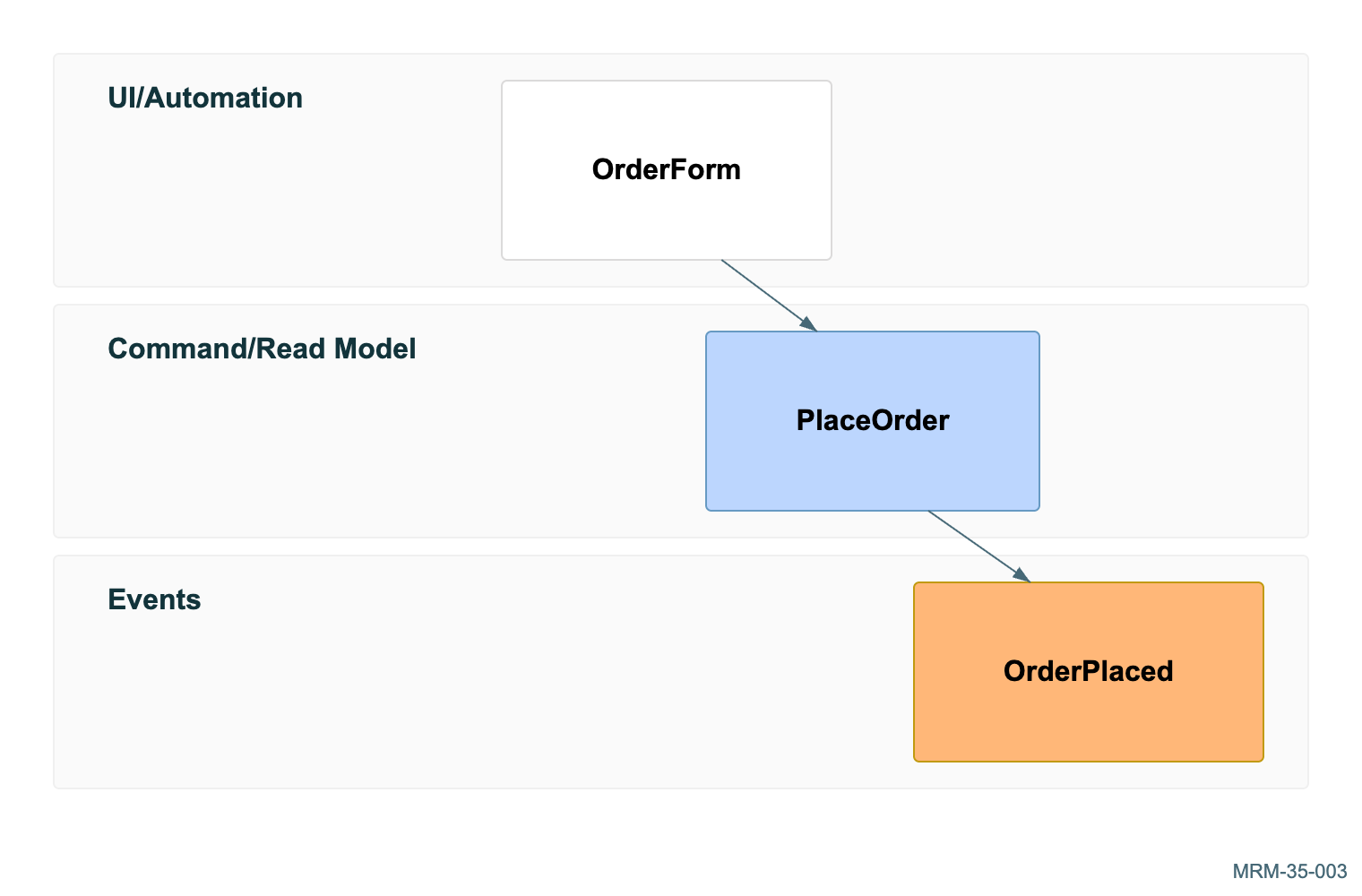
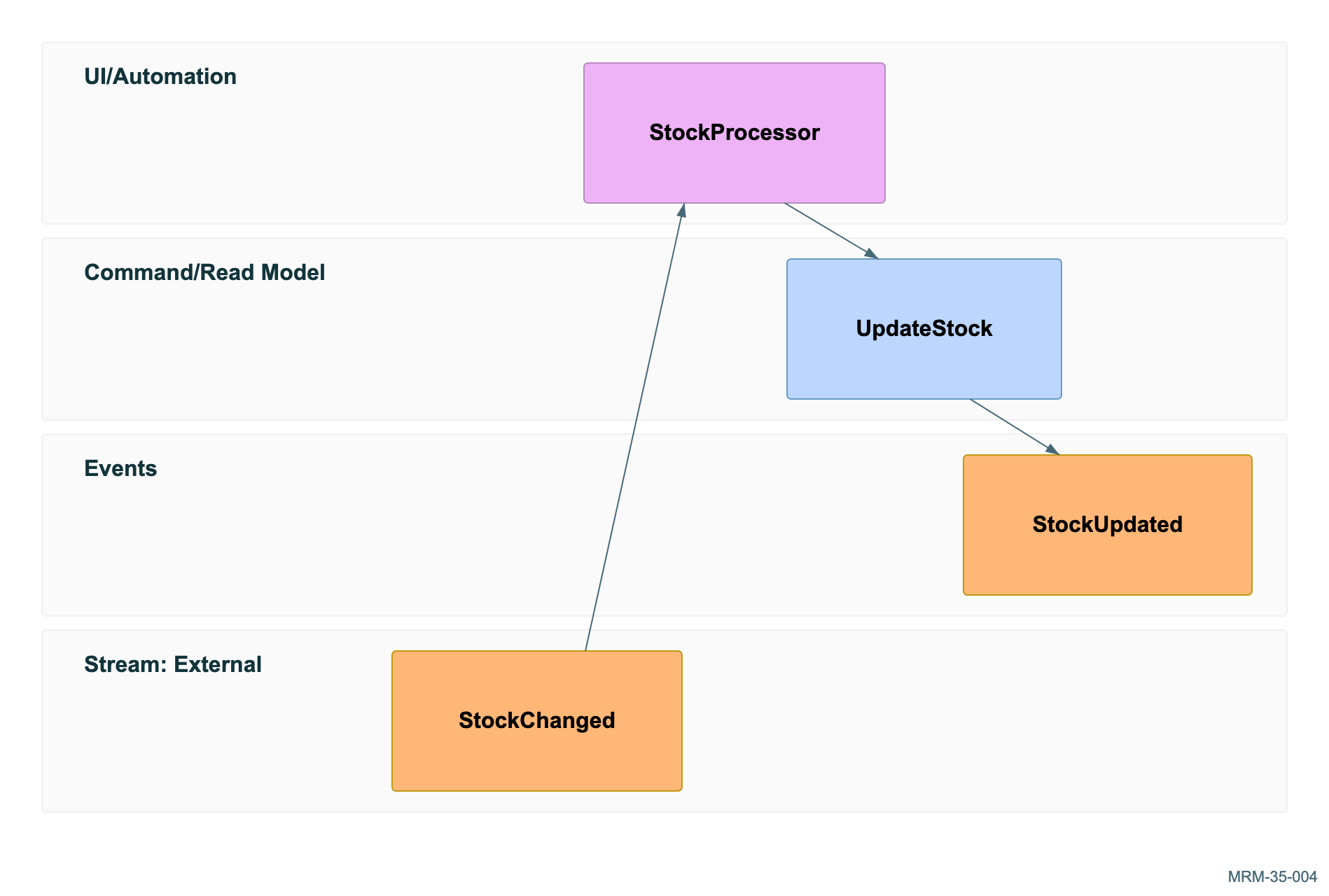
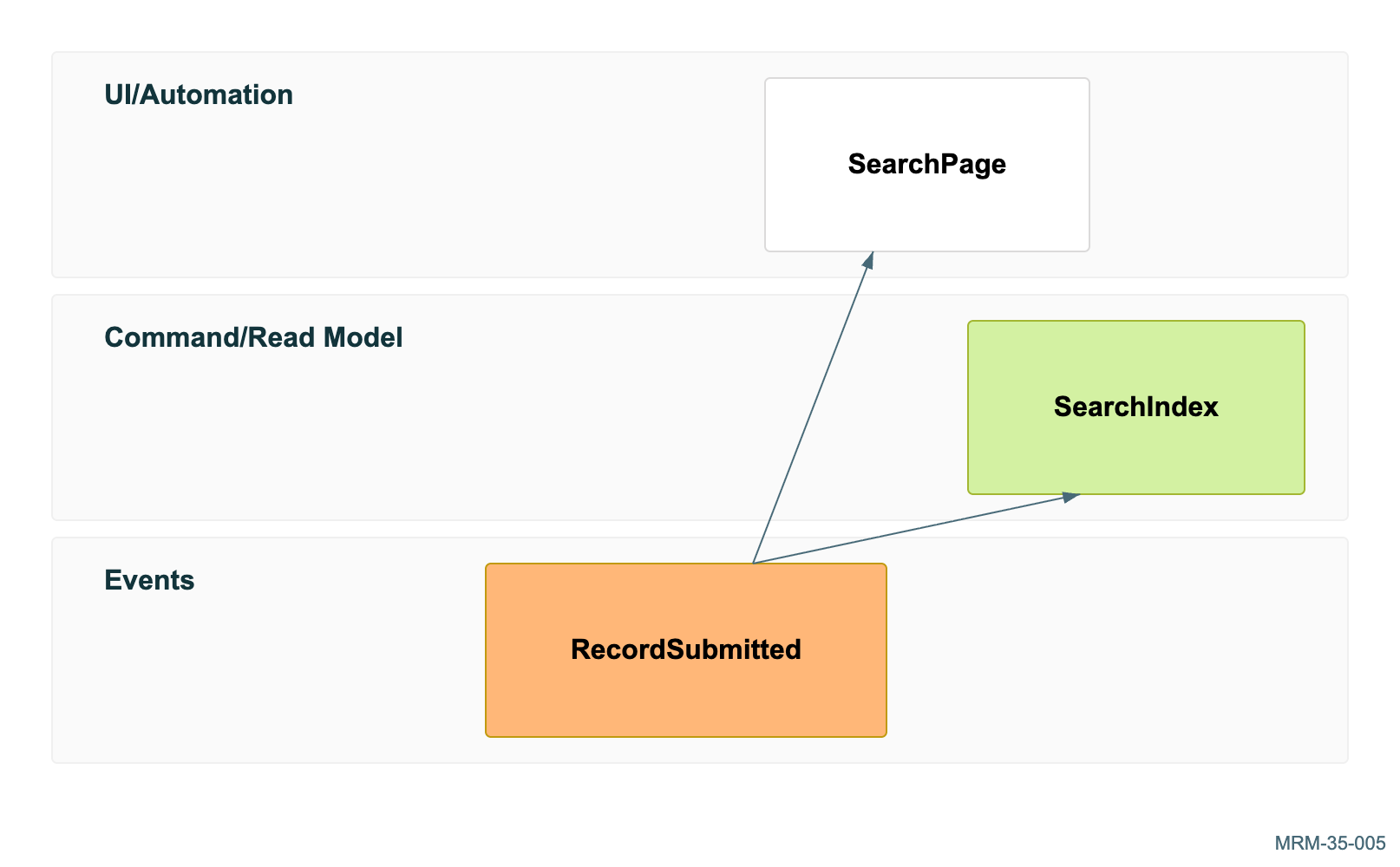
35 · Event modeling 6 diagrams Commands, events, read models and processors connect behavior over time. Use event names for facts that have occurred.
36 · ZenUML interactions 6 diagrams An additional sequence language for nested calls, asynchronous messages and control flow. Rendering uses the official ZenUML integration.
Copy link Reading the tour
Three ways to see a change
Mermaid source
Read a complete, editable diagram. Each example introduces a specific idea.
Actual diagram
Inspect Mermaid output in the visual gallery, with portable SVG, PDF and PNG downloads.
Try a change
Compare a named baseline, download the .mmd source and render it with the Mermaid CLI.
Read from the beginning or jump to a stable example ID. Each example includes
its complete input and captured result. Copy link preserves the address of the
guide you are reading, including its current domain and path.
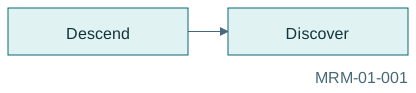
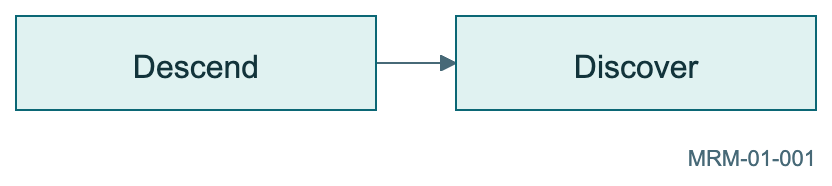
Copy link MRM-01-001 Follow the current A node ID is a handle; its bracketed text is the label. Start with two nodes and one directed edge.
Back to diagram overview Mermaid source flowchart LR
dive [ Descend ] --> discover [ Discover ]
Parameter Meaning in this example flowchart LRPlace the main flow from left to right.
Actual output MRM-01-001 · Rendered by Mermaid Mermaid renderer log Standard output Render this diagram --no-install mmdc -i examples/MRM-01-001.mmd -o figures/MRM-01-001.svg -c examples/mermaid-config.json -I MRM-01-001 --no-font-embed
Uses the shared rendering setup and configuration .
Download: Mermaid source · SVG diagram · Vector PDF · PNG preview · Render configuration
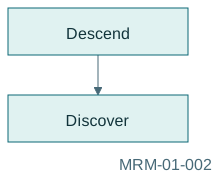
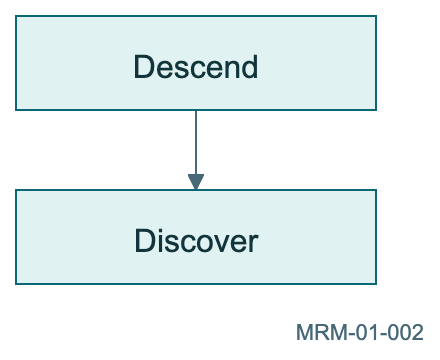
Copy link MRM-01-002 Turn the dive vertical Change only the direction. Mermaid computes the positions; the meaning of the edge stays the same.
Back to diagram overview Compare with MRM-01-001 · Follow the current .
Mermaid source flowchart TB
dive [ Descend ] --> discover [ Discover ]
Parameter Meaning in this example TBLay out the graph from top to bottom.
Actual output MRM-01-002 · Rendered by Mermaid Mermaid renderer log Standard output Render this diagram --no-install mmdc -i examples/MRM-01-002.mmd -o figures/MRM-01-002.svg -c examples/mermaid-config.json -I MRM-01-002 --no-font-embed
Uses the shared rendering setup and configuration .
Download: Mermaid source · SVG diagram · Vector PDF · PNG preview · Render configuration
Copy link MRM-01-003 Name the connection An edge label explains what crosses a boundary. Prefer a verb or concrete condition over a vague word such as next.
Back to diagram overview Compare with MRM-01-001 · Follow the current .
Mermaid source flowchart LR
dive [ Descend ] -->| follow the beacon| discover [ Discover ]
Parameter Meaning in this example |follow the beacon|Attach a label to this directed edge.
Actual output MRM-01-003 · Rendered by Mermaid Mermaid renderer log Standard output Render this diagram --no-install mmdc -i examples/MRM-01-003.mmd -o figures/MRM-01-003.svg -c examples/mermaid-config.json -I MRM-01-003 --no-font-embed
Uses the shared rendering setup and configuration .
Download: Mermaid source · SVG diagram · Vector PDF · PNG preview · Render configuration
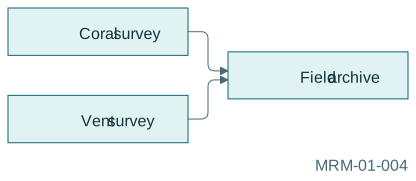
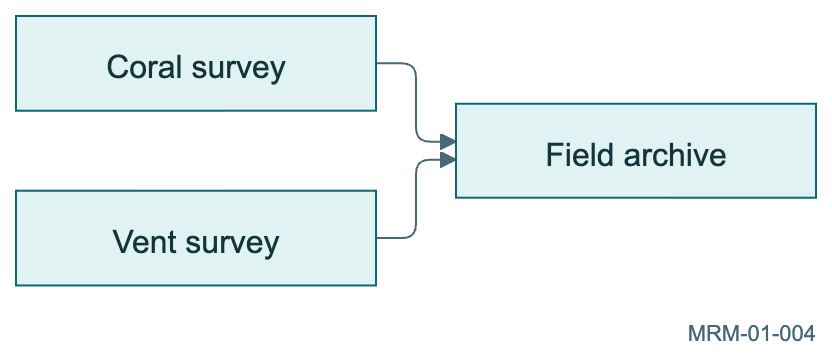
Copy link MRM-01-004 Reuse an identity Writing an ID again refers to the same node. Here two observations converge on one archive, rather than duplicating the archive.
Back to diagram overview Mermaid source flowchart LR
coral [ Coral survey ] --> archive [ Field archive ]
vent [ Vent survey ] --> archive
Parameter Meaning in this example archiveReuse an existing node by its ID.
Actual output MRM-01-004 · Rendered by Mermaid Mermaid renderer log Standard output Render this diagram --no-install mmdc -i examples/MRM-01-004.mmd -o figures/MRM-01-004.svg -c examples/mermaid-config.json -I MRM-01-004 --no-font-embed
Uses the shared rendering setup and configuration .
Download: Mermaid source · SVG diagram · Vector PDF · PNG preview · Render configuration
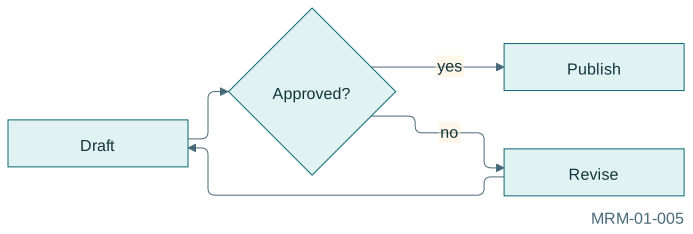
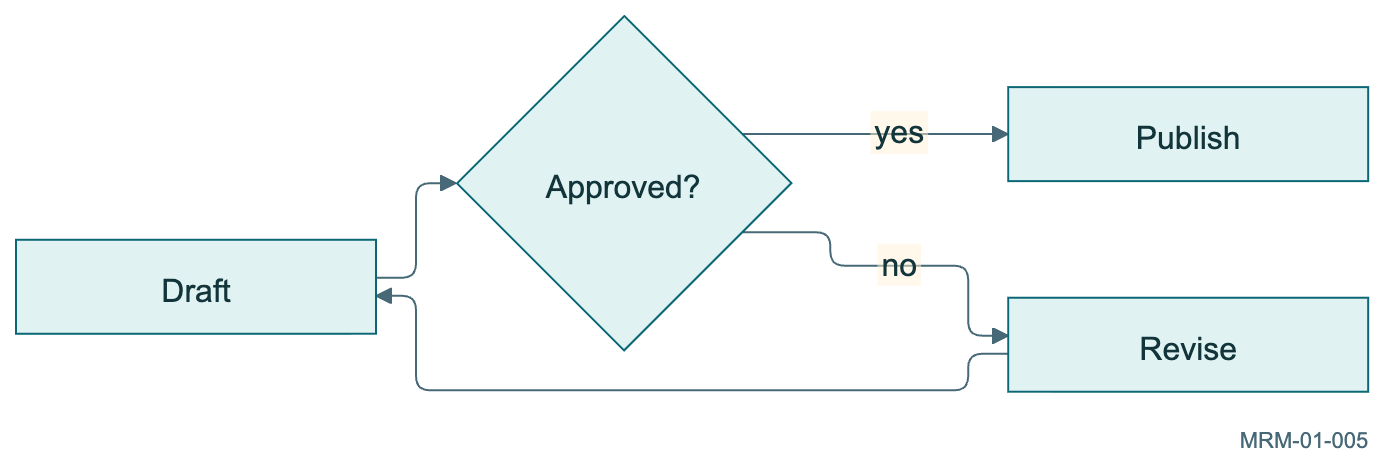
Copy link MRM-01-005 An approval workflow A practical standalone process sketch. Name both accepted and rejected routes.
Back to diagram overview Mermaid source flowchart LR
draft [ Draft ] --> review { Approved? }
review -->| yes| publish [ Publish ]
review -->| no| revise [ Revise ]
revise --> draft
Parameter Meaning in this example Decision exitsName both accepted and rejected routes.
Actual output MRM-01-005 · Rendered by Mermaid Mermaid renderer log Standard output Render this diagram --no-install mmdc -i examples/MRM-01-005.mmd -o figures/MRM-01-005.svg -c examples/mermaid-config.json -I MRM-01-005 --no-font-embed
Uses the shared rendering setup and configuration .
Download: Mermaid source · SVG diagram · Vector PDF · PNG preview · Render configuration
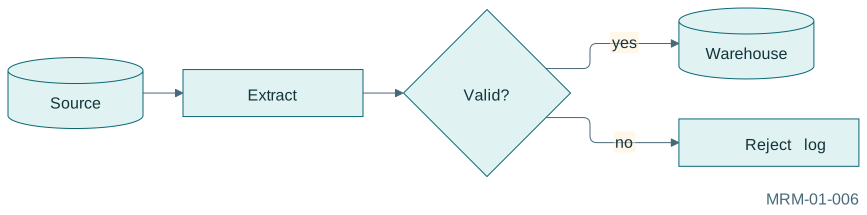
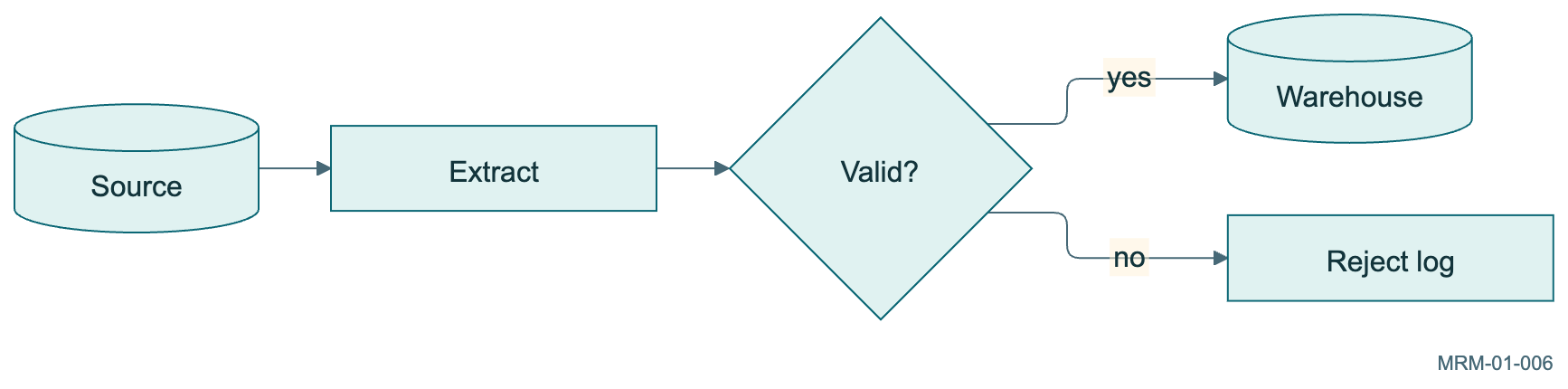
Copy link MRM-01-006 An ETL pipeline A practical standalone process sketch. Distinguish stored data, work and decisions.
Back to diagram overview Mermaid source flowchart LR
source [( Source )] --> extract [ Extract ] --> validate { Valid? }
validate -->| yes| load [( Warehouse )]
validate -->| no| reject [ Reject log ]
Parameter Meaning in this example Different node rolesDistinguish stored data, work and decisions.
Actual output MRM-01-006 · Rendered by Mermaid Mermaid renderer log Standard output Render this diagram --no-install mmdc -i examples/MRM-01-006.mmd -o figures/MRM-01-006.svg -c examples/mermaid-config.json -I MRM-01-006 --no-font-embed
Uses the shared rendering setup and configuration .
Download: Mermaid source · SVG diagram · Vector PDF · PNG preview · Render configuration
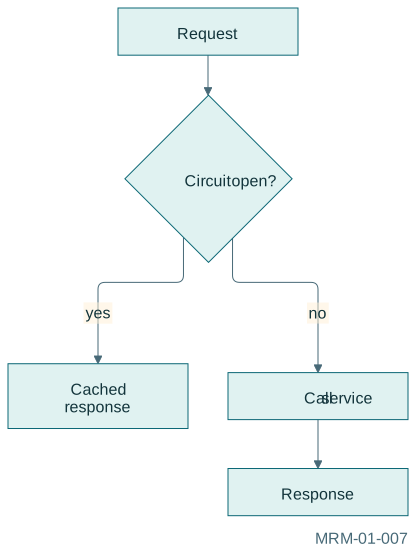
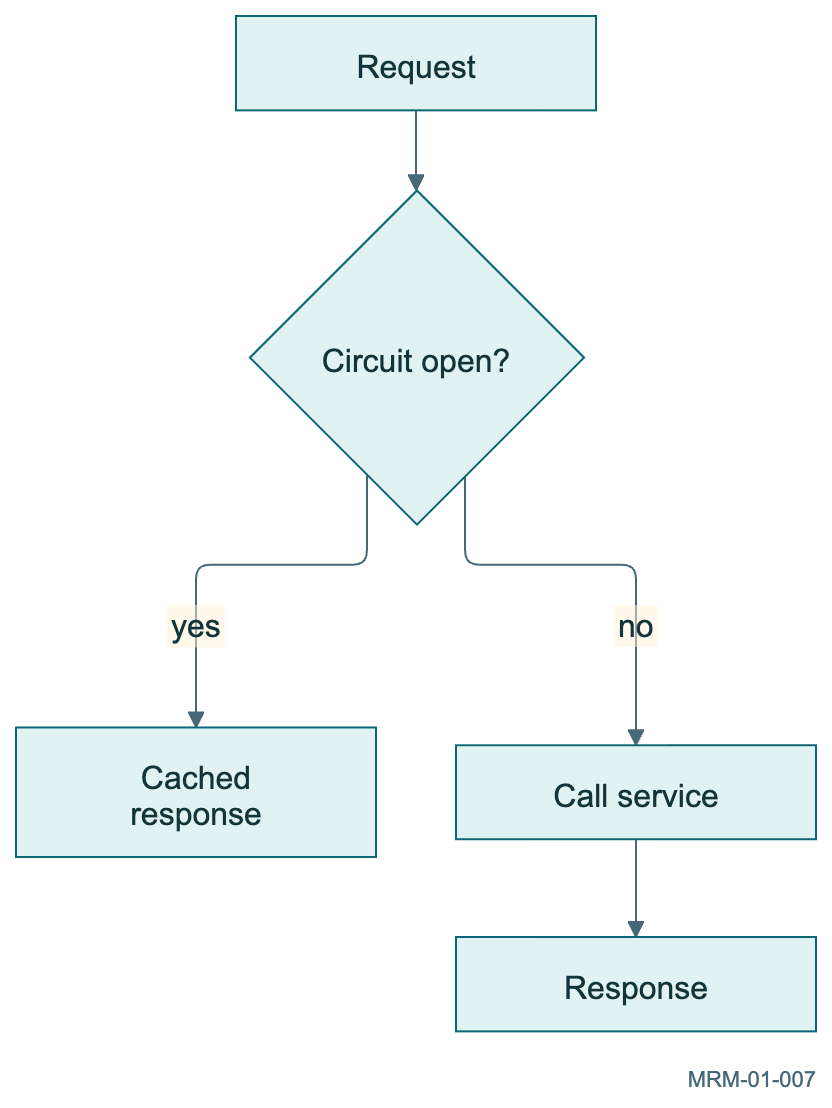
Copy link MRM-01-007 A circuit breaker flow A practical standalone process sketch. Document behavior when a dependency is unavailable.
Back to diagram overview Mermaid source flowchart TD
request [ Request ] --> open { Circuit open? }
open -->| yes| fallback [ Cached response ]
open -->| no| service [ Call service ]
service --> result [ Response ]
Parameter Meaning in this example Fallback branchDocument behavior when a dependency is unavailable.
Actual output MRM-01-007 · Rendered by Mermaid Mermaid renderer log Standard output Render this diagram --no-install mmdc -i examples/MRM-01-007.mmd -o figures/MRM-01-007.svg -c examples/mermaid-config.json -I MRM-01-007 --no-font-embed
Uses the shared rendering setup and configuration .
Download: Mermaid source · SVG diagram · Vector PDF · PNG preview · Render configuration
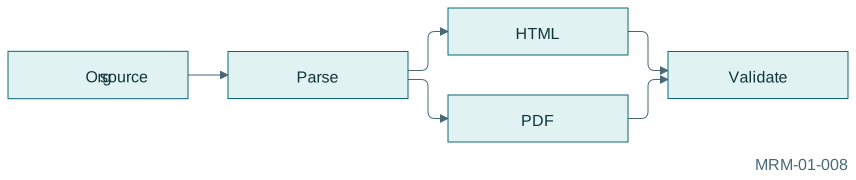
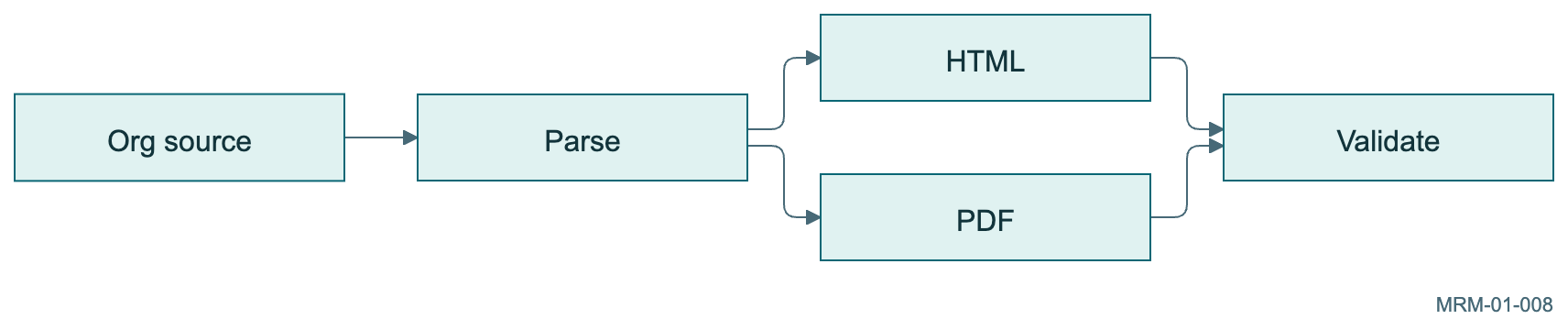
Copy link MRM-01-008 A document publication path A practical standalone process sketch. Build and validate complementary outputs.
Back to diagram overview Mermaid source flowchart LR
source [ Org source ] --> parse [ Parse ] --> html [ HTML ]
parse --> pdf [ PDF ]
html & pdf --> check [ Validate ]
Parameter Meaning in this example Fan-out and convergenceBuild and validate complementary outputs.
Actual output MRM-01-008 · Rendered by Mermaid Mermaid renderer log Standard output Render this diagram --no-install mmdc -i examples/MRM-01-008.mmd -o figures/MRM-01-008.svg -c examples/mermaid-config.json -I MRM-01-008 --no-font-embed
Uses the shared rendering setup and configuration .
Download: Mermaid source · SVG diagram · Vector PDF · PNG preview · Render configuration
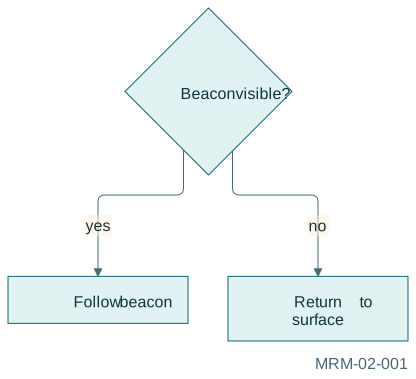
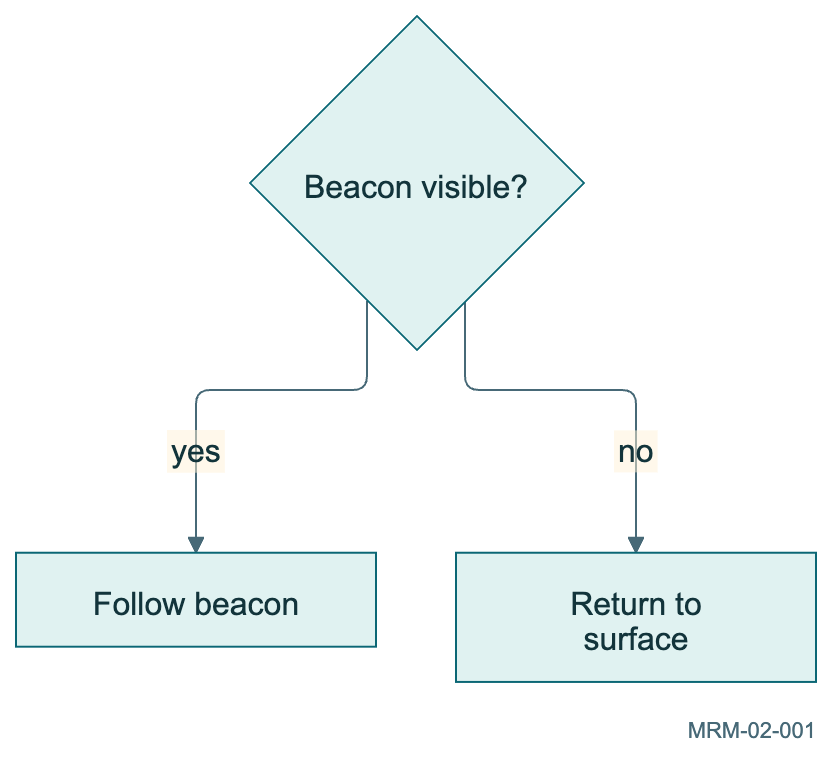
Copy link MRM-02-001 Ask a useful question A decision diamond makes the condition explicit. Label both exits so readers do not infer the branch meanings from position.
Back to diagram overview Mermaid source flowchart TD
check { Beacon visible? }
check -->| yes| follow [ Follow beacon ]
check -->| no| surface [ Return to surface ]
Parameter Meaning in this example {Beacon visible?}Use braces to draw a decision.
Actual output MRM-02-001 · Rendered by Mermaid Mermaid renderer log Standard output Render this diagram --no-install mmdc -i examples/MRM-02-001.mmd -o figures/MRM-02-001.svg -c examples/mermaid-config.json -I MRM-02-001 --no-font-embed
Uses the shared rendering setup and configuration .
Download: Mermaid source · SVG diagram · Vector PDF · PNG preview · Render configuration
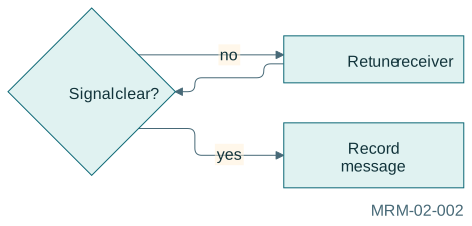
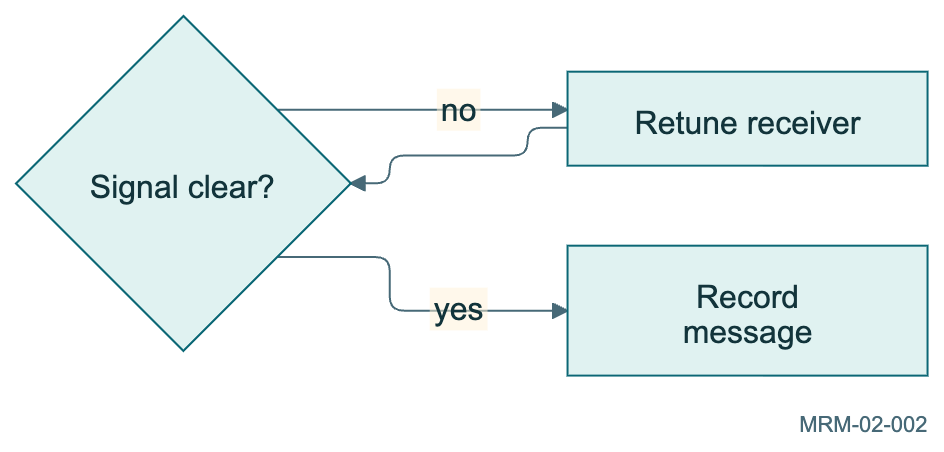
Copy link MRM-02-002 Give a loop an exit The retry path returns to the decision. The successful path leaves it. A diagram can describe a loop without executing one.
Back to diagram overview Mermaid source flowchart LR
listen { Signal clear? }
listen -->| no| tune [ Retune receiver ]
tune --> listen
listen -->| yes| record [ Record message ]
Parameter Meaning in this example tune --> listenShow a feedback path explicitly.
Actual output MRM-02-002 · Rendered by Mermaid Mermaid renderer log Standard output Render this diagram --no-install mmdc -i examples/MRM-02-002.mmd -o figures/MRM-02-002.svg -c examples/mermaid-config.json -I MRM-02-002 --no-font-embed
Uses the shared rendering setup and configuration .
Download: Mermaid source · SVG diagram · Vector PDF · PNG preview · Render configuration
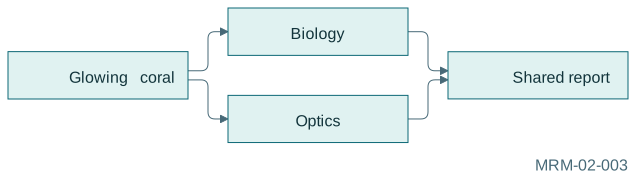
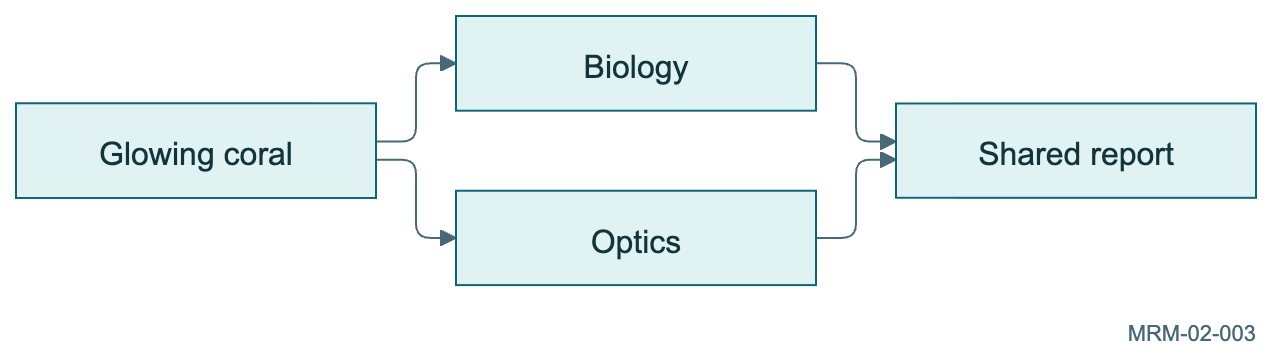
Copy link MRM-02-003 Send one observation to two teams The ampersand shorthand creates two edges. It does not imply that the teams finish simultaneously.
Back to diagram overview Mermaid source flowchart LR
observation [ Glowing coral ] --> biology [ Biology ] & optics [ Optics ]
biology & optics --> report [ Shared report ]
Parameter Meaning in this example &Connect one node to several destinations.
Actual output MRM-02-003 · Rendered by Mermaid Mermaid renderer log Standard output Render this diagram --no-install mmdc -i examples/MRM-02-003.mmd -o figures/MRM-02-003.svg -c examples/mermaid-config.json -I MRM-02-003 --no-font-embed
Uses the shared rendering setup and configuration .
Download: Mermaid source · SVG diagram · Vector PDF · PNG preview · Render configuration
Copy link MRM-02-004 Choose shapes with purpose Use a cylinder for stored data and rounded terminals for the ends of this process. The shape is a visual convention, not a type check.
Back to diagram overview Mermaid source flowchart LR
start ([ Launch ]) --> sample [ Collect sample ]
sample --> archive [( Archive )]
archive --> finish ([ Return ])
Parameter Meaning in this example [(Archive)]Draw a database cylinder.
Actual output MRM-02-004 · Rendered by Mermaid Mermaid renderer log Standard output Render this diagram --no-install mmdc -i examples/MRM-02-004.mmd -o figures/MRM-02-004.svg -c examples/mermaid-config.json -I MRM-02-004 --no-font-embed
Uses the shared rendering setup and configuration .
Download: Mermaid source · SVG diagram · Vector PDF · PNG preview · Render configuration
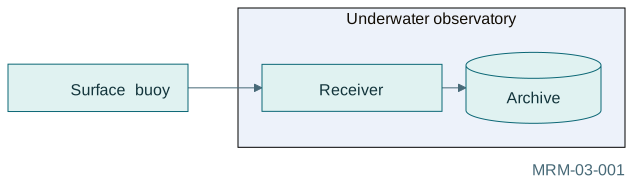
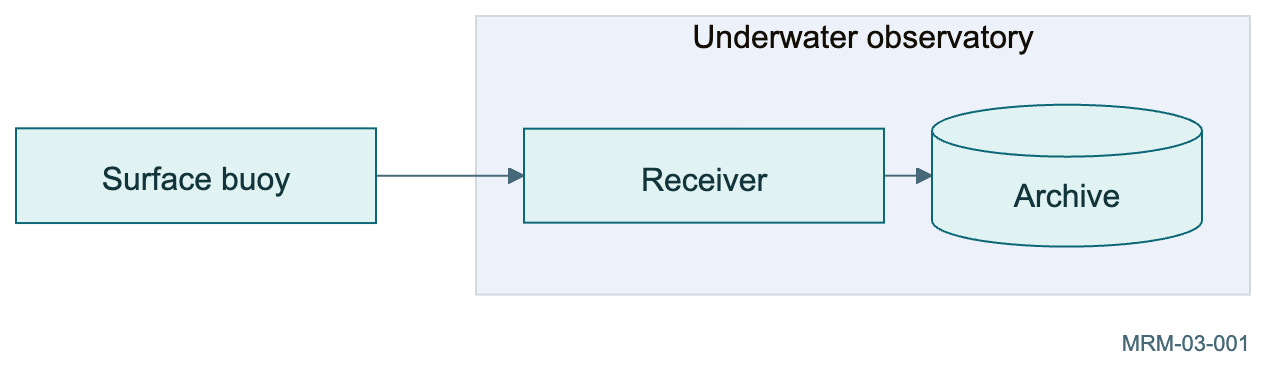
Copy link MRM-03-001 Put the lab in a box A subgraph groups equipment owned by the observatory. The external buoy remains outside that boundary.
Back to diagram overview Mermaid source flowchart LR
buoy [ Surface buoy ] --> receiver
subgraph lab [ Underwater observatory ]
receiver [ Receiver ] --> archive [( Archive )]
end
Parameter Meaning in this example subgraph lab[Underwater observatory]Give the group an ID and a readable title.
Actual output MRM-03-001 · Rendered by Mermaid Mermaid renderer log Standard output Render this diagram --no-install mmdc -i examples/MRM-03-001.mmd -o figures/MRM-03-001.svg -c examples/mermaid-config.json -I MRM-03-001 --no-font-embed
Uses the shared rendering setup and configuration .
Download: Mermaid source · SVG diagram · Vector PDF · PNG preview · Render configuration
Copy link MRM-03-002 Describe two teams Edges cross between nodes inside distinct groups. Ownership is encoded by the boxes; data movement is encoded by arrows.
Back to diagram overview Mermaid source flowchart LR
subgraph field [ Field crew ]
diver [ Diver ] --> sensor [ Sensor ]
end
subgraph shore [ Shore team ]
analyst [ Analyst ] --> report [ Report ]
end
sensor --> analyst
Parameter Meaning in this example sensor --> analystConnect nodes across group boundaries.
Actual output MRM-03-002 · Rendered by Mermaid Mermaid renderer log Standard output Render this diagram --no-install mmdc -i examples/MRM-03-002.mmd -o figures/MRM-03-002.svg -c examples/mermaid-config.json -I MRM-03-002 --no-font-embed
Uses the shared rendering setup and configuration .
Download: Mermaid source · SVG diagram · Vector PDF · PNG preview · Render configuration
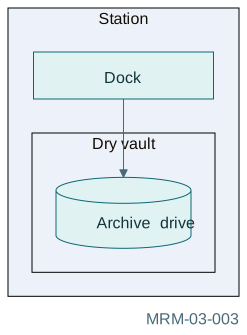
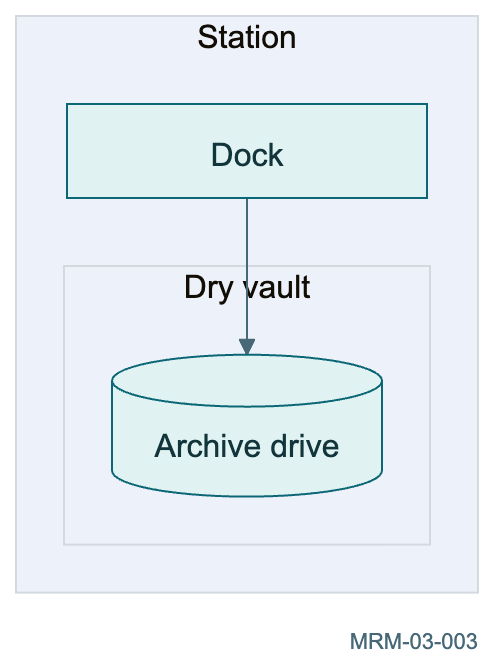
Copy link MRM-03-003 Nest a protected room Nested subgraphs express containment. Keep the nesting shallow enough that the main path stays easy to follow.
Back to diagram overview Mermaid source flowchart TB
subgraph station [ Station ]
dock [ Dock ]
subgraph vault [ Dry vault ]
drive [( Archive drive )]
end
dock --> drive
end
Parameter Meaning in this example subgraph vault[Dry vault]Nest one ownership boundary inside another.
Actual output MRM-03-003 · Rendered by Mermaid Mermaid renderer log Standard output Render this diagram --no-install mmdc -i examples/MRM-03-003.mmd -o figures/MRM-03-003.svg -c examples/mermaid-config.json -I MRM-03-003 --no-font-embed
Uses the shared rendering setup and configuration .
Download: Mermaid source · SVG diagram · Vector PDF · PNG preview · Render configuration
Copy link MRM-03-004 Separate power from observations Dotted and solid edges encode different relationships. The legend is written into the edge labels, so color is unnecessary.
Back to diagram overview Mermaid source flowchart LR
battery [ Battery ] -. powers .-> camera [ Camera ]
camera -->|o bservations| archive [( Archive )]
battery -. powers .-> archive
Parameter Meaning in this example -. powers .->Draw a dotted edge with a label.
Actual output MRM-03-004 · Rendered by Mermaid Mermaid renderer log Standard output Render this diagram --no-install mmdc -i examples/MRM-03-004.mmd -o figures/MRM-03-004.svg -c examples/mermaid-config.json -I MRM-03-004 --no-font-embed
Uses the shared rendering setup and configuration .
Download: Mermaid source · SVG diagram · Vector PDF · PNG preview · Render configuration
Copy link MRM-04-001 Highlight the hazard One named class emphasizes a hazard. Its text also names the problem, preserving meaning when printed in grayscale.
Back to diagram overview Mermaid source flowchart LR
start [ Dock ] --> leak [ Leak detected ] --> seal [ Seal hatch ]
classDef hazard fill : #fff1d6 , stroke : #995200 , stroke-width : 3px
class leak hazard
Parameter Meaning in this example classDef hazardDefine a reusable presentation class.
Actual output MRM-04-001 · Rendered by Mermaid Mermaid renderer log Standard output Render this diagram --no-install mmdc -i examples/MRM-04-001.mmd -o figures/MRM-04-001.svg -c examples/mermaid-config.json -I MRM-04-001 --no-font-embed
Uses the shared rendering setup and configuration .
Download: Mermaid source · SVG diagram · Vector PDF · PNG preview · Render configuration
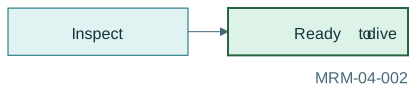
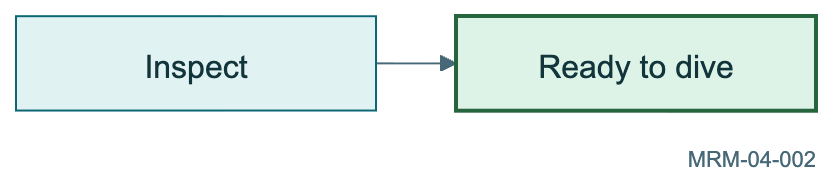
Copy link MRM-04-002 Apply a class inline Triple-colon syntax assigns a class at the node declaration. Use it when the style belongs to one clearly named role.
Back to diagram overview Mermaid source flowchart LR
inspect [ Inspect ] --> safe [ Ready to dive ]::: safe
classDef safe fill : #def3e7 , stroke : #27653f , stroke-width : 2px
Parameter Meaning in this example :::safeAssign the safe class to this node.
Actual output MRM-04-002 · Rendered by Mermaid Mermaid renderer log Standard output Render this diagram --no-install mmdc -i examples/MRM-04-002.mmd -o figures/MRM-04-002.svg -c examples/mermaid-config.json -I MRM-04-002 --no-font-embed
Uses the shared rendering setup and configuration .
Download: Mermaid source · SVG diagram · Vector PDF · PNG preview · Render configuration
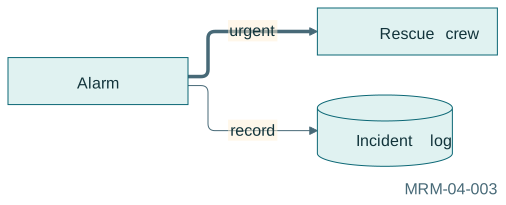
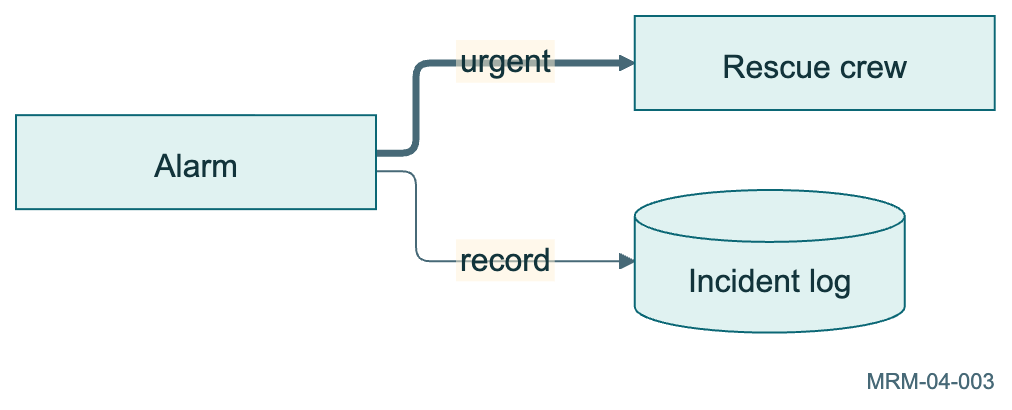
Copy link MRM-04-003 Emphasize a critical path A thick arrow distinguishes the critical route. Text labels explain why one route matters more.
Back to diagram overview Mermaid source flowchart LR
alarm [ Alarm ] ==>| urgent| rescue [ Rescue crew ]
alarm -->| record| log [( Incident log )]
Parameter Meaning in this example ==>Draw a thick connection.
Actual output MRM-04-003 · Rendered by Mermaid Mermaid renderer log Standard output Render this diagram --no-install mmdc -i examples/MRM-04-003.mmd -o figures/MRM-04-003.svg -c examples/mermaid-config.json -I MRM-04-003 --no-font-embed
Uses the shared rendering setup and configuration .
Download: Mermaid source · SVG diagram · Vector PDF · PNG preview · Render configuration
Copy link MRM-04-004 Style one node without a class An inline style is useful for a single exception. Repeated roles are easier to maintain with classDef.
Back to diagram overview Mermaid source flowchart LR
collect [ Collect ] --> quarantine [ Quarantine ] --> inspect [ Inspect ]
style quarantine fill : #f9e0eb , stroke : #8a315e , stroke-width : 3px
Parameter Meaning in this example style quarantineApply presentation attributes to one node.
Actual output MRM-04-004 · Rendered by Mermaid Mermaid renderer log Standard output Render this diagram --no-install mmdc -i examples/MRM-04-004.mmd -o figures/MRM-04-004.svg -c examples/mermaid-config.json -I MRM-04-004 --no-font-embed
Uses the shared rendering setup and configuration .
Download: Mermaid source · SVG diagram · Vector PDF · PNG preview · Render configuration
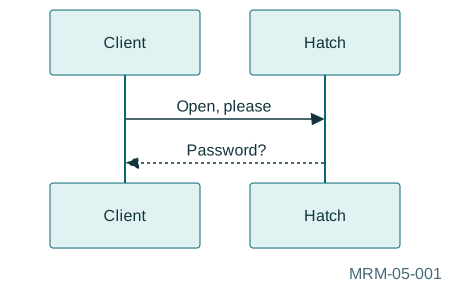
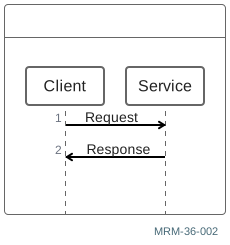
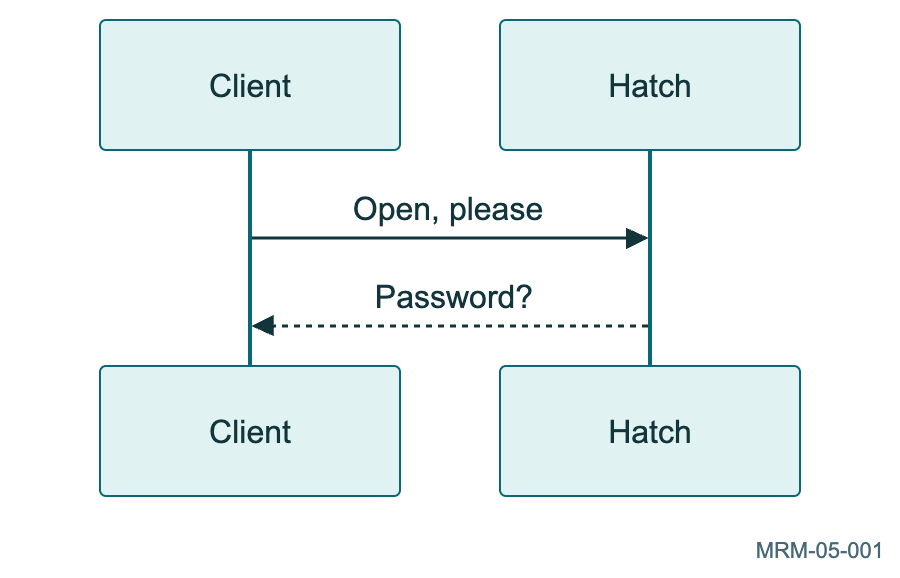
Copy link MRM-05-001 A client requests access Time runs downward. Participants are laid out across the page; the arrows show messages between them.
Back to diagram overview Mermaid source sequenceDiagram
participant Client
participant Hatch
Client->>Hatch : Open , please
Hatch-->>Client : Password?
Parameter Meaning in this example -->>Use a dashed response arrow.
Actual output MRM-05-001 · Rendered by Mermaid Mermaid renderer log Standard output Render this diagram --no-install mmdc -i examples/MRM-05-001.mmd -o figures/MRM-05-001.svg -c examples/mermaid-config.json -I MRM-05-001 --no-font-embed
Uses the shared rendering setup and configuration .
Download: Mermaid source · SVG diagram · Vector PDF · PNG preview · Render configuration
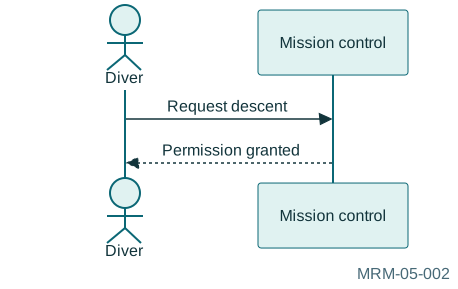
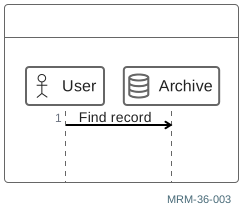
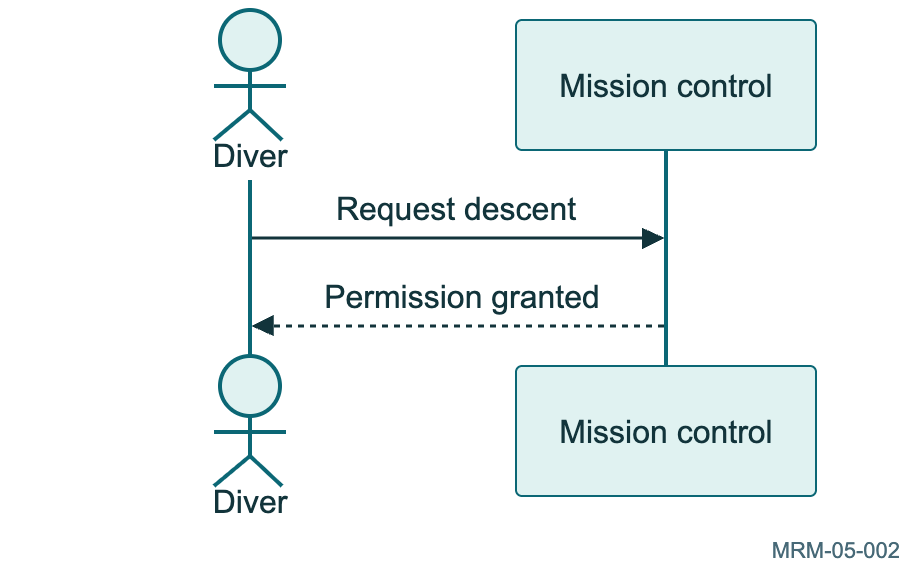
Copy link MRM-05-002 Give a participant a friendly label The short ID is used in messages while the alias appears at the top. An actor uses a human-shaped symbol.
Back to diagram overview Mermaid source sequenceDiagram
actor D as Diver
participant C as Mission control
D->>C : Request descent
C-->>D : Permission granted
Parameter Meaning in this example participant C as Mission controlSeparate a stable handle from its display name.
Actual output MRM-05-002 · Rendered by Mermaid Mermaid renderer log Standard output Render this diagram --no-install mmdc -i examples/MRM-05-002.mmd -o figures/MRM-05-002.svg -c examples/mermaid-config.json -I MRM-05-002 --no-font-embed
Uses the shared rendering setup and configuration .
Download: Mermaid source · SVG diagram · Vector PDF · PNG preview · Render configuration
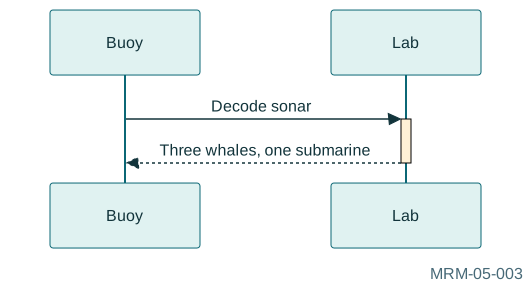
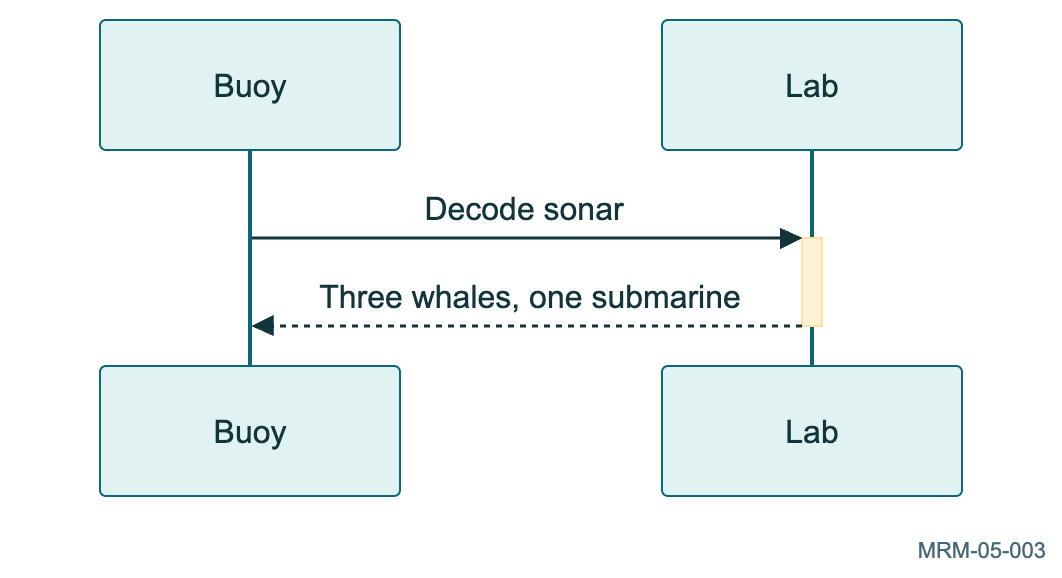
Copy link MRM-05-003 Show time spent working The plus and minus markers activate and deactivate the receiver. The bar shows a period of activity, not measured duration.
Back to diagram overview Mermaid source sequenceDiagram
participant Buoy
participant Lab
Buoy->>+Lab : Decode sonar
Lab-->>-Buoy : Three whales , one submarine
Parameter Meaning in this example ->>+Activate the receiver with the message.
Actual output MRM-05-003 · Rendered by Mermaid Mermaid renderer log Standard output Render this diagram --no-install mmdc -i examples/MRM-05-003.mmd -o figures/MRM-05-003.svg -c examples/mermaid-config.json -I MRM-05-003 --no-font-embed
Uses the shared rendering setup and configuration .
Download: Mermaid source · SVG diagram · Vector PDF · PNG preview · Render configuration
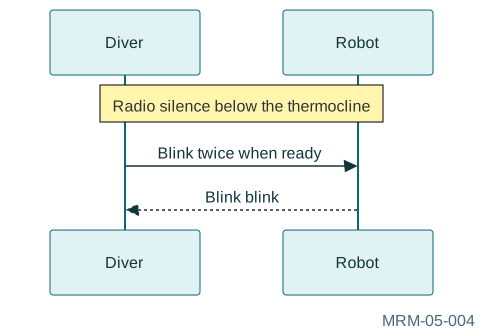
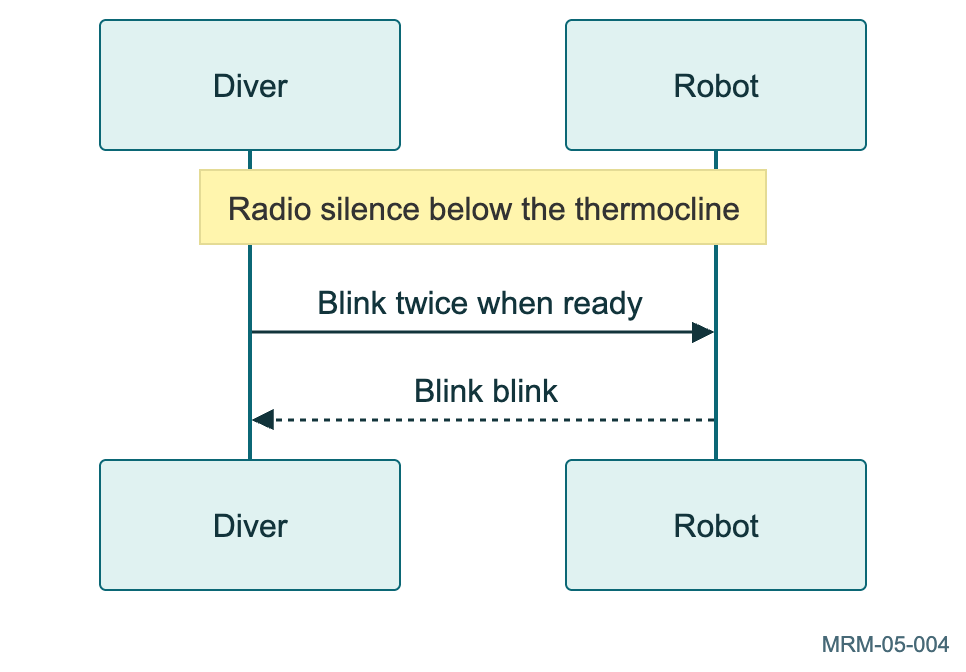
Copy link MRM-05-004 Add context without another message A note spanning participants explains a shared assumption. It does not add another protocol interaction.
Back to diagram overview Mermaid source sequenceDiagram
participant Diver
participant Robot
Note over Diver , Robot : Radio silence below the thermocline
Diver->>Robot : Blink twice when ready
Robot-->>Diver : Blink blink
Parameter Meaning in this example Note overAttach explanatory context across lifelines.
Actual output MRM-05-004 · Rendered by Mermaid Mermaid renderer log Standard output Render this diagram --no-install mmdc -i examples/MRM-05-004.mmd -o figures/MRM-05-004.svg -c examples/mermaid-config.json -I MRM-05-004 --no-font-embed
Uses the shared rendering setup and configuration .
Download: Mermaid source · SVG diagram · Vector PDF · PNG preview · Render configuration
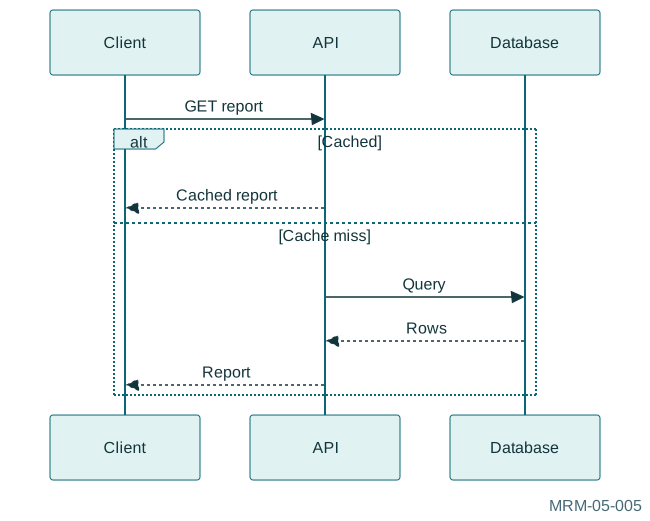
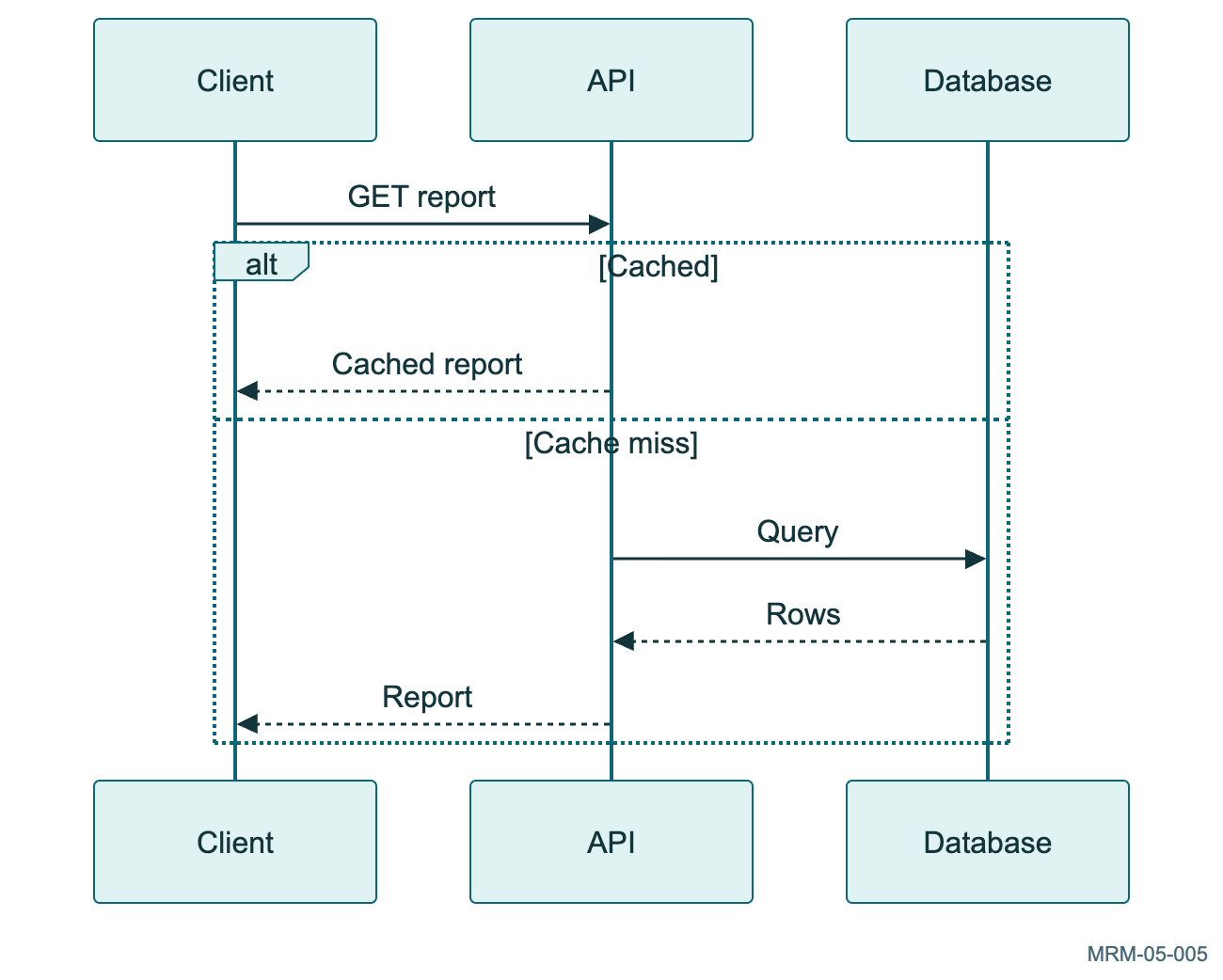
Copy link MRM-05-005 A cache hit and miss The alternatives distinguish a fast cached response from a database lookup.
Back to diagram overview Mermaid source sequenceDiagram
participant C as Client
participant A as API
participant D as Database
C->>A : GET report
alt Cached
A-->>C : Cached report
else Cache miss
A->>D : Query
D-->>A : Rows
A-->>C : Report
end
Parameter Meaning in this example altSeparate hit and miss paths.
Actual output MRM-05-005 · Rendered by Mermaid Mermaid renderer log Standard output Render this diagram --no-install mmdc -i examples/MRM-05-005.mmd -o figures/MRM-05-005.svg -c examples/mermaid-config.json -I MRM-05-005 --no-font-embed
Uses the shared rendering setup and configuration .
Download: Mermaid source · SVG diagram · Vector PDF · PNG preview · Render configuration
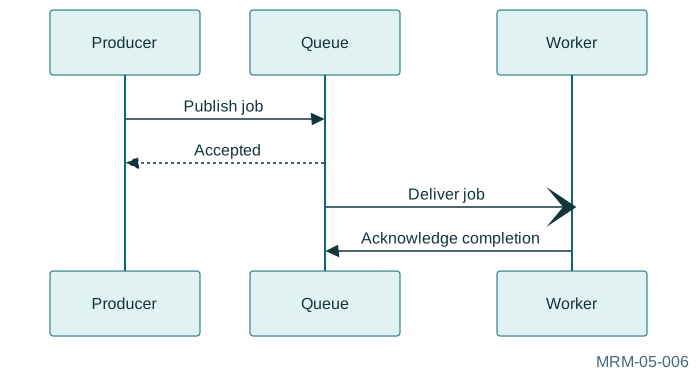
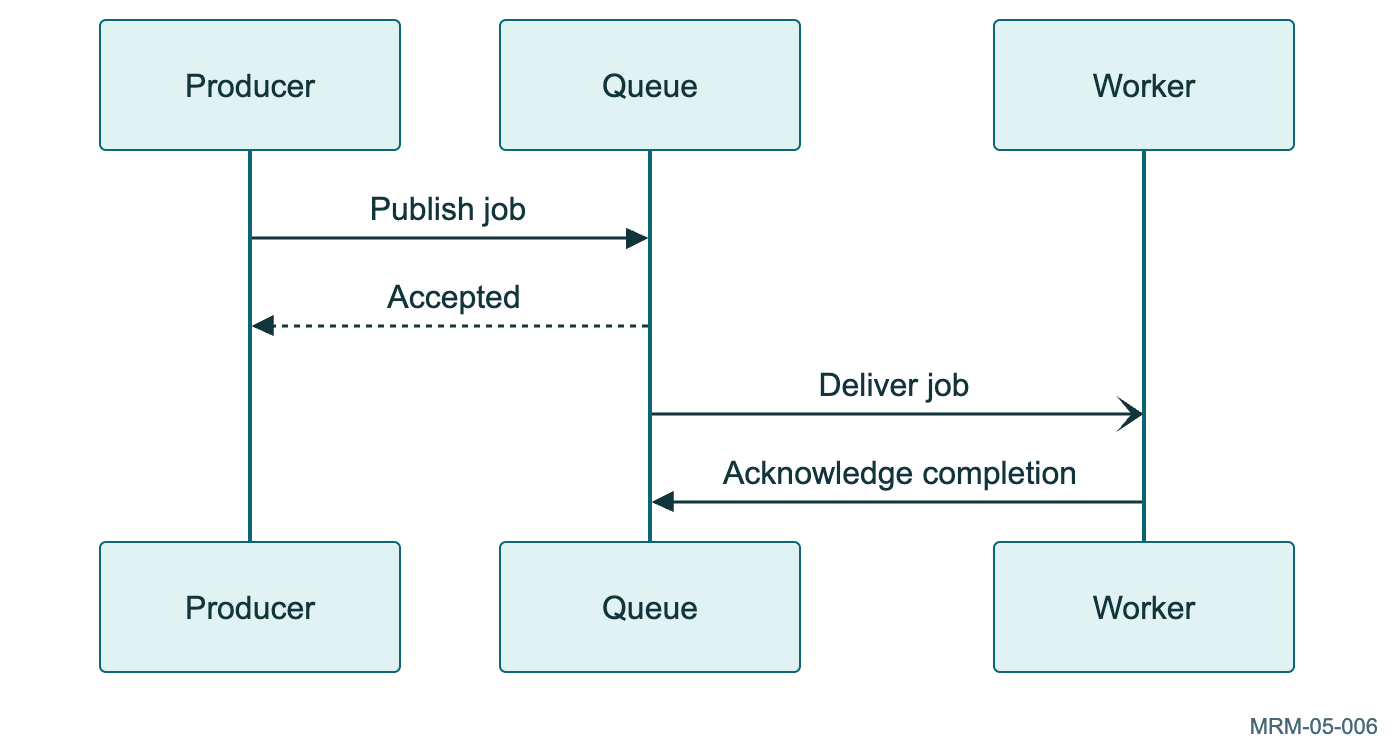
Copy link MRM-05-006 An asynchronous queue The consumer receives a later message; the initial acknowledgment does not claim that processing has finished.
Back to diagram overview Mermaid source sequenceDiagram
participant P as Producer
participant Q as Queue
participant W as Worker
P->>Q : Publish job
Q-->>P : Accepted
Q- ) W : Deliver job
W->>Q : Acknowledge completion
Parameter Meaning in this example -)Draw an asynchronous message.
Actual output MRM-05-006 · Rendered by Mermaid Mermaid renderer log Standard output Render this diagram --no-install mmdc -i examples/MRM-05-006.mmd -o figures/MRM-05-006.svg -c examples/mermaid-config.json -I MRM-05-006 --no-font-embed
Uses the shared rendering setup and configuration .
Download: Mermaid source · SVG diagram · Vector PDF · PNG preview · Render configuration
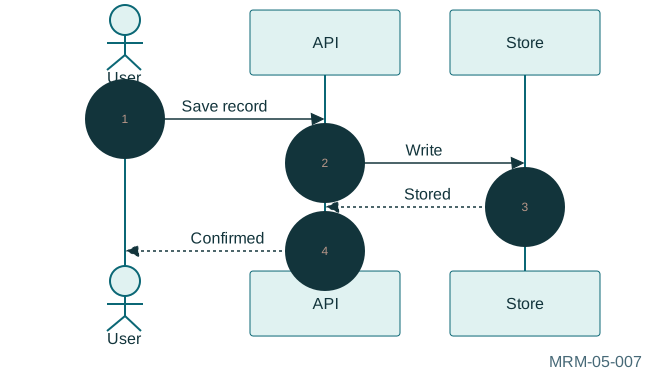
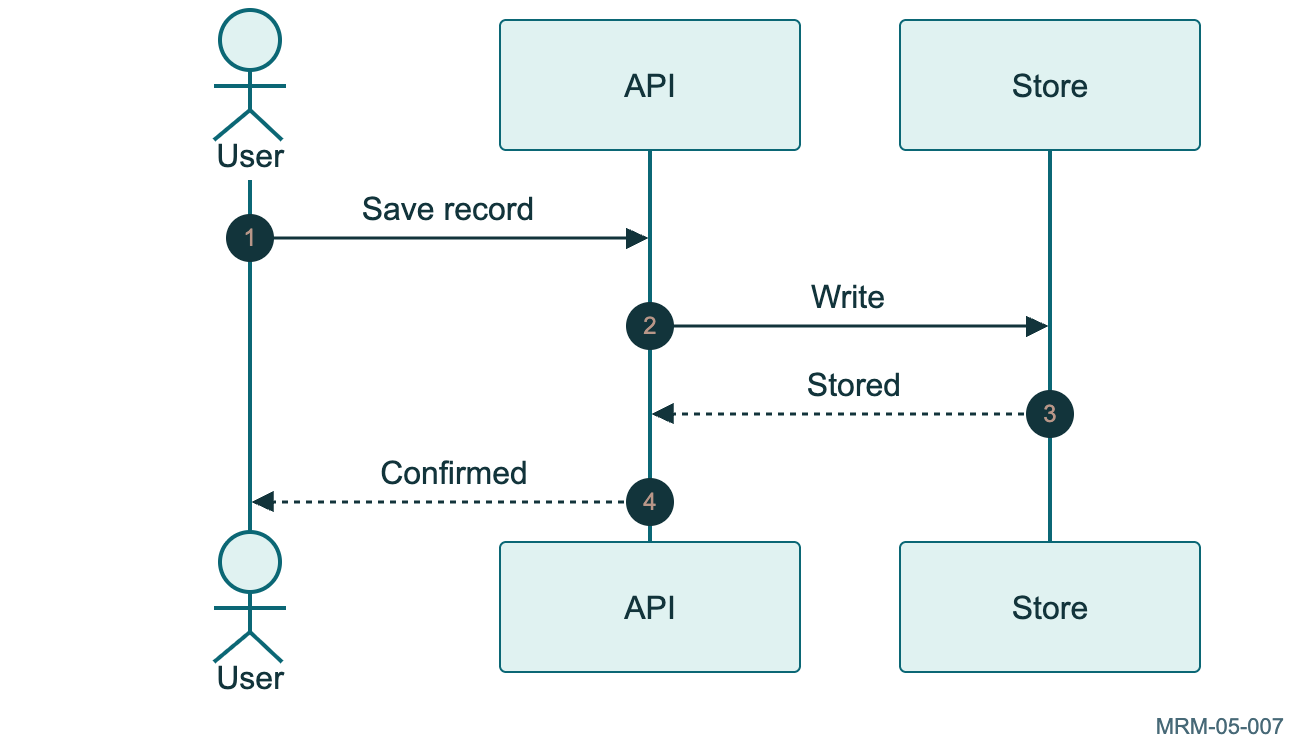
Copy link MRM-05-007 Number the messages Autonumber gives each interaction a visible reference for discussion.
Back to diagram overview Mermaid source sequenceDiagram
autonumber
actor U as User
participant A as API
participant S as Store
U->>A : Save record
A->>S : Write
S-->>A : Stored
A-->>U : Confirmed
Parameter Meaning in this example autonumberAdd sequential message numbers.
Actual output MRM-05-007 · Rendered by Mermaid Mermaid renderer log Standard output Render this diagram --no-install mmdc -i examples/MRM-05-007.mmd -o figures/MRM-05-007.svg -c examples/mermaid-config.json -I MRM-05-007 --no-font-embed
Uses the shared rendering setup and configuration .
Download: Mermaid source · SVG diagram · Vector PDF · PNG preview · Render configuration
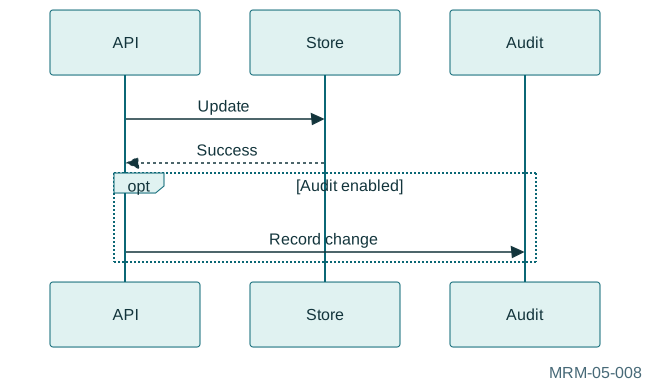
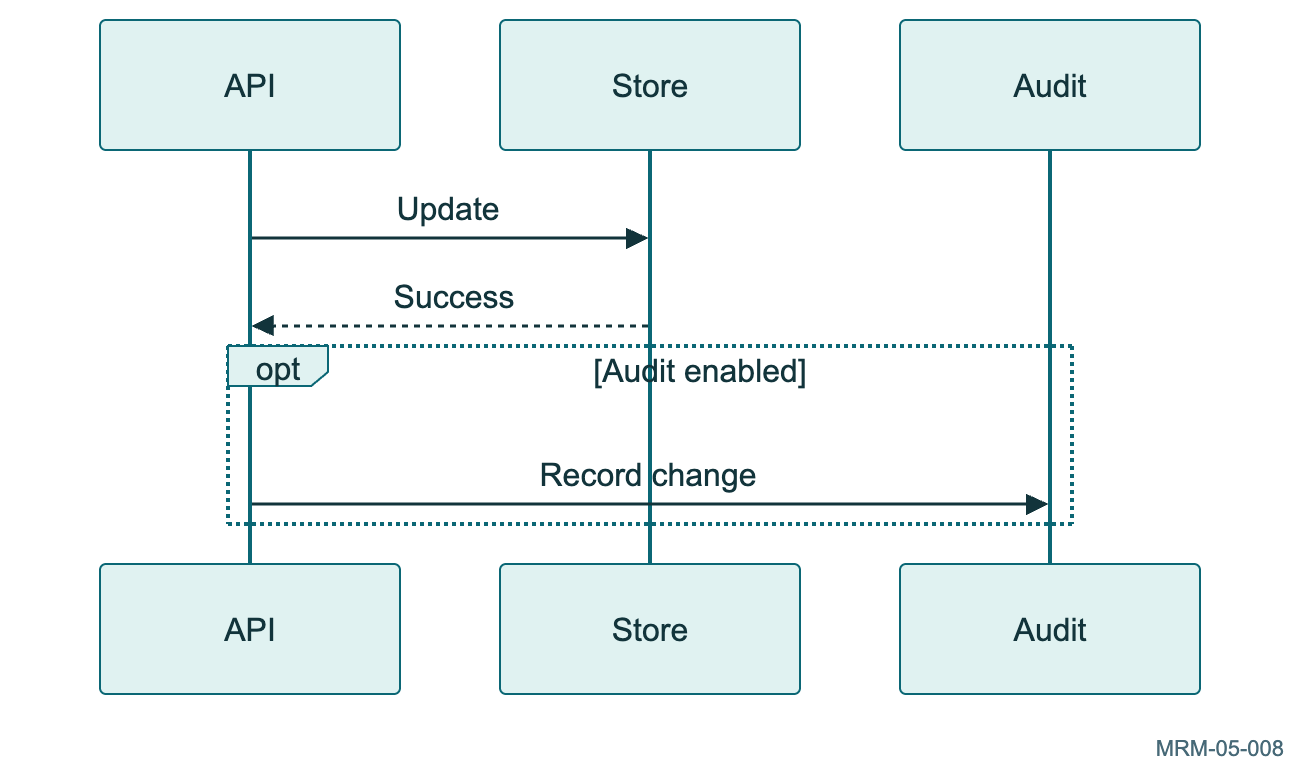
Copy link MRM-05-008 An optional audit message The optional block adds behavior only when its condition holds.
Back to diagram overview Mermaid source sequenceDiagram
participant A as API
participant S as Store
participant L as Audit
A->>S : Update
S-->>A : Success
opt Audit enabled
A->>L : Record change
end
Parameter Meaning in this example optGroup an optional exchange.
Actual output MRM-05-008 · Rendered by Mermaid Mermaid renderer log Standard output Render this diagram --no-install mmdc -i examples/MRM-05-008.mmd -o figures/MRM-05-008.svg -c examples/mermaid-config.json -I MRM-05-008 --no-font-embed
Uses the shared rendering setup and configuration .
Download: Mermaid source · SVG diagram · Vector PDF · PNG preview · Render configuration
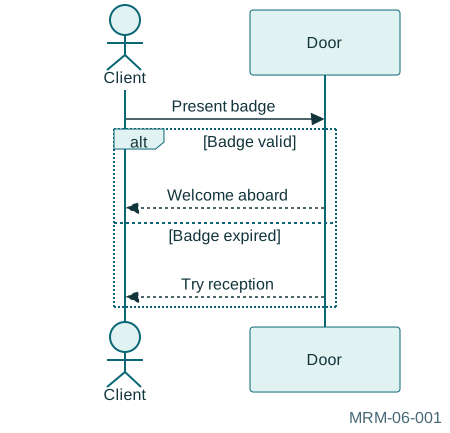
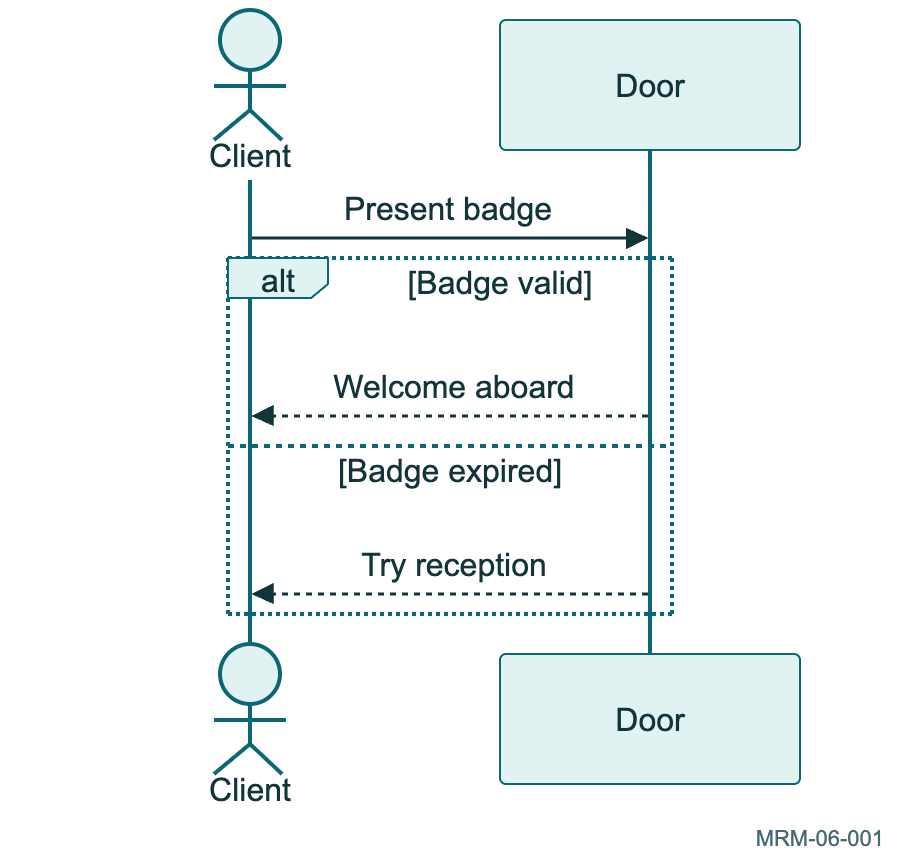
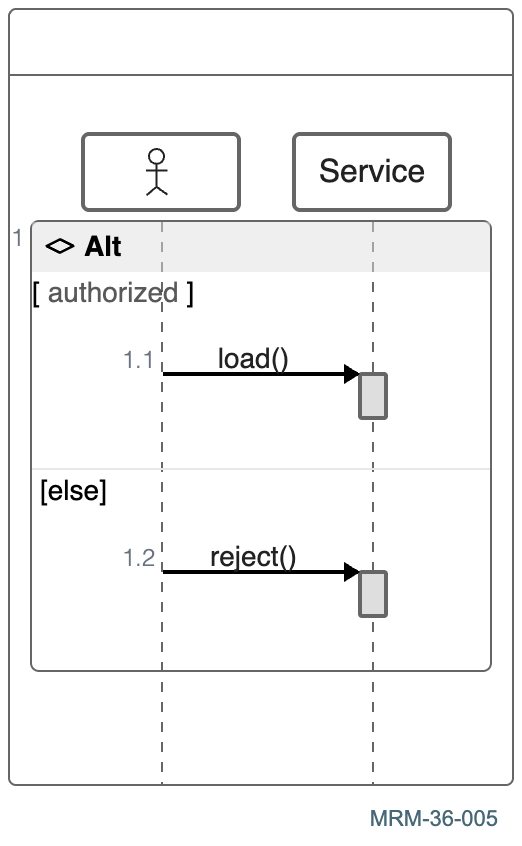
Copy link MRM-06-001 Authenticate a client An alt block shows mutually exclusive outcomes. Each branch states the observable condition.
Back to diagram overview Mermaid source sequenceDiagram
actor Client
participant Door
Client->>Door : Present badge
alt Badge valid
Door-->>Client : Welcome aboard
else Badge expired
Door-->>Client : Try reception
end
Parameter Meaning in this example alt / else / endDescribe alternative message paths.
Actual output MRM-06-001 · Rendered by Mermaid Mermaid renderer log Standard output Render this diagram --no-install mmdc -i examples/MRM-06-001.mmd -o figures/MRM-06-001.svg -c examples/mermaid-config.json -I MRM-06-001 --no-font-embed
Uses the shared rendering setup and configuration .
Download: Mermaid source · SVG diagram · Vector PDF · PNG preview · Render configuration
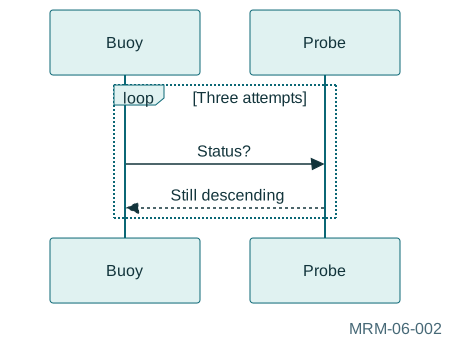
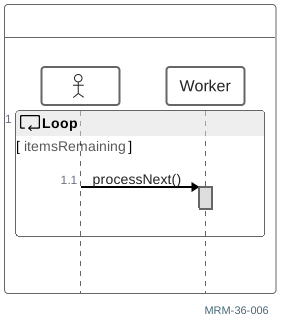
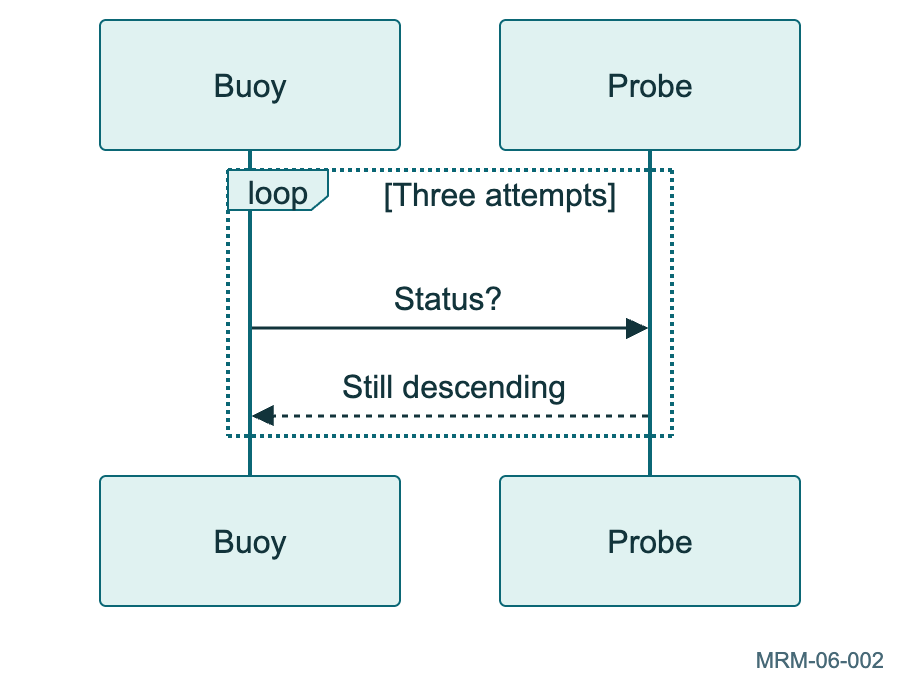
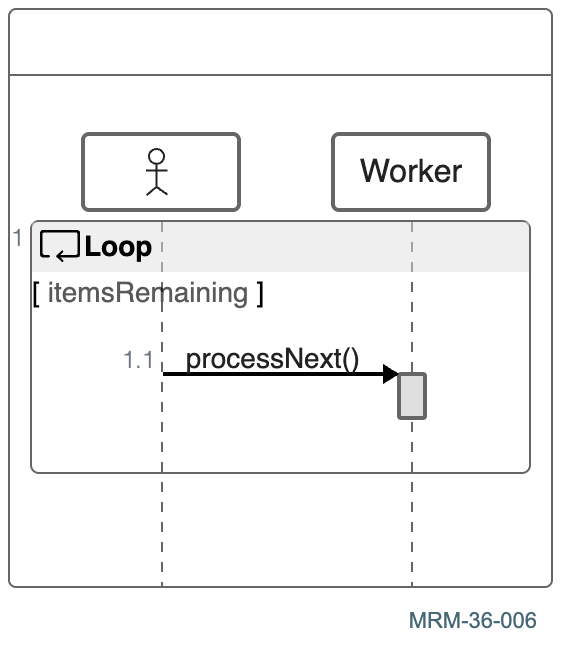
Copy link MRM-06-002 Poll until the signal arrives The loop label states a finite scenario. This drawing describes repeated requests; it is not runnable polling code.
Back to diagram overview Mermaid source sequenceDiagram
participant Buoy
participant Probe
loop Three attempts
Buoy->>Probe : Status?
Probe-->>Buoy : Still descending
end
Parameter Meaning in this example loop Three attemptsGroup a repeated exchange.
Actual output MRM-06-002 · Rendered by Mermaid Mermaid renderer log Standard output Render this diagram --no-install mmdc -i examples/MRM-06-002.mmd -o figures/MRM-06-002.svg -c examples/mermaid-config.json -I MRM-06-002 --no-font-embed
Uses the shared rendering setup and configuration .
Download: Mermaid source · SVG diagram · Vector PDF · PNG preview · Render configuration
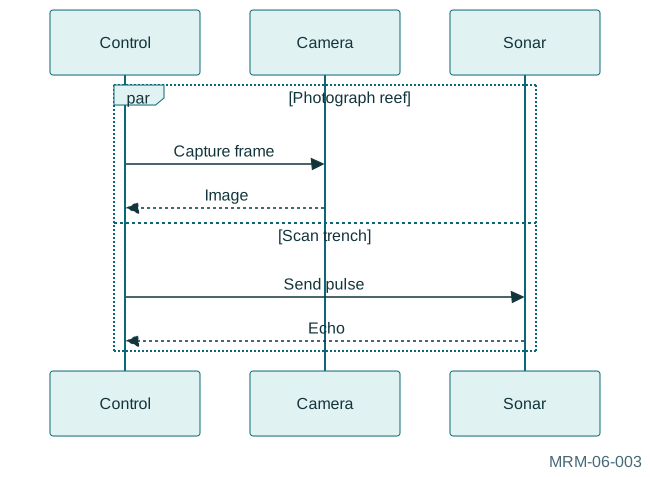
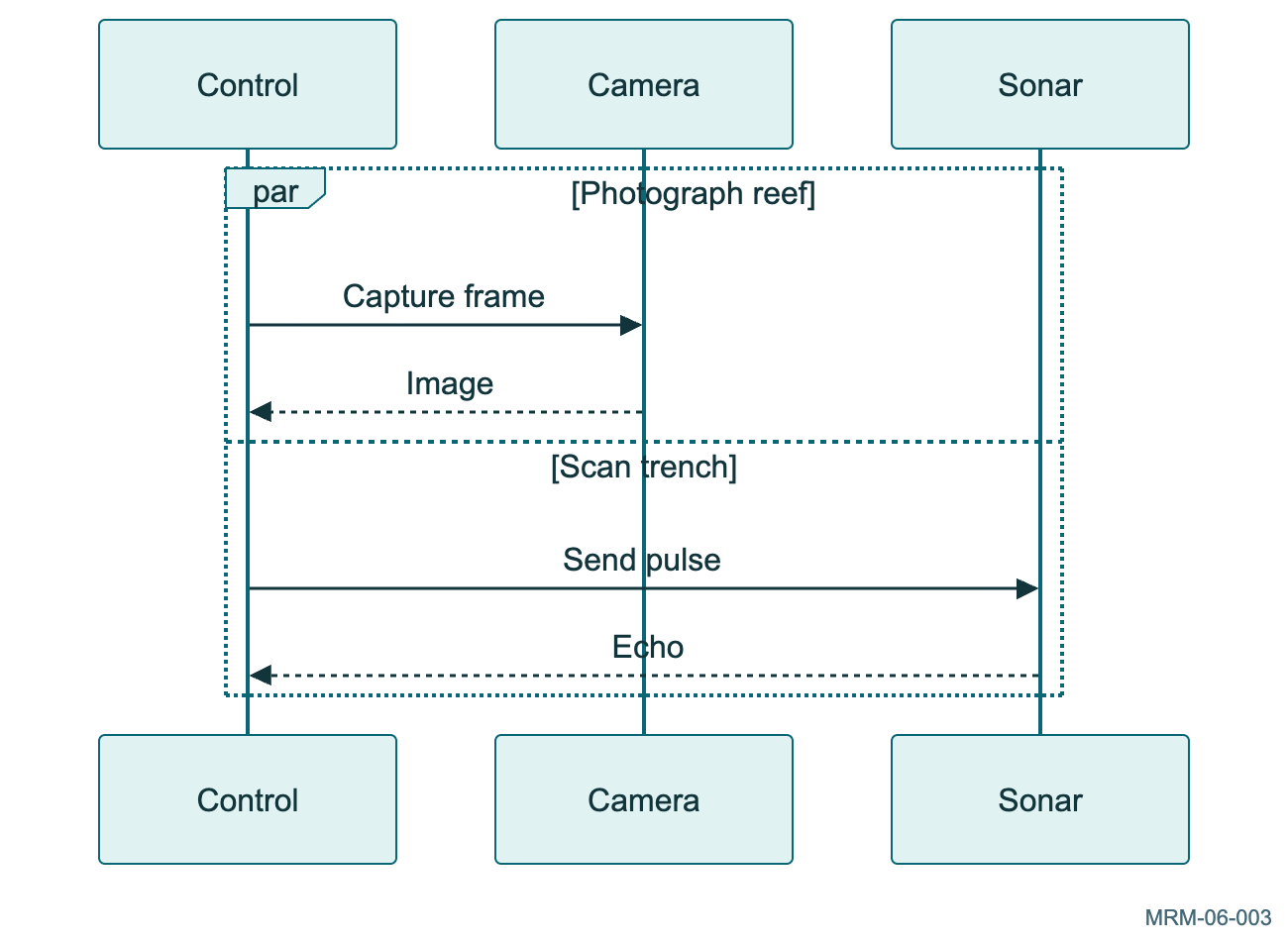
Copy link MRM-06-003 Let the robots work in parallel A par block presents work that can overlap. It does not establish a total order between messages in different branches.
Back to diagram overview Mermaid source sequenceDiagram
participant Control
participant Camera
participant Sonar
par Photograph reef
Control->>Camera : Capture frame
Camera-->>Control : Image
and Scan trench
Control->>Sonar : Send pulse
Sonar-->>Control : Echo
end
Parameter Meaning in this example par / andDescribe concurrent branches.
Actual output MRM-06-003 · Rendered by Mermaid Mermaid renderer log Standard output Render this diagram --no-install mmdc -i examples/MRM-06-003.mmd -o figures/MRM-06-003.svg -c examples/mermaid-config.json -I MRM-06-003 --no-font-embed
Uses the shared rendering setup and configuration .
Download: Mermaid source · SVG diagram · Vector PDF · PNG preview · Render configuration
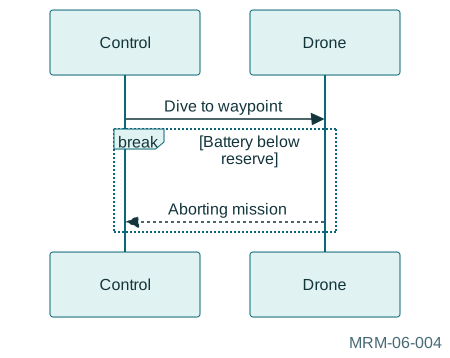
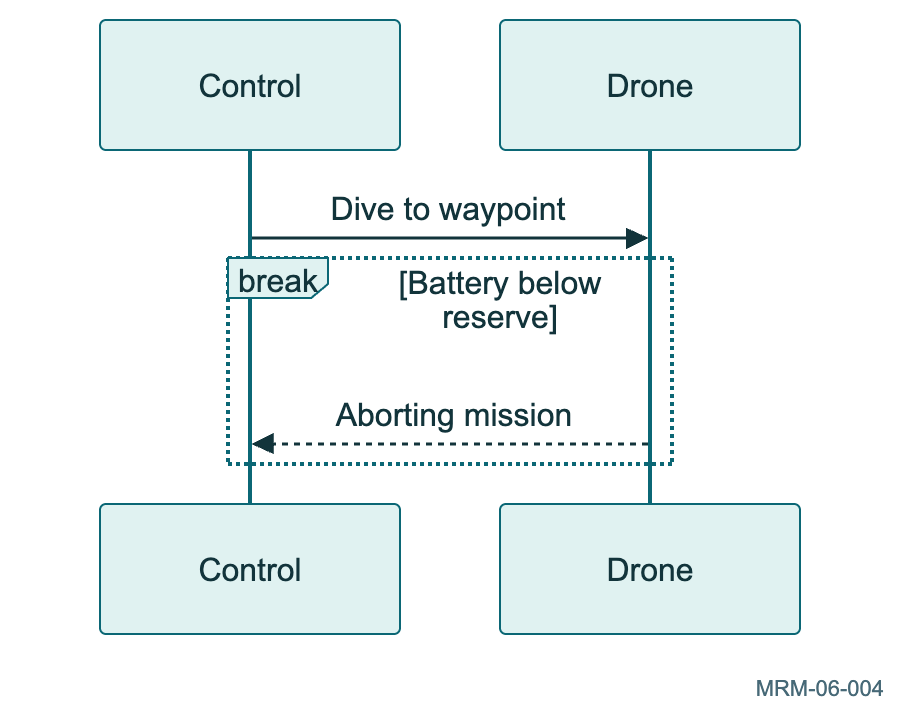
Copy link MRM-06-004 Stop after the emergency A break block shows the interruption of the interaction when the stated condition holds. The timeout is illustrative.
Back to diagram overview Mermaid source sequenceDiagram
participant Control
participant Drone
Control->>Drone : Dive to waypoint
break Battery below reserve
Drone-->>Control : Aborting mission
end
Parameter Meaning in this example breakShow a condition that interrupts the enclosing interaction.
Actual output MRM-06-004 · Rendered by Mermaid Mermaid renderer log Standard output Render this diagram --no-install mmdc -i examples/MRM-06-004.mmd -o figures/MRM-06-004.svg -c examples/mermaid-config.json -I MRM-06-004 --no-font-embed
Uses the shared rendering setup and configuration .
Download: Mermaid source · SVG diagram · Vector PDF · PNG preview · Render configuration
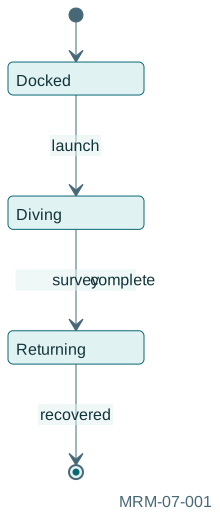
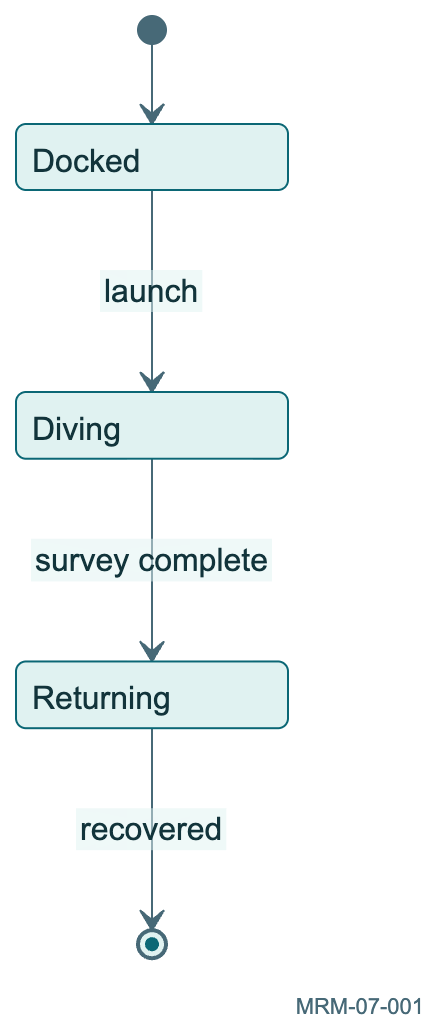
Copy link MRM-07-001 Name the robot states Initial and final pseudostates bracket this lifecycle. Transition labels name the events that cause state changes.
Back to diagram overview Mermaid source stateDiagram-v2
[ * ] --> Docked
Docked --> Diving : launch
Diving --> Returning : survey complete
Returning --> [ * ]: recovered
Parameter Meaning in this example [*]Mark an initial or final pseudostate.
Actual output MRM-07-001 · Rendered by Mermaid Mermaid renderer log Standard output Render this diagram --no-install mmdc -i examples/MRM-07-001.mmd -o figures/MRM-07-001.svg -c examples/mermaid-config.json -I MRM-07-001 --no-font-embed
Uses the shared rendering setup and configuration .
Download: Mermaid source · SVG diagram · Vector PDF · PNG preview · Render configuration
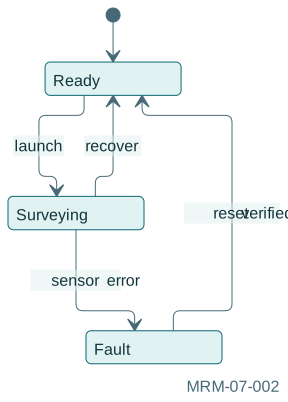
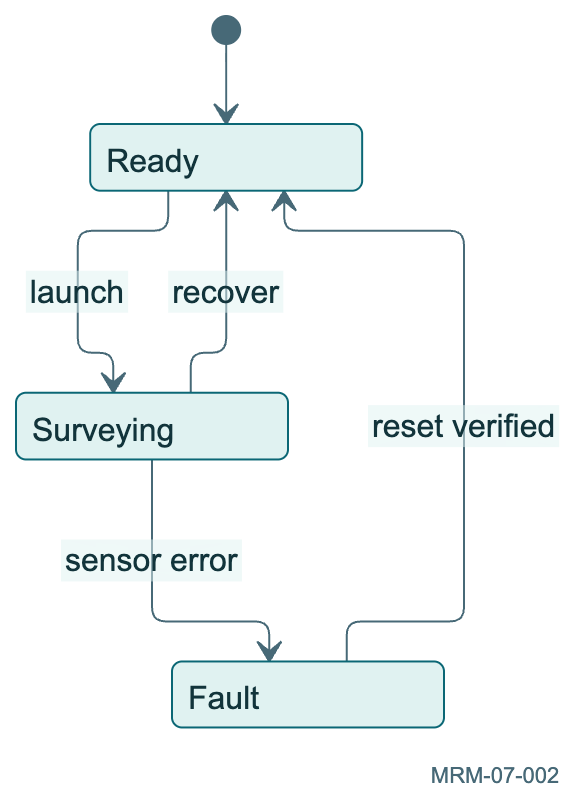
Copy link MRM-07-002 Recover from a fault A failure route and an explicit reset make the recovery policy visible. Returning to Ready is a separate transition.
Back to diagram overview Mermaid source stateDiagram-v2
[ * ] --> Ready
Ready --> Surveying : launch
Surveying --> Fault : sensor error
Fault --> Ready : reset verified
Surveying --> Ready : recover
Parameter Meaning in this example Fault --> Ready: reset verifiedLabel the event needed for recovery.
Actual output MRM-07-002 · Rendered by Mermaid Mermaid renderer log Standard output Render this diagram --no-install mmdc -i examples/MRM-07-002.mmd -o figures/MRM-07-002.svg -c examples/mermaid-config.json -I MRM-07-002 --no-font-embed
Uses the shared rendering setup and configuration .
Download: Mermaid source · SVG diagram · Vector PDF · PNG preview · Render configuration
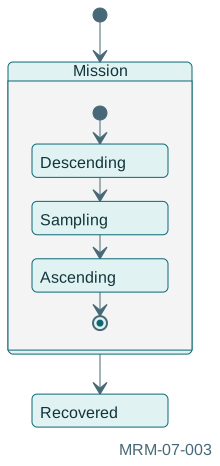
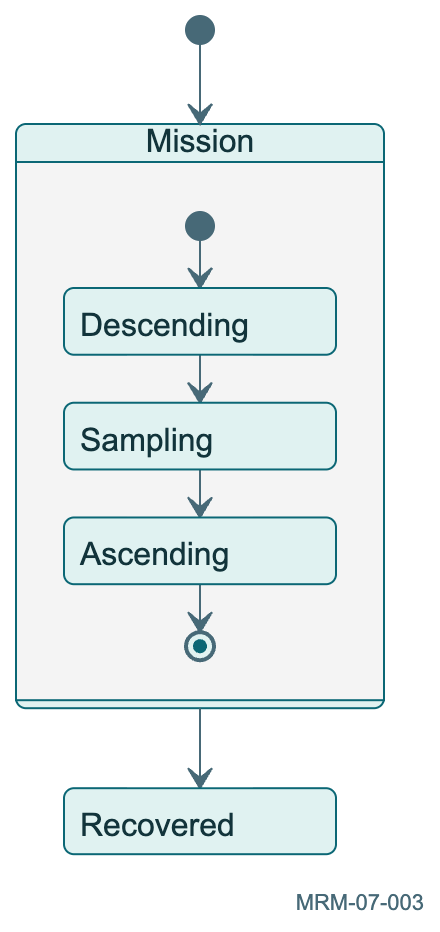
Copy link MRM-07-003 Open the mission state A composite state reveals the smaller states inside an activity. Entry into Mission starts its own internal lifecycle.
Back to diagram overview Mermaid source stateDiagram-v2
[ * ] --> Mission
state Mission {
[ * ] --> Descending
Descending --> Sampling
Sampling --> Ascending
Ascending --> [ * ]
}
Mission --> Recovered
Parameter Meaning in this example state Mission { ... }Group an internal state machine.
Actual output MRM-07-003 · Rendered by Mermaid Mermaid renderer log Standard output Render this diagram --no-install mmdc -i examples/MRM-07-003.mmd -o figures/MRM-07-003.svg -c examples/mermaid-config.json -I MRM-07-003 --no-font-embed
Uses the shared rendering setup and configuration .
Download: Mermaid source · SVG diagram · Vector PDF · PNG preview · Render configuration
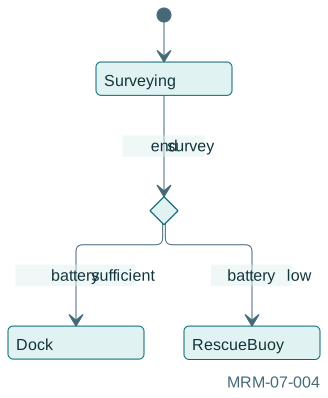
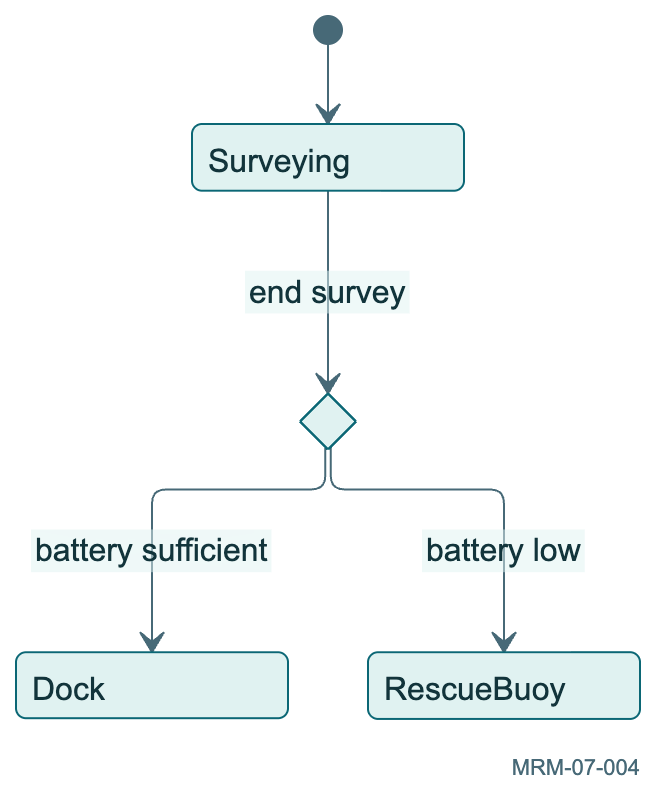
Copy link MRM-07-004 Decide where to return A choice pseudostate splits the path using guards. Bracketed guard text is explanatory; Mermaid does not evaluate it.
Back to diagram overview Mermaid source stateDiagram-v2
state choice << choice>>
[ * ] --> Surveying
Surveying --> choice : end survey
choice --> Dock : battery sufficient
choice --> RescueBuoy : battery low
Parameter Meaning in this example <<choice>>Draw a decision pseudostate.
Actual output MRM-07-004 · Rendered by Mermaid Mermaid renderer log Standard output Render this diagram --no-install mmdc -i examples/MRM-07-004.mmd -o figures/MRM-07-004.svg -c examples/mermaid-config.json -I MRM-07-004 --no-font-embed
Uses the shared rendering setup and configuration .
Download: Mermaid source · SVG diagram · Vector PDF · PNG preview · Render configuration
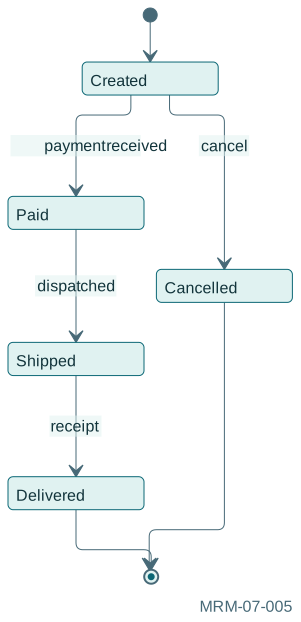
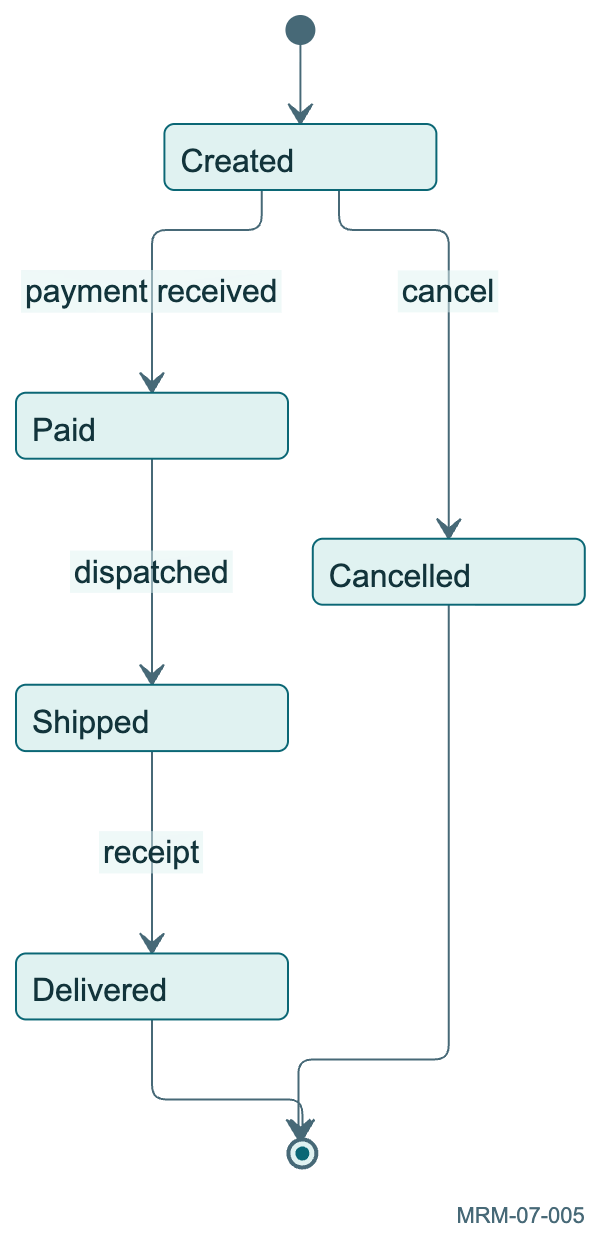
Copy link MRM-07-005 An order lifecycle Separate the states of an order from the steps performed by staff.
Back to diagram overview Mermaid source stateDiagram-v2
[ * ] --> Created
Created --> Paid : payment received
Paid --> Shipped : dispatched
Shipped --> Delivered : receipt
Created --> Cancelled : cancel
Delivered --> [ * ]
Cancelled --> [ * ]
Parameter Meaning in this example Transition eventsName the event that changes status.
Actual output MRM-07-005 · Rendered by Mermaid Mermaid renderer log Standard output Render this diagram --no-install mmdc -i examples/MRM-07-005.mmd -o figures/MRM-07-005.svg -c examples/mermaid-config.json -I MRM-07-005 --no-font-embed
Uses the shared rendering setup and configuration .
Download: Mermaid source · SVG diagram · Vector PDF · PNG preview · Render configuration
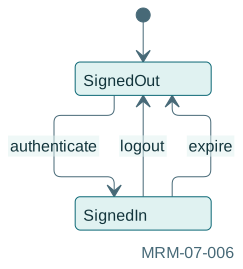
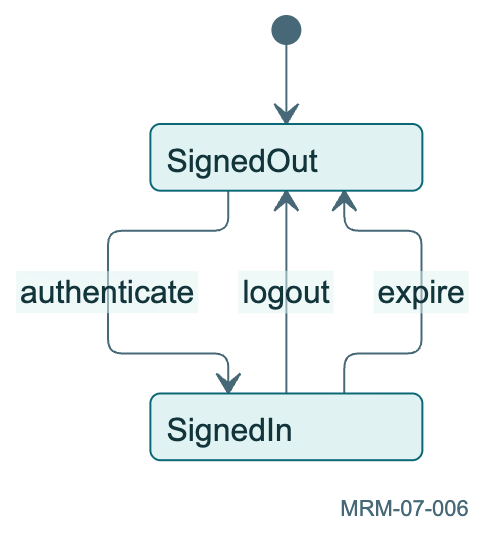
Copy link MRM-07-006 An authenticated session An expiry event returns the session to the signed-out state.
Back to diagram overview Mermaid source stateDiagram-v2
[ * ] --> SignedOut
SignedOut --> SignedIn : authenticate
SignedIn --> SignedOut : logout
SignedIn --> SignedOut : expire
Parameter Meaning in this example Multiple eventsAllow different events to reach the same state.
Actual output MRM-07-006 · Rendered by Mermaid Mermaid renderer log Standard output Render this diagram --no-install mmdc -i examples/MRM-07-006.mmd -o figures/MRM-07-006.svg -c examples/mermaid-config.json -I MRM-07-006 --no-font-embed
Uses the shared rendering setup and configuration .
Download: Mermaid source · SVG diagram · Vector PDF · PNG preview · Render configuration
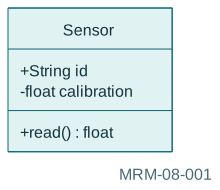
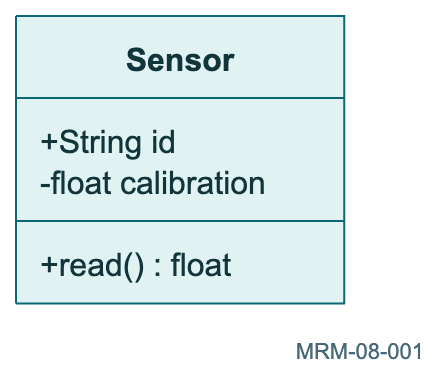
Copy link MRM-08-001 Sketch a sensor interface Visibility markers belong to the displayed notation. Mermaid draws the class; it does not compile or check these declarations.
Back to diagram overview Mermaid source classDiagram
class Sensor {
+String id
-float calibration
+read () float
}
Parameter Meaning in this example + / -Show public and private members.
Actual output MRM-08-001 · Rendered by Mermaid Mermaid renderer log Standard output Render this diagram --no-install mmdc -i examples/MRM-08-001.mmd -o figures/MRM-08-001.svg -c examples/mermaid-config.json -I MRM-08-001 --no-font-embed
Uses the shared rendering setup and configuration .
Download: Mermaid source · SVG diagram · Vector PDF · PNG preview · Render configuration
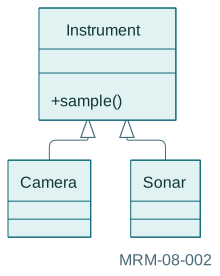
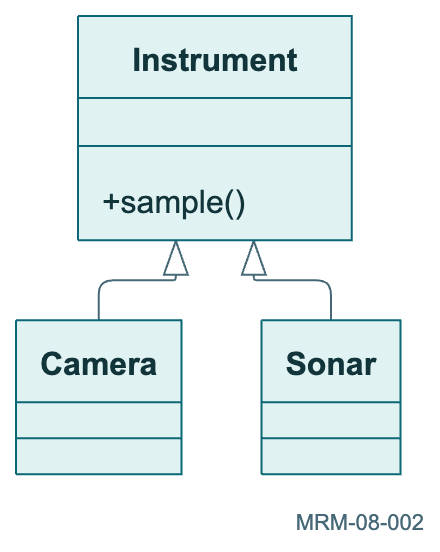
Copy link MRM-08-002 Specialize a common instrument The hollow triangular arrow points toward the superclass. The subclasses inherit the conceptual interface.
Back to diagram overview Mermaid source classDiagram
Instrument <|-- Camera
Instrument <|-- Sonar
class Instrument {
+sample ()
}
Parameter Meaning in this example <|--Draw an inheritance relationship.
Actual output MRM-08-002 · Rendered by Mermaid Mermaid renderer log Standard output Render this diagram --no-install mmdc -i examples/MRM-08-002.mmd -o figures/MRM-08-002.svg -c examples/mermaid-config.json -I MRM-08-002 --no-font-embed
Uses the shared rendering setup and configuration .
Download: Mermaid source · SVG diagram · Vector PDF · PNG preview · Render configuration
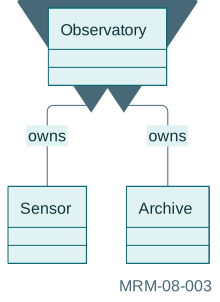
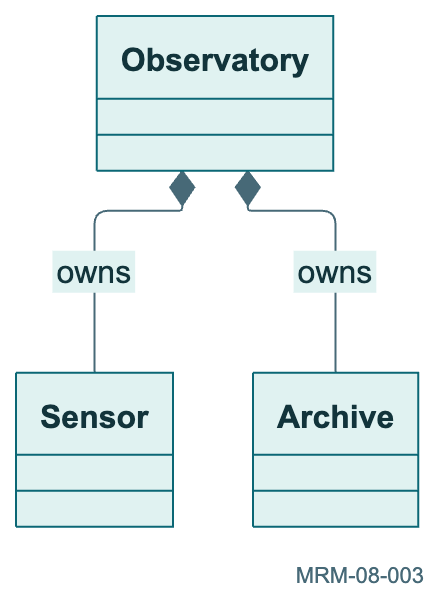
Copy link MRM-08-003 Make ownership explicit The filled diamond sits at the whole. Composition communicates ownership of parts within this model.
Back to diagram overview Mermaid source classDiagram
Observatory *-- Sensor : owns
Observatory *-- Archive : owns
Parameter Meaning in this example *--Draw a composition relationship.
Actual output MRM-08-003 · Rendered by Mermaid Mermaid renderer log Standard output Render this diagram --no-install mmdc -i examples/MRM-08-003.mmd -o figures/MRM-08-003.svg -c examples/mermaid-config.json -I MRM-08-003 --no-font-embed
Uses the shared rendering setup and configuration .
Download: Mermaid source · SVG diagram · Vector PDF · PNG preview · Render configuration
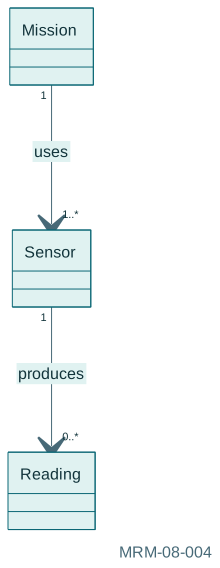
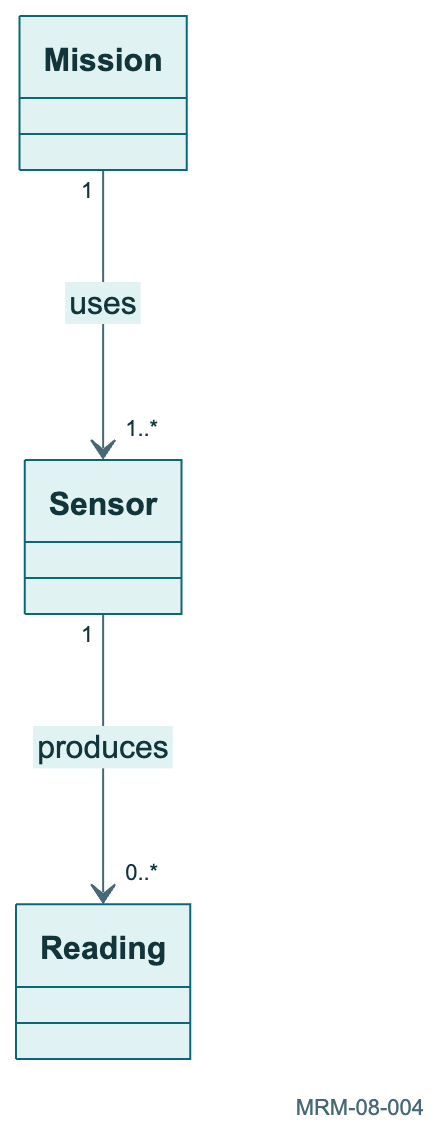
Copy link MRM-08-004 Count the instruments Quoted multiplicities describe how many objects can participate at each end. The relationship label gives the reading direction.
Back to diagram overview Mermaid source classDiagram
Mission "1" --> "1..*" Sensor : uses
Sensor "1" --> "0..*" Reading : produces
Parameter Meaning in this example "1..*"Show one or more related objects.
Actual output MRM-08-004 · Rendered by Mermaid Mermaid renderer log Standard output Render this diagram --no-install mmdc -i examples/MRM-08-004.mmd -o figures/MRM-08-004.svg -c examples/mermaid-config.json -I MRM-08-004 --no-font-embed
Uses the shared rendering setup and configuration .
Download: Mermaid source · SVG diagram · Vector PDF · PNG preview · Render configuration
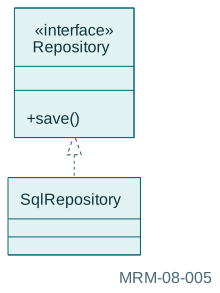
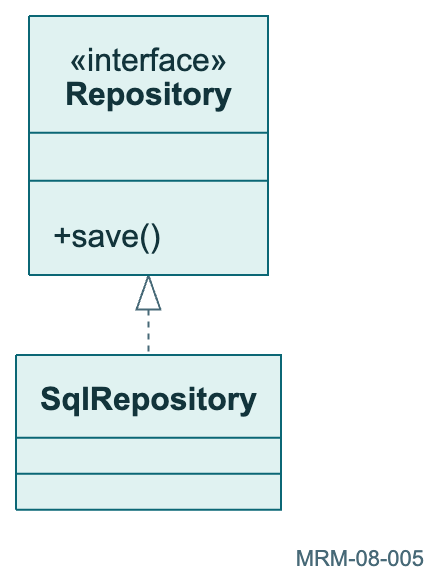
Copy link MRM-08-005 An interface and implementation The dashed realization arrow points from the implementation to its interface.
Back to diagram overview Mermaid source classDiagram
class Repository {
<< interface>>
+save ()
}
Repository <|.. SqlRepository
Parameter Meaning in this example <|..Draw realization of an interface.
Actual output MRM-08-005 · Rendered by Mermaid Mermaid renderer log Standard output Render this diagram --no-install mmdc -i examples/MRM-08-005.mmd -o figures/MRM-08-005.svg -c examples/mermaid-config.json -I MRM-08-005 --no-font-embed
Uses the shared rendering setup and configuration .
Download: Mermaid source · SVG diagram · Vector PDF · PNG preview · Render configuration
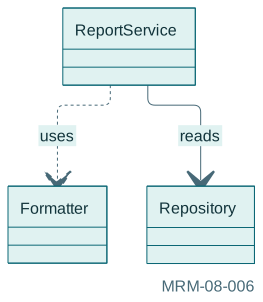
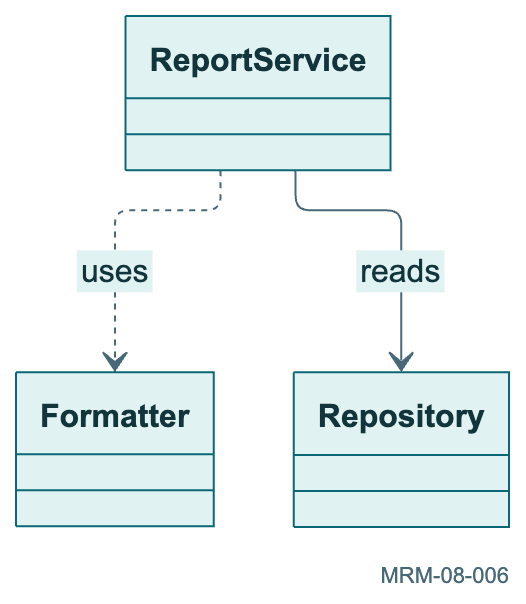
Copy link MRM-08-006 A dependency A short-lived usage relationship is weaker than composition.
Back to diagram overview Mermaid source classDiagram
ReportService ..> Formatter : uses
ReportService --> Repository : reads
Parameter Meaning in this example ..>Draw a dependency without asserting ownership.
Actual output MRM-08-006 · Rendered by Mermaid Mermaid renderer log Standard output Render this diagram --no-install mmdc -i examples/MRM-08-006.mmd -o figures/MRM-08-006.svg -c examples/mermaid-config.json -I MRM-08-006 --no-font-embed
Uses the shared rendering setup and configuration .
Download: Mermaid source · SVG diagram · Vector PDF · PNG preview · Render configuration
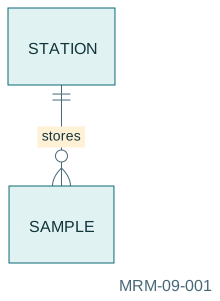
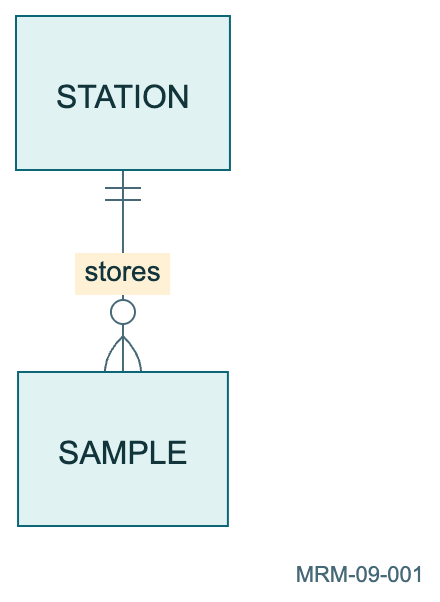
Copy link MRM-09-001 Describe one-to-many ownership A station owns zero or more samples. Read the crow-foot markers from both ends rather than from the line direction.
Back to diagram overview Mermaid source erDiagram
STATION ||--o { SAMPLE : stores
Parameter Meaning in this example ||--o{Connect exactly one station to zero or more samples.
Actual output MRM-09-001 · Rendered by Mermaid Mermaid renderer log Standard output Render this diagram --no-install mmdc -i examples/MRM-09-001.mmd -o figures/MRM-09-001.svg -c examples/mermaid-config.json -I MRM-09-001 --no-font-embed
Uses the shared rendering setup and configuration .
Download: Mermaid source · SVG diagram · Vector PDF · PNG preview · Render configuration
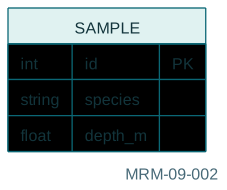
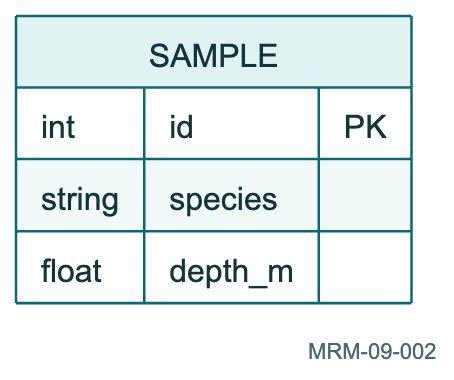
Copy link MRM-09-002 Add fields and keys The attribute block supplies names, displayed types and key annotations. These are a schema sketch rather than executable SQL.
Back to diagram overview Mermaid source erDiagram
SAMPLE {
int id PK
string species
float depth_m
}
Parameter Meaning in this example PKAnnotate the primary key attribute.
Actual output MRM-09-002 · Rendered by Mermaid Mermaid renderer log Standard output Render this diagram --no-install mmdc -i examples/MRM-09-002.mmd -o figures/MRM-09-002.svg -c examples/mermaid-config.json -I MRM-09-002 --no-font-embed
Uses the shared rendering setup and configuration .
Download: Mermaid source · SVG diagram · Vector PDF · PNG preview · Render configuration
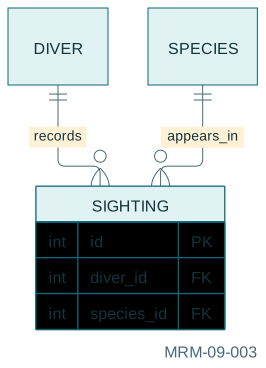
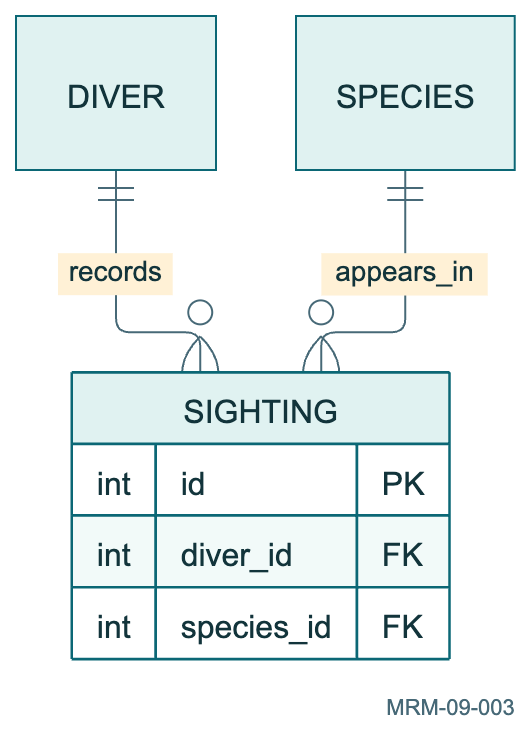
Copy link MRM-09-003 Resolve a many-to-many relationship An associative entity records each sighting. This also gives a place to store attributes of the association.
Back to diagram overview Mermaid source erDiagram
DIVER ||--o { SIGHTING : records
SPECIES ||--o { SIGHTING : appears_in
SIGHTING {
int id PK
int diver_id FK
int species_id FK
}
Parameter Meaning in this example SIGHTINGRepresent the association as its own entity.
Actual output MRM-09-003 · Rendered by Mermaid Mermaid renderer log Standard output Render this diagram --no-install mmdc -i examples/MRM-09-003.mmd -o figures/MRM-09-003.svg -c examples/mermaid-config.json -I MRM-09-003 --no-font-embed
Uses the shared rendering setup and configuration .
Download: Mermaid source · SVG diagram · Vector PDF · PNG preview · Render configuration
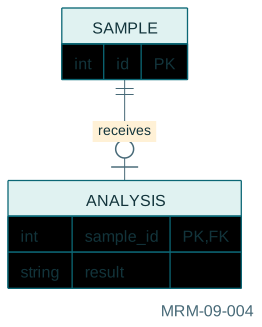
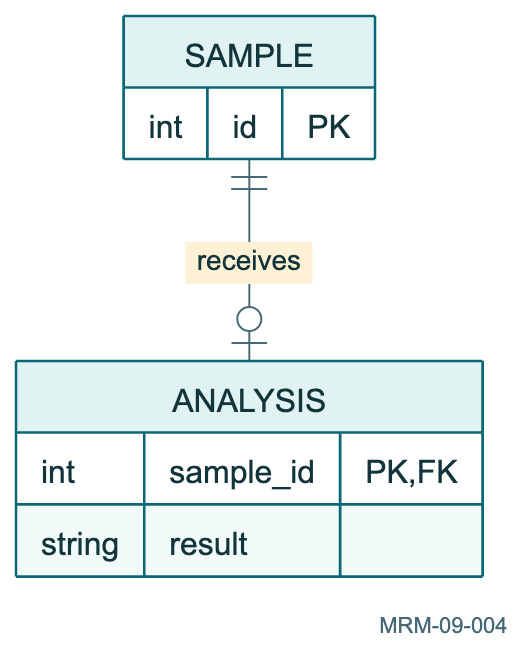
Copy link MRM-09-004 Make an optional link visible A sample can have zero or one analysis in this model. The optional end distinguishes a pending sample from a completed analysis.
Back to diagram overview Mermaid source erDiagram
SAMPLE ||--o| ANALYSIS : receives
SAMPLE {
int id PK
}
ANALYSIS {
int sample_id PK , FK
string result
}
Parameter Meaning in this example o|Describe zero or one related record.
Actual output MRM-09-004 · Rendered by Mermaid Mermaid renderer log Standard output Render this diagram --no-install mmdc -i examples/MRM-09-004.mmd -o figures/MRM-09-004.svg -c examples/mermaid-config.json -I MRM-09-004 --no-font-embed
Uses the shared rendering setup and configuration .
Download: Mermaid source · SVG diagram · Vector PDF · PNG preview · Render configuration
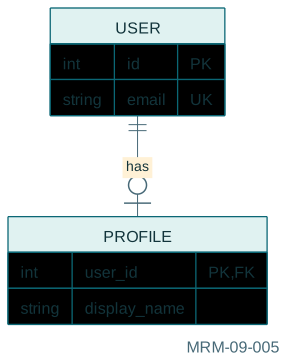
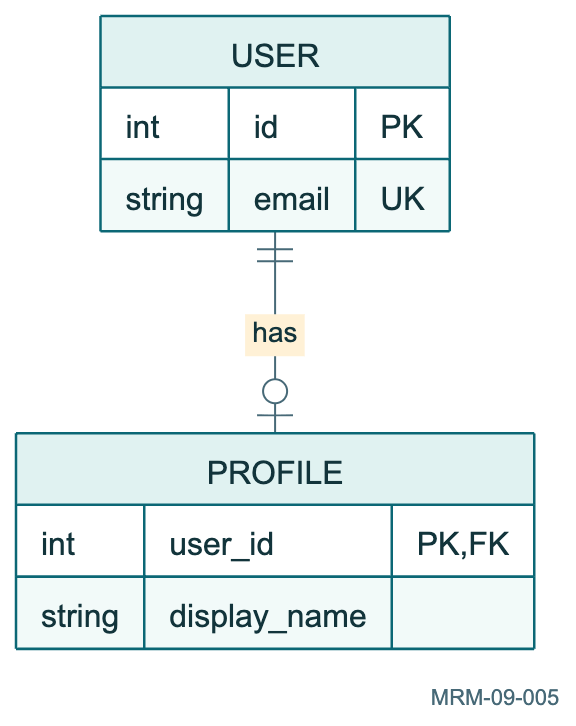
Copy link MRM-09-005 Users and unique profiles A profile is optional for a user in this model.
Back to diagram overview Mermaid source erDiagram
USER ||--o| PROFILE : has
USER {
int id PK
string email UK
}
PROFILE {
int user_id PK , FK
string display_name
}
Parameter Meaning in this example UKMark a unique attribute.
Actual output MRM-09-005 · Rendered by Mermaid Mermaid renderer log Standard output Render this diagram --no-install mmdc -i examples/MRM-09-005.mmd -o figures/MRM-09-005.svg -c examples/mermaid-config.json -I MRM-09-005 --no-font-embed
Uses the shared rendering setup and configuration .
Download: Mermaid source · SVG diagram · Vector PDF · PNG preview · Render configuration
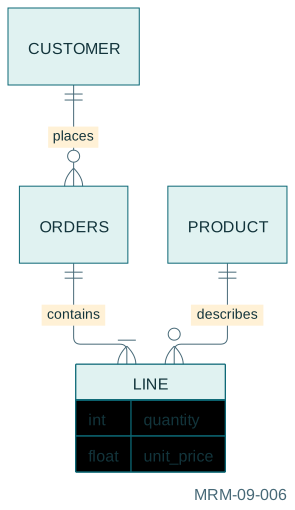
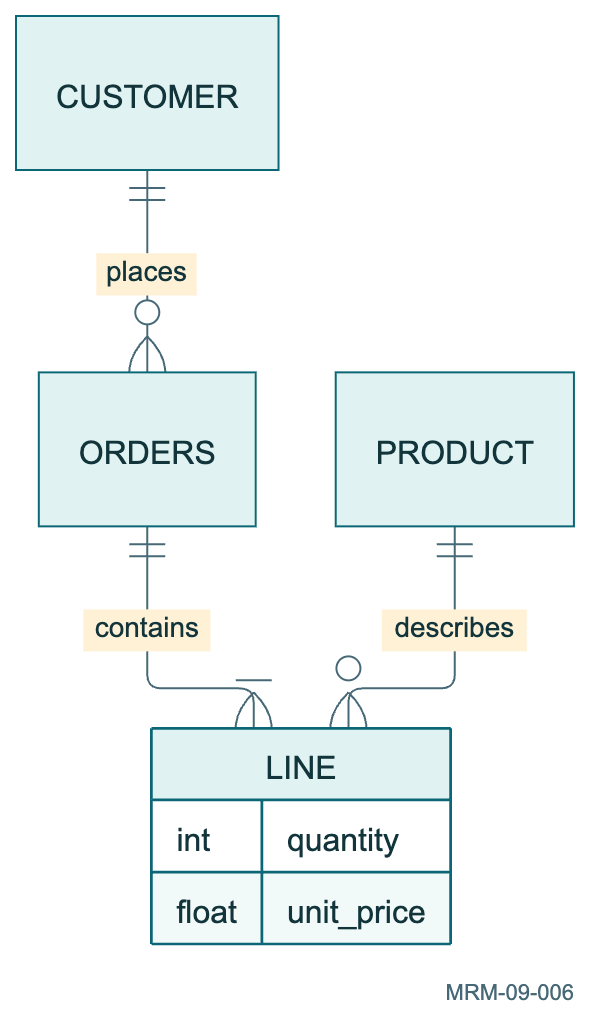
Copy link MRM-09-006 Orders with line items The association entity stores quantity and price for one product in one order.
Back to diagram overview Mermaid source erDiagram
CUSTOMER ||--o { ORDERS : places
ORDERS ||--| { LINE : contains
PRODUCT ||--o { LINE : describes
LINE {
int quantity
float unit_price
}
Parameter Meaning in this example LINEStore attributes of the association.
Actual output MRM-09-006 · Rendered by Mermaid Mermaid renderer log Standard output Render this diagram --no-install mmdc -i examples/MRM-09-006.mmd -o figures/MRM-09-006.svg -c examples/mermaid-config.json -I MRM-09-006 --no-font-embed
Uses the shared rendering setup and configuration .
Download: Mermaid source · SVG diagram · Vector PDF · PNG preview · Render configuration
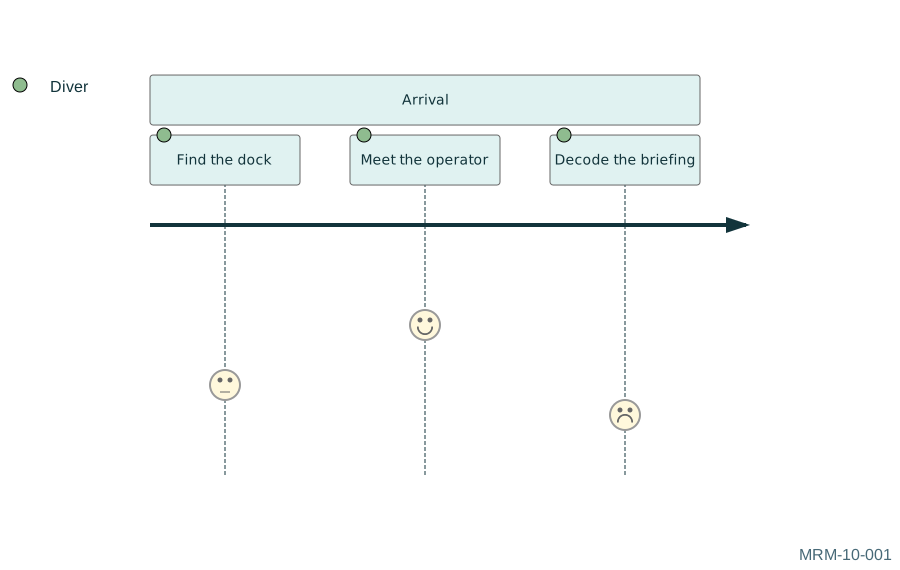
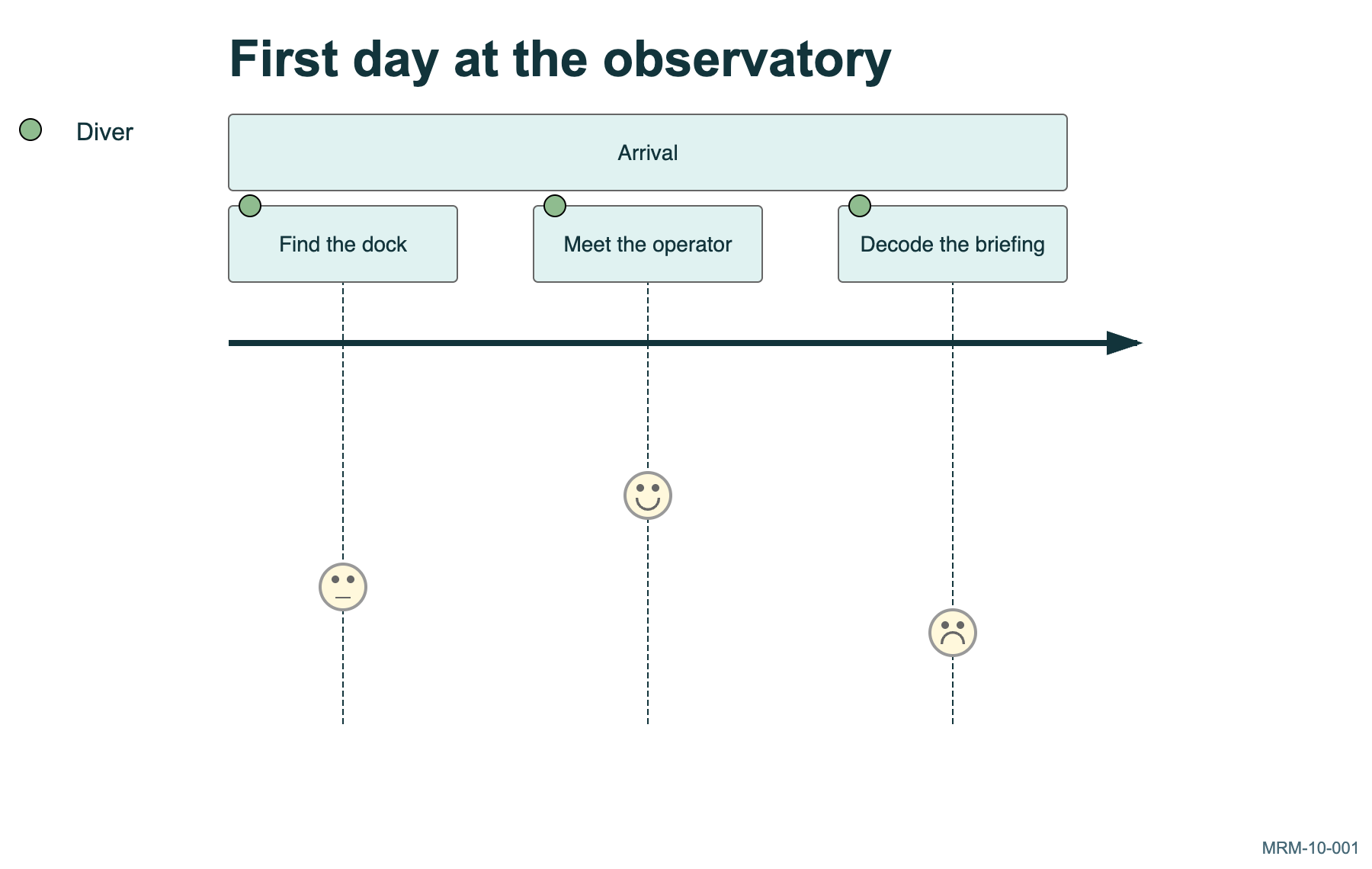
Copy link MRM-10-001 A diver makes a first visit Journey scores range from one to five. These invented scores express an experience, not a measured scientific result.
Back to diagram overview Mermaid source journey
title First day at the observatory
section Arrival
Find the dock : 3 : Diver
Meet the operator : 5 : Diver
Decode the briefing : 2 : Diver
Parameter Meaning in this example Task: score: actorAssign a satisfaction score and an actor.
Actual output MRM-10-001 · Rendered by Mermaid Mermaid renderer log Standard output Render this diagram --no-install mmdc -i examples/MRM-10-001.mmd -o figures/MRM-10-001.svg -c examples/mermaid-config.json -I MRM-10-001 --no-font-embed
Uses the shared rendering setup and configuration .
Download: Mermaid source · SVG diagram · Vector PDF · PNG preview · Render configuration
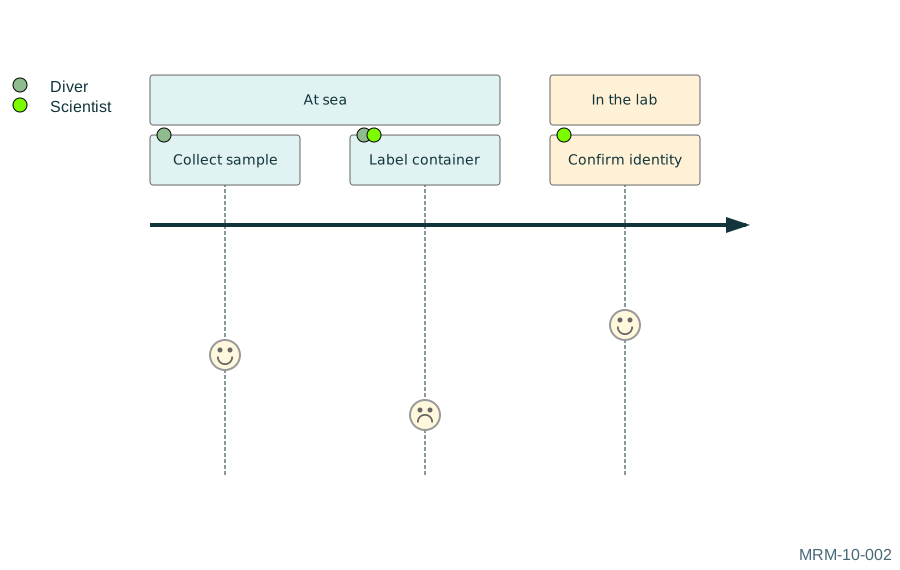
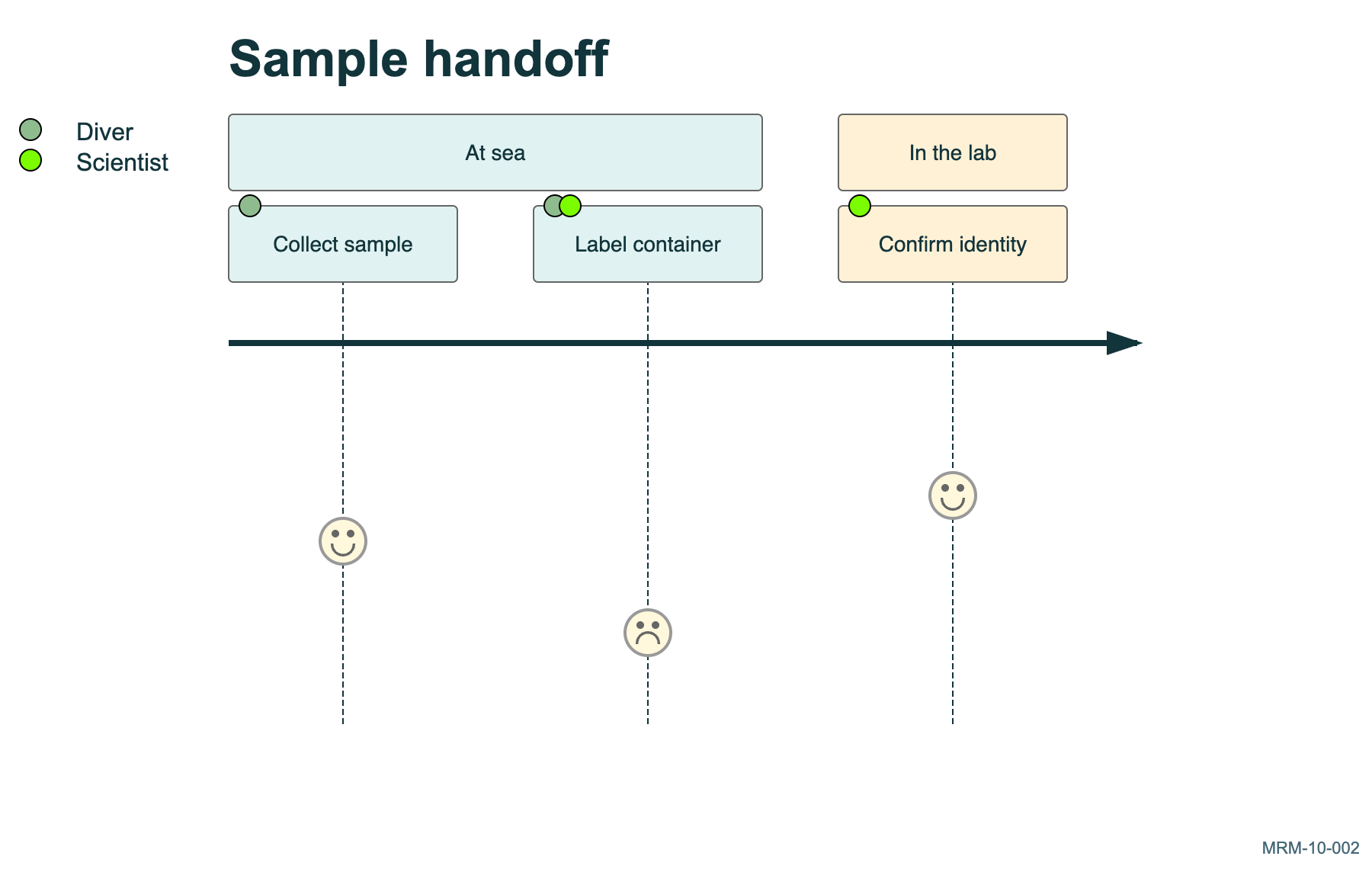
Copy link MRM-10-002 Compare two perspectives A task can involve several actors. Shared participation does not mean that their private experiences were independently measured.
Back to diagram overview Mermaid source journey
title Sample handoff
section At sea
Collect sample : 4 : Diver
Label container : 2 : Diver , Scientist
section In the lab
Confirm identity : 5 : Scientist
Parameter Meaning in this example Diver, ScientistAssociate more than one actor with a task.
Actual output MRM-10-002 · Rendered by Mermaid Mermaid renderer log Standard output Render this diagram --no-install mmdc -i examples/MRM-10-002.mmd -o figures/MRM-10-002.svg -c examples/mermaid-config.json -I MRM-10-002 --no-font-embed
Uses the shared rendering setup and configuration .
Download: Mermaid source · SVG diagram · Vector PDF · PNG preview · Render configuration
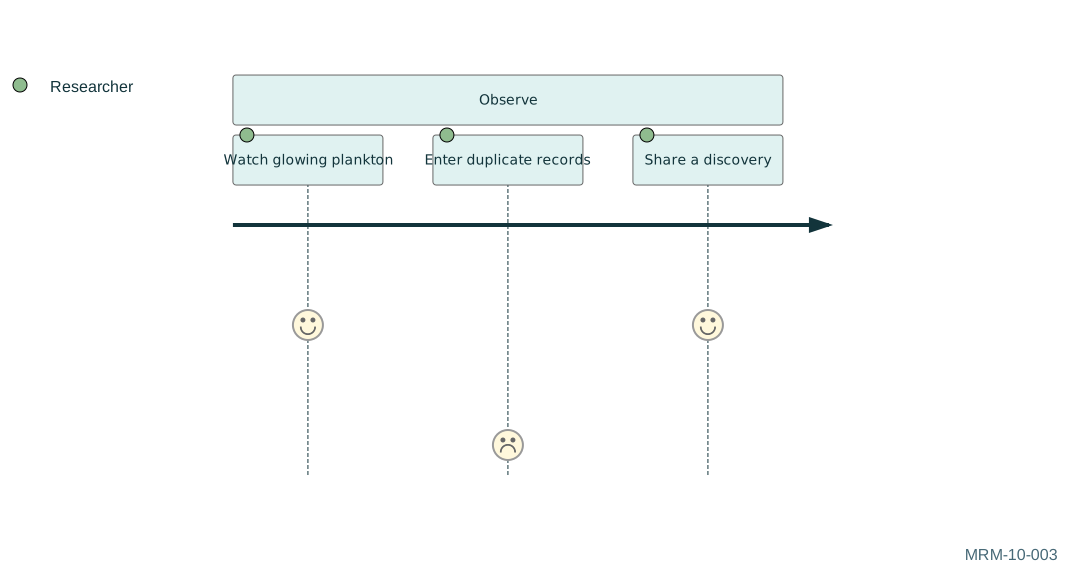
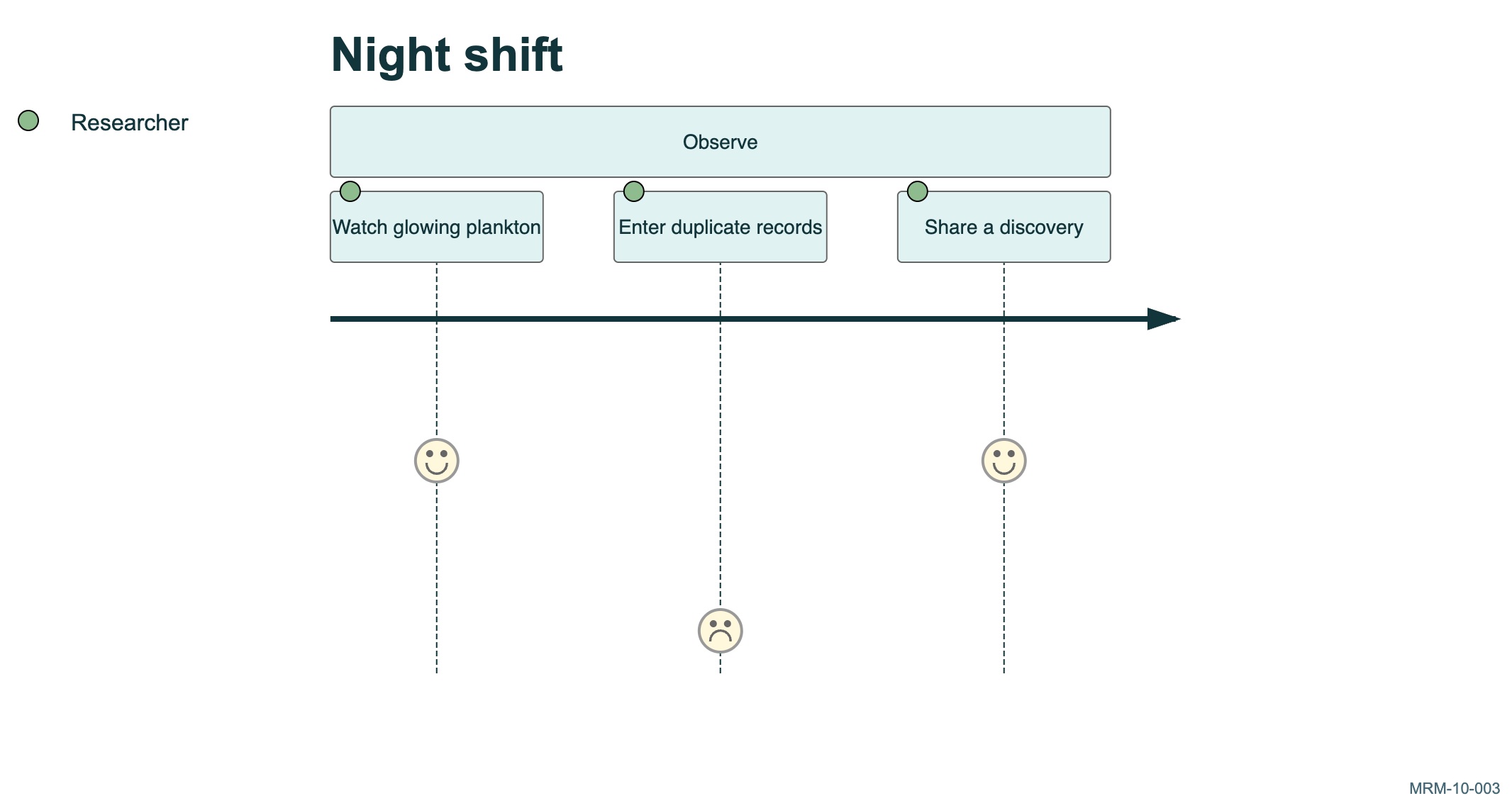
Copy link MRM-10-003 Find the low point The low score identifies a candidate for investigation. A journey diagram starts a conversation; it does not establish the cause.
Back to diagram overview Mermaid source journey
title Night shift
section Observe
Watch glowing plankton : 5 : Researcher
Enter duplicate records : 1 : Researcher
Share a discovery : 5 : Researcher
Parameter Meaning in this example 1Mark the weakest experience on the displayed scale.
Actual output MRM-10-003 · Rendered by Mermaid Mermaid renderer log Standard output Render this diagram --no-install mmdc -i examples/MRM-10-003.mmd -o figures/MRM-10-003.svg -c examples/mermaid-config.json -I MRM-10-003 --no-font-embed
Uses the shared rendering setup and configuration .
Download: Mermaid source · SVG diagram · Vector PDF · PNG preview · Render configuration
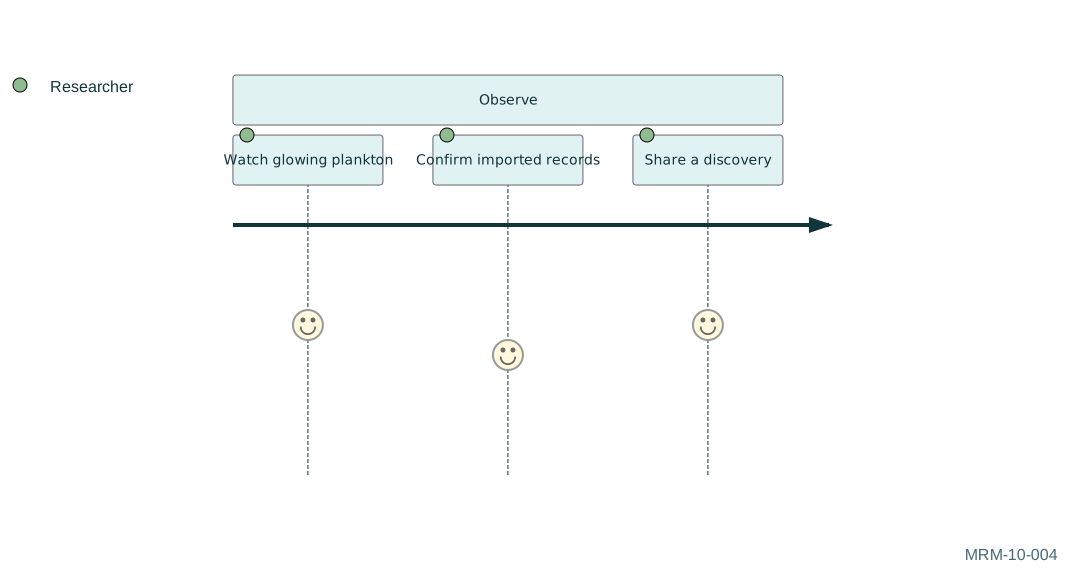
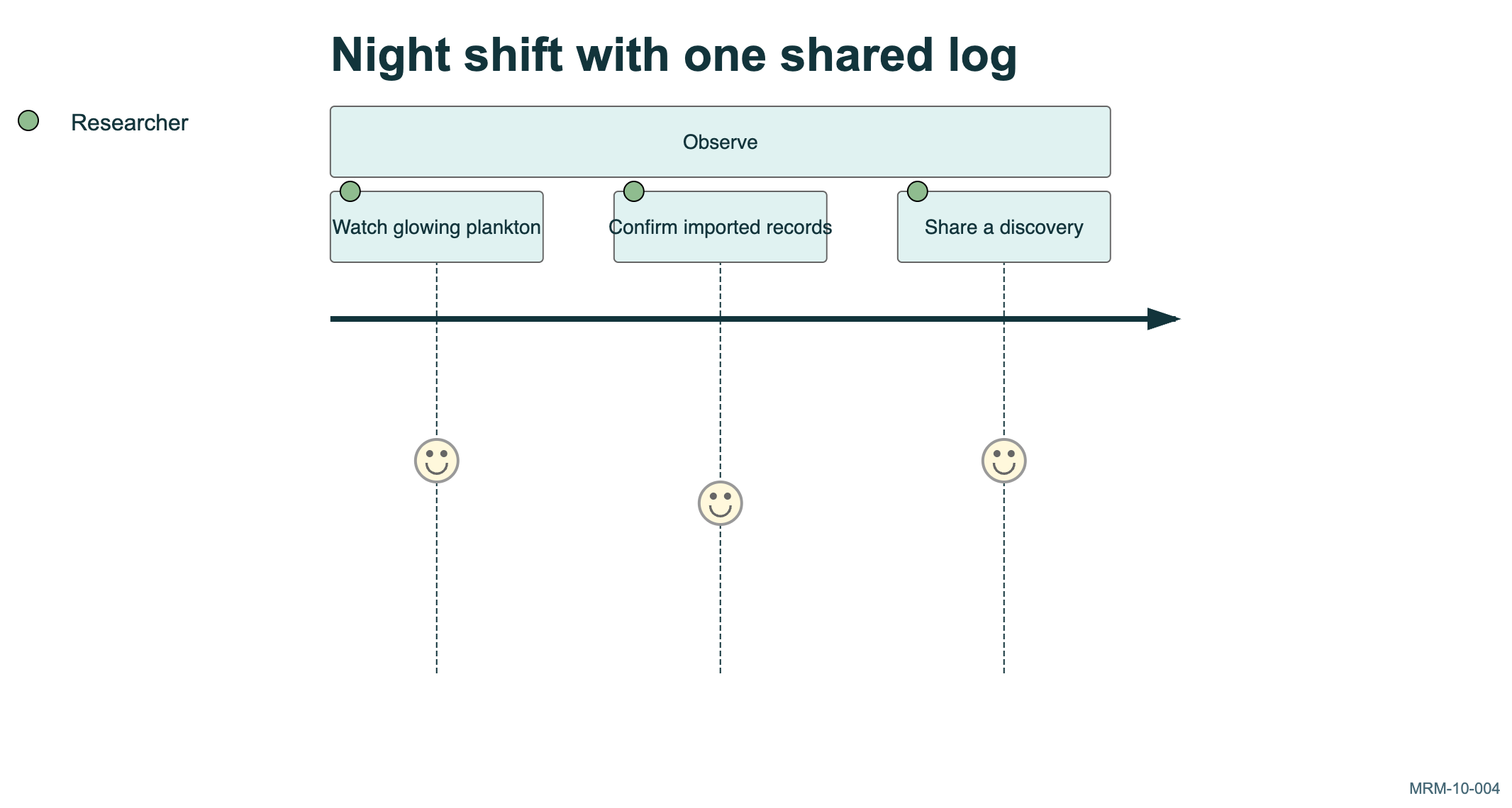
Copy link MRM-10-004 Sketch an improved journey Compare the administrative task with the previous example. The higher score is a proposed outcome to test.
Back to diagram overview Compare with MRM-10-003 · Find the low point .
Mermaid source journey
title Night shift with one shared log
section Observe
Watch glowing plankton : 5 : Researcher
Confirm imported records : 4 : Researcher
Share a discovery : 5 : Researcher
Parameter Meaning in this example titleName the scenario being evaluated.
Actual output MRM-10-004 · Rendered by Mermaid Mermaid renderer log Standard output Render this diagram --no-install mmdc -i examples/MRM-10-004.mmd -o figures/MRM-10-004.svg -c examples/mermaid-config.json -I MRM-10-004 --no-font-embed
Uses the shared rendering setup and configuration .
Download: Mermaid source · SVG diagram · Vector PDF · PNG preview · Render configuration
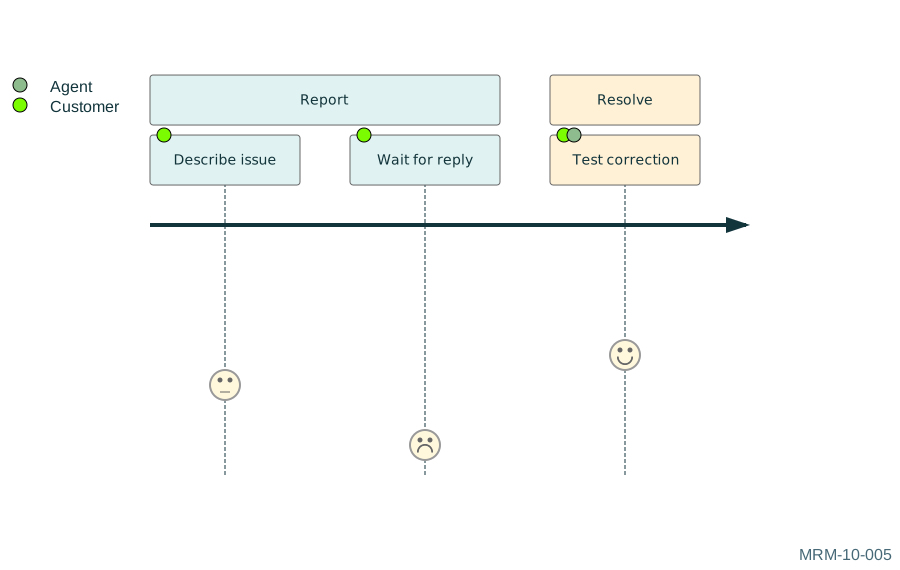
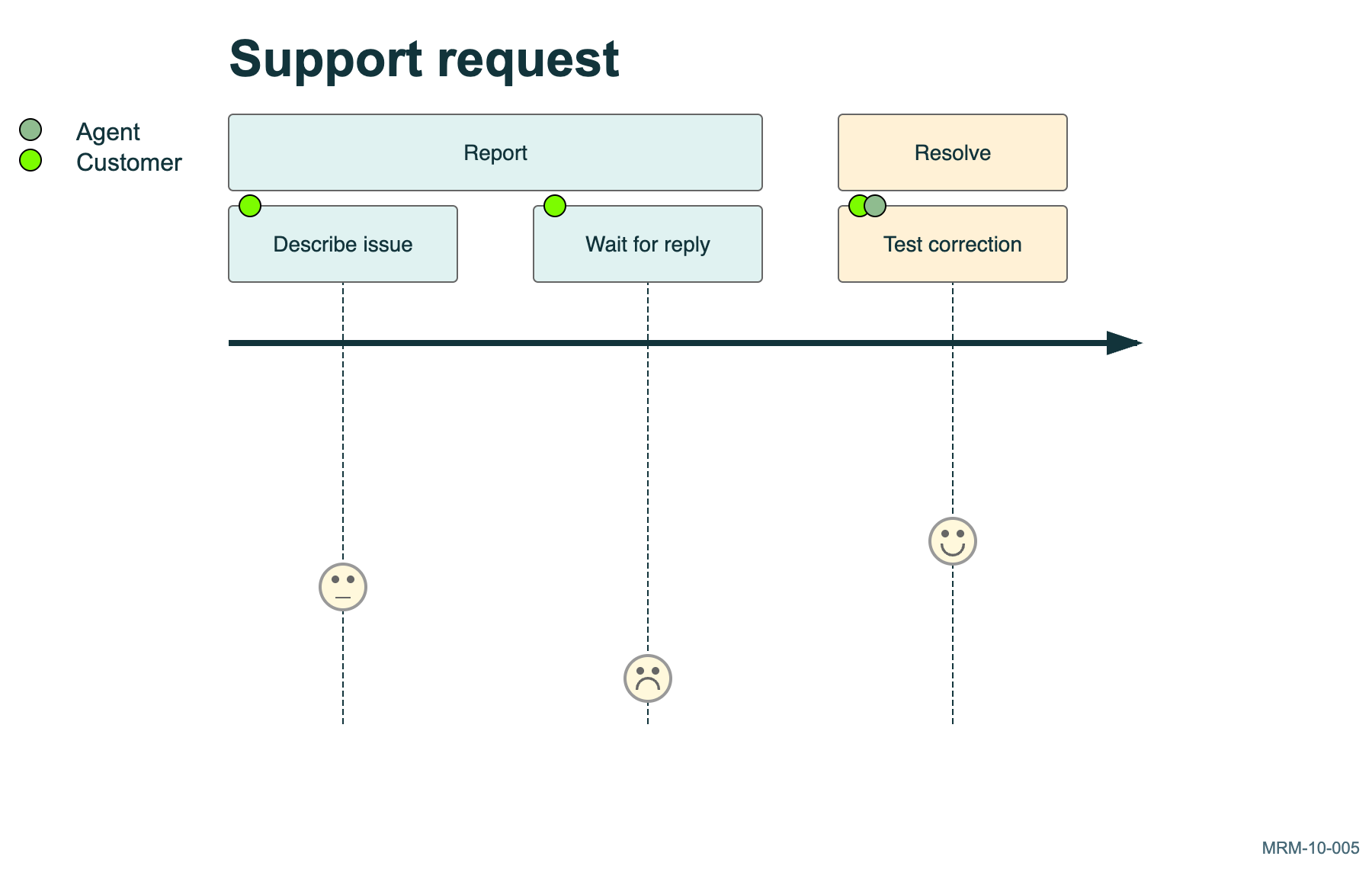
Copy link MRM-10-005 A support request experience The invented scores make a bottleneck visible for discussion.
Back to diagram overview Mermaid source journey
title Support request
section Report
Describe issue : 3 : Customer
Wait for reply : 1 : Customer
section Resolve
Test correction : 4 : Customer , Agent
Parameter Meaning in this example SectionsSeparate the reporting and resolution phases.
Actual output MRM-10-005 · Rendered by Mermaid Mermaid renderer log Standard output Render this diagram --no-install mmdc -i examples/MRM-10-005.mmd -o figures/MRM-10-005.svg -c examples/mermaid-config.json -I MRM-10-005 --no-font-embed
Uses the shared rendering setup and configuration .
Download: Mermaid source · SVG diagram · Vector PDF · PNG preview · Render configuration
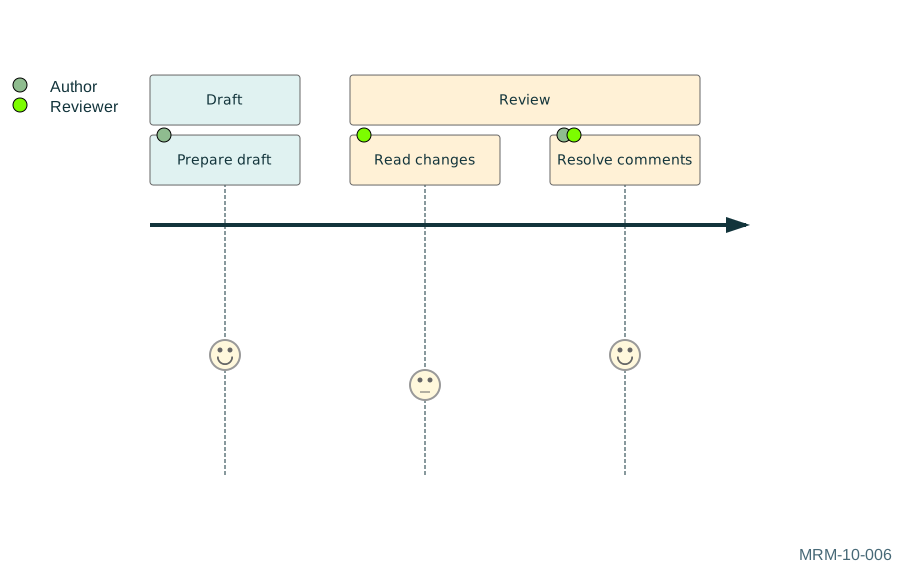
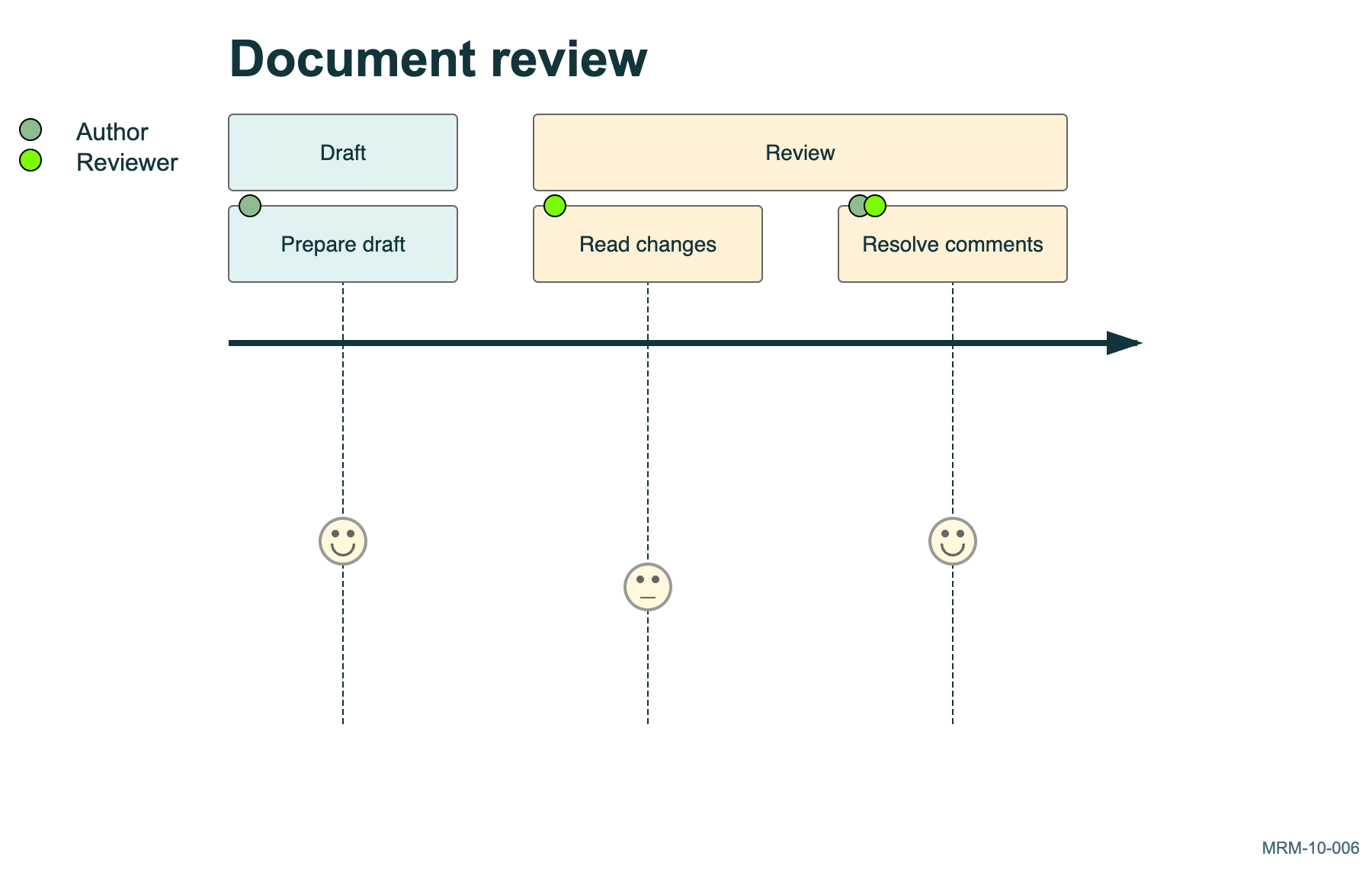
Copy link MRM-10-006 A document review experience Reviewers and authors participate in different tasks.
Back to diagram overview Mermaid source journey
title Document review
section Draft
Prepare draft : 4 : Author
section Review
Read changes : 3 : Reviewer
Resolve comments : 4 : Author , Reviewer
Parameter Meaning in this example ActorsIdentify the people involved in each task.
Actual output MRM-10-006 · Rendered by Mermaid Mermaid renderer log Standard output Render this diagram --no-install mmdc -i examples/MRM-10-006.mmd -o figures/MRM-10-006.svg -c examples/mermaid-config.json -I MRM-10-006 --no-font-embed
Uses the shared rendering setup and configuration .
Download: Mermaid source · SVG diagram · Vector PDF · PNG preview · Render configuration
Copy link MRM-11-001 Set a calendar Dates are fixed in the source so that the example remains readable offline. A duration ending in d counts days.
Back to diagram overview Mermaid source gantt
title Reef expedition
dateFormat YYYY-MM-DD
axisFormat %d %b
section Prepare
Calibrate sensors : cal , 2026 -06-01 , 3d
Pack samples : pack , 2026 -06-04 , 2d
Parameter Meaning in this example dateFormat YYYY-MM-DDSet the format used to read task dates.
Actual output MRM-11-001 · Rendered by Mermaid Mermaid renderer log Standard output Render this diagram --no-install mmdc -i examples/MRM-11-001.mmd -o figures/MRM-11-001.svg -c examples/mermaid-config.json -I MRM-11-001 --no-font-embed
Uses the shared rendering setup and configuration .
Download: Mermaid source · SVG diagram · Vector PDF · PNG preview · Render configuration
Copy link MRM-11-002 Express a dependency The second task begins after the named calibration task. Give prerequisites stable IDs rather than duplicating dates.
Back to diagram overview Mermaid source gantt
title Launch dependencies
dateFormat YYYY-MM-DD
Calibrate : cal , 2026 -06-01 , 3d
Sea trial : trial , after cal , 2d
Survey : survey , after trial , 4d
Parameter Meaning in this example after calStart after the task identified as cal.
Actual output MRM-11-002 · Rendered by Mermaid Mermaid renderer log Standard output Render this diagram --no-install mmdc -i examples/MRM-11-002.mmd -o figures/MRM-11-002.svg -c examples/mermaid-config.json -I MRM-11-002 --no-font-embed
Uses the shared rendering setup and configuration .
Download: Mermaid source · SVG diagram · Vector PDF · PNG preview · Render configuration
Copy link MRM-11-003 Mark the launch milestone A milestone is a point in time. Zero duration distinguishes the launch decision from the work leading up to it.
Back to diagram overview Mermaid source gantt
title Launch gate
dateFormat YYYY-MM-DD
Prepare equipment : prep , 2026 -06-01 , 4d
Launch approved : milestone , launch , after prep , 0d
Parameter Meaning in this example milestoneDraw an event rather than a work interval.
Actual output MRM-11-003 · Rendered by Mermaid Mermaid renderer log Standard output Render this diagram --no-install mmdc -i examples/MRM-11-003.mmd -o figures/MRM-11-003.svg -c examples/mermaid-config.json -I MRM-11-003 --no-font-embed
Uses the shared rendering setup and configuration .
Download: Mermaid source · SVG diagram · Vector PDF · PNG preview · Render configuration
Copy link MRM-11-004 Show status without hiding the task The chart labels and bars communicate completion and priority. This is a snapshot, not an automatically updated project tracker.
Back to diagram overview Mermaid source gantt
title Observatory refit
dateFormat YYYY-MM-DD
Inspect hull : done , hull , 2026 -06-01 , 2d
Replace seal : crit , active , seal , after hull , 3d
Pressure test : test , after seal , 2d
Parameter Meaning in this example crit, activeMark critical work that is currently active.
Actual output MRM-11-004 · Rendered by Mermaid Mermaid renderer log Standard output Render this diagram --no-install mmdc -i examples/MRM-11-004.mmd -o figures/MRM-11-004.svg -c examples/mermaid-config.json -I MRM-11-004 --no-font-embed
Uses the shared rendering setup and configuration .
Download: Mermaid source · SVG diagram · Vector PDF · PNG preview · Render configuration
Copy link MRM-11-005 Exclude weekends The displayed schedule excludes weekends from durations. Dates remain explicit and reproducible.
Back to diagram overview Mermaid source gantt
title Publication plan
dateFormat YYYY-MM-DD
excludes weekends
Draft : draft , 2026 -06-01 , 5d
Review : review , after draft , 3d
Parameter Meaning in this example excludes weekendsOmit weekend days from scheduling.
Actual output MRM-11-005 · Rendered by Mermaid Mermaid renderer log Standard output Render this diagram --no-install mmdc -i examples/MRM-11-005.mmd -o figures/MRM-11-005.svg -c examples/mermaid-config.json -I MRM-11-005 --no-font-embed
Uses the shared rendering setup and configuration .
Download: Mermaid source · SVG diagram · Vector PDF · PNG preview · Render configuration
Copy link MRM-11-006 Parallel work before a release The release waits for two independent prerequisites.
Back to diagram overview Mermaid source gantt
title Release plan
dateFormat YYYY-MM-DD
Documentation : docs , 2026 -06-01 , 3d
Tests : tests , 2026 -06-01 , 5d
Release : milestone , release , after docs tests , 0d
Parameter Meaning in this example after docs testsWait for both prerequisite tasks.
Actual output MRM-11-006 · Rendered by Mermaid Mermaid renderer log Standard output Render this diagram --no-install mmdc -i examples/MRM-11-006.mmd -o figures/MRM-11-006.svg -c examples/mermaid-config.json -I MRM-11-006 --no-font-embed
Uses the shared rendering setup and configuration .
Download: Mermaid source · SVG diagram · Vector PDF · PNG preview · Render configuration
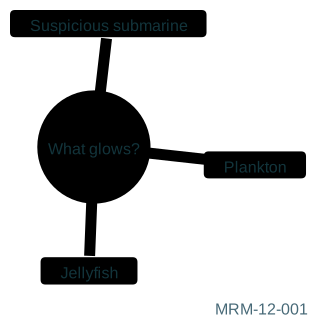
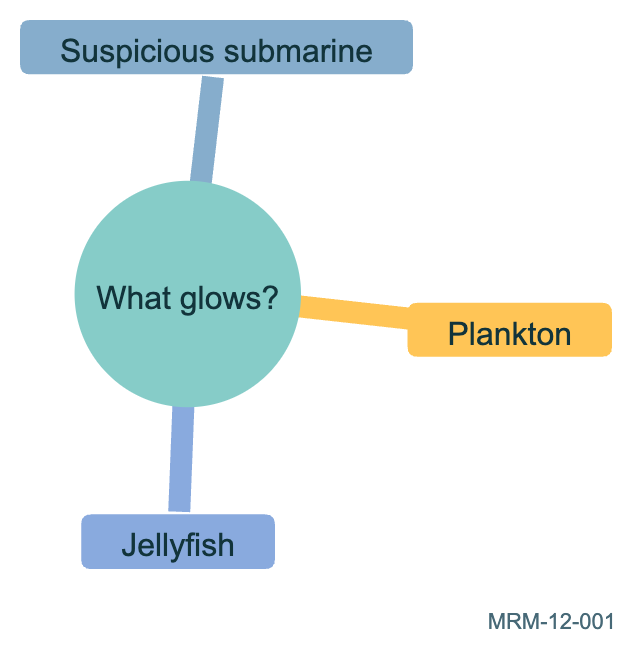
Copy link MRM-12-001 Branch from one question Indentation defines parent-child relationships. Begin with a root and three distinct branches.
Back to diagram overview Mermaid source mindmap
root (( What glows? ))
Plankton
Jellyfish
Suspicious submarine
Parameter Meaning in this example IndentationNest an idea beneath its parent.
Actual output MRM-12-001 · Rendered by Mermaid Mermaid renderer log Standard output Render this diagram --no-install mmdc -i examples/MRM-12-001.mmd -o figures/MRM-12-001.svg -c examples/mermaid-config.json -I MRM-12-001 --no-font-embed
Uses the shared rendering setup and configuration .
Download: Mermaid source · SVG diagram · Vector PDF · PNG preview · Render configuration
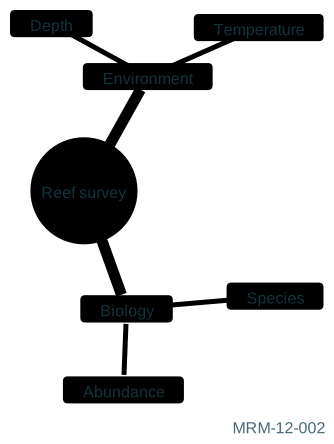
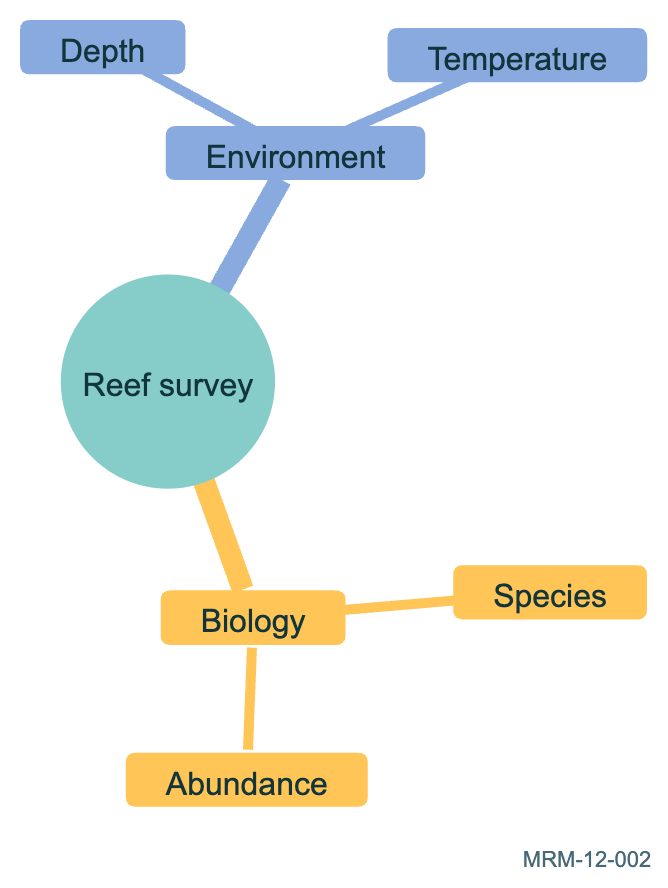
Copy link MRM-12-002 Add a second level Specific observations sit below broader categories. Equal indentation marks siblings.
Back to diagram overview Mermaid source mindmap
root (( Reef survey ))
Biology
Species
Abundance
Environment
Depth
Temperature
Parameter Meaning in this example Two indentation levelsSeparate categories from their observations.
Actual output MRM-12-002 · Rendered by Mermaid Mermaid renderer log Standard output Render this diagram --no-install mmdc -i examples/MRM-12-002.mmd -o figures/MRM-12-002.svg -c examples/mermaid-config.json -I MRM-12-002 --no-font-embed
Uses the shared rendering setup and configuration .
Download: Mermaid source · SVG diagram · Vector PDF · PNG preview · Render configuration
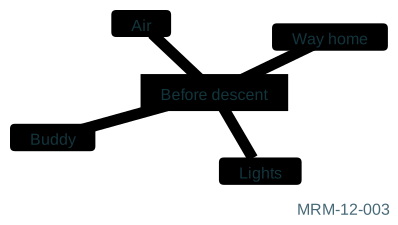
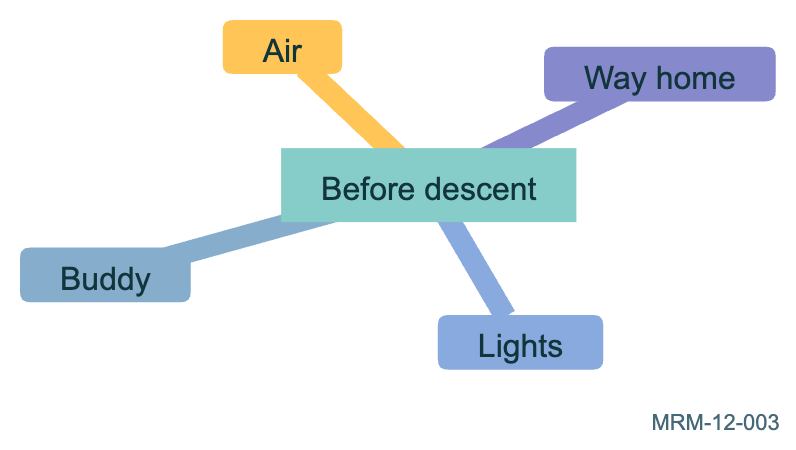
Copy link MRM-12-003 Choose a root shape A square root gives this checklist a different visual center. Shape helps recognition while the labels carry the meaning.
Back to diagram overview Mermaid source mindmap
root [ Before descent ]
Air
Lights
Buddy
Way home
Parameter Meaning in this example root[Before descent]Use a rectangular central node.
Actual output MRM-12-003 · Rendered by Mermaid Mermaid renderer log Standard output Render this diagram --no-install mmdc -i examples/MRM-12-003.mmd -o figures/MRM-12-003.svg -c examples/mermaid-config.json -I MRM-12-003 --no-font-embed
Uses the shared rendering setup and configuration .
Download: Mermaid source · SVG diagram · Vector PDF · PNG preview · Render configuration
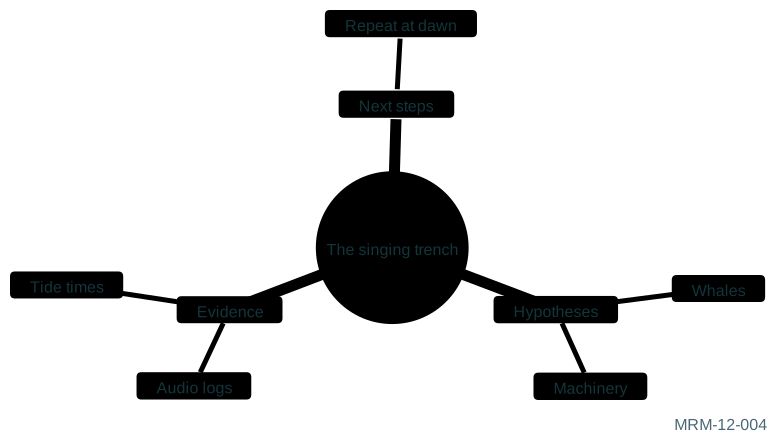
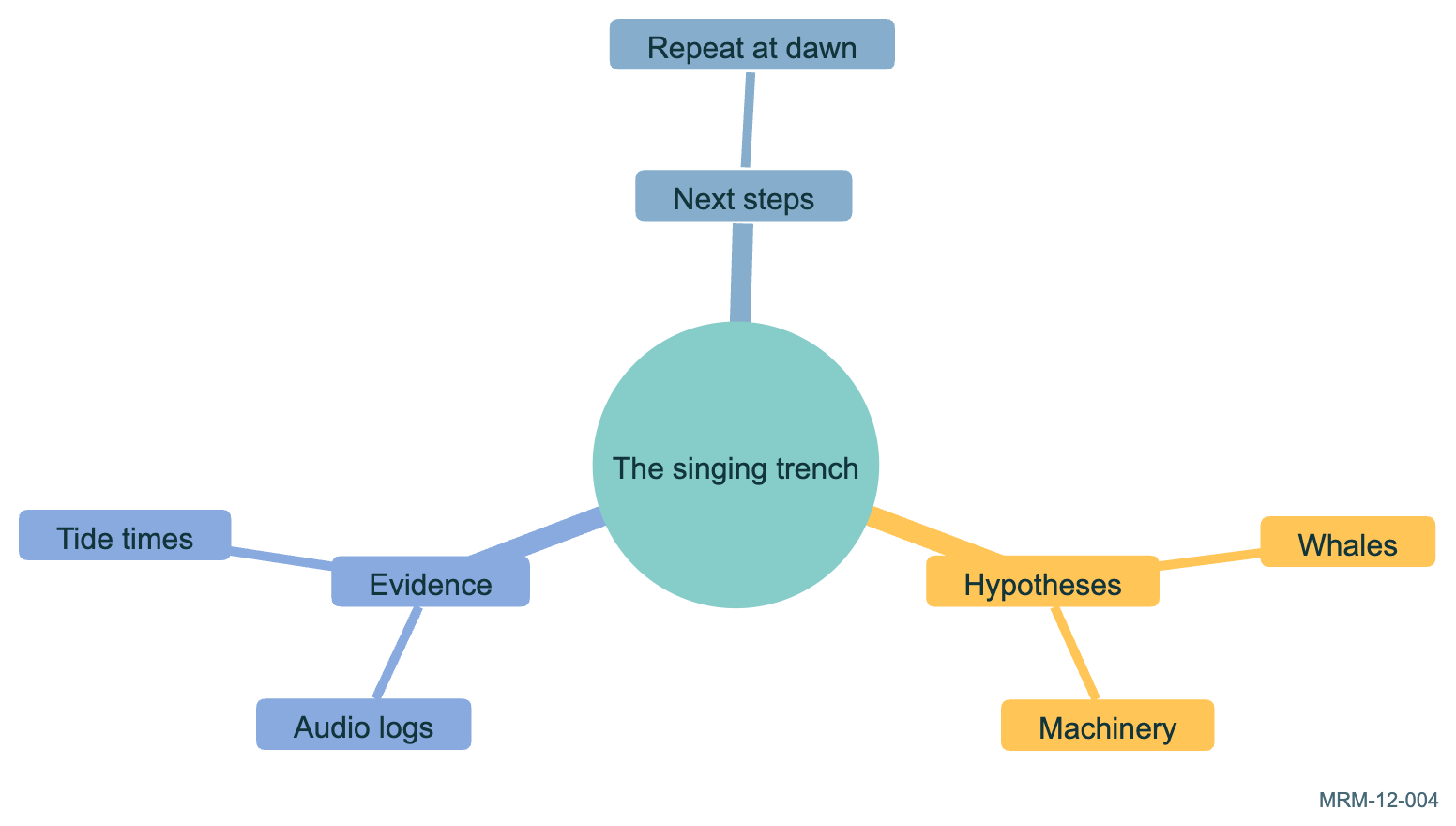
Copy link MRM-12-004 Plan an investigation The branches separate hypotheses from evidence and next steps. A mindmap captures a structure of thought without claiming causation.
Back to diagram overview Mermaid source mindmap
root (( The singing trench ))
Hypotheses
Whales
Machinery
Evidence
Audio logs
Tide times
Next steps
Repeat at dawn
Parameter Meaning in this example Hypotheses / Evidence / Next stepsUse parallel branches for distinct kinds of information.
Actual output MRM-12-004 · Rendered by Mermaid Mermaid renderer log Standard output Render this diagram --no-install mmdc -i examples/MRM-12-004.mmd -o figures/MRM-12-004.svg -c examples/mermaid-config.json -I MRM-12-004 --no-font-embed
Uses the shared rendering setup and configuration .
Download: Mermaid source · SVG diagram · Vector PDF · PNG preview · Render configuration
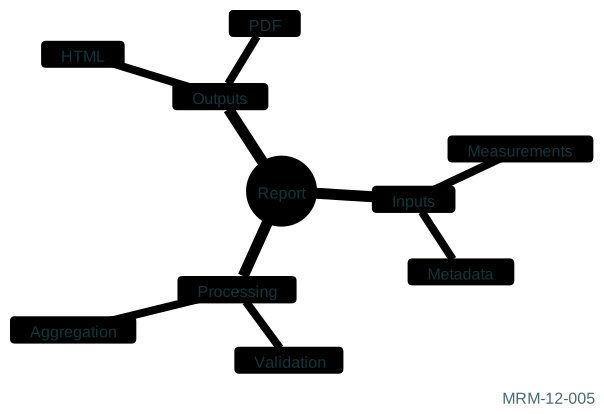
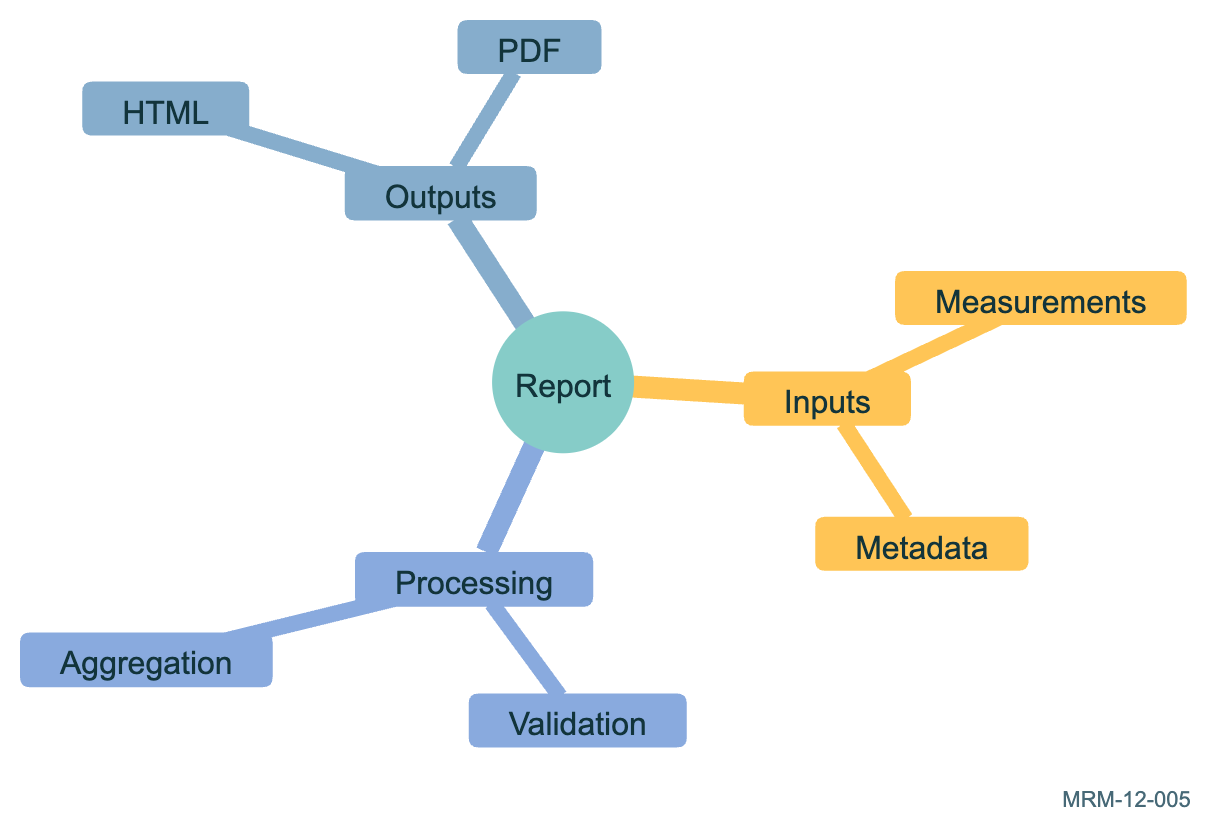
Copy link MRM-12-005 Plan a reproducible report Use sibling branches for inputs, transformations and published outputs.
Back to diagram overview Mermaid source mindmap
root (( Report ))
Inputs
Measurements
Metadata
Processing
Validation
Aggregation
Outputs
HTML
PDF
Parameter Meaning in this example Parallel branchesSeparate distinct concerns.
Actual output MRM-12-005 · Rendered by Mermaid Mermaid renderer log Standard output Render this diagram --no-install mmdc -i examples/MRM-12-005.mmd -o figures/MRM-12-005.svg -c examples/mermaid-config.json -I MRM-12-005 --no-font-embed
Uses the shared rendering setup and configuration .
Download: Mermaid source · SVG diagram · Vector PDF · PNG preview · Render configuration
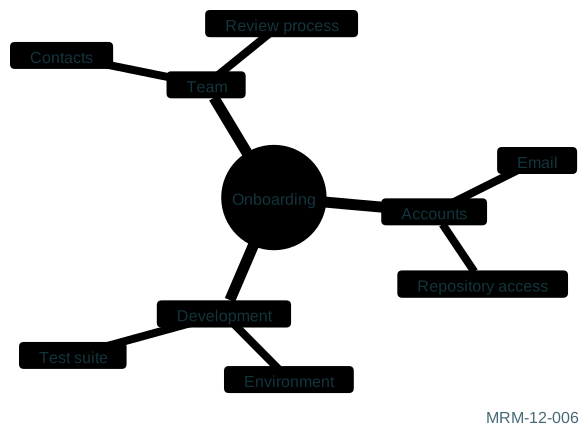
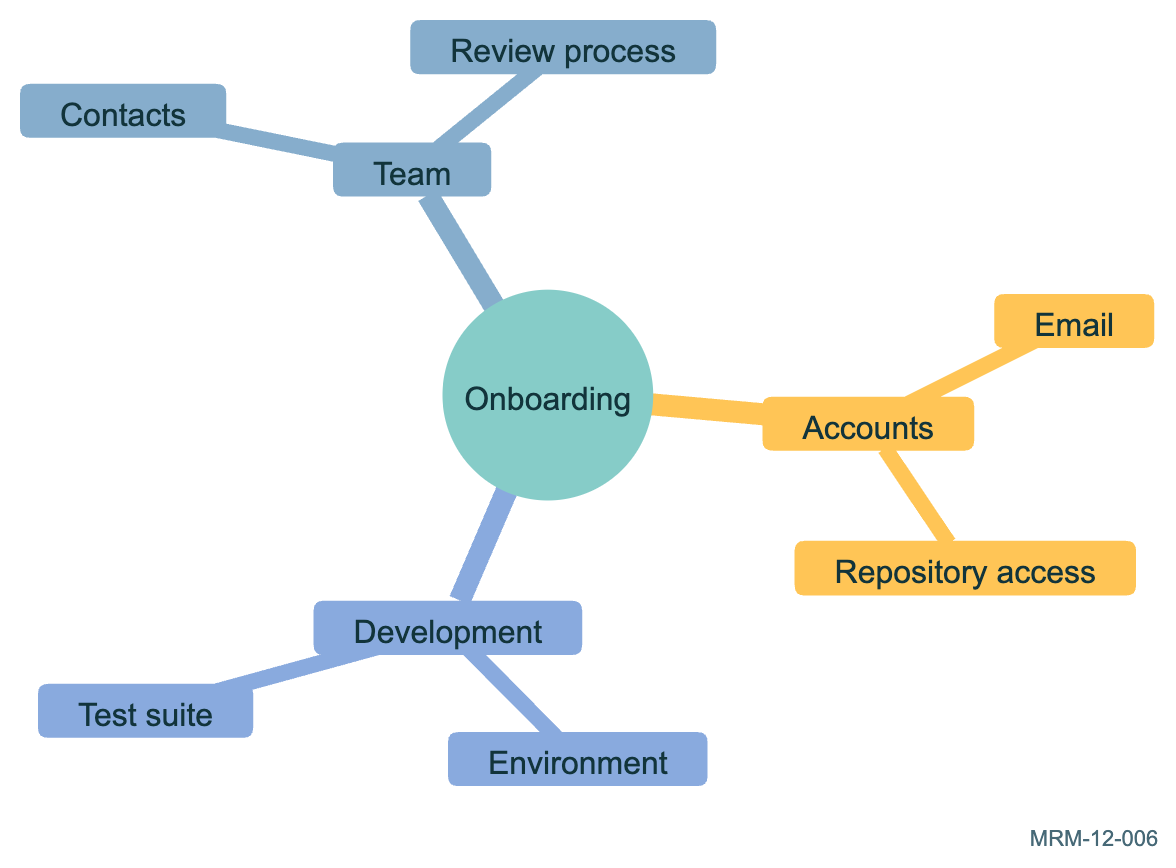
Copy link MRM-12-006 Organize onboarding A mindmap groups topics without asserting their chronological order.
Back to diagram overview Mermaid source mindmap
root (( Onboarding ))
Accounts
Email
Repository access
Development
Environment
Test suite
Team
Contacts
Review process
Parameter Meaning in this example HierarchyOrganize related topics without drawing a workflow.
Actual output MRM-12-006 · Rendered by Mermaid Mermaid renderer log Standard output Render this diagram --no-install mmdc -i examples/MRM-12-006.mmd -o figures/MRM-12-006.svg -c examples/mermaid-config.json -I MRM-12-006 --no-font-embed
Uses the shared rendering setup and configuration .
Download: Mermaid source · SVG diagram · Vector PDF · PNG preview · Render configuration
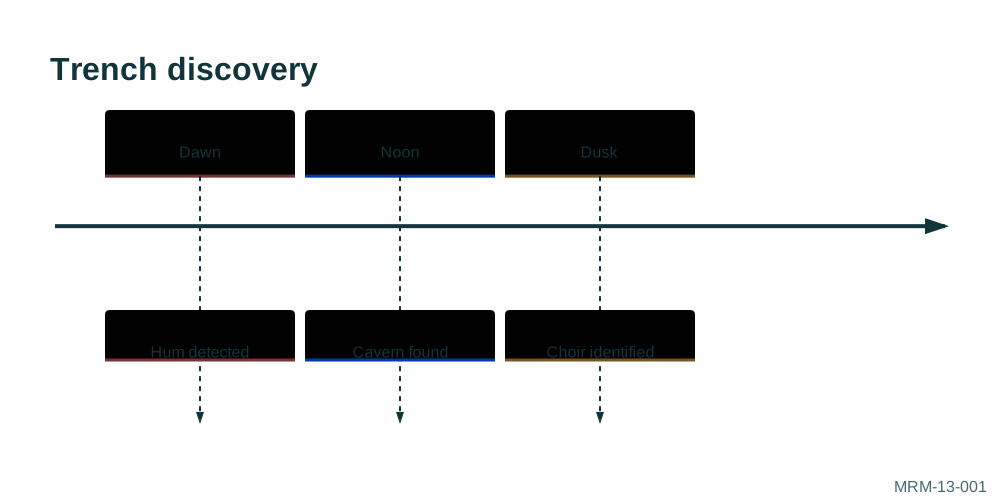
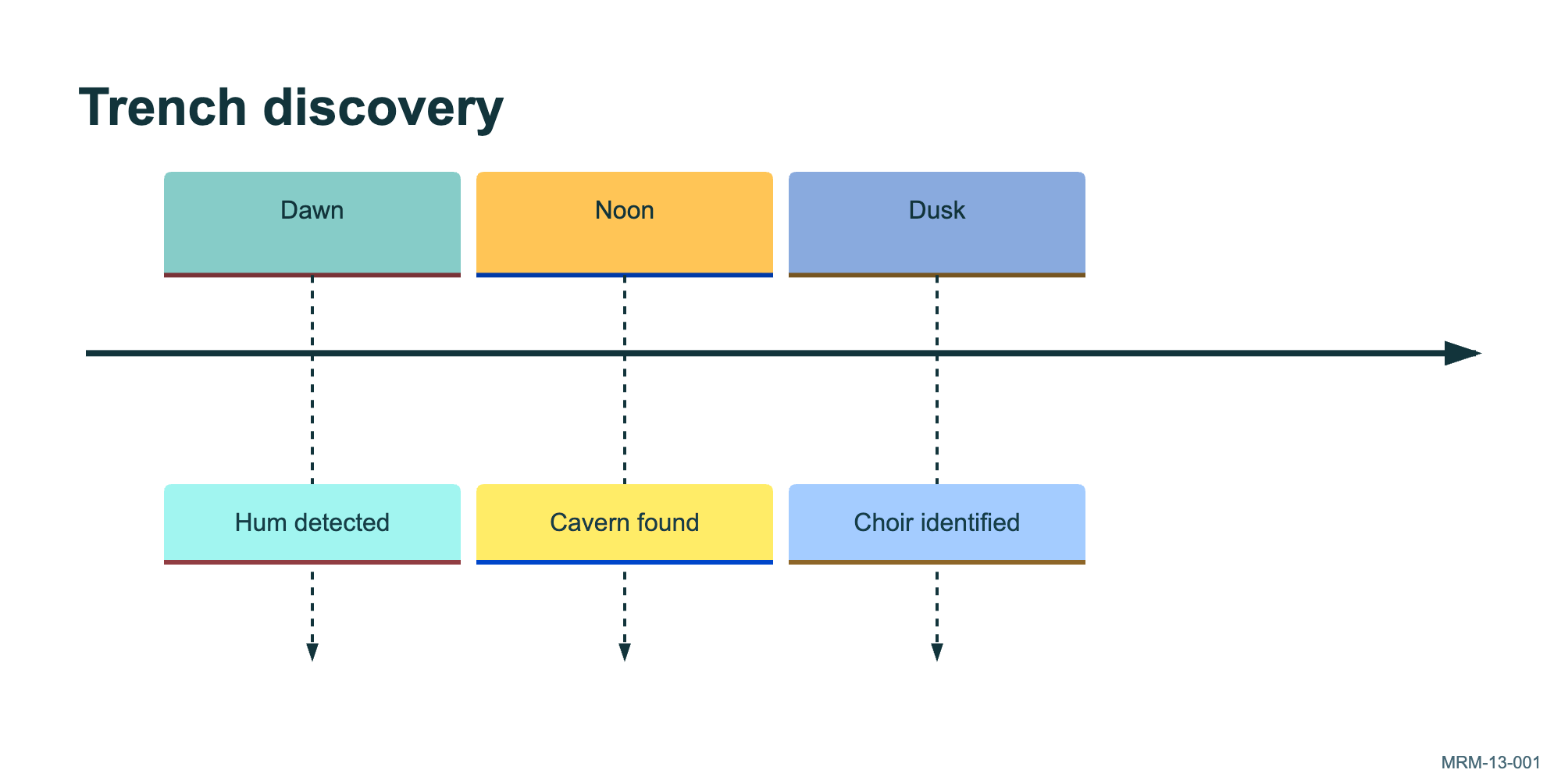
Copy link MRM-13-001 Three acts of a discovery The period labels are authored text. A timeline displays their order; it does not infer an elapsed-time scale.
Back to diagram overview Mermaid source timeline
title Trench discovery
Dawn : Hum detected
Noon : Cavern found
Dusk : Choir identified
Parameter Meaning in this example Period : eventAssociate an event with a displayed period.
Actual output MRM-13-001 · Rendered by Mermaid Mermaid renderer log Standard output Render this diagram --no-install mmdc -i examples/MRM-13-001.mmd -o figures/MRM-13-001.svg -c examples/mermaid-config.json -I MRM-13-001 --no-font-embed
Uses the shared rendering setup and configuration .
Download: Mermaid source · SVG diagram · Vector PDF · PNG preview · Render configuration
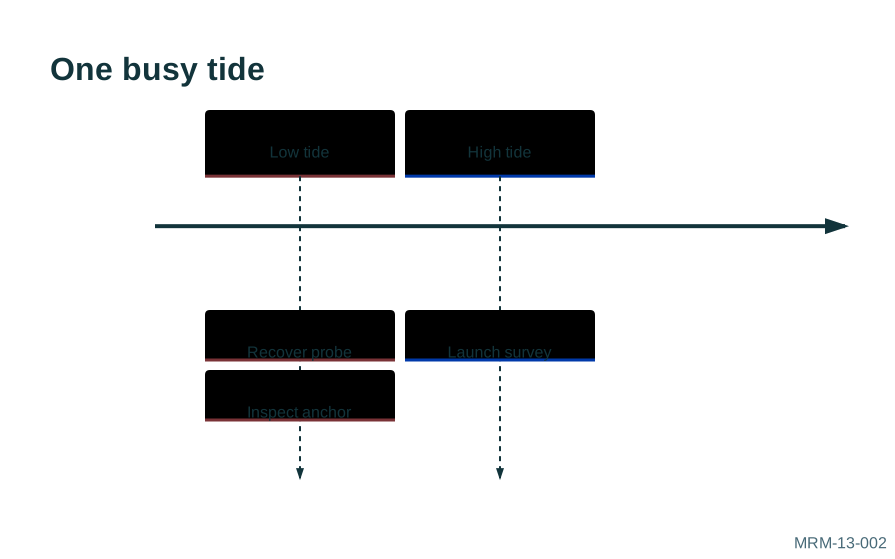
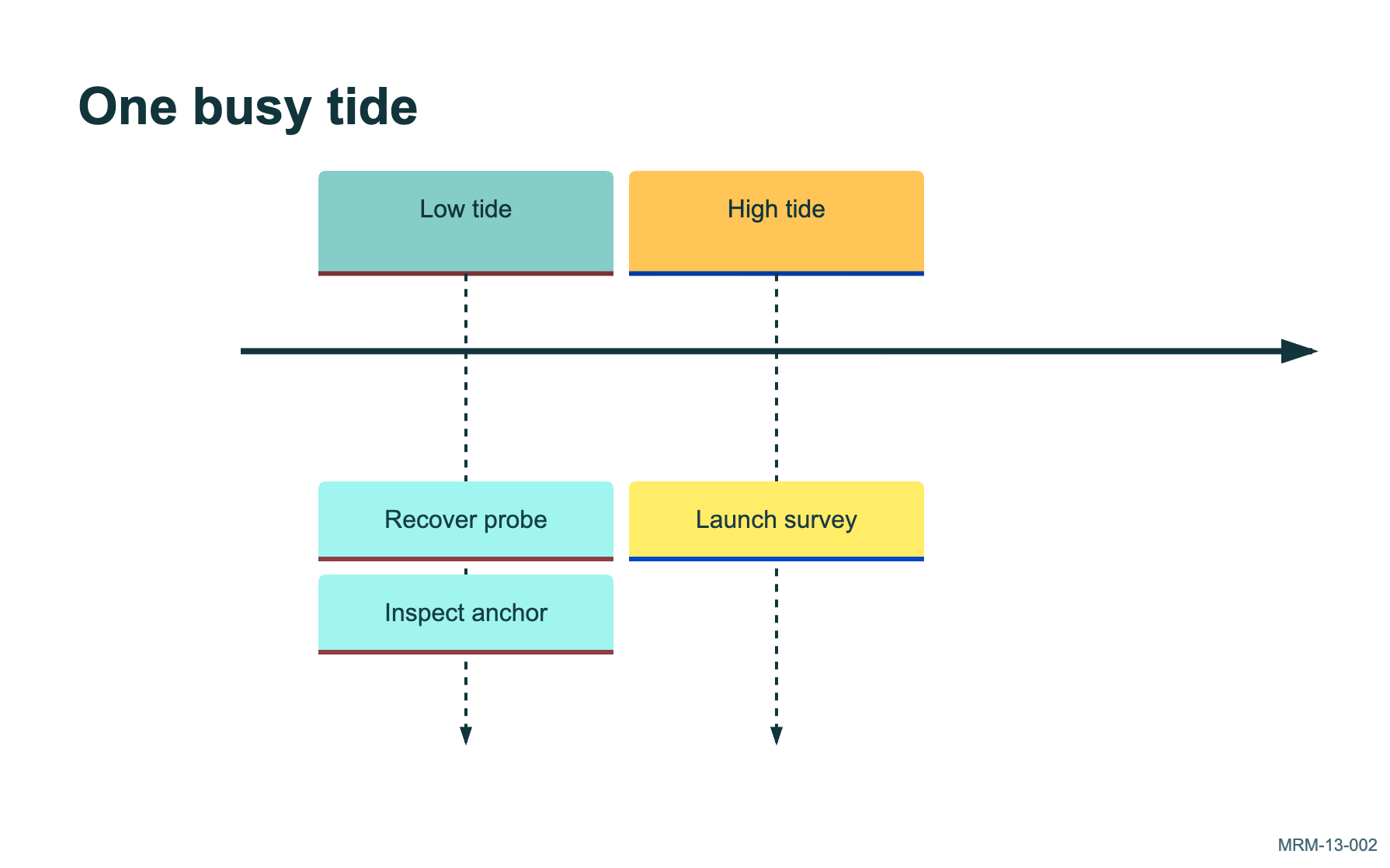
Copy link MRM-13-002 Put two events in one period Repeated colons attach several events to the same period. This avoids inventing an order within that period.
Back to diagram overview Mermaid source timeline
title One busy tide
Low tide : Recover probe : Inspect anchor
High tide : Launch survey
Parameter Meaning in this example : event : eventAdd more than one event to a period.
Actual output MRM-13-002 · Rendered by Mermaid Mermaid renderer log Standard output Render this diagram --no-install mmdc -i examples/MRM-13-002.mmd -o figures/MRM-13-002.svg -c examples/mermaid-config.json -I MRM-13-002 --no-font-embed
Uses the shared rendering setup and configuration .
Download: Mermaid source · SVG diagram · Vector PDF · PNG preview · Render configuration
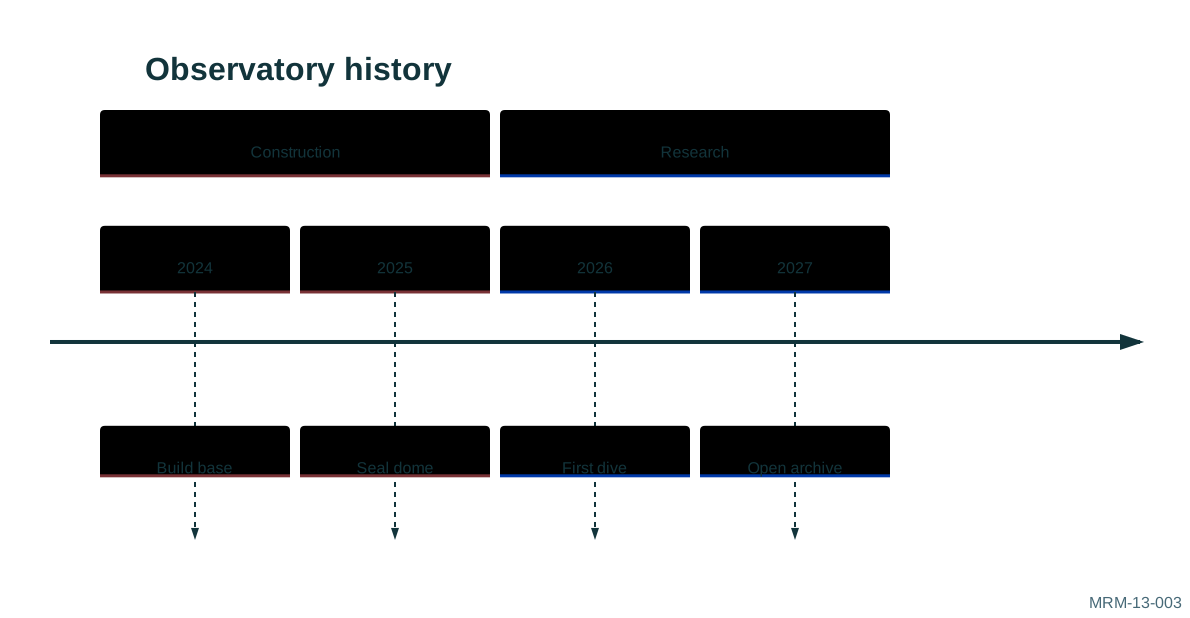
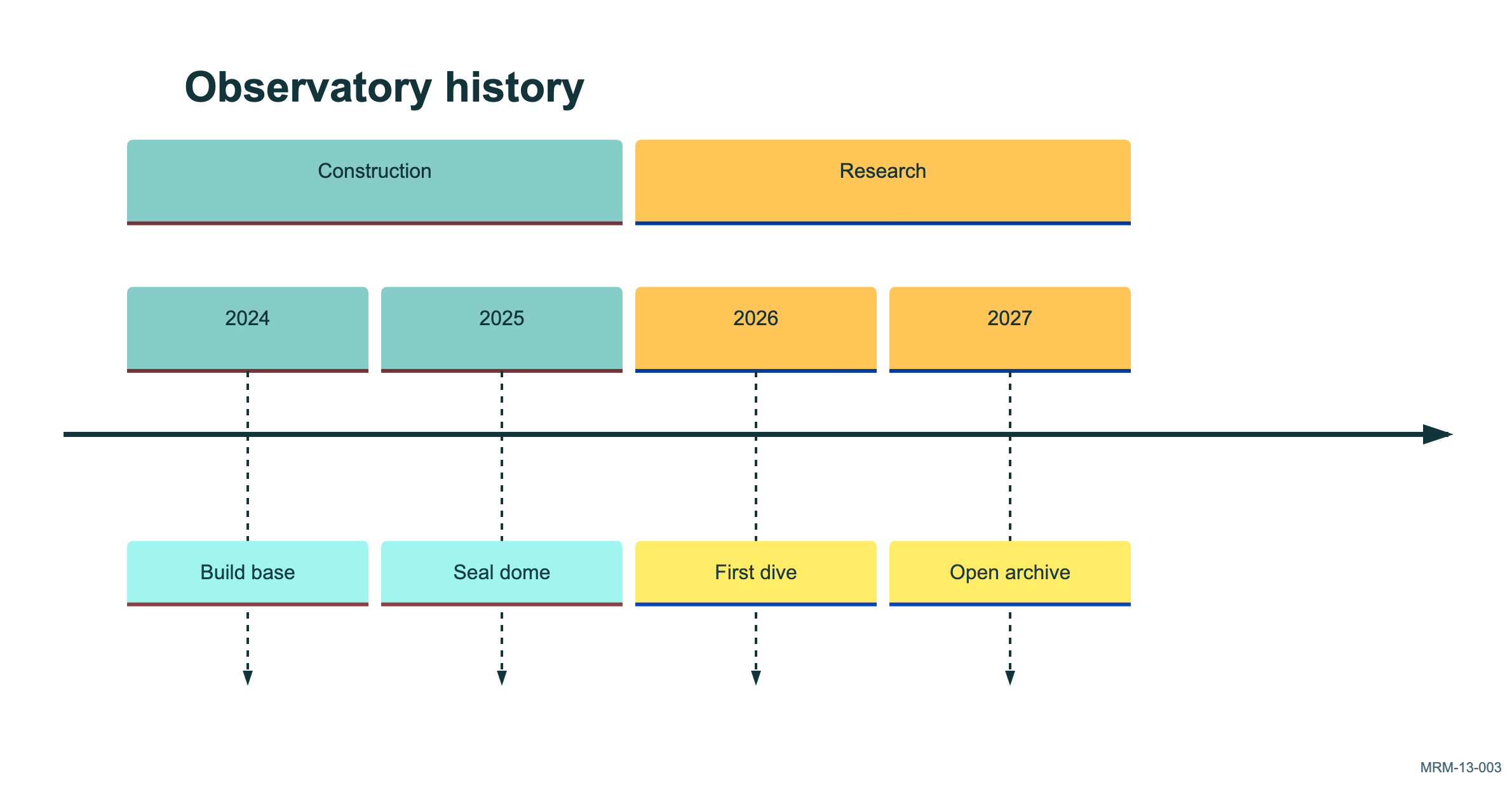
Copy link MRM-13-003 Divide the mission into eras Sections collect related periods into larger phases. Their names are narrative headings, not duration calculations.
Back to diagram overview Mermaid source timeline
title Observatory history
section Construction
2024 : Build base
2025 : Seal dome
section Research
2026 : First dive
2027 : Open archive
Parameter Meaning in this example sectionGroup periods into a named phase.
Actual output MRM-13-003 · Rendered by Mermaid Mermaid renderer log Standard output Render this diagram --no-install mmdc -i examples/MRM-13-003.mmd -o figures/MRM-13-003.svg -c examples/mermaid-config.json -I MRM-13-003 --no-font-embed
Uses the shared rendering setup and configuration .
Download: Mermaid source · SVG diagram · Vector PDF · PNG preview · Render configuration
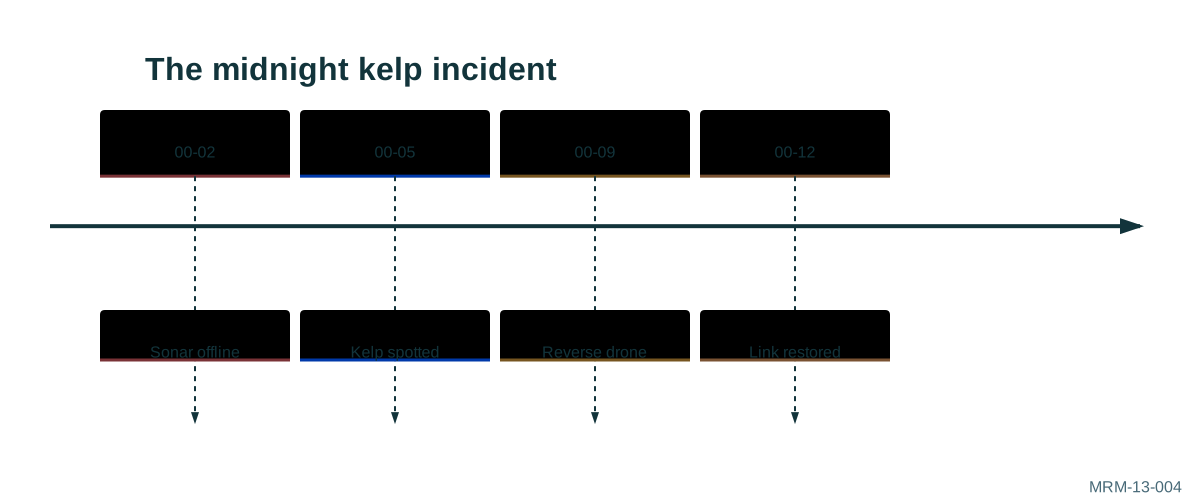
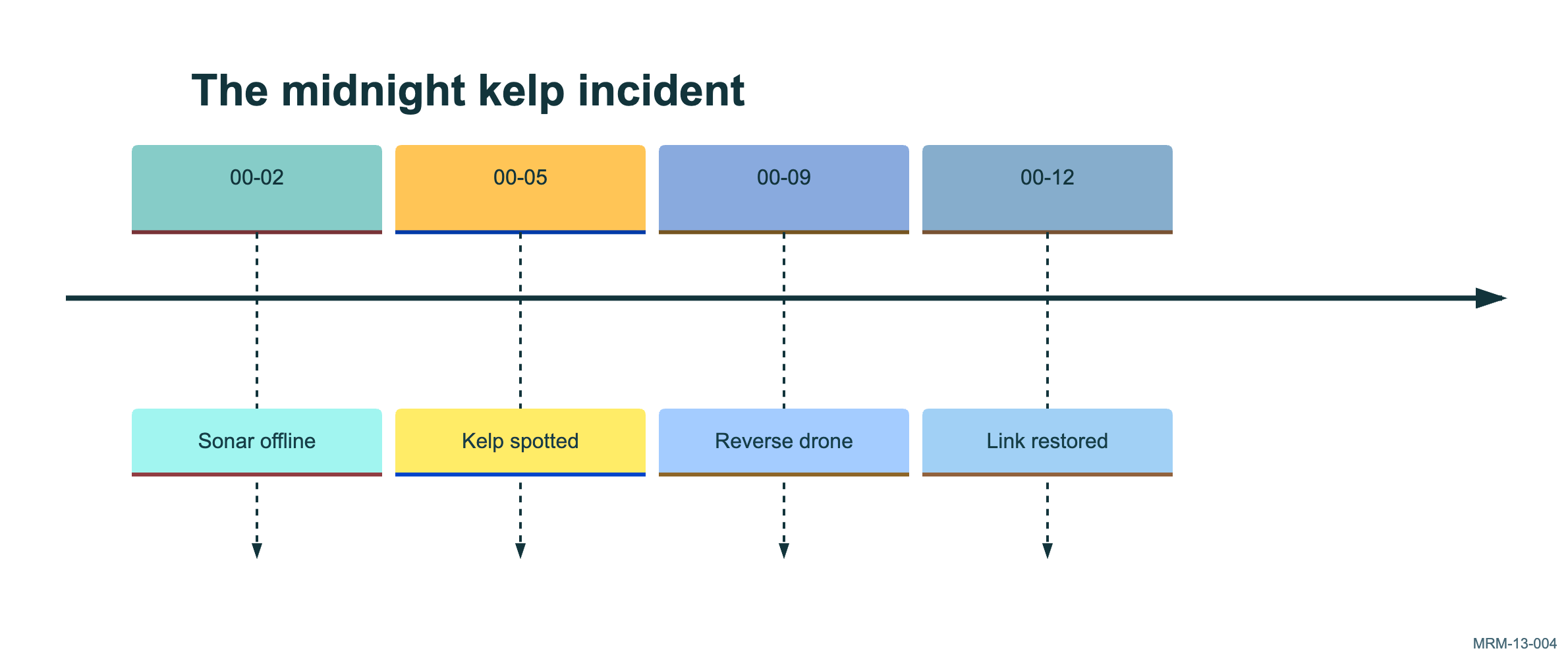
Copy link MRM-13-004 Write a fictional incident chronology The labels include explicit times because precise order matters in this story. For message causality, use a sequence diagram instead.
Back to diagram overview Mermaid source timeline
title The midnight kelp incident
00 -02 : Sonar offline
00 -05 : Kelp spotted
00 -09 : Reverse drone
00 -12 : Link restored
Parameter Meaning in this example Explicit period labelsGive readers the chronological detail that matters.
Actual output MRM-13-004 · Rendered by Mermaid Mermaid renderer log Standard output Render this diagram --no-install mmdc -i examples/MRM-13-004.mmd -o figures/MRM-13-004.svg -c examples/mermaid-config.json -I MRM-13-004 --no-font-embed
Uses the shared rendering setup and configuration .
Download: Mermaid source · SVG diagram · Vector PDF · PNG preview · Render configuration
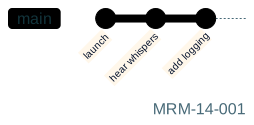
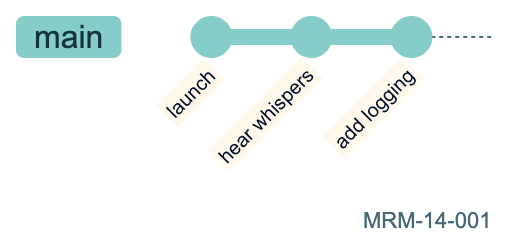
Copy link MRM-14-001 Leave a trail of commits Each commit creates a new point in the drawn history. This is a diagram of Git concepts; it does not modify a repository.
Back to diagram overview Mermaid source gitGraph
commit id : "launch"
commit id : "hear whispers"
commit id : "add logging"
Parameter Meaning in this example commit id:Give a displayed commit a memorable label.
Actual output MRM-14-001 · Rendered by Mermaid Mermaid renderer log Standard output Render this diagram --no-install mmdc -i examples/MRM-14-001.mmd -o figures/MRM-14-001.svg -c examples/mermaid-config.json -I MRM-14-001 --no-font-embed
Uses the shared rendering setup and configuration .
Download: Mermaid source · SVG diagram · Vector PDF · PNG preview · Render configuration
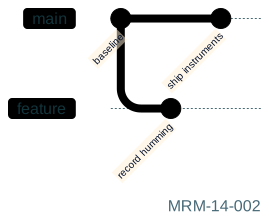
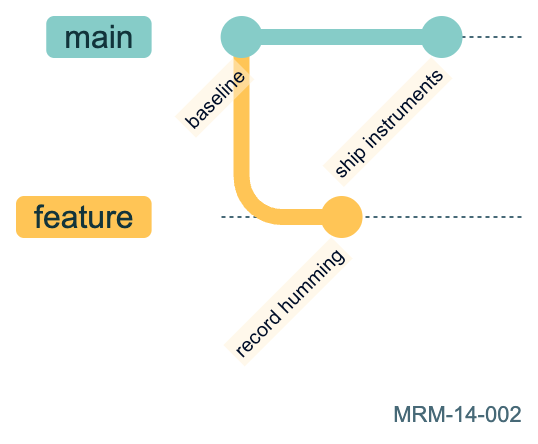
Copy link MRM-14-002 Investigate on a branch A branch creates a parallel line of development. checkout returns the drawing cursor to main.
Back to diagram overview Mermaid source gitGraph
commit id : "baseline"
branch feature
commit id : "record humming"
checkout main
commit id : "ship instruments"
Parameter Meaning in this example branch / checkoutCreate a branch and select the current line.
Actual output MRM-14-002 · Rendered by Mermaid Mermaid renderer log Standard output Render this diagram --no-install mmdc -i examples/MRM-14-002.mmd -o figures/MRM-14-002.svg -c examples/mermaid-config.json -I MRM-14-002 --no-font-embed
Uses the shared rendering setup and configuration .
Download: Mermaid source · SVG diagram · Vector PDF · PNG preview · Render configuration
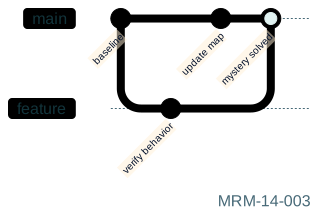
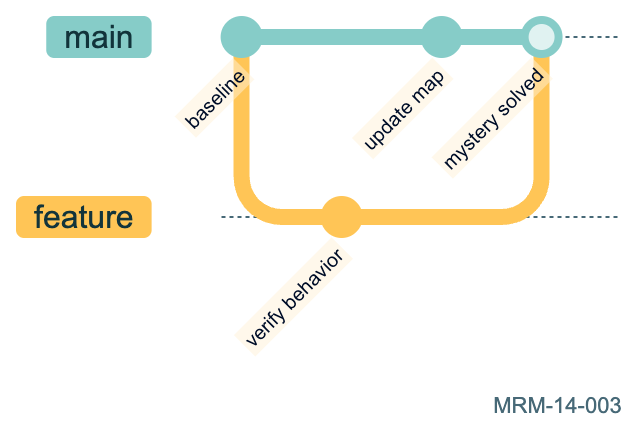
Copy link MRM-14-003 Merge the feature investigation The merge joins the selected branch into the current branch. The two lines retain their earlier histories.
Back to diagram overview Mermaid source gitGraph
commit id : "baseline"
branch feature
commit id : "verify behavior"
checkout main
commit id : "update map"
merge feature id : "mystery solved"
Parameter Meaning in this example merge featureJoin the feature branch into the current branch.
Actual output MRM-14-003 · Rendered by Mermaid Mermaid renderer log Standard output Render this diagram --no-install mmdc -i examples/MRM-14-003.mmd -o figures/MRM-14-003.svg -c examples/mermaid-config.json -I MRM-14-003 --no-font-embed
Uses the shared rendering setup and configuration .
Download: Mermaid source · SVG diagram · Vector PDF · PNG preview · Render configuration
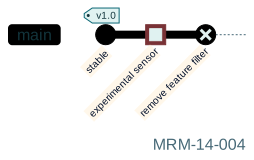
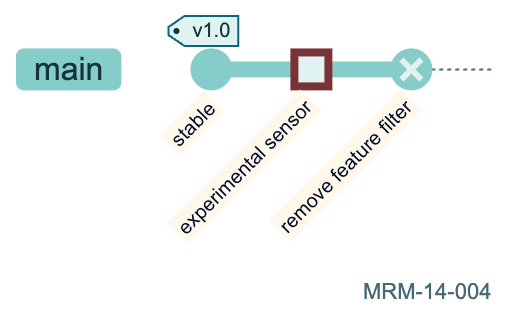
Copy link MRM-14-004 Mark a release and a reversal Tags annotate commits while commit types change their visual presentation. REVERSE is diagram notation, not an executed git revert.
Back to diagram overview Mermaid source gitGraph
commit id : "stable" tag : "v1.0"
commit id : "experimental sensor" type : HIGHLIGHT
commit id : "remove feature filter" type : REVERSE
Parameter Meaning in this example type: REVERSEUse the reverse marker for the story being illustrated.
Actual output MRM-14-004 · Rendered by Mermaid Mermaid renderer log Standard output Render this diagram --no-install mmdc -i examples/MRM-14-004.mmd -o figures/MRM-14-004.svg -c examples/mermaid-config.json -I MRM-14-004 --no-font-embed
Uses the shared rendering setup and configuration .
Download: Mermaid source · SVG diagram · Vector PDF · PNG preview · Render configuration
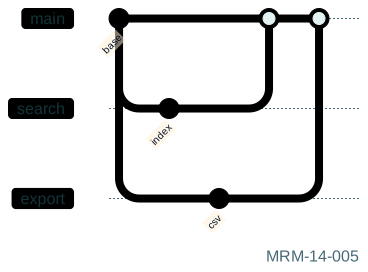
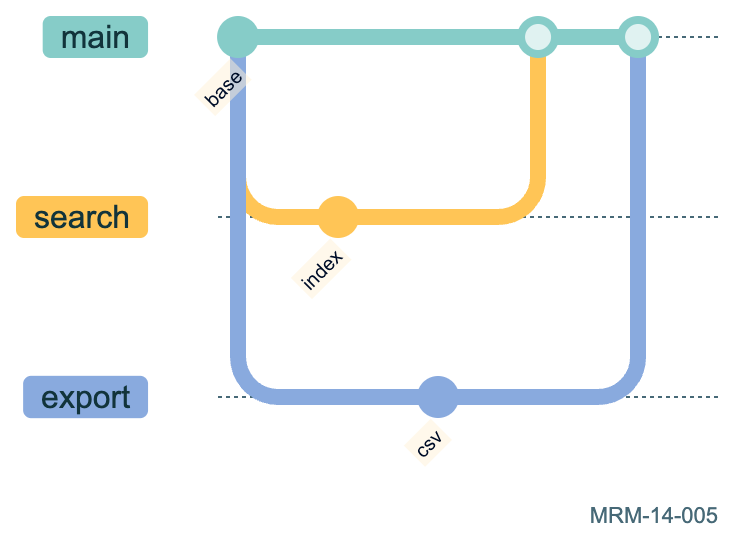
Copy link MRM-14-005 Merge two independent features Separate feature branches can progress from the same baseline. The two merges retain their own histories.
Back to diagram overview Mermaid source gitGraph
commit id : "base"
branch search
commit id : "index"
checkout main
branch export
commit id : "csv"
checkout main
merge search
merge export
Parameter Meaning in this example Two branchesShow independent development and integration.
Actual output MRM-14-005 · Rendered by Mermaid Mermaid renderer log Standard output Render this diagram --no-install mmdc -i examples/MRM-14-005.mmd -o figures/MRM-14-005.svg -c examples/mermaid-config.json -I MRM-14-005 --no-font-embed
Uses the shared rendering setup and configuration .
Download: Mermaid source · SVG diagram · Vector PDF · PNG preview · Render configuration
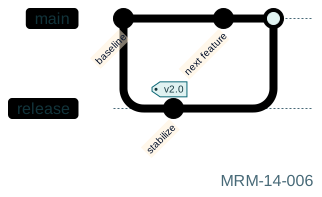
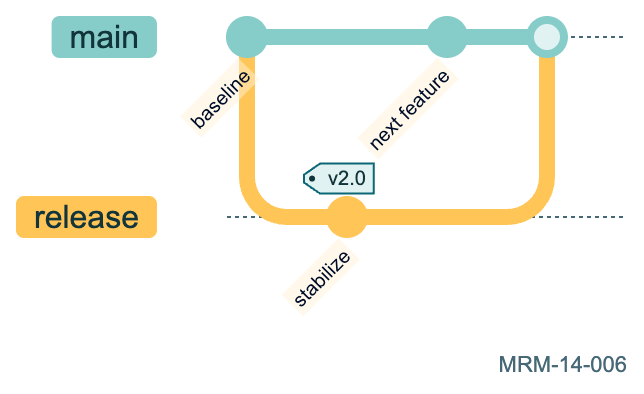
Copy link MRM-14-006 Keep a release branch The release branch receives a stabilization commit while main continues. The drawing describes the policy rather than executing Git.
Back to diagram overview Mermaid source gitGraph
commit id : "baseline"
branch release
commit id : "stabilize" tag : "v2.0"
checkout main
commit id : "next feature"
merge release
Parameter Meaning in this example branch releaseSeparate stabilization from ongoing development.
Actual output MRM-14-006 · Rendered by Mermaid Mermaid renderer log Standard output Render this diagram --no-install mmdc -i examples/MRM-14-006.mmd -o figures/MRM-14-006.svg -c examples/mermaid-config.json -I MRM-14-006 --no-font-embed
Uses the shared rendering setup and configuration .
Download: Mermaid source · SVG diagram · Vector PDF · PNG preview · Render configuration
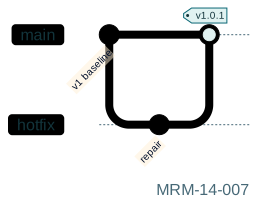
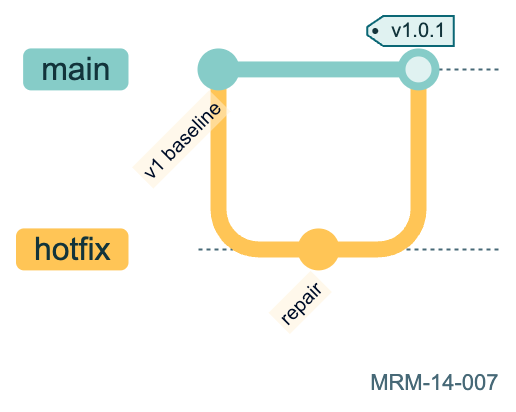
Copy link MRM-14-007 Deliver a hotfix A short-lived branch isolates an urgent change. The tag marks the resulting release on main.
Back to diagram overview Mermaid source gitGraph
commit id : "v1 baseline"
branch hotfix
commit id : "repair"
checkout main
merge hotfix tag : "v1.0.1"
Parameter Meaning in this example merge ... tag:Mark a release at the integration point.
Actual output MRM-14-007 · Rendered by Mermaid Mermaid renderer log Standard output Render this diagram --no-install mmdc -i examples/MRM-14-007.mmd -o figures/MRM-14-007.svg -c examples/mermaid-config.json -I MRM-14-007 --no-font-embed
Uses the shared rendering setup and configuration .
Download: Mermaid source · SVG diagram · Vector PDF · PNG preview · Render configuration
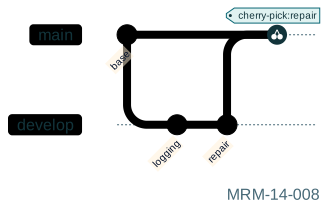
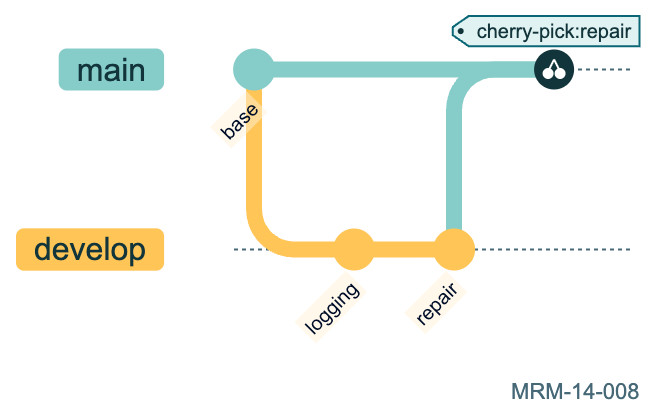
Copy link MRM-14-008 Cherry-pick one change Cherry-pick copies a selected commit into the current history. The original commit must have an explicit ID.
Back to diagram overview Mermaid source gitGraph
commit id : "base"
branch develop
commit id : "logging"
commit id : "repair"
checkout main
cherry-pick id : "repair"
Parameter Meaning in this example cherry-pick id:Select one commit without merging the complete branch.
Actual output MRM-14-008 · Rendered by Mermaid Mermaid renderer log Standard output Render this diagram --no-install mmdc -i examples/MRM-14-008.mmd -o figures/MRM-14-008.svg -c examples/mermaid-config.json -I MRM-14-008 --no-font-embed
Uses the shared rendering setup and configuration .
Download: Mermaid source · SVG diagram · Vector PDF · PNG preview · Render configuration
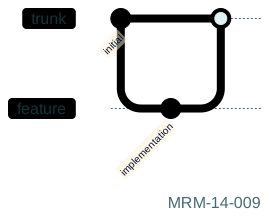
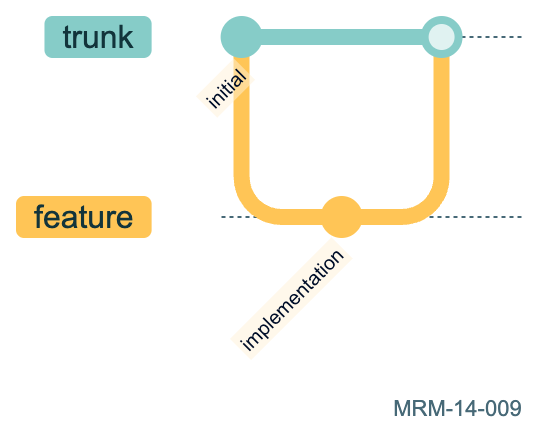
Copy link MRM-14-009 Name the main branch The mainBranchName configuration changes the initial branch name. Keep that setting with a portable source file.
Back to diagram overview Mermaid source ---
config :
gitGraph :
mainBranchName : trunk
---
gitGraph
commit id : "initial"
branch feature
commit id : "implementation"
checkout trunk
merge feature
Parameter Meaning in this example mainBranchNameChoose the initial branch name.
Actual output MRM-14-009 · Rendered by Mermaid Mermaid renderer log Standard output Render this diagram --no-install mmdc -i examples/MRM-14-009.mmd -o figures/MRM-14-009.svg -c examples/mermaid-config.json -I MRM-14-009 --no-font-embed
Uses the shared rendering setup and configuration .
Download: Mermaid source · SVG diagram · Vector PDF · PNG preview · Render configuration
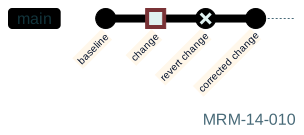
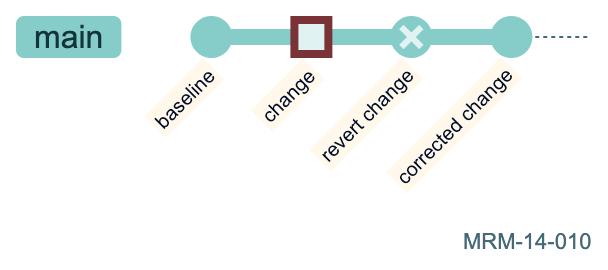
Copy link MRM-14-010 Show a rollback history A reversal marker describes a new commit in the drawing. It does not erase an earlier point from the history.
Back to diagram overview Mermaid source gitGraph
commit id : "baseline"
commit id : "change" type : HIGHLIGHT
commit id : "revert change" type : REVERSE
commit id : "corrected change"
Parameter Meaning in this example REVERSEMark a reversal while retaining the earlier history.
Actual output MRM-14-010 · Rendered by Mermaid Mermaid renderer log Standard output Render this diagram --no-install mmdc -i examples/MRM-14-010.mmd -o figures/MRM-14-010.svg -c examples/mermaid-config.json -I MRM-14-010 --no-font-embed
Uses the shared rendering setup and configuration .
Download: Mermaid source · SVG diagram · Vector PDF · PNG preview · Render configuration
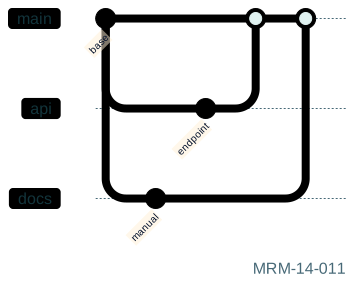
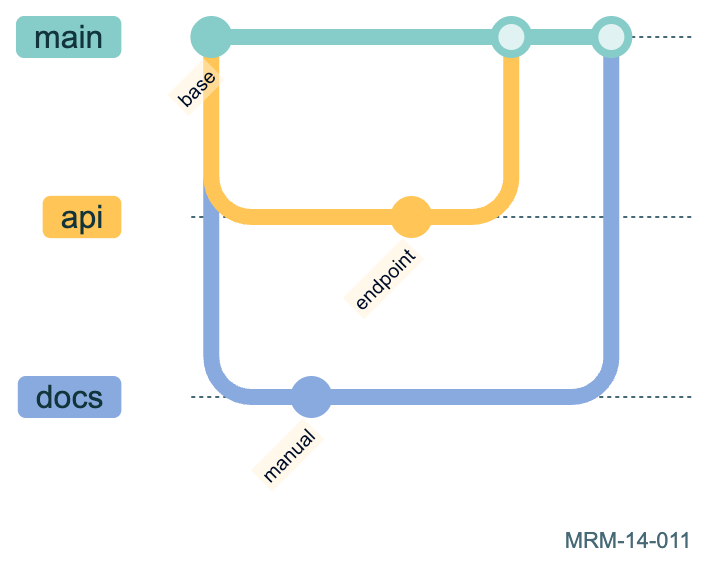
Copy link MRM-14-011 Order several branches Explicit branch order makes repeated diagrams easier to compare. The numbers control presentation rather than merge priority.
Back to diagram overview Mermaid source gitGraph
commit id : "base"
branch docs order : 2
commit id : "manual"
checkout main
branch api order : 1
commit id : "endpoint"
checkout main
merge api
merge docs
Parameter Meaning in this example order:Choose the displayed branch ordering.
Actual output MRM-14-011 · Rendered by Mermaid Mermaid renderer log Standard output Render this diagram --no-install mmdc -i examples/MRM-14-011.mmd -o figures/MRM-14-011.svg -c examples/mermaid-config.json -I MRM-14-011 --no-font-embed
Uses the shared rendering setup and configuration .
Download: Mermaid source · SVG diagram · Vector PDF · PNG preview · Render configuration
Copy link MRM-14-012 Model maintenance and development An older release and a development branch can both receive work. A maintenance tag identifies the supported patch release.
Back to diagram overview Mermaid source gitGraph
commit id : "release base" tag : "v3.0"
branch maintenance
commit id : "security repair" tag : "v3.0.1"
checkout main
branch develop
commit id : "new format"
checkout main
merge develop tag : "v4.0"
Parameter Meaning in this example Tags on separate branchesDistinguish maintenance and new development.
Actual output MRM-14-012 · Rendered by Mermaid Mermaid renderer log Standard output Render this diagram --no-install mmdc -i examples/MRM-14-012.mmd -o figures/MRM-14-012.svg -c examples/mermaid-config.json -I MRM-14-012 --no-font-embed
Uses the shared rendering setup and configuration .
Download: Mermaid source · SVG diagram · Vector PDF · PNG preview · Render configuration
Copy link MRM-15-001 Where did the ship time go? These fictional hours add to a whole. A pie is appropriate for a small number of positive parts with a meaningful common total.
Back to diagram overview Mermaid source pie showData
title Ship time in hours
"Surveying" : 36
"Transit" : 18
"Repairs" : 6
Parameter Meaning in this example showDataDisplay values next to the category labels.
Actual output MRM-15-001 · Rendered by Mermaid Mermaid renderer log Standard output Render this diagram --no-install mmdc -i examples/MRM-15-001.mmd -o figures/MRM-15-001.svg -c examples/mermaid-config.json -I MRM-15-001 --no-font-embed
Uses the shared rendering setup and configuration .
Download: Mermaid source · SVG diagram · Vector PDF · PNG preview · Render configuration
Copy link MRM-15-002 Reduce the number of slices Aggregate minor categories when their distinctions do not help the question. Keep an explicit Other label.
Back to diagram overview Mermaid source pie showData
title Fictional archive storage in GB
"Images" : 70
"Audio" : 20
"Other" : 10
Parameter Meaning in this example "Other" : 10Keep small categories visible as one named aggregate.
Actual output MRM-15-002 · Rendered by Mermaid Mermaid renderer log Standard output Render this diagram --no-install mmdc -i examples/MRM-15-002.mmd -o figures/MRM-15-002.svg -c examples/mermaid-config.json -I MRM-15-002 --no-font-embed
Uses the shared rendering setup and configuration .
Download: Mermaid source · SVG diagram · Vector PDF · PNG preview · Render configuration
Copy link MRM-15-003 Choose the next expedition Coordinates run from zero to one. This is an invented prioritization exercise, not a measured estimate of scientific value.
Back to diagram overview Mermaid source quadrantChart
title Next expedition
x- axis Low effort --> High effort
y-axis Low insight --> High insight
quadrant-1 Plan carefully
quadrant-2 Try first
quadrant-3 Park it
quadrant-4 Reconsider
Reef audio : [ 0.2 , 0.8 ]
Abyss drilling : [ 0.85 , 0.9 ]
Paint buoy : [ 0.15 , 0.2 ]
Parameter Meaning in this example [x, y]Place an item on two normalized judgment axes.
Actual output MRM-15-003 · Rendered by Mermaid Mermaid renderer log Standard output Render this diagram --no-install mmdc -i examples/MRM-15-003.mmd -o figures/MRM-15-003.svg -c examples/mermaid-config.json -I MRM-15-003 --no-font-embed
Uses the shared rendering setup and configuration .
Download: Mermaid source · SVG diagram · Vector PDF · PNG preview · Render configuration
Copy link MRM-15-004 Compare risks and preparation Changing the axis meanings changes the interpretation of each quadrant. Label the ends so readers can interpret the positions.
Back to diagram overview Mermaid source quadrantChart
title Mission readiness
x- axis Low preparation --> High preparation
y-axis Low uncertainty --> High uncertainty
quadrant-1 Rehearse
quadrant-2 Investigate
quadrant-3 Prepare
quadrant-4 Proceed
Kelp survey : [ 0.8 , 0.2 ]
Singing trench : [ 0.7 , 0.9 ]
Night dive : [ 0.2 , 0.6 ]
Parameter Meaning in this example x-axis / y-axisState the meaning and direction of both axes.
Actual output MRM-15-004 · Rendered by Mermaid Mermaid renderer log Standard output Render this diagram --no-install mmdc -i examples/MRM-15-004.mmd -o figures/MRM-15-004.svg -c examples/mermaid-config.json -I MRM-15-004 --no-font-embed
Uses the shared rendering setup and configuration .
Download: Mermaid source · SVG diagram · Vector PDF · PNG preview · Render configuration
Copy link MRM-16-001 Count samples by site Bars compare discrete categories. A zero baseline makes their lengths proportional to these fictional counts.
Back to diagram overview Mermaid source xychart-beta
title "Samples by site"
x- axis [ Reef , Trench , Vent ]
y-axis "Samples" 0 --> 20
bar [ 12 , 18 , 7 ]
Parameter Meaning in this example bar [12, 18, 7]Assign one value to each category in order.
Actual output MRM-16-001 · Rendered by Mermaid Mermaid renderer log Standard output Render this diagram --no-install mmdc -i examples/MRM-16-001.mmd -o figures/MRM-16-001.svg -c examples/mermaid-config.json -I MRM-16-001 --no-font-embed
Uses the shared rendering setup and configuration .
Download: Mermaid source · SVG diagram · Vector PDF · PNG preview · Render configuration
Copy link MRM-16-002 Track a temperature series A line is useful for ordered observations. The units and numeric range are explicit; the observations are invented.
Back to diagram overview Mermaid source xychart-beta
title "Water temperature"
x- axis [ Mon , Tue , Wed , Thu ]
y-axis "Degrees C" 0 --> 20
line [ 14 , 13 , 15 , 16 ]
Parameter Meaning in this example y-axis "Degrees C"Give the numeric axis an informative unit.
Actual output MRM-16-002 · Rendered by Mermaid Mermaid renderer log Standard output Render this diagram --no-install mmdc -i examples/MRM-16-002.mmd -o figures/MRM-16-002.svg -c examples/mermaid-config.json -I MRM-16-002 --no-font-embed
Uses the shared rendering setup and configuration .
Download: Mermaid source · SVG diagram · Vector PDF · PNG preview · Render configuration
Copy link MRM-16-003 Compare observations with a target The line and bars share a unit and scale. Explain the series in surrounding prose because this renderer does not supply a full series legend.
Back to diagram overview Mermaid source xychart-beta
title "Samples and daily target of 10"
x- axis [ Mon , Tue , Wed , Thu ]
y-axis "Samples" 0 --> 20
bar [ 8 , 12 , 9 , 16 ]
line [ 10 , 10 , 10 , 10 ]
Parameter Meaning in this example bar / lineOverlay observed counts and the stated target on one scale.
Actual output MRM-16-003 · Rendered by Mermaid Mermaid renderer log Standard output Render this diagram --no-install mmdc -i examples/MRM-16-003.mmd -o figures/MRM-16-003.svg -c examples/mermaid-config.json -I MRM-16-003 --no-font-embed
Uses the shared rendering setup and configuration .
Download: Mermaid source · SVG diagram · Vector PDF · PNG preview · Render configuration
Copy link MRM-16-004 Turn the category comparison sideways Horizontal layout leaves more room for category labels. The data and zero baseline match the earlier bar chart.
Back to diagram overview Compare with MRM-16-001 · Count samples by site .
Mermaid source xychart-beta horizontal
title "Samples by site"
x- axis [ Reef , Trench , Vent ]
y-axis "Samples" 0 --> 20
bar [ 12 , 18 , 7 ]
Parameter Meaning in this example horizontalRotate the chart layout.
Actual output MRM-16-004 · Rendered by Mermaid Mermaid renderer log Standard output Render this diagram --no-install mmdc -i examples/MRM-16-004.mmd -o figures/MRM-16-004.svg -c examples/mermaid-config.json -I MRM-16-004 --no-font-embed
Uses the shared rendering setup and configuration .
Download: Mermaid source · SVG diagram · Vector PDF · PNG preview · Render configuration
Copy link MRM-16-005 A numeric function series The array length matches the implicit positions on the numeric x axis.
Back to diagram overview Mermaid source xychart-beta
title "Quadratic samples"
x- axis 1 --> 5
y-axis "Value" 0 --> 25
line [ 1 , 4 , 9 , 16 , 25 ]
Parameter Meaning in this example Numeric x-axisLabel an ordered numeric domain.
Actual output MRM-16-005 · Rendered by Mermaid Mermaid renderer log Standard output Render this diagram --no-install mmdc -i examples/MRM-16-005.mmd -o figures/MRM-16-005.svg -c examples/mermaid-config.json -I MRM-16-005 --no-font-embed
Uses the shared rendering setup and configuration .
Download: Mermaid source · SVG diagram · Vector PDF · PNG preview · Render configuration
Copy link MRM-16-006 Compare monthly totals A bar chart can compare discrete reporting periods without implying continuous interpolation.
Back to diagram overview Mermaid source xychart-beta
title "Monthly requests"
x- axis [ Jan , Feb , Mar , Apr ]
y-axis "Requests" 0 --> 100
bar [ 42 , 58 , 71 , 65 ]
Parameter Meaning in this example Zero baselineKeep bar lengths proportional to the stated counts.
Actual output MRM-16-006 · Rendered by Mermaid Mermaid renderer log Standard output Render this diagram --no-install mmdc -i examples/MRM-16-006.mmd -o figures/MRM-16-006.svg -c examples/mermaid-config.json -I MRM-16-006 --no-font-embed
Uses the shared rendering setup and configuration .
Download: Mermaid source · SVG diagram · Vector PDF · PNG preview · Render configuration
Copy link MRM-17-001 Trace an invented power budget Each CSV row gives a source, destination and quantity. All values here are watts in an illustrative steady-state budget.
Back to diagram overview Mermaid source sankey-beta
Solar , Station , 100
Station , Lab , 60
Station , Life support , 40
Parameter Meaning in this example source,target,valueDefine one weighted connection per CSV row.
Actual output MRM-17-001 · Rendered by Mermaid Mermaid renderer log Standard output Render this diagram --no-install mmdc -i examples/MRM-17-001.mmd -o figures/MRM-17-001.svg -c examples/mermaid-config.json -I MRM-17-001 --no-font-embed
Uses the shared rendering setup and configuration .
Download: Mermaid source · SVG diagram · Vector PDF · PNG preview · Render configuration
Copy link MRM-17-002 Make losses explicit The outgoing values add to the incoming value. Mermaid draws the weights but does not enforce your conservation assumptions.
Back to diagram overview Mermaid source sankey-beta
Generator , Distribution , 100
Distribution , Instruments , 70
Distribution , Heat loss , 30
Parameter Meaning in this example Heat lossShow a loss as a named destination.
Actual output MRM-17-002 · Rendered by Mermaid Mermaid renderer log Standard output Render this diagram --no-install mmdc -i examples/MRM-17-002.mmd -o figures/MRM-17-002.svg -c examples/mermaid-config.json -I MRM-17-002 --no-font-embed
Uses the shared rendering setup and configuration .
Download: Mermaid source · SVG diagram · Vector PDF · PNG preview · Render configuration
Copy link MRM-17-003 Combine two sources Two sources feed the same intermediate node. The total arriving at the bus equals its total outgoing power.
Back to diagram overview Mermaid source sankey-beta
Solar , Bus , 60
Battery , Bus , 40
Bus , Sonar , 45
Bus , Lighting , 35
Bus , Computing , 20
Parameter Meaning in this example BusReuse a node label to combine flows.
Actual output MRM-17-003 · Rendered by Mermaid Mermaid renderer log Standard output Render this diagram --no-install mmdc -i examples/MRM-17-003.mmd -o figures/MRM-17-003.svg -c examples/mermaid-config.json -I MRM-17-003 --no-font-embed
Uses the shared rendering setup and configuration .
Download: Mermaid source · SVG diagram · Vector PDF · PNG preview · Render configuration
Copy link MRM-17-004 Follow samples through triage Sankey quantities need a consistent meaning. These invented counts represent samples, with no negative or circular flows.
Back to diagram overview Mermaid source sankey-beta
Collected , Accepted , 80
Collected , Rejected , 20
Accepted , Microscopy , 50
Accepted , Chemistry , 30
Parameter Meaning in this example One shared unitKeep every edge quantity in samples.
Actual output MRM-17-004 · Rendered by Mermaid Mermaid renderer log Standard output Render this diagram --no-install mmdc -i examples/MRM-17-004.mmd -o figures/MRM-17-004.svg -c examples/mermaid-config.json -I MRM-17-004 --no-font-embed
Uses the shared rendering setup and configuration .
Download: Mermaid source · SVG diagram · Vector PDF · PNG preview · Render configuration
Copy link MRM-18-001 Place three devices in a row Unlike a flowchart, the column count directly organizes placement. Keep the component labels short.
Back to diagram overview Mermaid source block-beta
columns 3
sonar [ "Sonar" ] console [ "Console" ] archive [ "Archive" ]
sonar --> console
console --> archive
Parameter Meaning in this example columns 3Place blocks on a three-column grid.
Actual output MRM-18-001 · Rendered by Mermaid Mermaid renderer log Standard output Render this diagram --no-install mmdc -i examples/MRM-18-001.mmd -o figures/MRM-18-001.svg -c examples/mermaid-config.json -I MRM-18-001 --no-font-embed
Uses the shared rendering setup and configuration .
Download: Mermaid source · SVG diagram · Vector PDF · PNG preview · Render configuration
Copy link MRM-18-002 Reserve an empty slot space occupies a position without drawing a visible component. It is a layout choice rather than a missing data value.
Back to diagram overview Mermaid source block-beta
columns 3
camera [ "Camera" ] space screen [ "Screen" ]
camera --> screen
Parameter Meaning in this example spaceLeave a deliberate gap in the layout.
Actual output MRM-18-002 · Rendered by Mermaid Mermaid renderer log Standard output Render this diagram --no-install mmdc -i examples/MRM-18-002.mmd -o figures/MRM-18-002.svg -c examples/mermaid-config.json -I MRM-18-002 --no-font-embed
Uses the shared rendering setup and configuration .
Download: Mermaid source · SVG diagram · Vector PDF · PNG preview · Render configuration
Copy link MRM-18-003 Span the station bus across the row A numeric suffix controls how many columns a block occupies. The wide bus visually groups three devices below it.
Back to diagram overview Mermaid source block-beta
columns 3
bus [ "Station bus" ]: 3
sonar [ "Sonar" ] camera [ "Camera" ] lamp [ "Lamp" ]
bus --> sonar
bus --> camera
bus --> lamp
Parameter Meaning in this example :3Span three columns with one block.
Actual output MRM-18-003 · Rendered by Mermaid Mermaid renderer log Standard output Render this diagram --no-install mmdc -i examples/MRM-18-003.mmd -o figures/MRM-18-003.svg -c examples/mermaid-config.json -I MRM-18-003 --no-font-embed
Uses the shared rendering setup and configuration .
Download: Mermaid source · SVG diagram · Vector PDF · PNG preview · Render configuration
Copy link MRM-18-004 Stack the signal pipeline One column makes this a vertical pipeline. Block placement is explicit while the arrows describe the signal path.
Back to diagram overview Mermaid source block-beta
columns 1
input [ "Hydrophone" ]
filter [ "Noise filter" ]
output [ "Recorder" ]
input --> filter
filter --> output
Parameter Meaning in this example columns 1Stack components in a single column.
Actual output MRM-18-004 · Rendered by Mermaid Mermaid renderer log Standard output Render this diagram --no-install mmdc -i examples/MRM-18-004.mmd -o figures/MRM-18-004.svg -c examples/mermaid-config.json -I MRM-18-004 --no-font-embed
Uses the shared rendering setup and configuration .
Download: Mermaid source · SVG diagram · Vector PDF · PNG preview · Render configuration
Copy link MRM-19-001 State a verifiable requirement The fields record an identifier, text, risk and verification method. They document a proposed requirement rather than a passing test.
Back to diagram overview Mermaid source requirementDiagram
requirement beacon {
id : B1
text : Beacon visible at the dock
risk : medium
verifymethod : test
}
Parameter Meaning in this example verifymethod: testDeclare how the requirement is intended to be verified.
Actual output MRM-19-001 · Rendered by Mermaid Mermaid renderer log Standard output Render this diagram --no-install mmdc -i examples/MRM-19-001.mmd -o figures/MRM-19-001.svg -c examples/mermaid-config.json -I MRM-19-001 --no-font-embed
Uses the shared rendering setup and configuration .
Download: Mermaid source · SVG diagram · Vector PDF · PNG preview · Render configuration
Copy link MRM-19-002 Connect an implementation The satisfies relationship points from an implementation element toward the requirement it is intended to meet.
Back to diagram overview Mermaid source requirementDiagram
requirement beacon {
id : B1
text : Beacon visible at the dock
risk : medium
verifymethod : test
}
element lamp {
type : hardware
}
lamp - satisfies -> beacon
Parameter Meaning in this example - satisfies ->Link an implementation to its requirement.
Actual output MRM-19-002 · Rendered by Mermaid Mermaid renderer log Standard output Render this diagram --no-install mmdc -i examples/MRM-19-002.mmd -o figures/MRM-19-002.svg -c examples/mermaid-config.json -I MRM-19-002 --no-font-embed
Uses the shared rendering setup and configuration .
Download: Mermaid source · SVG diagram · Vector PDF · PNG preview · Render configuration
Copy link MRM-19-003 Record the verification link A test element verifies a requirement. Drawing this relationship does not establish that the test ran or passed.
Back to diagram overview Mermaid source requirementDiagram
requirement seal {
id : S1
text : Hatch remains dry
risk : high
verifymethod : test
}
element pressure_test {
type : "verification"
}
pressure_test - verifies -> seal
Parameter Meaning in this example - verifies ->Trace a verification activity to a requirement.
Actual output MRM-19-003 · Rendered by Mermaid Mermaid renderer log Standard output Render this diagram --no-install mmdc -i examples/MRM-19-003.mmd -o figures/MRM-19-003.svg -c examples/mermaid-config.json -I MRM-19-003 --no-font-embed
Uses the shared rendering setup and configuration .
Download: Mermaid source · SVG diagram · Vector PDF · PNG preview · Render configuration
Copy link MRM-19-004 Decompose a broad promise The parent contains a narrower requirement. Decomposition helps inspection, but the text still needs measurable acceptance criteria in a real specification.
Back to diagram overview Mermaid source requirementDiagram
requirement mission {
id : M1
text : Recover observations
risk : medium
verifymethod : demonstration
}
requirement archive {
id : M2
text : Save each sample record
risk : low
verifymethod : inspection
}
mission - contains -> archive
Parameter Meaning in this example - contains ->Connect a parent requirement to a narrower requirement.
Actual output MRM-19-004 · Rendered by Mermaid Mermaid renderer log Standard output Render this diagram --no-install mmdc -i examples/MRM-19-004.mmd -o figures/MRM-19-004.svg -c examples/mermaid-config.json -I MRM-19-004 --no-font-embed
Uses the shared rendering setup and configuration .
Download: Mermaid source · SVG diagram · Vector PDF · PNG preview · Render configuration
Copy link MRM-20-001 Connect a service and its store The port letters select sides of the nodes. These built-in server and database symbols require no external assets.
Back to diagram overview Mermaid source architecture-beta
service api ( server )[ API ]
service db ( database )[ Archive ]
api : R -- L : db
Parameter Meaning in this example :R -- L:Connect the right side to the left side.
Actual output MRM-20-001 · Rendered by Mermaid Mermaid renderer log Standard output Render this diagram --no-install mmdc -i examples/MRM-20-001.mmd -o figures/MRM-20-001.svg -c examples/mermaid-config.json -I MRM-20-001 --no-font-embed
Uses the shared rendering setup and configuration .
Download: Mermaid source · SVG diagram · Vector PDF · PNG preview · Render configuration
Copy link MRM-20-002 Draw the observatory boundary A group encloses services assigned with in. The architecture-beta grammar is version sensitive; this tour records the actual rendering tools.
Back to diagram overview Mermaid source architecture-beta
group station ( cloud )[ Observatory ]
service api ( server )[ API ] in station
service db ( database )[ Archive ] in station
api : R -- L : db
Parameter Meaning in this example in stationPlace a service inside a group.
Actual output MRM-20-002 · Rendered by Mermaid Mermaid renderer log Standard output Render this diagram --no-install mmdc -i examples/MRM-20-002.mmd -o figures/MRM-20-002.svg -c examples/mermaid-config.json -I MRM-20-002 --no-font-embed
Uses the shared rendering setup and configuration .
Download: Mermaid source · SVG diagram · Vector PDF · PNG preview · Render configuration
Copy link MRM-20-003 Add a local archive disk A second connection uses top and bottom ports. Keep the relation type in the explanation when the connector itself is unlabeled.
Back to diagram overview Mermaid source architecture-beta
service api ( server )[ API ]
service db ( database )[ Database ]
service backup ( disk )[ Backup ]
api : R -- L : db
db : B -- T : backup
Parameter Meaning in this example :B -- T:Connect the bottom of one service to the top of another.
Actual output MRM-20-003 · Rendered by Mermaid Mermaid renderer log Standard output Render this diagram --no-install mmdc -i examples/MRM-20-003.mmd -o figures/MRM-20-003.svg -c examples/mermaid-config.json -I MRM-20-003 --no-font-embed
Uses the shared rendering setup and configuration .
Download: Mermaid source · SVG diagram · Vector PDF · PNG preview · Render configuration
Copy link MRM-20-004 Put the uplink outside the station The public endpoint sits outside the ownership group. The boundary makes the physical location of the archive clear.
Back to diagram overview Mermaid source architecture-beta
group station ( cloud )[ Station ]
service relay ( server )[ Relay ] in station
service archive ( database )[ Archive ] in station
service shore ( internet )[ Shore ]
relay : R -- L : archive
relay : T -- B : shore
Parameter Meaning in this example service shore(internet)Use a built-in external endpoint symbol.
Actual output MRM-20-004 · Rendered by Mermaid Mermaid renderer log Standard output Render this diagram --no-install mmdc -i examples/MRM-20-004.mmd -o figures/MRM-20-004.svg -c examples/mermaid-config.json -I MRM-20-004 --no-font-embed
Uses the shared rendering setup and configuration .
Download: Mermaid source · SVG diagram · Vector PDF · PNG preview · Render configuration
Copy link MRM-20-005 Separate compute and storage Three built-in service symbols provide a compact infrastructure view.
Back to diagram overview Mermaid source architecture-beta
service app ( server )[ Application ]
service store ( database )[ Database ]
service files ( disk )[ Files ]
app : R -- L : store
app : B -- T : files
Parameter Meaning in this example Service portsChoose sides for each connection.
Actual output MRM-20-005 · Rendered by Mermaid Mermaid renderer log Standard output Render this diagram --no-install mmdc -i examples/MRM-20-005.mmd -o figures/MRM-20-005.svg -c examples/mermaid-config.json -I MRM-20-005 --no-font-embed
Uses the shared rendering setup and configuration .
Download: Mermaid source · SVG diagram · Vector PDF · PNG preview · Render configuration
Copy link MRM-20-006 Model two deployment groups Group membership shows deployment scope while the connection crosses the boundary.
Back to diagram overview Mermaid source architecture-beta
group edge ( cloud )[ Edge ]
group core ( cloud )[ Core ]
service gateway ( server )[ Gateway ] in edge
service api ( server )[ API ] in core
gateway : R -- L : api
Parameter Meaning in this example GroupsDistinguish deployment scopes.
Actual output MRM-20-006 · Rendered by Mermaid Mermaid renderer log Standard output Render this diagram --no-install mmdc -i examples/MRM-20-006.mmd -o figures/MRM-20-006.svg -c examples/mermaid-config.json -I MRM-20-006 --no-font-embed
Uses the shared rendering setup and configuration .
Download: Mermaid source · SVG diagram · Vector PDF · PNG preview · Render configuration
Copy link MRM-21-001 Define a tiny sonar header The endpoints are inclusive: bits zero through seven occupy eight bits. This is an invented protocol, not a standard network header.
Back to diagram overview Mermaid source packet-beta
0 -7 : "Version"
8 -15 : "Message type"
16 -31 : "Payload length"
Parameter Meaning in this example 0-7Reserve an eight-bit field.
Actual output MRM-21-001 · Rendered by Mermaid Mermaid renderer log Standard output Render this diagram --no-install mmdc -i examples/MRM-21-001.mmd -o figures/MRM-21-001.svg -c examples/mermaid-config.json -I MRM-21-001 --no-font-embed
Uses the shared rendering setup and configuration .
Download: Mermaid source · SVG diagram · Vector PDF · PNG preview · Render configuration
Copy link MRM-21-002 Split flags from a value A single bit can be labeled on its own. Keep the remaining ranges contiguous to make the layout easy to audit.
Back to diagram overview Mermaid source packet-beta
0 : "Urgent"
1 : "Acknowledged"
2 -7 : "Reserved"
8 -31 : "Sample number"
Parameter Meaning in this example 0: "Urgent"Name a single-bit flag.
Actual output MRM-21-002 · Rendered by Mermaid Mermaid renderer log Standard output Render this diagram --no-install mmdc -i examples/MRM-21-002.mmd -o figures/MRM-21-002.svg -c examples/mermaid-config.json -I MRM-21-002 --no-font-embed
Uses the shared rendering setup and configuration .
Download: Mermaid source · SVG diagram · Vector PDF · PNG preview · Render configuration
Copy link MRM-21-003 Extend into a second word The bit ranges continue beyond the first row. The renderer wraps them into its displayed word layout.
Back to diagram overview Mermaid source packet-beta
0 -15 : "Sender"
16 -31 : "Receiver"
32 -63 : "Timestamp"
Parameter Meaning in this example 32-63Place a field in the next 32-bit word.
Actual output MRM-21-003 · Rendered by Mermaid Mermaid renderer log Standard output Render this diagram --no-install mmdc -i examples/MRM-21-003.mmd -o figures/MRM-21-003.svg -c examples/mermaid-config.json -I MRM-21-003 --no-font-embed
Uses the shared rendering setup and configuration .
Download: Mermaid source · SVG diagram · Vector PDF · PNG preview · Render configuration
Copy link MRM-21-004 Reserve a checksum field Every field has a stated width. A checksum label documents the format; the diagram does not calculate or validate a checksum.
Back to diagram overview Mermaid source packet-beta
0 -7 : "Version"
8 -15 : "Kind"
16 -31 : "Length"
32 -47 : "Sequence"
48 -63 : "Checksum"
Parameter Meaning in this example 48-63Allocate sixteen bits to the checksum.
Actual output MRM-21-004 · Rendered by Mermaid Mermaid renderer log Standard output Render this diagram --no-install mmdc -i examples/MRM-21-004.mmd -o figures/MRM-21-004.svg -c examples/mermaid-config.json -I MRM-21-004 --no-font-embed
Uses the shared rendering setup and configuration .
Download: Mermaid source · SVG diagram · Vector PDF · PNG preview · Render configuration
Copy link MRM-22-001 Start with three columns Indentation assigns a task to its column. This is a static snapshot of work, not a live task management service.
Back to diagram overview Mermaid source kanban
todo [ To do ]
map [ Map reef ]
doing [ In progress ]
sonar [ Calibrate sonar ]
done [ Done ]
dock [ Inspect dock ]
Parameter Meaning in this example Column / indented taskPlace each task under its current workflow stage.
Actual output MRM-22-001 · Rendered by Mermaid Mermaid renderer log Standard output Render this diagram --no-install mmdc -i examples/MRM-22-001.mmd -o figures/MRM-22-001.svg -c examples/mermaid-config.json -I MRM-22-001 --no-font-embed
Uses the shared rendering setup and configuration .
Download: Mermaid source · SVG diagram · Vector PDF · PNG preview · Render configuration
Copy link MRM-22-002 Give one task an owner Metadata annotates a task. The assigned value is a display label rather than a connection to an external account.
Back to diagram overview Mermaid source kanban
todo [ To do ]
reef [ Map the reef ] @ { assigned : 'Ada' }
doing [ In progress ]
audio [ Identify humming ] @ { assigned : 'Client' }
Parameter Meaning in this example @{ assigned: ... }Display an owner on the task card.
Actual output MRM-22-002 · Rendered by Mermaid Mermaid renderer log Standard output Render this diagram --no-install mmdc -i examples/MRM-22-002.mmd -o figures/MRM-22-002.svg -c examples/mermaid-config.json -I MRM-22-002 --no-font-embed
Uses the shared rendering setup and configuration .
Download: Mermaid source · SVG diagram · Vector PDF · PNG preview · Render configuration
Copy link MRM-22-003 Mark a priority Priority is one of the named values supported by this grammar. The surrounding task text still explains the actual work.
Back to diagram overview Mermaid source kanban
ready [ Ready ]
seal [ Replace hatch seal ] @ { priority : 'High' }
paint [ Paint buoy ] @ { priority : 'Low' }
Parameter Meaning in this example priority: HighAnnotate urgency on a task card.
Actual output MRM-22-003 · Rendered by Mermaid Mermaid renderer log Standard output Render this diagram --no-install mmdc -i examples/MRM-22-003.mmd -o figures/MRM-22-003.svg -c examples/mermaid-config.json -I MRM-22-003 --no-font-embed
Uses the shared rendering setup and configuration .
Download: Mermaid source · SVG diagram · Vector PDF · PNG preview · Render configuration
Copy link MRM-22-004 Expose work that is waiting A dedicated waiting column makes the queue visible. The board shows status at one moment; it does not measure time spent waiting.
Back to diagram overview Mermaid source kanban
doing [ Doing ]
decode [ Decode whale song ]
waiting [ Waiting for sample ]
identify [ Identify glowing algae ]
measure [ Measure salinity ]
done [ Done ]
backup [ Back up recorder ]
Parameter Meaning in this example waiting[Waiting for sample]Name a workflow stage after its actual constraint.
Actual output MRM-22-004 · Rendered by Mermaid Mermaid renderer log Standard output Render this diagram --no-install mmdc -i examples/MRM-22-004.mmd -o figures/MRM-22-004.svg -c examples/mermaid-config.json -I MRM-22-004 --no-font-embed
Uses the shared rendering setup and configuration .
Download: Mermaid source · SVG diagram · Vector PDF · PNG preview · Render configuration
Copy link MRM-23-001 Give the station a context A context diagram shows the station as one system and a person interacting with it. It deliberately omits internal components.
Back to diagram overview Mermaid source C4Context
title Observatory context
Person ( diver , "Diver" , "Collects observations" )
System ( station , "Observatory" , "Stores and shares discoveries" )
Rel ( diver , station , "Uploads observations" )
Parameter Meaning in this example C4ContextDescribe people and systems at the context level.
Actual output MRM-23-001 · Rendered by Mermaid Mermaid renderer log Standard output Render this diagram --no-install mmdc -i examples/MRM-23-001.mmd -o figures/MRM-23-001.svg -c examples/mermaid-config.json -I MRM-23-001 --no-font-embed
Uses the shared rendering setup and configuration .
Download: Mermaid source · SVG diagram · Vector PDF · PNG preview · Render configuration
Copy link MRM-23-002 Show an external collaborator System_Ext distinguishes a system outside the chosen scope. Relationship labels explain the exchange.
Back to diagram overview Mermaid source C4Context
title Research collaboration
System ( station , "Observatory" , "Stores observations" )
System_Ext ( university , "University" , "Studies marine life" )
Rel ( station , university , "Shares reviewed records" )
Parameter Meaning in this example System_ExtMark a system outside the modeled scope.
Actual output MRM-23-002 · Rendered by Mermaid Mermaid renderer log Standard output Render this diagram --no-install mmdc -i examples/MRM-23-002.mmd -o figures/MRM-23-002.svg -c examples/mermaid-config.json -I MRM-23-002 --no-font-embed
Uses the shared rendering setup and configuration .
Download: Mermaid source · SVG diagram · Vector PDF · PNG preview · Render configuration
Copy link MRM-23-003 Open the system boundary A container diagram shows an application and a data store inside the station boundary. Technology labels add useful context at this scale.
Back to diagram overview Mermaid source C4Container
title Observatory containers
System_Boundary ( station , "Observatory" ) {
Container ( api , "Archive API" , "Python" , "Accepts samples" )
ContainerDb ( db , "Archive" , "SQLite" , "Stores records" )
}
Rel ( api , db , "Reads and writes" , "SQL" )
Parameter Meaning in this example System_BoundaryEnclose containers belonging to the same system.
Actual output MRM-23-003 · Rendered by Mermaid Mermaid renderer log Standard output Render this diagram --no-install mmdc -i examples/MRM-23-003.mmd -o figures/MRM-23-003.svg -c examples/mermaid-config.json -I MRM-23-003 --no-font-embed
Uses the shared rendering setup and configuration .
Download: Mermaid source · SVG diagram · Vector PDF · PNG preview · Render configuration
Copy link MRM-23-004 Connect a user at container scale The user reaches the web interface, which calls the API. Keep one abstraction level per diagram.
Back to diagram overview Mermaid source C4Container
title Researcher access
Person ( researcher , "Researcher" , "Reviews discoveries" )
System_Boundary ( station , "Observatory" ) {
Container ( web , "Research portal" , "HTML" , "Browse samples" )
Container ( api , "Archive API" , "Python" , "Retrieve records" )
}
Rel ( researcher , web , "Browses" , "HTTPS" )
Rel ( web , api , "Requests records" , "JSON" )
Parameter Meaning in this example Rel(source, destination, label, technology)State what crosses each connection.
Actual output MRM-23-004 · Rendered by Mermaid Mermaid renderer log Standard output Render this diagram --no-install mmdc -i examples/MRM-23-004.mmd -o figures/MRM-23-004.svg -c examples/mermaid-config.json -I MRM-23-004 --no-font-embed
Uses the shared rendering setup and configuration .
Download: Mermaid source · SVG diagram · Vector PDF · PNG preview · Render configuration
Copy link MRM-23-005 A payment service context Keep internal containers out of a context view.
Back to diagram overview Mermaid source C4Context
title Payment context
Person ( customer , "Customer" , "Places orders" )
System ( shop , "Shop" , "Accepts orders" )
System_Ext ( payments , "Payment service" , "Processes payments" )
Rel ( customer , shop , "Orders" )
Rel ( shop , payments , "Requests payment" )
Parameter Meaning in this example Context scaleShow people, systems and external dependencies.
Actual output MRM-23-005 · Rendered by Mermaid Mermaid renderer log Standard output Render this diagram --no-install mmdc -i examples/MRM-23-005.mmd -o figures/MRM-23-005.svg -c examples/mermaid-config.json -I MRM-23-005 --no-font-embed
Uses the shared rendering setup and configuration .
Download: Mermaid source · SVG diagram · Vector PDF · PNG preview · Render configuration
Copy link MRM-23-006 A background worker container A container view explains which deployed applications consume queued work.
Back to diagram overview Mermaid source C4Container
title Background processing
System_Boundary ( app , "Application" ) {
Container ( api , "API" , "Python" , "Accepts jobs" )
ContainerQueue ( queue , "Queue" , "AMQP" , "Buffers jobs" )
Container ( worker , "Worker" , "Python" , "Processes jobs" )
}
Rel ( api , queue , "Publishes" )
Rel ( queue , worker , "Delivers" )
Parameter Meaning in this example ContainerQueueDisplay a queue at container scale.
Actual output MRM-23-006 · Rendered by Mermaid Mermaid renderer log Standard output Render this diagram --no-install mmdc -i examples/MRM-23-006.mmd -o figures/MRM-23-006.svg -c examples/mermaid-config.json -I MRM-23-006 --no-font-embed
Uses the shared rendering setup and configuration .
Download: Mermaid source · SVG diagram · Vector PDF · PNG preview · Render configuration
Copy link MRM-24-001 Write an accessible title and description The accessible title identifies the picture and the description states its relationships. They complement the visible labels and the surrounding explanation.
Back to diagram overview Mermaid source flowchart LR
accTitle : Sample review
accDescr : A collected sample is reviewed , then stored in the archive.
sample [ Sample ] --> review [ Review ] --> archive [ Archive ]
Parameter Meaning in this example accTitle / accDescrProvide an accessible diagram title and relationship description.
Actual output MRM-24-001 · Rendered by Mermaid Mermaid renderer log Standard output Render this diagram --no-install mmdc -i examples/MRM-24-001.mmd -o figures/MRM-24-001.svg -c examples/mermaid-config.json -I MRM-24-001 --no-font-embed
Uses the shared rendering setup and configuration .
Download: Mermaid source · SVG diagram · Vector PDF · PNG preview · Render configuration
Copy link MRM-24-002 Give a diagram a document title YAML frontmatter belongs at the start of the Mermaid source. The title describes this standalone figure.
Back to diagram overview Mermaid source ---
title : A route home
---
flowchart LR
trench [ Trench ] --> beacon [ Beacon ] --> dock [ Dock ]
Parameter Meaning in this example title in frontmatterAdd a standalone title before the diagram declaration.
Actual output MRM-24-002 · Rendered by Mermaid Mermaid renderer log Standard output Render this diagram --no-install mmdc -i examples/MRM-24-002.mmd -o figures/MRM-24-002.svg -c examples/mermaid-config.json -I MRM-24-002 --no-font-embed
Uses the shared rendering setup and configuration .
Download: Mermaid source · SVG diagram · Vector PDF · PNG preview · Render configuration
Copy link MRM-24-003 Use words as well as color Labels and edge text carry the distinction between approved and rejected paths. Color is a redundant cue.
Back to diagram overview Mermaid source flowchart TD
review { Sample quality }
review -->| approved| archive [ Archive approved sample ]
review -->| rejected| investigate [ Investigate rejected sample ]
classDef approved fill : #e0f2e5 , stroke : #27653f
classDef rejected fill : #fff1d6 , stroke : #995200
class archive approved
class investigate rejected
Parameter Meaning in this example Text plus classPreserve meaning when color is unavailable.
Actual output MRM-24-003 · Rendered by Mermaid Mermaid renderer log Standard output Render this diagram --no-install mmdc -i examples/MRM-24-003.mmd -o figures/MRM-24-003.svg -c examples/mermaid-config.json -I MRM-24-003 --no-font-embed
Uses the shared rendering setup and configuration .
Download: Mermaid source · SVG diagram · Vector PDF · PNG preview · Render configuration
Copy link MRM-24-004 Choose a neutral theme for print A per-diagram configuration overrides the tour default. Native text labels make the exported SVG and PDF portable.
Back to diagram overview Mermaid source ---
config :
theme : neutral
---
flowchart LR
observe [ Observe ] --> explain [ Explain ] --> share [ Share ]
Parameter Meaning in this example config.theme: neutralSelect the neutral theme for this diagram.
Actual output MRM-24-004 · Rendered by Mermaid Mermaid renderer log Standard output Render this diagram --no-install mmdc -i examples/MRM-24-004.mmd -o figures/MRM-24-004.svg -c examples/mermaid-config.json -I MRM-24-004 --no-font-embed
Uses the shared rendering setup and configuration .
Download: Mermaid source · SVG diagram · Vector PDF · PNG preview · Render configuration
Copy link MRM-25-001 Draw the investigation workflow This capstone combines groups, conditions, feedback and a named exception. Follow the process from the first observation to a reviewed record.
Back to diagram overview Mermaid source flowchart TB
subgraph sea [ At sea ]
hear [ Record the humming ] --> clear { Signal usable? }
clear -->| no| retune [ Retune hydrophone ]
retune --> hear
end
subgraph lab [ In the observatory ]
compare [ Compare recordings ] --> match { Known source? }
match -->| yes| publish [ Publish identification ]
match -->| no| investigate [ Plan another survey ]
end
clear -->| yes| compare
investigate --> hear
publish --> archive [( Reviewed archive )]
Parameter Meaning in this example Separate viewsUse the workflow for activities and decisions, not for object structure.
Actual output MRM-25-001 · Rendered by Mermaid Mermaid renderer log Standard output Render this diagram --no-install mmdc -i examples/MRM-25-001.mmd -o figures/MRM-25-001.svg -c examples/mermaid-config.json -I MRM-25-001 --no-font-embed
Uses the shared rendering setup and configuration .
Download: Mermaid source · SVG diagram · Vector PDF · PNG preview · Render configuration
Copy link MRM-25-002 Describe the expedition handoff The buoy acknowledges receipt before the lab reviews the recording. The alternative explicitly distinguishes accepted evidence from a request for more data.
Back to diagram overview Mermaid source sequenceDiagram
actor Diver
participant Buoy
participant Lab
Diver->>Buoy : Upload trench recording
Buoy-->>Diver : Received
Buoy->>Lab : Forward recording and depth
alt Evidence sufficient
Lab-->>Diver : Identification confirmed
else More evidence needed
Lab-->>Diver : Repeat at another tide
end
Parameter Meaning in this example Interaction viewUse lifelines to show message ordering between participants.
Actual output MRM-25-002 · Rendered by Mermaid Mermaid renderer log Standard output Render this diagram --no-install mmdc -i examples/MRM-25-002.mmd -o figures/MRM-25-002.svg -c examples/mermaid-config.json -I MRM-25-002 --no-font-embed
Uses the shared rendering setup and configuration .
Download: Mermaid source · SVG diagram · Vector PDF · PNG preview · Render configuration
Copy link MRM-25-003 Follow one recording through review The state diagram follows one object over time. Rejected evidence remains a distinct terminal outcome rather than silently disappearing.
Back to diagram overview Mermaid source stateDiagram-v2
[ * ] --> Captured
Captured --> Reviewing : metadata complete
Reviewing --> Confirmed : source identified
Reviewing --> NeedsEvidence : uncertain
NeedsEvidence --> Reviewing : new recording
Reviewing --> Rejected : corrupt audio
Confirmed --> [ * ]
Rejected --> [ * ]
Parameter Meaning in this example Lifecycle viewUse states for the status of one recording.
Actual output MRM-25-003 · Rendered by Mermaid Mermaid renderer log Standard output Render this diagram --no-install mmdc -i examples/MRM-25-003.mmd -o figures/MRM-25-003.svg -c examples/mermaid-config.json -I MRM-25-003 --no-font-embed
Uses the shared rendering setup and configuration .
Download: Mermaid source · SVG diagram · Vector PDF · PNG preview · Render configuration
Copy link MRM-25-004 Keep the evidence connected The final view describes stored relationships. The same fictional investigation now has a schema that preserves recordings and review decisions.
Back to diagram overview Mermaid source erDiagram
EXPEDITION ||--o { RECORDING : collects
RECORDING ||--o { REVIEW : receives
RESEARCHER ||--o { REVIEW : writes
RECORDING {
int id PK
int expedition_id FK
float depth_m
string audio_path
}
REVIEW {
int id PK
int recording_id FK
int researcher_id FK
string decision
}
Parameter Meaning in this example Evidence viewUse entities and keys for persistent records, not for message order.
Actual output MRM-25-004 · Rendered by Mermaid Mermaid renderer log Standard output Render this diagram --no-install mmdc -i examples/MRM-25-004.mmd -o figures/MRM-25-004.svg -c examples/mermaid-config.json -I MRM-25-004 --no-font-embed
Uses the shared rendering setup and configuration .
Download: Mermaid source · SVG diagram · Vector PDF · PNG preview · Render configuration
Copy link MRM-26-001 Two-team handoff Separate the request owner from the team performing the work.
Back to diagram overview Mermaid source swimlane-beta LR
subgraph Requester
submit [ Submit request ]
receive [ Receive result ]
end
subgraph Service
process [ Process request ]
end
submit --> process --> receive
Parameter Meaning in this example Top-level subgraphCreate a responsibility lane.
Actual output MRM-26-001 · Rendered by Mermaid Mermaid renderer log Standard output Render this diagram --no-install mmdc -i examples/MRM-26-001.mmd -o figures/MRM-26-001.svg -c examples/mermaid-config.json -I MRM-26-001 --no-font-embed
Uses the shared rendering setup and configuration .
Download: Mermaid source · SVG diagram · Vector PDF · PNG preview · Render configuration
Copy link MRM-26-002 Approval and revision A rejected review returns work to its author.
Back to diagram overview Mermaid source swimlane-beta LR
subgraph Author
draft [ Draft ]
revise [ Revise ]
end
subgraph Reviewer
review { Approved? }
end
subgraph Publishing
publish [ Publish ]
end
draft --> review
review -->| yes| publish
review -->| no| revise
revise --> draft
Parameter Meaning in this example Cross-lane edgesShow a handoff and its return path.
Actual output MRM-26-002 · Rendered by Mermaid Mermaid renderer log Standard output Render this diagram --no-install mmdc -i examples/MRM-26-002.mmd -o figures/MRM-26-002.svg -c examples/mermaid-config.json -I MRM-26-002 --no-font-embed
Uses the shared rendering setup and configuration .
Download: Mermaid source · SVG diagram · Vector PDF · PNG preview · Render configuration
Copy link MRM-26-003 A vertical incident process Change orientation while retaining responsibility boundaries.
Back to diagram overview Mermaid source swimlane-beta TB
subgraph Support
triage [ Triage incident ]
end
subgraph Engineering
diagnose [ Diagnose ]
fix [ Correct ]
end
triage --> diagnose --> fix
Parameter Meaning in this example TBArrange the process vertically.
Actual output MRM-26-003 · Rendered by Mermaid Mermaid renderer log Standard output Render this diagram --no-install mmdc -i examples/MRM-26-003.mmd -o figures/MRM-26-003.svg -c examples/mermaid-config.json -I MRM-26-003 --no-font-embed
Uses the shared rendering setup and configuration .
Download: Mermaid source · SVG diagram · Vector PDF · PNG preview · Render configuration
Copy link MRM-26-004 An order across three teams Ownership and work sequence answer different questions.
Back to diagram overview Mermaid source swimlane-beta LR
subgraph Sales
order [ Confirm order ]
end
subgraph Warehouse
pick [ Pick ]
pack [ Pack ]
end
subgraph Carrier
deliver [ Deliver ]
end
order --> pick --> pack --> deliver
Parameter Meaning in this example Three lanesKeep one organizational role per lane.
Actual output MRM-26-004 · Rendered by Mermaid Mermaid renderer log Standard output Render this diagram --no-install mmdc -i examples/MRM-26-004.mmd -o figures/MRM-26-004.svg -c examples/mermaid-config.json -I MRM-26-004 --no-font-embed
Uses the shared rendering setup and configuration .
Download: Mermaid source · SVG diagram · Vector PDF · PNG preview · Render configuration
Copy link MRM-26-005 A parallel finance handoff The two outgoing edges describe separate responsibilities without specifying completion order.
Back to diagram overview Mermaid source swimlane-beta LR
subgraph Operations
accept [ Accept order ]
end
subgraph Finance
invoice [ Invoice ]
end
subgraph Logistics
reserve [ Reserve stock ]
end
accept --> invoice
accept --> reserve
Parameter Meaning in this example Fan-outGive two owners work from one trigger.
Actual output MRM-26-005 · Rendered by Mermaid Mermaid renderer log Standard output Render this diagram --no-install mmdc -i examples/MRM-26-005.mmd -o figures/MRM-26-005.svg -c examples/mermaid-config.json -I MRM-26-005 --no-font-embed
Uses the shared rendering setup and configuration .
Download: Mermaid source · SVG diagram · Vector PDF · PNG preview · Render configuration
Copy link MRM-26-006 An accessible service workflow Accessible metadata describes the handoff as well as naming the picture.
Back to diagram overview Mermaid source swimlane-beta LR
accTitle : Service request
accDescr : A user submits a request and support sends a response.
subgraph User
request [ Request service ]
end
subgraph Support
respond [ Respond ]
end
request --> respond
Parameter Meaning in this example accDescrDescribe relationships for nonvisual reading.
Actual output MRM-26-006 · Rendered by Mermaid Mermaid renderer log Standard output Render this diagram --no-install mmdc -i examples/MRM-26-006.mmd -o figures/MRM-26-006.svg -c examples/mermaid-config.json -I MRM-26-006 --no-font-embed
Uses the shared rendering setup and configuration .
Download: Mermaid source · SVG diagram · Vector PDF · PNG preview · Render configuration
Copy link MRM-27-001 An actor and a goal A use case represents an actor goal rather than an implementation step.
Back to diagram overview Mermaid source usecase-beta
actor Reader
Search ( "Search catalogue" )
Reader --> Search
Parameter Meaning in this example actorName the role that interacts with the system.
Actual output MRM-27-001 · Rendered by Mermaid Mermaid renderer log Standard output Render this diagram --no-install mmdc -i examples/MRM-27-001.mmd -o figures/MRM-27-001.svg -c examples/mermaid-config.json -I MRM-27-001 --no-font-embed
Uses the shared rendering setup and configuration .
Download: Mermaid source · SVG diagram · Vector PDF · PNG preview · Render configuration
Copy link MRM-27-002 Draw a system boundary The boundary names the scope of the modeled goals.
Back to diagram overview Mermaid source usecase-beta
actor Author
systemBoundary "Publishing system"
Draft ( "Prepare draft" )
Publish ( "Publish document" )
end
Author --> Draft
Author --> Publish
Parameter Meaning in this example systemBoundaryEnclose use cases owned by the system.
Actual output MRM-27-002 · Rendered by Mermaid Mermaid renderer log Standard output Render this diagram --no-install mmdc -i examples/MRM-27-002.mmd -o figures/MRM-27-002.svg -c examples/mermaid-config.json -I MRM-27-002 --no-font-embed
Uses the shared rendering setup and configuration .
Download: Mermaid source · SVG diagram · Vector PDF · PNG preview · Render configuration
Copy link MRM-27-003 Include required behavior The source use case always includes the target behavior in this model.
Back to diagram overview Mermaid source usecase-beta
actor Customer
Checkout ( "Checkout" )
Payment ( "Take payment" )
Customer --> Checkout
Checkout ..> : include Payment
Parameter Meaning in this example includeConnect a use case to required shared behavior.
Actual output MRM-27-003 · Rendered by Mermaid Mermaid renderer log Standard output Render this diagram --no-install mmdc -i examples/MRM-27-003.mmd -o figures/MRM-27-003.svg -c examples/mermaid-config.json -I MRM-27-003 --no-font-embed
Uses the shared rendering setup and configuration .
Download: Mermaid source · SVG diagram · Vector PDF · PNG preview · Render configuration
Copy link MRM-27-004 Extend a base goal An extension adds optional behavior to the base goal.
Back to diagram overview Mermaid source usecase-beta
actor Customer
Checkout ( "Checkout" )
Coupon ( "Apply coupon" )
Customer --> Checkout
Coupon ..> : extend Checkout
Parameter Meaning in this example extendConnect an optional extension to its base use case.
Actual output MRM-27-004 · Rendered by Mermaid Mermaid renderer log Standard output Render this diagram --no-install mmdc -i examples/MRM-27-004.mmd -o figures/MRM-27-004.svg -c examples/mermaid-config.json -I MRM-27-004 --no-font-embed
Uses the shared rendering setup and configuration .
Download: Mermaid source · SVG diagram · Vector PDF · PNG preview · Render configuration
Copy link MRM-27-005 Two roles with different goals Roles make access and responsibility visible without modeling authorization code.
Back to diagram overview Mermaid source usecase-beta
actor Researcher
actor Curator
Browse ( "Browse records" )
Approve ( "Approve records" )
Researcher --> Browse
Curator --> Browse
Curator --> Approve
Parameter Meaning in this example Multiple actorsDistinguish the goals available to different roles.
Actual output MRM-27-005 · Rendered by Mermaid Mermaid renderer log Standard output Render this diagram --no-install mmdc -i examples/MRM-27-005.mmd -o figures/MRM-27-005.svg -c examples/mermaid-config.json -I MRM-27-005 --no-font-embed
Uses the shared rendering setup and configuration .
Download: Mermaid source · SVG diagram · Vector PDF · PNG preview · Render configuration
Copy link MRM-27-006 Two cooperating systems Separate system boundaries keep the ownership of goals clear.
Back to diagram overview Mermaid source usecase-beta
direction LR
actor Customer
systemBoundary Store
Order ( "Place order" )
end
systemBoundary Delivery
Track ( "Track shipment" )
end
Customer --> Order
Customer --> Track
Parameter Meaning in this example Separate boundariesShow the same actor interacting with distinct systems.
Actual output MRM-27-006 · Rendered by Mermaid Mermaid renderer log Standard output Render this diagram --no-install mmdc -i examples/MRM-27-006.mmd -o figures/MRM-27-006.svg -c examples/mermaid-config.json -I MRM-27-006 --no-font-embed
Uses the shared rendering setup and configuration .
Download: Mermaid source · SVG diagram · Vector PDF · PNG preview · Render configuration
Copy link MRM-28-001 A three-axis profile Use an explicit maximum for comparable profiles.
Back to diagram overview Mermaid source radar-beta
title Service profile
axis speed [ "Speed" ], quality [ "Quality" ], cost [ "Economy" ]
curve current [ "Current" ]{ 4 , 3 , 5 }
max 5
min 0
Parameter Meaning in this example max / minFix the scale for all dimensions.
Actual output MRM-28-001 · Rendered by Mermaid Mermaid renderer log Standard output Render this diagram --no-install mmdc -i examples/MRM-28-001.mmd -o figures/MRM-28-001.svg -c examples/mermaid-config.json -I MRM-28-001 --no-font-embed
Uses the shared rendering setup and configuration .
Download: Mermaid source · SVG diagram · Vector PDF · PNG preview · Render configuration
Copy link MRM-28-002 Compare two releases Both curves use the same axis order and range.
Back to diagram overview Mermaid source radar-beta
title Release comparison
axis Speed , Reliability , Usability , Support
curve old [ "Previous" ]{ 3 , 4 , 2 , 3 }
curve next [ "New" ]{ 4 , 4 , 4 , 3 }
max 5
Parameter Meaning in this example Multiple curvesCompare profiles on one shared scale.
Actual output MRM-28-002 · Rendered by Mermaid Mermaid renderer log Standard output Render this diagram --no-install mmdc -i examples/MRM-28-002.mmd -o figures/MRM-28-002.svg -c examples/mermaid-config.json -I MRM-28-002 --no-font-embed
Uses the shared rendering setup and configuration .
Download: Mermaid source · SVG diagram · Vector PDF · PNG preview · Render configuration
Copy link MRM-28-003 Name values by their axis IDs Key-value data removes dependence on the order in which values are written.
Back to diagram overview Mermaid source radar-beta
axis latency [ "Latency" ], uptime [ "Uptime" ], coverage [ "Coverage" ]
curve team { coverage : 80 , latency : 60 , uptime : 95 }
max 100
Parameter Meaning in this example Axis keysAssociate each value with an explicit axis.
Actual output MRM-28-003 · Rendered by Mermaid Mermaid renderer log Standard output Render this diagram --no-install mmdc -i examples/MRM-28-003.mmd -o figures/MRM-28-003.svg -c examples/mermaid-config.json -I MRM-28-003 --no-font-embed
Uses the shared rendering setup and configuration .
Download: Mermaid source · SVG diagram · Vector PDF · PNG preview · Render configuration
Copy link MRM-28-004 Use polygon grid lines The graticule changes the reference grid without changing the data.
Back to diagram overview Mermaid source radar-beta
axis A , B , C , D
curve sample { 2 , 4 , 3 , 5 }
max 5
graticule polygon
Parameter Meaning in this example graticule polygonUse polygonal reference lines.
Actual output MRM-28-004 · Rendered by Mermaid Mermaid renderer log Standard output Render this diagram --no-install mmdc -i examples/MRM-28-004.mmd -o figures/MRM-28-004.svg -c examples/mermaid-config.json -I MRM-28-004 --no-font-embed
Uses the shared rendering setup and configuration .
Download: Mermaid source · SVG diagram · Vector PDF · PNG preview · Render configuration
Copy link MRM-28-005 Choose a tick count Grid density affects how easily values can be estimated.
Back to diagram overview Mermaid source radar-beta
axis Speed , Quality , Coverage
curve profile { 60 , 90 , 70 }
max 100
ticks 4
Parameter Meaning in this example ticks 4Use four concentric reference levels.
Actual output MRM-28-005 · Rendered by Mermaid Mermaid renderer log Standard output Render this diagram --no-install mmdc -i examples/MRM-28-005.mmd -o figures/MRM-28-005.svg -c examples/mermaid-config.json -I MRM-28-005 --no-font-embed
Uses the shared rendering setup and configuration .
Download: Mermaid source · SVG diagram · Vector PDF · PNG preview · Render configuration
Copy link MRM-28-006 Hide an unnecessary legend A single curve can be explained directly in the caption.
Back to diagram overview Mermaid source radar-beta
title Target profile
axis Speed , Quality , Coverage
curve target { 4 , 5 , 4 }
max 5
showLegend false
Parameter Meaning in this example showLegend falseOmit a redundant single-series legend.
Actual output MRM-28-006 · Rendered by Mermaid Mermaid renderer log Standard output Render this diagram --no-install mmdc -i examples/MRM-28-006.mmd -o figures/MRM-28-006.svg -c examples/mermaid-config.json -I MRM-28-006 --no-font-embed
Uses the shared rendering setup and configuration .
Download: Mermaid source · SVG diagram · Vector PDF · PNG preview · Render configuration
Copy link MRM-29-001 A departmental budget Leaf values are fictional units of one common budget.
Back to diagram overview Mermaid source treemap-beta
"Research"
"Fieldwork" : 45
"Analysis" : 30
"Operations"
"Facilities" : 15
"Support" : 10
Parameter Meaning in this example IndentationAssign leaves to their parent category.
Actual output MRM-29-001 · Rendered by Mermaid Mermaid renderer log Standard output Render this diagram --no-install mmdc -i examples/MRM-29-001.mmd -o figures/MRM-29-001.svg -c examples/mermaid-config.json -I MRM-29-001 --no-font-embed
Uses the shared rendering setup and configuration .
Download: Mermaid source · SVG diagram · Vector PDF · PNG preview · Render configuration
Copy link MRM-29-002 A storage inventory Use the same storage unit for each leaf.
Back to diagram overview Mermaid source treemap-beta
"Archive"
"Images" : 60
"Audio" : 25
"Tables" : 15
Parameter Meaning in this example Leaf valuesMap storage quantities to area.
Actual output MRM-29-002 · Rendered by Mermaid Mermaid renderer log Standard output Render this diagram --no-install mmdc -i examples/MRM-29-002.mmd -o figures/MRM-29-002.svg -c examples/mermaid-config.json -I MRM-29-002 --no-font-embed
Uses the shared rendering setup and configuration .
Download: Mermaid source · SVG diagram · Vector PDF · PNG preview · Render configuration
Copy link MRM-29-003 A nested product portfolio Additional indentation adds another hierarchical level.
Back to diagram overview Mermaid source treemap-beta
"Products"
"Software"
"Desktop" : 35
"Web" : 40
"Services"
"Training" : 15
"Support" : 10
Parameter Meaning in this example Nested categoriesShow subgroups within a larger portfolio.
Actual output MRM-29-003 · Rendered by Mermaid Mermaid renderer log Standard output Render this diagram --no-install mmdc -i examples/MRM-29-003.mmd -o figures/MRM-29-003.svg -c examples/mermaid-config.json -I MRM-29-003 --no-font-embed
Uses the shared rendering setup and configuration .
Download: Mermaid source · SVG diagram · Vector PDF · PNG preview · Render configuration
Copy link MRM-29-004 Compare publication workloads The chart compares effort totals rather than publication quality.
Back to diagram overview Mermaid source treemap-beta
"Editorial"
"Review" : 32
"Copyediting" : 18
"Production"
"Typesetting" : 25
"Validation" : 25
Parameter Meaning in this example Shared unitKeep every leaf in hours of work.
Actual output MRM-29-004 · Rendered by Mermaid Mermaid renderer log Standard output Render this diagram --no-install mmdc -i examples/MRM-29-004.mmd -o figures/MRM-29-004.svg -c examples/mermaid-config.json -I MRM-29-004 --no-font-embed
Uses the shared rendering setup and configuration .
Download: Mermaid source · SVG diagram · Vector PDF · PNG preview · Render configuration
Copy link MRM-29-005 Organize repository contents File-size areas do not measure the importance of modules.
Back to diagram overview Mermaid source treemap-beta
"Source"
"Application" : 42
"Tests" : 28
"Resources"
"Fixtures" : 20
"Documentation" : 10
Parameter Meaning in this example Area interpretationState what the area measures.
Actual output MRM-29-005 · Rendered by Mermaid Mermaid renderer log Standard output Render this diagram --no-install mmdc -i examples/MRM-29-005.mmd -o figures/MRM-29-005.svg -c examples/mermaid-config.json -I MRM-29-005 --no-font-embed
Uses the shared rendering setup and configuration .
Download: Mermaid source · SVG diagram · Vector PDF · PNG preview · Render configuration
Copy link MRM-29-006 Keep small categories visible Consolidate minor leaves when individual labels would be unreadable.
Back to diagram overview Mermaid source treemap-beta
"Requests"
"Search" : 55
"Downloads" : 30
"Other" : 15
Parameter Meaning in this example OtherAggregate small categories explicitly.
Actual output MRM-29-006 · Rendered by Mermaid Mermaid renderer log Standard output Render this diagram --no-install mmdc -i examples/MRM-29-006.mmd -o figures/MRM-29-006.svg -c examples/mermaid-config.json -I MRM-29-006 --no-font-embed
Uses the shared rendering setup and configuration .
Download: Mermaid source · SVG diagram · Vector PDF · PNG preview · Render configuration
Copy link MRM-30-001 Two overlapping responsibilities The overlap identifies shared ownership.
Back to diagram overview Mermaid source venn-beta
title Team overlap
set Research
set Engineering
union Research , Engineering [ "Analysis tools" ]
Parameter Meaning in this example unionName the overlap between sets.
Actual output MRM-30-001 · Rendered by Mermaid Mermaid renderer log Standard output Render this diagram --no-install mmdc -i examples/MRM-30-001.mmd -o figures/MRM-30-001.svg -c examples/mermaid-config.json -I MRM-30-001 --no-font-embed
Uses the shared rendering setup and configuration .
Download: Mermaid source · SVG diagram · Vector PDF · PNG preview · Render configuration
Copy link MRM-30-002 Use stable IDs and readable labels IDs identify the sets while labels explain their meaning.
Back to diagram overview Mermaid source venn-beta
set A [ "Authors" ]
set R [ "Reviewers" ]
union A , R [ "Contributors" ]
Parameter Meaning in this example set ID[Label]Separate set identity from display text.
Actual output MRM-30-002 · Rendered by Mermaid Mermaid renderer log Standard output Render this diagram --no-install mmdc -i examples/MRM-30-002.mmd -o figures/MRM-30-002.svg -c examples/mermaid-config.json -I MRM-30-002 --no-font-embed
Uses the shared rendering setup and configuration .
Download: Mermaid source · SVG diagram · Vector PDF · PNG preview · Render configuration
Copy link MRM-30-003 Combine three constraints The three-way intersection names items meeting every condition.
Back to diagram overview Mermaid source venn-beta
set Useful
set Feasible
set Supported
union Useful , Feasible , Supported [ "Ready" ]
Parameter Meaning in this example Three-way unionIdentify the overlap of all three sets.
Actual output MRM-30-003 · Rendered by Mermaid Mermaid renderer log Standard output Render this diagram --no-install mmdc -i examples/MRM-30-003.mmd -o figures/MRM-30-003.svg -c examples/mermaid-config.json -I MRM-30-003 --no-font-embed
Uses the shared rendering setup and configuration .
Download: Mermaid source · SVG diagram · Vector PDF · PNG preview · Render configuration
Copy link MRM-30-004 Label pairwise and triple overlaps Pairwise intersections remain distinct from the triple intersection.
Back to diagram overview Mermaid source venn-beta
set Design
set Data
set Development
union Design , Data [ "Research" ]
union Data , Development [ "Pipelines" ]
union Design , Development [ "Interfaces" ]
union Design , Data , Development [ "Product" ]
Parameter Meaning in this example Several unionsExplain different kinds of shared membership.
Actual output MRM-30-004 · Rendered by Mermaid Mermaid renderer log Standard output Render this diagram --no-install mmdc -i examples/MRM-30-004.mmd -o figures/MRM-30-004.svg -c examples/mermaid-config.json -I MRM-30-004 --no-font-embed
Uses the shared rendering setup and configuration .
Download: Mermaid source · SVG diagram · Vector PDF · PNG preview · Render configuration
Copy link MRM-30-005 Supply quantitative set sizes Weights are illustrative and must be mutually consistent.
Back to diagram overview Mermaid source venn-beta
set A [ "HTML readers" ]: 30
set B [ "PDF readers" ]: 20
union A , B [ "Both" ]: 8
Parameter Meaning in this example :valueProvide weights for sets and intersections.
Actual output MRM-30-005 · Rendered by Mermaid Mermaid renderer log Standard output Render this diagram --no-install mmdc -i examples/MRM-30-005.mmd -o figures/MRM-30-005.svg -c examples/mermaid-config.json -I MRM-30-005 --no-font-embed
Uses the shared rendering setup and configuration .
Download: Mermaid source · SVG diagram · Vector PDF · PNG preview · Render configuration
Copy link MRM-30-006 List representative members Text items give concrete examples of membership.
Back to diagram overview Mermaid source venn-beta
set A [ "Frontend" ]
text a1 [ "Components" ]
set B [ "Backend" ]
text b1 [ "Queries" ]
union A , B [ "Shared" ]
text ab1 [ "API contracts" ]
Parameter Meaning in this example textPlace explanatory items inside a region.
Actual output MRM-30-006 · Rendered by Mermaid Mermaid renderer log Standard output Render this diagram --no-install mmdc -i examples/MRM-30-006.mmd -o figures/MRM-30-006.svg -c examples/mermaid-config.json -I MRM-30-006 --no-font-embed
Uses the shared rendering setup and configuration .
Download: Mermaid source · SVG diagram · Vector PDF · PNG preview · Render configuration
Copy link MRM-31-001 Investigate slow requests Group hypotheses by cause family, then investigate them with evidence.
Back to diagram overview Mermaid source ishikawa-beta
Slow requests
Application
Repeated queries
Missing cache
Infrastructure
CPU saturation
Network latency
Data
Large records
Parameter Meaning in this example Indented causesUse hierarchy to distinguish broad causes and specific hypotheses.
Actual output MRM-31-001 · Rendered by Mermaid Mermaid renderer log Standard output Render this diagram --no-install mmdc -i examples/MRM-31-001.mmd -o figures/MRM-31-001.svg -c examples/mermaid-config.json -I MRM-31-001 --no-font-embed
Uses the shared rendering setup and configuration .
Download: Mermaid source · SVG diagram · Vector PDF · PNG preview · Render configuration
Copy link MRM-31-002 Investigate failed builds Group hypotheses by cause family, then investigate them with evidence.
Back to diagram overview Mermaid source ishikawa-beta
Build failure
Inputs
Missing fixture
Invalid configuration
Environment
Wrong compiler
Missing package
Process
Unreviewed dependency
Parameter Meaning in this example Indented causesUse hierarchy to distinguish broad causes and specific hypotheses.
Actual output MRM-31-002 · Rendered by Mermaid Mermaid renderer log Standard output Render this diagram --no-install mmdc -i examples/MRM-31-002.mmd -o figures/MRM-31-002.svg -c examples/mermaid-config.json -I MRM-31-002 --no-font-embed
Uses the shared rendering setup and configuration .
Download: Mermaid source · SVG diagram · Vector PDF · PNG preview · Render configuration
Copy link MRM-31-003 Investigate rejected submissions Group hypotheses by cause family, then investigate them with evidence.
Back to diagram overview Mermaid source ishikawa-beta
Submission rejected
Content
Missing evidence
Unclear question
Format
Incomplete metadata
Wrong template
Review
Late submission
Parameter Meaning in this example Indented causesUse hierarchy to distinguish broad causes and specific hypotheses.
Actual output MRM-31-003 · Rendered by Mermaid Mermaid renderer log Standard output Render this diagram --no-install mmdc -i examples/MRM-31-003.mmd -o figures/MRM-31-003.svg -c examples/mermaid-config.json -I MRM-31-003 --no-font-embed
Uses the shared rendering setup and configuration .
Download: Mermaid source · SVG diagram · Vector PDF · PNG preview · Render configuration
Copy link MRM-31-004 Investigate data quality Group hypotheses by cause family, then investigate them with evidence.
Back to diagram overview Mermaid source ishikawa-beta
Invalid records
Collection
Uncalibrated sensor
Missing values
Transformation
Wrong units
Duplicate join
Validation
Missing constraints
Parameter Meaning in this example Indented causesUse hierarchy to distinguish broad causes and specific hypotheses.
Actual output MRM-31-004 · Rendered by Mermaid Mermaid renderer log Standard output Render this diagram --no-install mmdc -i examples/MRM-31-004.mmd -o figures/MRM-31-004.svg -c examples/mermaid-config.json -I MRM-31-004 --no-font-embed
Uses the shared rendering setup and configuration .
Download: Mermaid source · SVG diagram · Vector PDF · PNG preview · Render configuration
Copy link MRM-31-005 Investigate service backlogs Group hypotheses by cause family, then investigate them with evidence.
Back to diagram overview Mermaid source ishikawa-beta
Growing backlog
Demand
Request spike
Large batches
Capacity
Few workers
Slow dependency
Process
Repeated handoffs
Parameter Meaning in this example Indented causesUse hierarchy to distinguish broad causes and specific hypotheses.
Actual output MRM-31-005 · Rendered by Mermaid Mermaid renderer log Standard output Render this diagram --no-install mmdc -i examples/MRM-31-005.mmd -o figures/MRM-31-005.svg -c examples/mermaid-config.json -I MRM-31-005 --no-font-embed
Uses the shared rendering setup and configuration .
Download: Mermaid source · SVG diagram · Vector PDF · PNG preview · Render configuration
Copy link MRM-31-006 Use nested causes Group hypotheses by cause family, then investigate them with evidence.
Back to diagram overview Mermaid source ishikawa-beta
Incorrect report
Data
SOURCE
Stale extract
Duplicate rows
Computation
Wrong grouping
Presentation
Misleading scale
Parameter Meaning in this example Indented causesUse hierarchy to distinguish broad causes and specific hypotheses.
Actual output MRM-31-006 · Rendered by Mermaid Mermaid renderer log Standard output Render this diagram --no-install mmdc -i examples/MRM-31-006.mmd -o figures/MRM-31-006.svg -c examples/mermaid-config.json -I MRM-31-006 --no-font-embed
Uses the shared rendering setup and configuration .
Download: Mermaid source · SVG diagram · Vector PDF · PNG preview · Render configuration
Copy link MRM-32-001 A service value chain Coordinates mean visibility followed by evolution, both between zero and one.
Back to diagram overview Mermaid source wardley-beta
title Research portal
anchor Researcher [ 0.95 , 0.8 ]
component Portal [ 0.75 , 0.55 ]
component Search [ 0.5 , 0.6 ]
component Storage [ 0.2 , 0.9 ]
Researcher -> Portal
Portal -> Search
Search -> Storage
Parameter Meaning in this example [visibility, evolution]Locate each component on the two model axes.
Actual output MRM-32-001 · Rendered by Mermaid Mermaid renderer log Standard output Render this diagram --no-install mmdc -i examples/MRM-32-001.mmd -o figures/MRM-32-001.svg -c examples/mermaid-config.json -I MRM-32-001 --no-font-embed
Uses the shared rendering setup and configuration .
Download: Mermaid source · SVG diagram · Vector PDF · PNG preview · Render configuration
Copy link MRM-32-002 Two user needs Several anchors can depend on the same capability.
Back to diagram overview Mermaid source wardley-beta
title Shared capability
anchor Author [ 0.95 , 0.8 ]
anchor Reviewer [ 0.9 , 0.7 ]
component Archive [ 0.6 , 0.65 ]
Author -> Archive
Reviewer -> Archive
Parameter Meaning in this example anchorName a user or business need.
Actual output MRM-32-002 · Rendered by Mermaid Mermaid renderer log Standard output Render this diagram --no-install mmdc -i examples/MRM-32-002.mmd -o figures/MRM-32-002.svg -c examples/mermaid-config.json -I MRM-32-002 --no-font-embed
Uses the shared rendering setup and configuration .
Download: Mermaid source · SVG diagram · Vector PDF · PNG preview · Render configuration
Copy link MRM-32-003 Show expected evolution The evolution arrow expresses a proposed movement rather than a measured prediction.
Back to diagram overview Mermaid source wardley-beta
title Storage evolution
component Storage [ 0.3 , 0.4 ]
evolve Storage 0.85
Parameter Meaning in this example evolveShow an intended change in the evolution dimension.
Actual output MRM-32-003 · Rendered by Mermaid Mermaid renderer log Standard output Render this diagram --no-install mmdc -i examples/MRM-32-003.mmd -o figures/MRM-32-003.svg -c examples/mermaid-config.json -I MRM-32-003 --no-font-embed
Uses the shared rendering setup and configuration .
Download: Mermaid source · SVG diagram · Vector PDF · PNG preview · Render configuration
Copy link MRM-32-004 Record inertia Inertia identifies resistance to change in the model.
Back to diagram overview Mermaid source wardley-beta
title Platform migration
component Legacy [ 0.5 , 0.35 ] ( inertia )
component Platform [ 0.4 , 0.7 ]
Legacy -> Platform
Parameter Meaning in this example (inertia)Mark a component that is difficult to change.
Actual output MRM-32-004 · Rendered by Mermaid Mermaid renderer log Standard output Render this diagram --no-install mmdc -i examples/MRM-32-004.mmd -o figures/MRM-32-004.svg -c examples/mermaid-config.json -I MRM-32-004 --no-font-embed
Uses the shared rendering setup and configuration .
Download: Mermaid source · SVG diagram · Vector PDF · PNG preview · Render configuration
Copy link MRM-32-005 Add a strategic note A note records an assumption that readers can challenge.
Back to diagram overview Mermaid source wardley-beta
title API strategy
component API [ 0.7 , 0.6 ]
component Database [ 0.3 , 0.85 ]
API -> Database
note "Use a managed database" [ 0.35 , 0.55 ]
Parameter Meaning in this example noteDocument an assumption at a map position.
Actual output MRM-32-005 · Rendered by Mermaid Mermaid renderer log Standard output Render this diagram --no-install mmdc -i examples/MRM-32-005.mmd -o figures/MRM-32-005.svg -c examples/mermaid-config.json -I MRM-32-005 --no-font-embed
Uses the shared rendering setup and configuration .
Download: Mermaid source · SVG diagram · Vector PDF · PNG preview · Render configuration
Copy link MRM-32-006 Move a label for clarity Label offsets improve readability without moving the component itself.
Back to diagram overview Mermaid source wardley-beta
title Label placement
component API [ 0.65 , 0.6 ]
component Database [ 0.4 , 0.8 ] label [ -40 , 15 ]
API -> Database
Parameter Meaning in this example label [dx, dy]Offset the displayed component label.
Actual output MRM-32-006 · Rendered by Mermaid Mermaid renderer log Standard output Render this diagram --no-install mmdc -i examples/MRM-32-006.mmd -o figures/MRM-32-006.svg -c examples/mermaid-config.json -I MRM-32-006 --no-font-embed
Uses the shared rendering setup and configuration .
Download: Mermaid source · SVG diagram · Vector PDF · PNG preview · Render configuration
Copy link MRM-33-001 Classify incident work Routine fixes, analysis, experiments and urgent containment require different responses.
Back to diagram overview Mermaid source cynefin-beta
title Incident work
clear
"Apply known fix"
complicated
"Analyze query plan"
complex
"Test a new hypothesis"
chaotic
"Contain outage"
confusion
"Clarify the situation"
Parameter Meaning in this example Domain namesDistinguish contexts requiring different approaches.
Actual output MRM-33-001 · Rendered by Mermaid Mermaid renderer log Standard output Render this diagram --no-install mmdc -i examples/MRM-33-001.mmd -o figures/MRM-33-001.svg -c examples/mermaid-config.json -I MRM-33-001 --no-font-embed
Uses the shared rendering setup and configuration .
Download: Mermaid source · SVG diagram · Vector PDF · PNG preview · Render configuration
Copy link MRM-33-002 A clear operating procedure A known repeatable process belongs in the clear domain in this example.
Back to diagram overview Mermaid source cynefin-beta
title Routine operations
clear
"Rotate a known log"
"Renew a documented credential"
Parameter Meaning in this example clearUse established practice when cause and effect are understood.
Actual output MRM-33-002 · Rendered by Mermaid Mermaid renderer log Standard output Render this diagram --no-install mmdc -i examples/MRM-33-002.mmd -o figures/MRM-33-002.svg -c examples/mermaid-config.json -I MRM-33-002 --no-font-embed
Uses the shared rendering setup and configuration .
Download: Mermaid source · SVG diagram · Vector PDF · PNG preview · Render configuration
Copy link MRM-33-003 Expert analysis The complicated domain allows an answer to be reached through specialist analysis.
Back to diagram overview Mermaid source cynefin-beta
title Specialist work
complicated
"Compare storage designs"
"Investigate a query plan"
Parameter Meaning in this example complicatedIdentify work requiring analysis or expertise.
Actual output MRM-33-003 · Rendered by Mermaid Mermaid renderer log Standard output Render this diagram --no-install mmdc -i examples/MRM-33-003.mmd -o figures/MRM-33-003.svg -c examples/mermaid-config.json -I MRM-33-003 --no-font-embed
Uses the shared rendering setup and configuration .
Download: Mermaid source · SVG diagram · Vector PDF · PNG preview · Render configuration
Copy link MRM-33-004 An exploratory research question Experiments help reveal patterns in a complex situation.
Back to diagram overview Mermaid source cynefin-beta
title Research exploration
complex
"Run a small pilot"
"Compare emerging patterns"
Parameter Meaning in this example complexModel situations where patterns emerge through probing.
Actual output MRM-33-004 · Rendered by Mermaid Mermaid renderer log Standard output Render this diagram --no-install mmdc -i examples/MRM-33-004.mmd -o figures/MRM-33-004.svg -c examples/mermaid-config.json -I MRM-33-004 --no-font-embed
Uses the shared rendering setup and configuration .
Download: Mermaid source · SVG diagram · Vector PDF · PNG preview · Render configuration
Copy link MRM-33-005 Stabilize a crisis Containment precedes deeper investigation when immediate action is necessary.
Back to diagram overview Mermaid source cynefin-beta
title Service crisis
chaotic
"Stop harmful traffic"
"Restore basic service"
Parameter Meaning in this example chaoticIdentify a need for immediate stabilizing action.
Actual output MRM-33-005 · Rendered by Mermaid Mermaid renderer log Standard output Render this diagram --no-install mmdc -i examples/MRM-33-005.mmd -o figures/MRM-33-005.svg -c examples/mermaid-config.json -I MRM-33-005 --no-font-embed
Uses the shared rendering setup and configuration .
Download: Mermaid source · SVG diagram · Vector PDF · PNG preview · Render configuration
Copy link MRM-33-006 Show a transition in understanding A transition label explains why the situation is reclassified.
Back to diagram overview Mermaid source cynefin-beta
title Learning cycle
complex
"Explore failure patterns"
complicated
"Analyze a stable pattern"
clear
"Apply a documented procedure"
complex --> complicated : "Pattern found"
complicated --> clear : "Practice documented"
Parameter Meaning in this example Domain transitionsDescribe how learning changes the appropriate response.
Actual output MRM-33-006 · Rendered by Mermaid Mermaid renderer log Standard output Render this diagram --no-install mmdc -i examples/MRM-33-006.mmd -o figures/MRM-33-006.svg -c examples/mermaid-config.json -I MRM-33-006 --no-font-embed
Uses the shared rendering setup and configuration .
Download: Mermaid source · SVG diagram · Vector PDF · PNG preview · Render configuration
Copy link MRM-34-001 A small repository Box-drawing characters describe parent-child relationships.
Back to diagram overview Mermaid source ---
config :
treeView :
showIcons : false
---
treeView-beta
├── src/
│ ├── app.py
│ └── model.py
├── tests/
└── README.md
Parameter Meaning in this example Tree structureUse nesting to describe containment; no remote icons are required.
Actual output MRM-34-001 · Rendered by Mermaid Mermaid renderer log Standard output Render this diagram --no-install mmdc -i examples/MRM-34-001.mmd -o figures/MRM-34-001.svg -c examples/mermaid-config.json -I MRM-34-001 --no-font-embed
Uses the shared rendering setup and configuration .
Download: Mermaid source · SVG diagram · Vector PDF · PNG preview · Render configuration
Copy link MRM-34-002 Use indentation Indentation is a compact alternative to tree characters.
Back to diagram overview Mermaid source ---
config :
treeView :
showIcons : false
---
treeView-beta
src/
main.py
config.py
tests/
test_main.py
Parameter Meaning in this example Tree structureUse nesting to describe containment; no remote icons are required.
Actual output MRM-34-002 · Rendered by Mermaid Mermaid renderer log Standard output Render this diagram --no-install mmdc -i examples/MRM-34-002.mmd -o figures/MRM-34-002.svg -c examples/mermaid-config.json -I MRM-34-002 --no-font-embed
Uses the shared rendering setup and configuration .
Download: Mermaid source · SVG diagram · Vector PDF · PNG preview · Render configuration
Copy link MRM-34-003 Annotate important files Comments explain a file without changing its hierarchical position.
Back to diagram overview Mermaid source ---
config :
treeView :
showIcons : false
---
treeView-beta
src/
main.py ## entry point
model.py ## data model
pyproject.toml ## project settings
Parameter Meaning in this example Tree structureUse nesting to describe containment; no remote icons are required.
Actual output MRM-34-003 · Rendered by Mermaid Mermaid renderer log Standard output Render this diagram --no-install mmdc -i examples/MRM-34-003.mmd -o figures/MRM-34-003.svg -c examples/mermaid-config.json -I MRM-34-003 --no-font-embed
Uses the shared rendering setup and configuration .
Download: Mermaid source · SVG diagram · Vector PDF · PNG preview · Render configuration
Copy link MRM-34-004 Highlight the entry point A class marker emphasizes an important node.
Back to diagram overview Mermaid source ---
config :
treeView :
showIcons : false
---
treeView-beta
src/
main.py ::: highlight
model.py
README.md
Parameter Meaning in this example Tree structureUse nesting to describe containment; no remote icons are required.
Actual output MRM-34-004 · Rendered by Mermaid Mermaid renderer log Standard output Render this diagram --no-install mmdc -i examples/MRM-34-004.mmd -o figures/MRM-34-004.svg -c examples/mermaid-config.json -I MRM-34-004 --no-font-embed
Uses the shared rendering setup and configuration .
Download: Mermaid source · SVG diagram · Vector PDF · PNG preview · Render configuration
Copy link MRM-34-005 Describe a publication project Separate sources, data and outputs in the project structure.
Back to diagram overview Mermaid source ---
config :
treeView :
showIcons : false
---
treeView-beta
report/
chapters/
introduction.org
results.org
data/
measurements.csv
bibliography.bib
Parameter Meaning in this example Tree structureUse nesting to describe containment; no remote icons are required.
Actual output MRM-34-005 · Rendered by Mermaid Mermaid renderer log Standard output Render this diagram --no-install mmdc -i examples/MRM-34-005.mmd -o figures/MRM-34-005.svg -c examples/mermaid-config.json -I MRM-34-005 --no-font-embed
Uses the shared rendering setup and configuration .
Download: Mermaid source · SVG diagram · Vector PDF · PNG preview · Render configuration
Copy link MRM-34-006 Show a package workspace The tree exposes package boundaries without drawing dependencies.
Back to diagram overview Mermaid source ---
config :
treeView :
showIcons : false
---
treeView-beta
packages/
parser/
src/
tests/
renderer/
src/
tests/
package.json
Parameter Meaning in this example Tree structureUse nesting to describe containment; no remote icons are required.
Actual output MRM-34-006 · Rendered by Mermaid Mermaid renderer log Standard output Render this diagram --no-install mmdc -i examples/MRM-34-006.mmd -o figures/MRM-34-006.svg -c examples/mermaid-config.json -I MRM-34-006 --no-font-embed
Uses the shared rendering setup and configuration .
Download: Mermaid source · SVG diagram · Vector PDF · PNG preview · Render configuration
Copy link MRM-35-001 A command and its event A user interface requests a change and an event records the resulting fact.
Back to diagram overview Mermaid source eventmodeling
tf 01 ui SubmissionForm
tf 02 cmd SubmitRecord
tf 03 evt RecordSubmitted
Parameter Meaning in this example ui / cmd / evtDistinguish interaction, intent and recorded fact.
Actual output MRM-35-001 · Rendered by Mermaid Mermaid renderer log Standard output Render this diagram --no-install mmdc -i examples/MRM-35-001.mmd -o figures/MRM-35-001.svg -c examples/mermaid-config.json -I MRM-35-001 --no-font-embed
Uses the shared rendering setup and configuration .
Download: Mermaid source · SVG diagram · Vector PDF · PNG preview · Render configuration
Copy link MRM-35-002 Describe command data Inline attributes document data carried by the command and event.
Back to diagram overview Mermaid source eventmodeling
tf 01 ui AccountForm
tf 02 cmd CreateAccount { email : string }
tf 03 evt AccountCreated { email : string }
Parameter Meaning in this example Inline dataRecord the data associated with a message.
Actual output MRM-35-002 · Rendered by Mermaid Mermaid renderer log Standard output Render this diagram --no-install mmdc -i examples/MRM-35-002.mmd -o figures/MRM-35-002.svg -c examples/mermaid-config.json -I MRM-35-002 --no-font-embed
Uses the shared rendering setup and configuration .
Download: Mermaid source · SVG diagram · Vector PDF · PNG preview · Render configuration
Copy link MRM-35-003 Use full keywords Expanded keywords can improve readability in unfamiliar diagrams.
Back to diagram overview Mermaid source eventmodeling
timeframe 01 ui OrderForm
timeframe 02 command PlaceOrder
timeframe 03 event OrderPlaced
Parameter Meaning in this example timeframe / command / eventUse the long forms of the diagram keywords.
Actual output MRM-35-003 · Rendered by Mermaid Mermaid renderer log Standard output Render this diagram --no-install mmdc -i examples/MRM-35-003.mmd -o figures/MRM-35-003.svg -c examples/mermaid-config.json -I MRM-35-003 --no-font-embed
Uses the shared rendering setup and configuration .
Download: Mermaid source · SVG diagram · Vector PDF · PNG preview · Render configuration
Copy link MRM-35-004 An external event and a processor A processor reacts to a fact from another context and issues a command.
Back to diagram overview Mermaid source eventmodeling
rf 01 evt External.StockChanged
tf 02 pcr StockProcessor
tf 03 cmd UpdateStock
tf 04 evt StockUpdated
Parameter Meaning in this example pcrDescribe an automated processor.
Actual output MRM-35-004 · Rendered by Mermaid Mermaid renderer log Standard output Render this diagram --no-install mmdc -i examples/MRM-35-004.mmd -o figures/MRM-35-004.svg -c examples/mermaid-config.json -I MRM-35-004 --no-font-embed
Uses the shared rendering setup and configuration .
Download: Mermaid source · SVG diagram · Vector PDF · PNG preview · Render configuration
Copy link MRM-35-005 A read model from an event The projection explicitly names the event used to build its view.
Back to diagram overview Mermaid source eventmodeling
tf 01 evt RecordSubmitted
tf 02 ui SearchPage
rf 03 rmo SearchIndex ->> 01
Parameter Meaning in this example rmo / ->>Connect a read model to its source event.
Actual output MRM-35-005 · Rendered by Mermaid Mermaid renderer log Standard output Render this diagram --no-install mmdc -i examples/MRM-35-005.mmd -o figures/MRM-35-005.svg -c examples/mermaid-config.json -I MRM-35-005 --no-font-embed
Uses the shared rendering setup and configuration .
Download: Mermaid source · SVG diagram · Vector PDF · PNG preview · Render configuration
Copy link MRM-35-006 Reuse named data definitions Named data blocks avoid duplicating the description of a payload.
Back to diagram overview Mermaid source eventmodeling
tf 01 cmd CreateRecord [[ Payload ]]
tf 02 evt RecordCreated [[ Payload ]]
data Payload {
title : string
owner : string
}
Parameter Meaning in this example [[Payload]]Reference a named payload definition.
Actual output MRM-35-006 · Rendered by Mermaid Mermaid renderer log Standard output Render this diagram --no-install mmdc -i examples/MRM-35-006.mmd -o figures/MRM-35-006.svg -c examples/mermaid-config.json -I MRM-35-006 --no-font-embed
Uses the shared rendering setup and configuration .
Download: Mermaid source · SVG diagram · Vector PDF · PNG preview · Render configuration
Copy link MRM-36-001 A request and a response Explicit sender and receiver names make the exchange readable.
Back to diagram overview Mermaid source zenuml
Client->API : Request report
API->Client : Report ready
Parameter Meaning in this example Sender->ReceiverSend a labeled asynchronous message.
Actual output MRM-36-001 · Rendered by Mermaid Mermaid renderer log Standard output Render this diagram --no-install mmdc -i examples/MRM-36-001.mmd -o figures/MRM-36-001.svg -c examples/mermaid-config.json -I MRM-36-001 --no-font-embed
Uses the shared rendering setup and configuration .
Download: Mermaid source · SVG diagram · Vector PDF · PNG preview · Render configuration
Copy link MRM-36-002 Declare participant aliases Short handles keep message declarations compact.
Back to diagram overview Mermaid source zenuml
C as Client
S as Service
C->S : Request
S->C : Response
Parameter Meaning in this example asSeparate the handle from the participant label.
Actual output MRM-36-002 · Rendered by Mermaid Mermaid renderer log Standard output Render this diagram --no-install mmdc -i examples/MRM-36-002.mmd -o figures/MRM-36-002.svg -c examples/mermaid-config.json -I MRM-36-002 --no-font-embed
Uses the shared rendering setup and configuration .
Download: Mermaid source · SVG diagram · Vector PDF · PNG preview · Render configuration
Copy link MRM-36-003 Annotate a user and a database Participant annotations communicate roles.
Back to diagram overview Mermaid source zenuml
@Actor User
@Database Archive
User->Archive : Find record
Parameter Meaning in this example @Actor / @DatabaseChoose meaningful participant symbols.
Actual output MRM-36-003 · Rendered by Mermaid Mermaid renderer log Standard output Render this diagram --no-install mmdc -i examples/MRM-36-003.mmd -o figures/MRM-36-003.svg -c examples/mermaid-config.json -I MRM-36-003 --no-font-embed
Uses the shared rendering setup and configuration .
Download: Mermaid source · SVG diagram · Vector PDF · PNG preview · Render configuration
Copy link MRM-36-004 Nest synchronous calls Braces show work performed while a synchronous call is active.
Back to diagram overview Mermaid source zenuml
Controller.handle () {
Repository.read ()
}
Parameter Meaning in this example Nested callShow a synchronous call and its internal work.
Actual output MRM-36-004 · Rendered by Mermaid Mermaid renderer log Standard output Render this diagram --no-install mmdc -i examples/MRM-36-004.mmd -o figures/MRM-36-004.svg -c examples/mermaid-config.json -I MRM-36-004 --no-font-embed
Uses the shared rendering setup and configuration .
Download: Mermaid source · SVG diagram · Vector PDF · PNG preview · Render configuration
Copy link MRM-36-005 Choose between outcomes The conditional groups alternative behavior. The condition is displayed text, not evaluated code.
Back to diagram overview Mermaid source zenuml
if ( authorized ) {
Service.load ()
} else {
Service.reject ()
}
Parameter Meaning in this example if / elseDescribe conditional interactions.
Actual output MRM-36-005 · Rendered by Mermaid Mermaid renderer log Standard output Render this diagram --no-install mmdc -i examples/MRM-36-005.mmd -o figures/MRM-36-005.svg -c examples/mermaid-config.json -I MRM-36-005 --no-font-embed
Uses the shared rendering setup and configuration .
Download: Mermaid source · SVG diagram · Vector PDF · PNG preview · Render configuration
Copy link MRM-36-006 Repeat processing The loop describes repeated interactions without running a loop in the reader.
Back to diagram overview Mermaid source zenuml
while ( itemsRemaining ) {
Worker.processNext ()
}
Parameter Meaning in this example whileGroup a repeated interaction.
Actual output MRM-36-006 · Rendered by Mermaid Mermaid renderer log Standard output Render this diagram --no-install mmdc -i examples/MRM-36-006.mmd -o figures/MRM-36-006.svg -c examples/mermaid-config.json -I MRM-36-006 --no-font-embed
Uses the shared rendering setup and configuration .
Download: Mermaid source · SVG diagram · Vector PDF · PNG preview · Render configuration
Example and command index