No matching examples. Try another query or clear the filters.
A visual reference · Graphviz
Graphviz, one change at a time
From a first edge to process maps, architecture, networks, data structures and deliberate diagram design.
Complete source. A small change. Its actual result.
The Org file is the canonical source. Read the HTML guide beside your work,
or download its PDF and source for offline reading.
Last changes: 2026-10-14. Visual overview: browse all 108 diagrams across 20 chapters before the reading notes. Added 36 examples of architecture, trees, protocols, planning, graph algorithms and data structures. Every thumbnail opens a complete example with rendered SVG and downloadable DOT source.
Read a complete graph and distinguish process meaning from the attributes that arrange it.
Rendered diagram
Compare the source with the SVG produced by Graphviz itself.
Try a change
Use the Try changing prompts, follow comparison links and download complete DOT/SVG files.
Start with the image overview: select a diagram, or use search and the topic filter
to find a process or design feature. Back to diagram overview returns to the same
thumbnail. Each example includes
its complete input and captured result. Copy link preserves the address of the
guide you are reading, including its current domain and path.
Render a diagram
Graphviz turns a text description of nodes and edges into a diagram. DOT is the
input language; dot is both a command and the default hierarchical layout
engine. The examples specify another engine with layout when needed.
Download the DOT source from any example. From the folder containing that file:
-T selects the output format and -o names the file. SVG stays sharp when
scaled; PNG is a raster image; PDF is useful in documents. Available renderers
and fonts depend on the Graphviz installation. The tour prepares SVG figures;
the PNG and PDF commands above are optional local exports.
To rebuild the whole guide, use make full in the tour folder. It explicitly
runs reviewed DOT examples and then renders HTML/PDF. A subsequent make uses
the prepared results. Each diagram starts from its own complete DOT source.
HTML embeds its SVGs for offline reading; download links use the accompanying
examples/ and figures/ folders. The guide PDF is produced by the shared
publisher from the same prepared figures.
The examples are original, small demonstrations. The references below explain
the language and attributes in more detail:
The image overview above covers every example. Its first four chapters introduce
DOT, followed by process patterns and design techniques. Choose a route below
when you want to work through related chapters in order:
Choose a process example close to your task, then use the design chapters to
change its appearance. Each new example ends with a Try changing exercise.
Comparison links connect variants that keep the process structure stable while
changing a layout or style setting. All 108 examples remain independently runnable.
Process meaning and visual conventions
Graphviz lays out a graph; it does not execute activities, check business rules,
schedule jobs, wait for both branches, or enforce a retry budget. Decide what
nodes and arrows mean before tuning their appearance. These examples are
illustrative process maps, not formal BPMN or UML conformance examples.
Visual element
Convention in these examples
Box with a verb
An activity or task
Diamond with a question
A decision; label every outgoing alternative
Ellipse
A start, finish, wait or state, as explained in the example
Narrow bar
A parallel fork or join; the text states the AND rule
Cylinder or note
Stored data or a document, not an activity
Cluster with a role name
Ownership boundary; crossings are handoffs
Dashed return arrow
Rework, retry or recovery, identified by its label
Invisible edge
Layout scaffolding only, never an implied business step
An exclusive merge and a parallel join have different meanings even when both
have several incoming edges. State the rule explicitly. A long edge does not
mean a long duration, and weight is not a task priority or elapsed time.
Swimlanes here are constructed with clusters and rank constraints; dot does not
provide a dedicated fixed-grid swimlane feature.
Chapters 15-20 broaden the gallery beyond workflow maps. Arrows may mean calls,
dependencies, transitions, pointers or resource requests; each example states
its own convention. Mathematical results and highlighted solutions are supplied
in the source and explained in the text. Graphviz draws those results; it does
not calculate schedules, run automata, simulate Petri nets or solve the graph
optimization problems.
Design and layout reference
Start with short verb labels, one reading direction and an obvious outcome.
Add branches and ownership boundaries next. Tune spacing before shrinking type,
and inspect the result at the size where it will be used. Use color together
with text, shapes or line styles so a monochrome version remains intelligible.
The dot engine is the default for the process chapters. Orthogonal routing
has documented limitations with ports and ordinary edge labels; use the tested
alternatives shown in chapter 12. Exact geometry can vary with fonts and Graphviz
versions, even when the process structure is unchanged.
Primary references for process diagrams
These examples are original. The official documentation explains the Graphviz
features used to draw them:
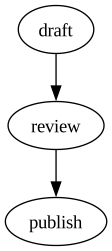
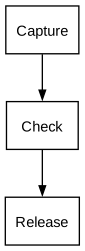
A digraph describes directed relationships. Each arrow creates an edge; nodes are created when first mentioned. The chain expands to two edges. The default dot layout places the first step above the next.
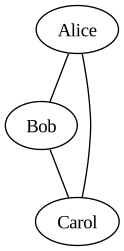
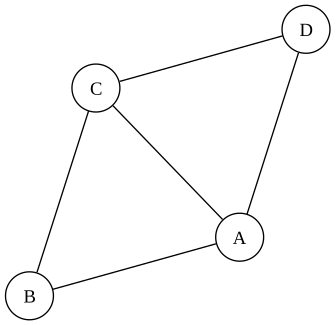
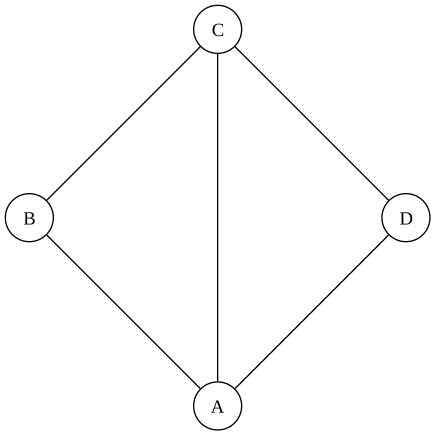
Use graph and the double hyphen for relationships without a direction. This triangle has three nodes and three edges, with no arrowheads. Graphviz chooses positions from the connections; the source does not specify coordinates.
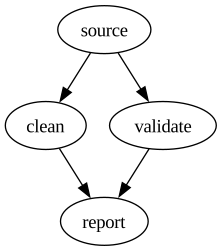
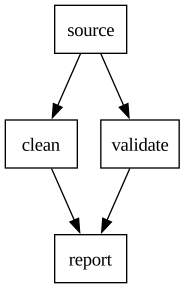
Braces collect nodes into an anonymous subgraph. The first statement connects source to both branches; the second connects both branches to report. Each name refers to the same node everywhere in the graph.
Keep short identifiers for connections and use label for readable text. The backslash-n inside a quoted label inserts a line break. rankdir=LR changes the dot layout to left-to-right; the node default makes subsequent nodes boxes.
The node statement sets defaults for nodes created afterward. style combines rounded corners and a filled interior; fillcolor colors that interior and color controls the outline. A node-specific attribute overrides the default without changing its neighbors.
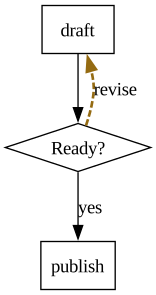
A diamond marks a decision while edge labels describe the branches. The dashed return path has a distinct color and penwidth. constraint=false prevents that edge from participating in dot rank assignment, keeping the retry path from defining the main flow.
The rank=same subgraph puts clean and validate on the same level in dot. ranksep adjusts the space between levels, in inches. These are layout constraints: the edges still describe the same branch-and-join pipeline as GVZ-01-003.
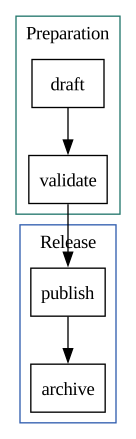
A subgraph whose name starts with cluster creates a visible group in dot. Each cluster gets its own label and border color. Nodes remain ordinary graph nodes, so an edge can connect validate to publish across the two groups.
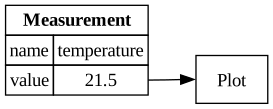
Graphviz HTML-like labels use a supported subset of HTML, enclosed in angle brackets instead of quotes. shape=plain lets the table define the node boundary. PORT names a cell; fields:value:e targets that cell on its east side. BORDER and CELLBORDER control the table and cell outlines.
The layout attribute selects the engine inside the DOT source, so the same dot command can render every example. neato uses a spring-model layout. A fixed start value seeds its initial placement; overlap=false requests overlap removal. Exact positions can still vary with the Graphviz version and fonts.
circo emphasizes cyclic structure. Compared with GVZ-04-001, this example changes only the layout engine; the network, seed and overlap setting remain in the source. The start seed is relevant to neato, while circo determines its circular ordering.
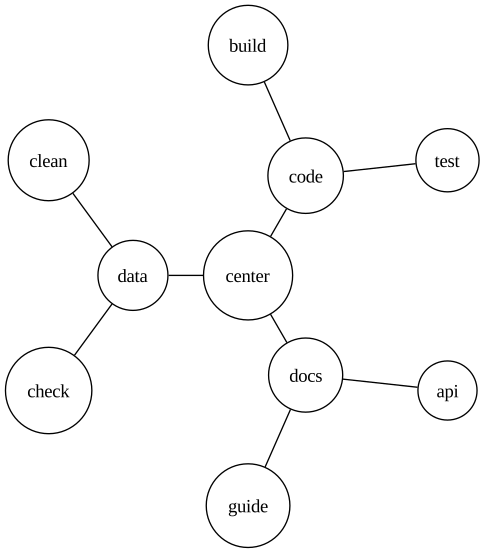
twopi arranges nodes on concentric circles according to their graph distance from the root. root=center chooses the central node; ranksep sets the radial spacing in inches. Branch nodes sit one edge from center and leaves two edges away.
Make the boundary of a process visible before adding branches. Rounded boxes denote activities; ellipses mark the start and finish in this guide. The arrows describe sequence, while rankdir=LR chooses the reading direction. Naming activities with verbs helps readers distinguish work from outcomes.
Try changing: Change LR to TB to compare a horizontal overview with a vertical checklist.
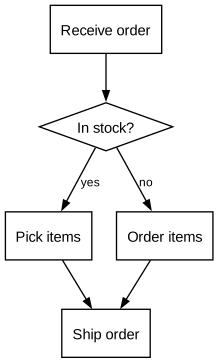
A diamond asks a question; yes and no label its alternatives. Both paths lead to the same next activity. This is an exclusive choice by convention, not a rule enforced by Graphviz. The merge does not wait for both branches because only one branch is intended to run.
Try changing: Rename the edge labels to the exact conditions used by your process.
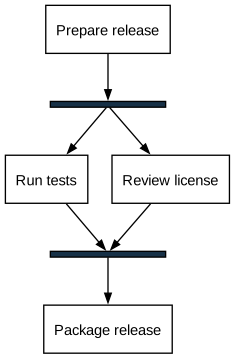
The narrow dark bars represent a parallel fork and a synchronization join. Packaging begins after both checks finish. Those AND semantics belong to the diagram convention; a pair of incoming arrows alone does not implement synchronization. Fixed dimensions are suitable for these deliberately empty bar labels.
Try changing: Add a third independent check between the same fork and join.
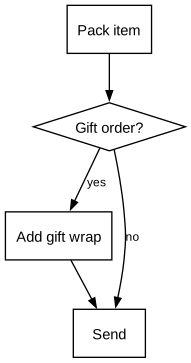
The optional activity has a visible bypass, so the diagram states what happens when it is skipped. Both paths converge at Send. A direct arrow from the decision to Send is clearer than a disconnected note saying that wrapping is optional.
Try changing: Give the optional branch a distinct label while keeping its destination explicit.
digraphprocess{rankdir=TB;node[shape=box,fontname="Helvetica",fontsize=11];edge[fontname="Helvetica",fontsize=9,arrowsize=0.7];pack[label="Pack item"];gift[shape=diamond,label="Gift order?"];wrap[label="Add gift wrap"];send[label="Send"];pack->gift;gift->wrap[label="yes"];gift->send[label="no"];wrap->send;}
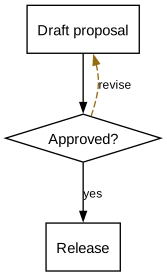
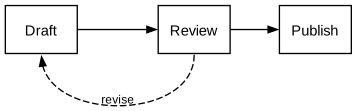
Approval is a decision with two distinct outcomes. A rejected proposal returns for revision; an approved one advances. The return edge uses constraint=false so it does not determine the forward ranks. Dashed styling distinguishes rework, but the revise label carries the meaning without color.
Try changing: Add a separate terminal rejection if some proposals must never return to drafting.
This is a state-transition diagram: nodes name conditions and edges name events. It complements an activity flow without mixing the two vocabularies. A point marks the initial entry; doublecircle marks the terminal Closed state. The Reopened transition is an explicit exception.
Try changing: Use verbs on transitions and stable condition names on states.
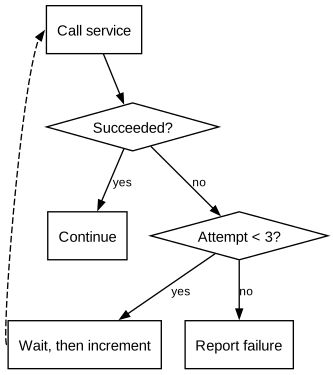
A retry needs both a success exit and a stopping condition. The second decision makes the attempt budget visible; the pause records backoff as an activity. This drawing documents the policy and does not count attempts or schedule waits. The actual retry implementation must enforce the same limit.
Try changing: Change the retry budget and name the error types that are eligible for retry.
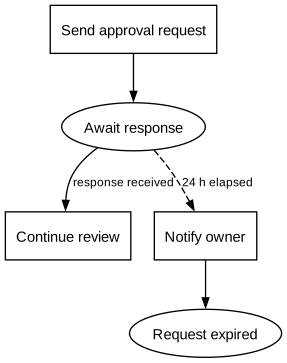
Waiting has two competing outcomes: a reply or an expired deadline. The edge labels state which event advances the process. A timeout path ends explicitly instead of hanging in mid-air. The diagram does not express a duration by geometric distance; the 24 h label is the source of that information.
Try changing: Replace the example deadline with a named business rule rather than a longer arrow.
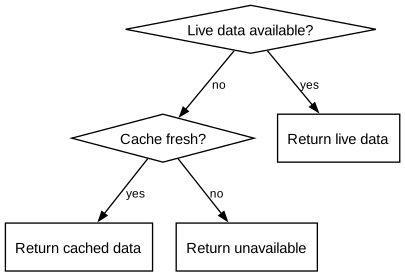
A failed primary lookup can use a cached response, but only if that response is fresh enough. Both branches end in an explicit outcome. This separates graceful degradation from silent success and makes the fallback condition reviewable.
Try changing: Label the cached result explicitly so consumers can distinguish it from live data.
digraphprocess{rankdir=TB;node[shape=box,fontname="Helvetica",fontsize=11];edge[fontname="Helvetica",fontsize=9,arrowsize=0.7];live[shape=diamond,label="Live data available?"];cache[shape=diamond,label="Cache fresh?"];current[label="Return live data"];stale[label="Return cached data"];error[label="Return unavailable"];live->current[label="yes"];live->cache[label="no"];cache->stale[label="yes"];cache->error[label="no"];}
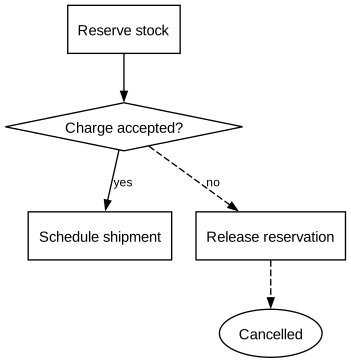
A later failure can require undoing earlier business actions. Here a failed charge releases a reservation. Compensation is a separate action, not a reversed normal-flow arrow: it may itself fail and may need monitoring in a larger design. Dashed edges identify the recovery path.
Try changing: Add a manual-resolution branch for a failed compensation in a larger process.
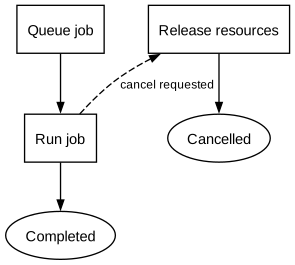
Cancellation leaves the ordinary completion path but still performs cleanup. The two exits are named, so a reader can distinguish completed work from interrupted work. The request-cancel edge is unconstrained to keep the main sequence easy to scan.
Try changing: Decide which activities permit cancellation and draw only those entry points.
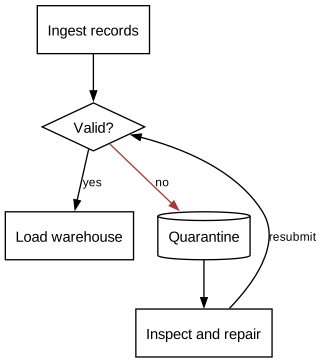
Invalid records are retained for inspection rather than discarded invisibly. The repair loop returns to validation, ensuring that repaired input follows the same gate as new input. A cylinder denotes retained data by this guide's convention; it does not create a database.
Try changing: Add a terminal discard route if some records cannot be repaired.
digraphprocess{rankdir=TB;node[shape=box,fontname="Helvetica",fontsize=11];edge[fontname="Helvetica",fontsize=9,arrowsize=0.7];ingest[label="Ingest records"];validate[shape=diamond,label="Valid?"];load[label="Load warehouse"];quarantine[shape=cylinder,label="Quarantine"];repair[label="Inspect and repair"];ingest->validate;validate->load[label="yes"];validate->quarantine[label="no",color="#a33b38"];quarantine->repair;repair->validate[label="resubmit",constraint=false];}
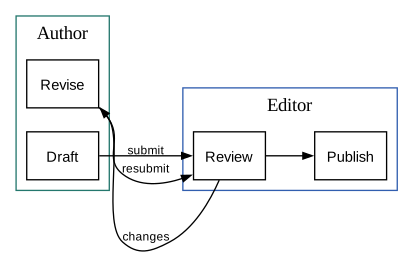
Clusters group activities by owner. The crossing arrow is the handoff: authors submit a draft to an editor, who reviews and publishes it. Graphviz clusters are containers for layout and styling; their names must start with cluster to receive the familiar boundary treatment.
Try changing: Rename each cluster to the role accountable for its activities.
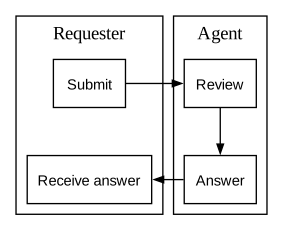
The lanes use clusters for ownership, same-rank constraints for shared stages, and newrank=true to rank across cluster boundaries. Invisible edges align successive positions without claiming an extra business handoff. Dot computes the geometry; this is an approximate swimlane layout, not a fixed table.
Try changing: Remove the invisible edge to see how the layout loses its lane scaffold.
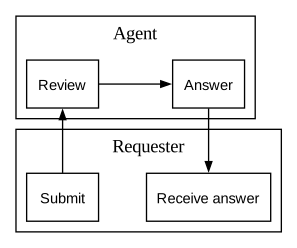
This uses the same ownership, rank constraints and edges as GVZ-07-002. Changing only rankdir rotates the progression: same-rank pairs now share a vertical column and each role progresses left to right. A lane orientation is a reading choice, not a change to process semantics.
Try changing: Compare both orientations at the width where the final diagram will be read.
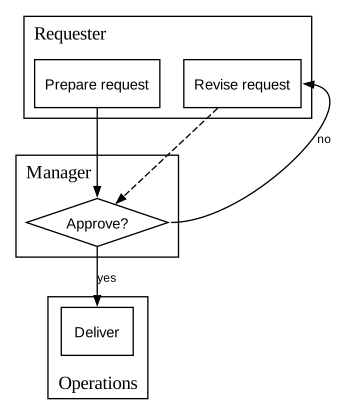
The requester prepares the proposal, the manager makes the decision, and operations delivers an approved request. Keeping the decision inside the manager cluster makes authority visible. The rejected path returns to the requester; an approval does not move ownership of the proposal itself.
Try changing: Use role names instead of individual names when the process should survive staff changes.
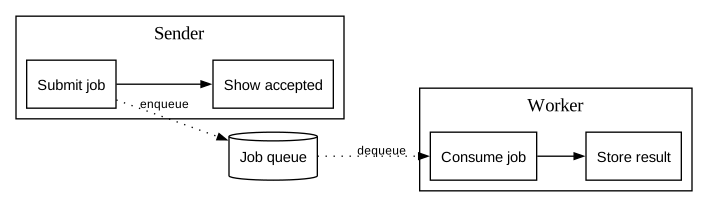
The sender posts a message and can continue before the receiver finishes. A dotted edge denotes message transport in this example; solid arrows denote local sequence. The queue separates ownership and timing, while the explanation prevents readers from mistaking the picture for an executable messaging specification.
Try changing: Add correlation or acknowledgment labels when the handoff needs more precision.
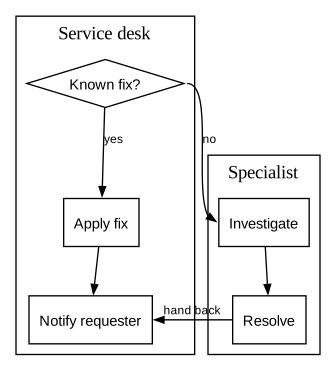
An escalation changes who handles a case, then returns the result to the original owner. The specialist is a separate cluster rather than just a different-colored node. The final notification remains the service desk's responsibility, making the handback as clear as the initial handoff.
Try changing: State the escalation condition on the crossing edge, not only in a separate legend.
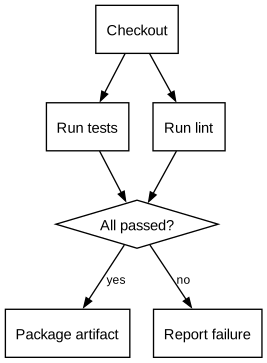
Tests and linting can run independently after checkout. The diamond names the all-pass rule before an artifact is packaged. This documents a dependency and decision structure; incoming edges do not make Graphviz evaluate results. The failure outcome is drawn instead of omitted.
Try changing: Add security or license checks as named prerequisites of the same gate.
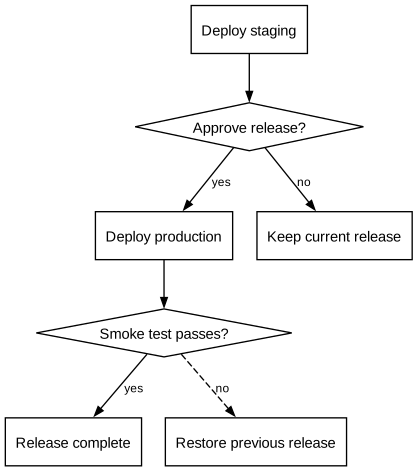
Deployment continues only after a manual approval. A smoke-test failure triggers rollback to the previous release. Distinct failure and success ends make this a deployment process rather than a picture of environments alone. The dashed rollback route is deliberately secondary in the layout.
Try changing: Name the release being restored; a generic failure arrow is not a rollback plan.
An ETL flow distinguishes stored datasets from transforming activities. Cylinders denote retained data, boxes denote work, and the diamond is a quality decision. Rejected rows have their own destination. Shapes and labels preserve the distinctions when the drawing is printed without color.
Try changing: Give each transformation a verb and each dataset a noun.
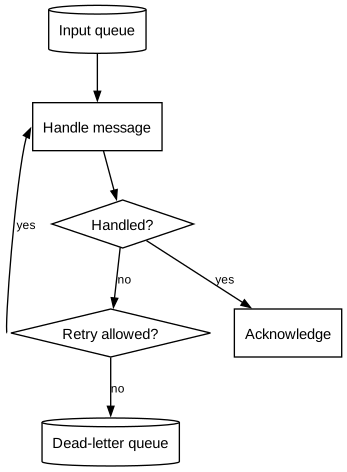
A consumer tries a message, records success, or routes repeated failure to a dead-letter queue. The retry counter is part of the application policy, shown explicitly as a condition. Routing failures away from the main queue prevents the process description from implying unbounded retries.
Try changing: Add an inspection and replay process for the dead-letter queue as a separate diagram.
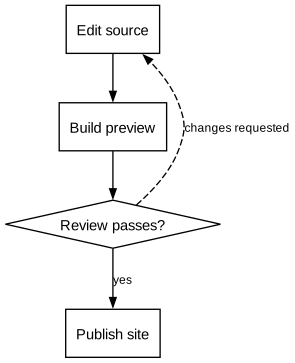
Source changes produce a preview that a person reviews before publication. A failed review returns to editing. The diagram separates artifact production from approval and public release, making it suitable for documentation, reports or other generated material.
Try changing: Add a link-check activity before review when broken references are a release gate.
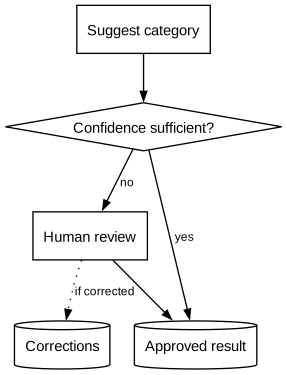
Automation proposes a classification and a person checks uncertain cases. The confidence threshold is a policy input, not a property that Graphviz computes. Both accepted routes converge on the same saved result, while a correction is recorded as feedback for later improvement.
Try changing: Describe which cases always require review, regardless of the score.
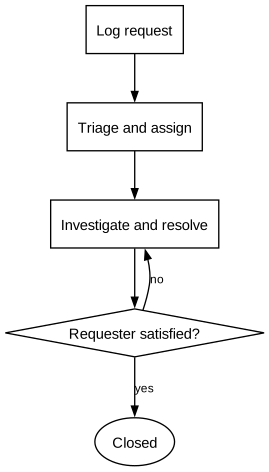
Resolution and closure are separate steps. The requester confirms that the solution worked; otherwise the case returns for investigation. This prevents a straight-line drawing from hiding the possibility of reopening. The unconstrained return edge preserves the main reading order.
Try changing: Make the ownership of confirmation explicit when closure requires a different role.
digraphprocess{rankdir=TB;node[shape=box,fontname="Helvetica",fontsize=11];edge[fontname="Helvetica",fontsize=9,arrowsize=0.7];log[label="Log request"];triage[label="Triage and assign"];solve[label="Investigate and resolve"];confirm[shape=diamond,label="Requester satisfied?"];close[shape=ellipse,label="Closed"];log->triage->solve->confirm;confirm->close[label="yes"];confirm->solve[label="no",constraint=false];}
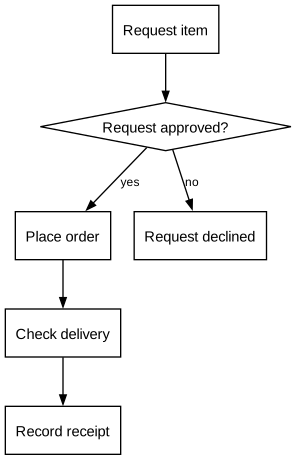
This illustrative purchasing flow separates approval, ordering and receipt. Rejection ends the request before an order is placed. It is a process example, not an organizational policy; actual approval thresholds and controls belong in the accompanying rules.
Try changing: Add a delivery-mismatch branch instead of assuming every received item is correct.
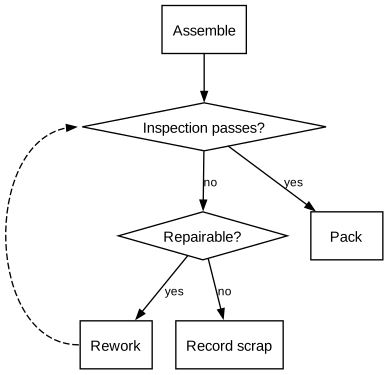
An inspection gate separates acceptable output from defects. A second question distinguishes repairable defects from scrap. Returning reworked items to inspection makes the quality loop explicit and avoids implying that a repair automatically passes.
Try changing: Name the inspection criterion and the maximum rework policy in the process documentation.
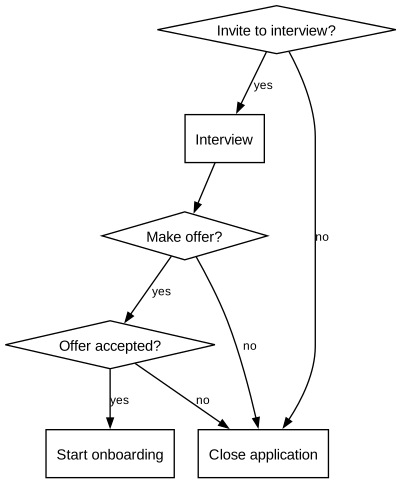
Applications move through review, interview and an offer decision. Unsuccessful and declined outcomes remain visible rather than disappearing from the chart. This example models stages only; it does not define candidate selection criteria or automate hiring decisions.
Try changing: Keep the stage diagram separate from the detailed evaluation rubric.
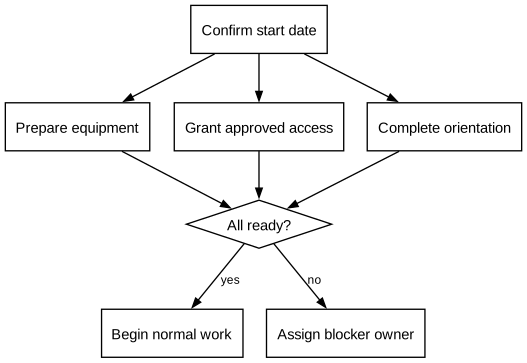
Equipment, access and introductory training can progress independently. The final gate requires all three to be complete. A blocked prerequisite routes to an owner rather than silently treating the new colleague as ready. AND is a stated convention, not an executable join.
Try changing: Split a large prerequisite into its own sub-process instead of enlarging every node.
Restoring service is not the last activity in this incident workflow. The closing review records follow-up work and feeds improvements back into preparation. The feedback edge is dotted and unconstrained so it remains visible without distorting the forward sequence.
Try changing: Use a separate detailed diagram for investigation paths that would overwhelm the overview.
digraphprocess{rankdir=LR;node[shape=box,fontname="Helvetica",fontsize=11];edge[fontname="Helvetica",fontsize=9,arrowsize=0.7];prepare[label="Prepare response"];detect[label="Detect and triage"];contain[label="Contain impact"];restore[label="Restore service"];review[label="Review and assign actions"];prepare->detect->contain->restore->review;review->prepare[label="improve",style=dotted,constraint=false];}
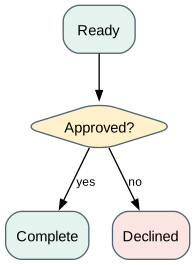
Color reinforces a meaning already carried by words and shapes. Green denotes completed work, amber denotes a decision, and red denotes rejection in this example. Filled nodes need fillcolor; color controls their outline. Keep the same mapping across the entire process family.
Try changing: Change the palette while preserving the labels and shape distinctions.
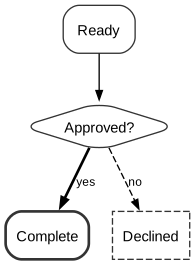
The same approval process remains understandable without colored fills. A heavier outline emphasizes the completed outcome, while the declined branch is dashed and labeled. Redundant visual cues help when a diagram is photocopied, printed in grayscale or read by someone who cannot distinguish its colors.
Try changing: Compare with the colored version to confirm that no meaning depends on hue.
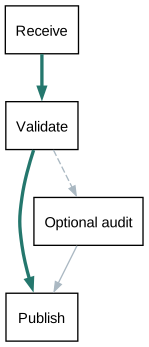
A strong line marks the primary route through the process, while a secondary review branch stays lighter. penwidth changes visual stroke thickness; weight affects dot layout and is a different control. This highlight is authored emphasis, not a calculated critical path or timing analysis.
Try changing: Highlight a user journey or exception path without changing the underlying connections.
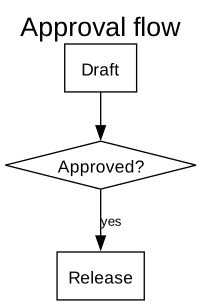
Graph, node and edge text have separate defaults. A graph title can be larger than activity names, and branch labels can be smaller. fontname requests an installed font; a fallback may change text metrics. Use short, consistent labels before trying to solve crowding by shrinking type.
Try changing: Increase only the graph title size and compare the text hierarchy.
Node margin adds breathing room around text. Width and height are minimum dimensions when fixedsize=false, allowing long labels to enlarge the box. Avoid fixedsize=true for arbitrary text: it can produce labels that do not fit. Inch-based dimensions are independent of the font size in points.
Try changing: Reduce the margin before reducing the type size when a diagram needs to be more compact.
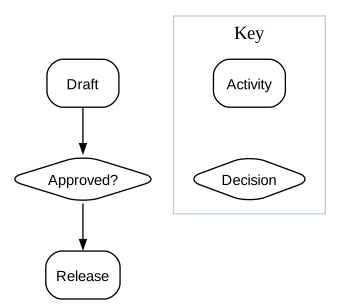
A legend defines the diagram's vocabulary where readers need it. The process uses the same rounded activity and diamond decision shapes shown in the key. Invisible edges arrange the legend only; the key is a disconnected component and does not participate in the workflow.
Try changing: Add only symbols actually used in the diagram; a large unused legend adds visual noise.
rankdir affects dot's main progression. TB reads top-to-bottom, LR reads left-to-right, and BT or RL reverse those directions. Use the available page shape and the audience's reading task to choose. A direction setting does not guarantee exact coordinates for individual nodes.
Try changing: Change only rankdir to LR, then RL, and compare the reading order.
ranksep controls the gap between successive ranks; nodesep controls separation between adjacent nodes on the same rank in dot. Both use inches. The two branches make the difference visible: one setting opens the diagram along the main flow, the other spreads the alternatives apart.
Try changing: Halve nodesep while leaving ranksep unchanged, then reverse the experiment.
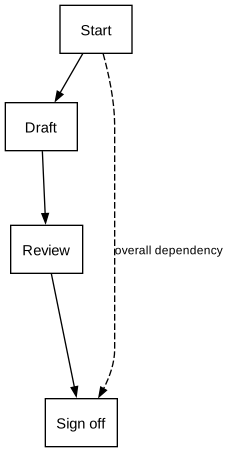
minlen sets a minimum rank difference for one edge. It counts ranks rather than inches, unlike ranksep. Here the direct signoff dependency spans at least five ranks, giving the intermediate work room to sit alongside it. The setting is a layout constraint, not an elapsed-time annotation.
Try changing: Compare minlen=1 and minlen=5 while keeping the same process edges.
ordering=out asks dot to place a node's outgoing edges left-to-right in their source order. This is useful when branches should read in a deliberate order. It controls edge ordering, not arbitrary global coordinates; other constraints still affect the rest of the drawing.
Try changing: Swap two outgoing edge statements and inspect which branches change position.
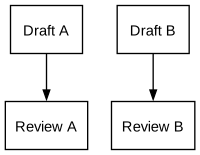
The visible arrows represent two streams. Matching group values encourage straight connections within each stream, while invisible same-rank edges establish a left-to-right ordering. These invisible edges are layout aids only; the accompanying explanation prevents them from being mistaken for hidden process requirements.
Try changing: Remove the group values separately from the invisible edges to isolate each effect.
rank=source and rank=sink reserve the first and last ranks for the chosen nodes. This helps when several internal paths have different lengths. The heavier main edge encourages a shorter, straighter route in dot; weight does not make the edge thicker or change process priority.
Try changing: Set both paths to the same weight to see whether the preferred alignment changes.
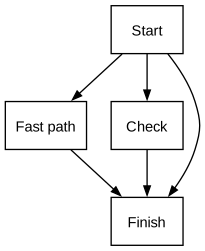
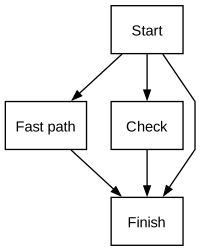
splines=spline lets dot route curved connections around nodes. The direct bypass from Start to Finish bends around the intermediate tasks, making the routing easy to compare with the next two examples. Routing changes the drawn path of an edge while leaving its endpoints and process relationship unchanged.
Try changing: Compare the next two examples before choosing a routing style for a whole diagram family.
Only the routing setting changes from GVZ-12-001. splines=polyline uses piecewise straight segments, which can make turns more explicit. Check the result at its final size: more corners do not necessarily make a dense process easier to follow.
Try changing: Look for crossings and sharp turns rather than judging the style only on a small example.
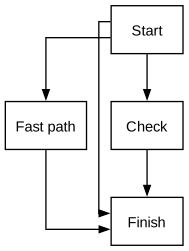
splines=ortho requests axis-aligned segments. Graphviz documents limitations with ports and ordinary edge labels in this mode, so this example uses neither. For a labeled decision diagram, prefer splines or polylines, or test external xlabels carefully after layout.
Try changing: Compare the corners with the spline baseline; avoid combining ortho with explicit ports.
Compass ports identify sides of a node: n, s, e and w mean north, south, east and west. With ordinary spline routing, the two paths can attach to different sides of Review. A port guides the endpoint rather than prescribing the entire path.
Try changing: Move the return edge to the north ports and compare the loop placement.
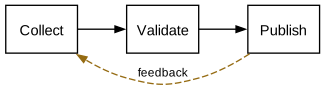
The return edge documents rework, while constraint=false removes that edge from rank assignment in dot. It still exists and is still drawn. A larger weight on the forward path encourages a straighter main sequence, independently of the feedback edge's dashed appearance.
Try changing: Remove constraint=false and inspect the layout before deciding whether it is needed.
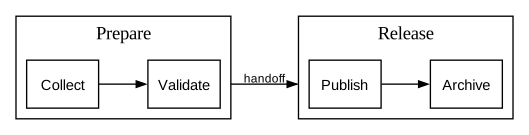
compound=true enables edges clipped at cluster boundaries. The edge still connects real member nodes, but ltail and lhead name the enclosing source and destination clusters. This is useful for an overview handoff between sub-processes, without pretending the cluster itself is an ordinary node.
Try changing: Remove lhead and ltail to compare node-to-node and boundary-to-boundary connections.
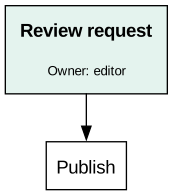
An HTML-like label can establish a title and smaller supporting line inside one node. shape=plain lets the table determine the boundary. CELLBORDER=0 removes interior rules, CELLPADDING adds inset space, and BGCOLOR provides a restrained background. This is Graphviz's label markup, not arbitrary browser HTML.
Try changing: Change the subtitle to an input, output or owner; avoid turning every card into a paragraph.
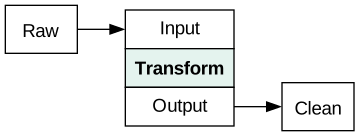
A table can name distinct attachment points with PORT. The source connects to the input cell and the output cell connects to the destination. This works with normal spline routing and is useful for processes with several artifacts or channels. The port name is part of the connection syntax, not visible prose.
Try changing: Add a separate error port when a task produces both a normal result and a diagnostic artifact.
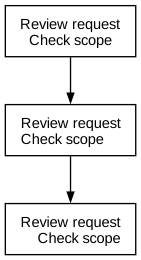
Quoted labels use backslash-n for centered line breaks, backslash-l for left-aligned lines, and backslash-r for right-aligned lines. The escape ends the line it aligns, including the final line. These are DOT label escapes; they are not the same as inserting an actual newline into the source file.
Try changing: Use left alignment for short lists and centered labels for compact activity names.
label names the relationship, while taillabel and headlabel annotate its ends. labelfontsize applies to those endpoint labels; fontsize applies to the ordinary edge label. labeldistance adjusts their offset and labelangle their direction. A wider ranksep leaves room for all three labels. Inspect the rendered result because crowded endpoint labels can collide.
Try changing: Compare endpoint annotations with a single short edge label before adding more text.
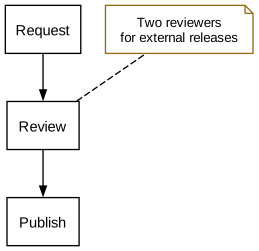
A note explains a step without becoming another activity. shape=note provides a paper-like symbol; dir=none removes the arrowhead and constraint=false keeps the annotation out of rank assignment. The dashed connector communicates association, so it should not be interpreted as a sequence transition.
Try changing: Move detailed policy text to a separate note instead of enlarging the activity label.
digraphprocess{rankdir=TB;node[shape=box,fontname="Helvetica",fontsize=11];edge[fontname="Helvetica",fontsize=9,arrowsize=0.7];request[label="Request"];review[label="Review"];publish[label="Publish"];note[shape=note,label="Two reviewers for external releases",fontsize=10,color="#956b12"];request->review->publish;review->note[style=dashed,dir=none,constraint=false];}
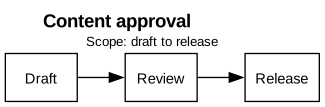
A graph label provides context that travels with the downloaded SVG. labelloc=t puts it above the drawing; labeljust=l requests left justification. An HTML-like label makes the process name prominent and the scope line smaller. This is a useful place to state the diagram's boundary or revision.
Try changing: Replace the scope statement with a useful revision or ownership note, keeping it short.
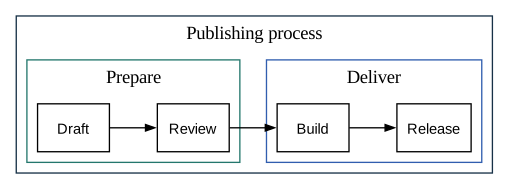
Nested clusters show a hierarchy: the overall process contains preparation and delivery phases. Distinct cluster labels establish scope while the arrows still connect activities. Avoid deep nesting; each extra boundary consumes space and can make crossings harder to read.
Try changing: Split a third level into its own diagram when the nested boundaries dominate the content.
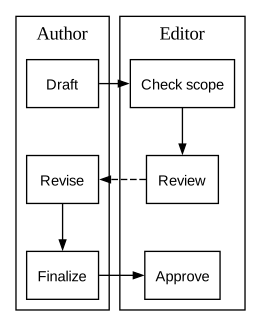
This extends the two-lane pattern to a shared three-stage grid. newrank=true permits rank constraints across clusters. Invisible edges align positions within each lane, and same-rank groups align the stages. Only the solid arrows are process steps; the dashed arrow is a review return.
Try changing: Keep scaffold edges visibly separate in the source so they are not confused with business logic.
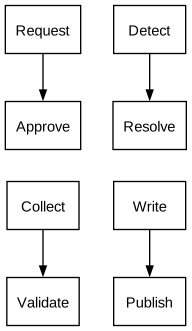
Disconnected components can be laid out separately and packed together. pack specifies padding in points, while packmode=array2 arranges components in two columns. These panels are independent workflows: packing changes their placement but does not add relationships between them.
Try changing: Change array2 to array1 to compare a dashboard-like arrangement with a vertical reference.
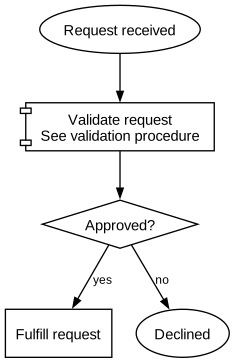
A compact overview uses a named sub-process instead of exposing every internal task. The component-shaped symbol is a visual convention for a reusable procedure. This is an abstraction decision: keep the entry condition, outcome and detail reference in the documentation so the overview remains traceable.
Try changing: Replace a crowded cluster with a named sub-process and link its detailed definition separately.
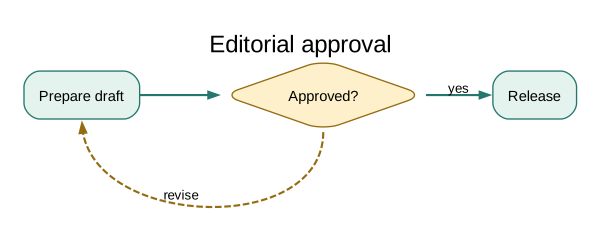
This complete recipe combines a restrained palette, readable labels, a decision gate and an explicit revision loop. The main path uses green emphasis; the return path uses amber and dashes. A graph title gives the exported image context. Keep each cue consistent with the earlier design examples.
Try changing: Adapt the text to a real approval process before adding further decoration.
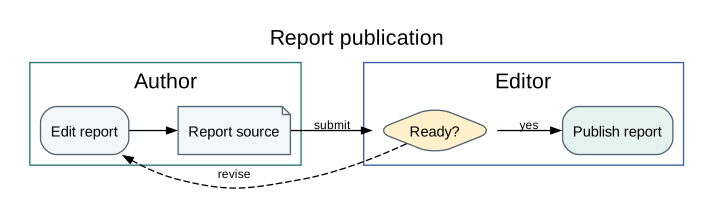
The final recipe combines role boundaries, an artifact, a decision and rework. The source file and published output are explicitly named; the author and editor own different activities. This is an overview of responsibility and flow, not a formal BPMN model or an executable workflow definition.
Try changing: Check every boundary crossing: who sends what, who receives it, and what returns on failure?
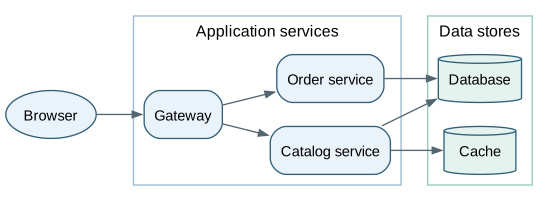
Boxes represent deployed components, cylinders represent storage, and arrows show which component calls or reads another. The two clusters separate request handling from stored data. This is a structural view: arrow direction does not prescribe the order of a single request. Shared storage becomes visible because several services point to the same node.
Try changing: Add a reporting service and connect only the stores it actually reads.
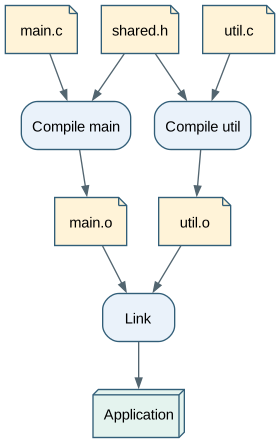
A note is a file; a rounded box is a build action. Two compilation branches join at the linker, making the shared header and the required object files visible. The graph describes prerequisites, so it can explain which branch needs rebuilding after a source edit. It does not run a compiler or calculate file freshness.
Try changing: Trace the affected path when util.c changes, then compare it with a shared-header change.
This view follows data products rather than activities. Two sources contribute to an enriched table, which feeds a summary and two consumers. Edge labels name transformations; cylinders name persisted datasets. Keeping an intermediate dataset as a node makes reuse and downstream impact easier to inspect than a single long pipeline.
Try changing: Add a second consumer of the enriched table without duplicating the dataset node.
digraphexample{graph[rankdir=LR,fontname="Helvetica",fontsize=12];node[shape=box,style="rounded,filled",fillcolor="#eaf2fa",color="#315e78",fontname="Helvetica",fontsize=11];edge[color="#526570",fontname="Helvetica",fontsize=9,arrowsize=0.7];node[shape=cylinder,style=filled,fillcolor="#e4f3ee"];sales[label="Sales rows"];products[label="Product catalog"];enriched[label="Enriched sales"];totals[label="Daily totals"];node[shape=note,fillcolor="#fff3d8"];dashboard[label="Dashboard"];report[label="Weekly report"];{rank=same;sales;products;}sales->enriched[label="join by product_id"];products->enriched;enriched->totals[label="group by day"];totals->{dashboardreport};}
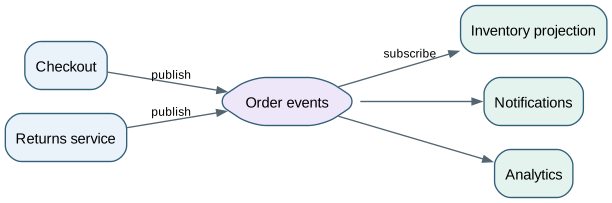
Show event distribution to independent subscribers
Two publishers emit events to a topic. Three subscribers receive those events independently; the drawing does not imply a work queue where only one consumer receives each message. The hexagon emphasizes the shared distribution point. Delivery guarantees and ordering are application choices and are not determined by this fan-out shape.
Try changing: Add an audit subscriber and describe whether it needs every event or only a filtered subset.
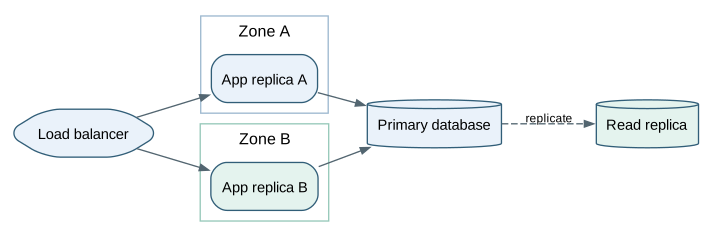
The two application nodes run the same role in different zones. Both write through the primary database; the dashed edge identifies replication to the standby. Cluster boundaries communicate placement, while labels communicate operational roles. A second database in the picture does not by itself imply automatic failover or consistent reads.
Try changing: Add a read-only consumer of the replica and label the freshness assumption.
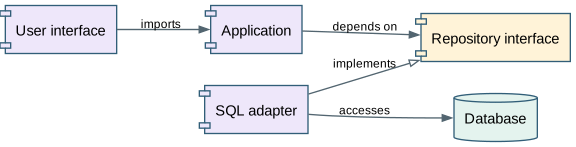
Component-shaped nodes describe code boundaries. The application depends on an interface; an adapter implements that interface and accesses storage. The hollow arrow is an explicitly chosen implementation convention. These arrows describe source dependencies, not the direction in which runtime data necessarily travels.
Try changing: Add an in-memory adapter that implements the same interface.
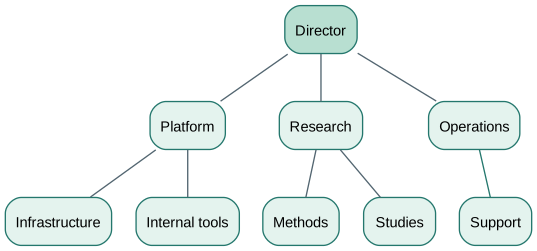
Each edge means reports to the node above. A tree layout gives reporting depth a consistent vertical direction, while same-rank siblings remain visually comparable. This small structure has one parent per team. A matrix organization needs a separately labeled relationship rather than an unexplained second reporting arrow.
Try changing: Add a team under Platform and keep the meaning of every edge the same.
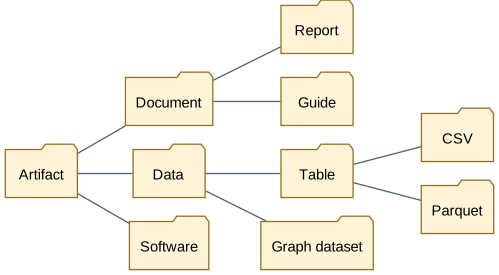
Folder-shaped nodes and arrowless connectors suggest classification, not execution. Some categories stop early while others contain another level; there is no need to invent filler nodes to make the tree balanced. The left-to-right direction leaves more horizontal room for category labels.
Try changing: Introduce a new format under Data and decide whether it belongs in one branch or requires a cross-classification.
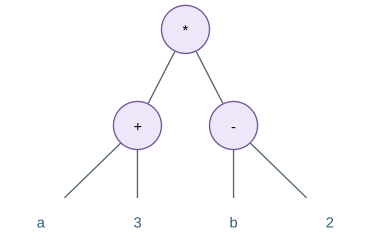
The expression (a + 3) * (b - 2) becomes an ordered tree. Operators are filled circles, while operands are plain labels. ordering=out preserves the declaration order of children, which matters for subtraction. Node identifiers remain unique even when two leaves later display the same text.
Try changing: Swap the two children of subtraction and explain why the expression changes.
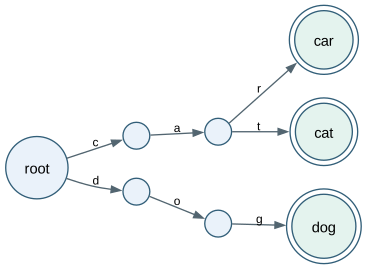
Letters live on edges, so the path from the root spells a word. Double circles mark stored words, not merely intermediate prefixes. The words car and cat share two edges, whereas dog begins on another branch. This is a structural snapshot of a trie; Graphviz does not insert or search the words.
Try changing: Add cart and keep car marked as a complete word as well as a prefix.
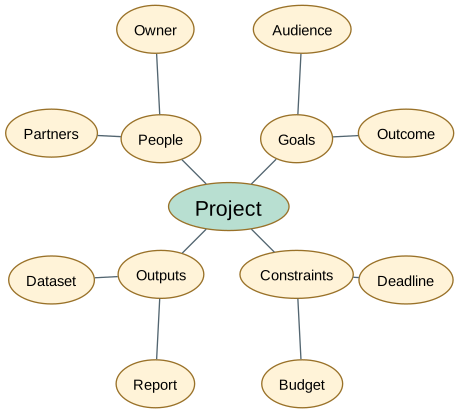
twopi places nodes in radial layers around the named root. Four topic families and their leaves form a mind map rather than a chronological process. The named root controls the center, while ranksep adjusts radial spacing. overlap=true keeps this compact placement, so check label clearance after edits. Angular position does not encode priority.
Try changing: Move the root to Outputs and compare the placement, checking for crowded labels.
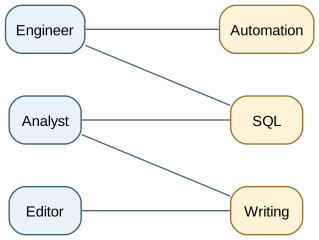
This bipartite graph links roles to capabilities, with no edges inside either set. Equal-rank groups create two columns. Color reinforces the distinction between the sets, but the labels remain sufficient without it. A connection means the capability is relevant to the role; it does not assign a person to a task.
Try changing: Add a role that needs two capabilities and check whether the ordering reduces crossings.
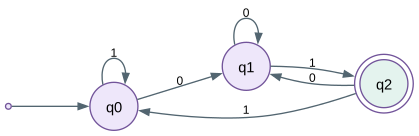
This deterministic automaton accepts binary strings ending in 01. q0 has no useful suffix, q1 remembers a trailing 0, and the double-circle q2 is accepting. Every state has exactly one transition for each input symbol. The point marks the initial state; it is not a state that consumes input.
Try changing: Trace 101, 010 and the empty string by hand before changing any transition.
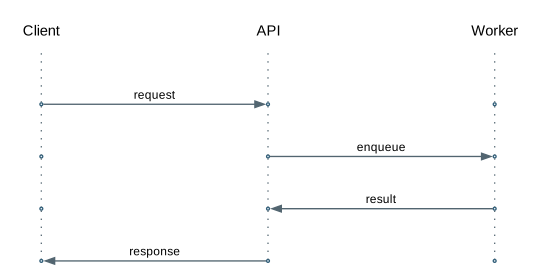
Vertical dotted lifelines preserve actor identity while horizontal arrows show ordered messages. Same-rank groups align each message row; invisible horizontal edges keep columns in order. Time progresses downward, but the spacing is not a measured duration. This is a small sequence-diagram convention built from ordinary DOT nodes and edges.
Try changing: Add a timeout response on a new row without reusing an earlier row to imply simultaneous events.
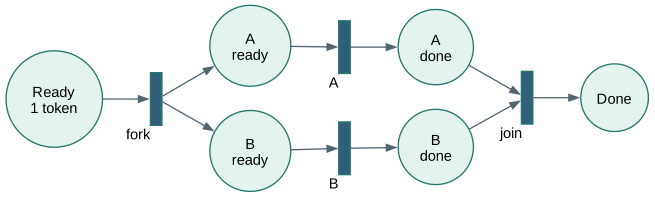
Circles are places and narrow bars are transitions. Initially Ready contains one token. Firing the fork creates one token on each branch; the join requires a token from both completed branches. The labels describe that token model, while Graphviz only draws the current structure and marking. It does not simulate transition firing.
Try changing: Remove one input to the join and explain how the synchronization rule would change.
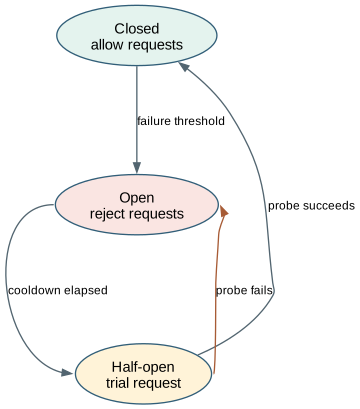
Closed permits normal requests; Open rejects them; Half-open permits a trial. Labeled transitions state the events that move the breaker between those states. The cooldown and failure threshold are policy conditions, not timing behavior provided by Graphviz. Keeping state names inside nodes prevents this from looking like a sequence of service calls.
Try changing: Specify the threshold and trial policy in the labels, then trace a failed probe.
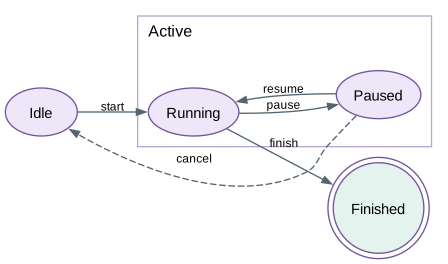
Running and Paused are both active states, so a cluster names their shared region. Only the drawn transitions are permitted in this simplified model: a paused job can resume or cancel, and a running job can finish. The region is an explanatory grouping, not an executable statechart with inherited transitions.
Try changing: Add cancellation from Running explicitly if the application supports it.
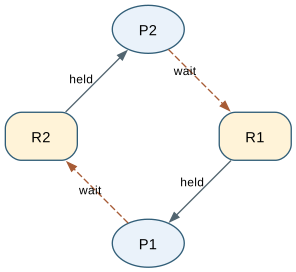
A solid arrow from a resource to a process means allocated; a dashed arrow in the opposite direction means requested. P1 holds R1 and waits for R2, while P2 holds R2 and waits for R1. With exclusive resources and no forced release, this snapshot describes a deadlock. circo makes the circular dependency easy to see; it does not detect deadlocks.
Try changing: Remove one held resource or impose a common acquisition order, then redraw the waiting relationships.
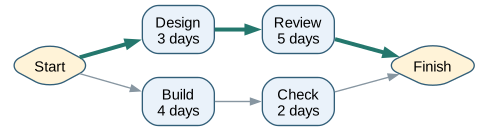
Start and Finish are milestones. The upper branch takes 3 + 5 = 8 days; the lower takes 4 + 2 = 6 days. Assuming both branches can start together and Finish waits for both, the project duration is eight days. Thick teal edges mark the longer branch. These calculations are supplied by the author; DOT labels and edge lengths do not calculate a schedule.
Try changing: Increase Build to seven days and recompute the critical path before changing the highlight.
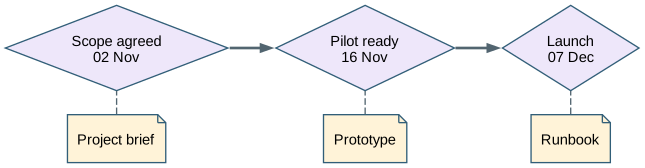
Diamonds identify three dated milestones. Notes identify the deliverables needed at each milestone, and dashed connectors mean contributes to rather than happens next. The dates are synthetic labels; equal horizontal gaps are not equal calendar intervals. Use a real timeline tool when distance must encode elapsed time.
Try changing: Add another deliverable to Pilot without inventing an extra milestone.
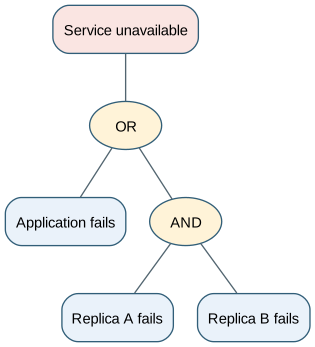
The top event occurs if the application fails OR both replicas fail. Explicitly named gates distinguish those conditions: either child is enough at OR, but both are required at AND. Connectors are arrowless because this tree expands a logical condition rather than scheduling work. No failure probabilities are assumed or computed.
Try changing: Add a third replica under AND and explain the new condition in words.
digraphexample{graph[rankdir=TB,fontname="Helvetica",fontsize=12];node[shape=box,style="rounded,filled",fillcolor="#eaf2fa",color="#315e78",fontname="Helvetica",fontsize=11];edge[color="#526570",fontname="Helvetica",fontsize=9,arrowsize=0.7];edge[arrowhead=none];outage[label="Service unavailable",fillcolor="#fae5e2"];any[shape=ellipse,label="OR",fillcolor="#fff3d8"];app[label="Application fails"];both[shape=ellipse,label="AND",fillcolor="#fff3d8"];a[label="Replica A fails"];b[label="Replica B fails"];outage->any;any->app;any->both;both->{ab};}
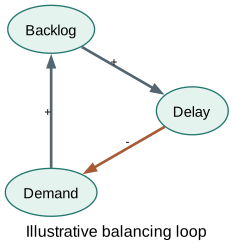
Each node is a quantity, not an activity. A plus sign means an increase tends to increase the next quantity; a minus sign means the opposite, under the assumptions of this illustrative model. More demand increases backlog, backlog increases delay, and delay reduces demand. One negative relationship gives this loop a balancing polarity; no numerical dynamics are simulated.
Try changing: Change the final relationship to a plus and explain how the loop polarity changes.
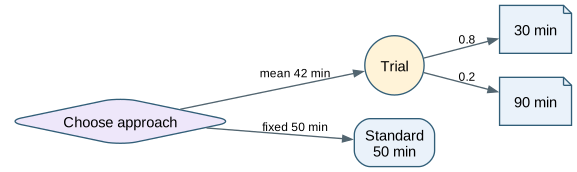
The diamond is a choice; the circle is an uncertain outcome. In this synthetic example, Trial takes 30 minutes with probability 0.8 and 90 minutes with probability 0.2, giving an expected time of 42 minutes. Standard takes 50 minutes. The lower mean does not guarantee the shorter run; the diagram keeps that distinction visible.
Try changing: Change the slow-case probability to 0.4, update the other probability, and recompute the mean.
Connect a goal to actors, behavior and deliverables
An impact map asks who could help achieve a goal, what behavior should change, and which deliverables might enable that change. Shapes distinguish those four levels. Arrows express a proposed contribution chain, not proven causation or task order. This helps separate a desired result from the outputs a team plans to produce.
Try changing: Add a second deliverable for one behavior and state how you would check its effect.
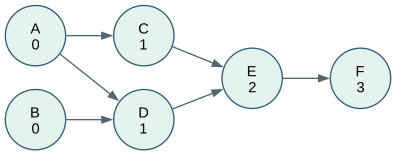
This directed acyclic graph has two initial tasks, two tasks in the next layer, and a final dependency chain. Same-rank groups show a manually assigned valid layering. A and B can be interchanged in a topological ordering, as can C and D once their prerequisites are met. Horizontal placement within a layer is not a dependency.
Try changing: Write two valid topological orders, then add a dependency from C to D and update the layers.
The numbers are nonnegative edge costs. The highlighted route A-C-B-D-E costs 2 + 1 + 5 + 2 = 10, the minimum from A to E in this example. Labels display those costs; they do not ask neato to solve a shortest-path problem. Geometry is chosen for readability and is unrelated to travel distance.
Try changing: Lower the cost of C-D to three and find the new shortest route before updating the highlight.
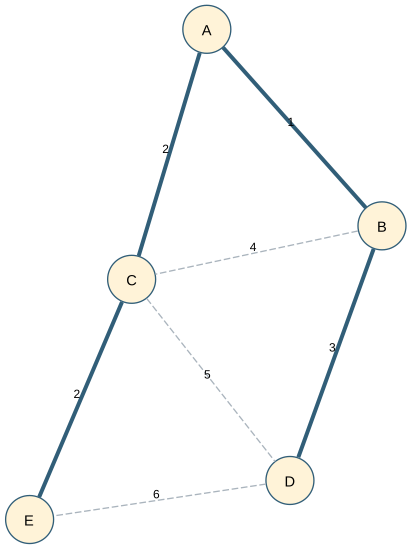
Keep a minimum spanning tree inside the full network
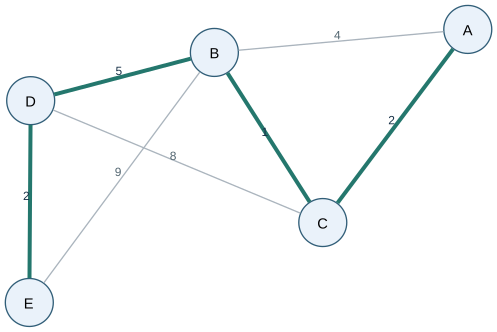
The solid edges connect all five vertices without a cycle, with total cost 1 + 2 + 3 + 2 = 8. The dashed edges preserve the alternatives so the choice remains inspectable. This is a minimum spanning tree for the given costs, chosen before rendering. It minimizes the total connection cost, not every pairwise route.
Try changing: Reduce C-D from five to one and recompute the selected tree.
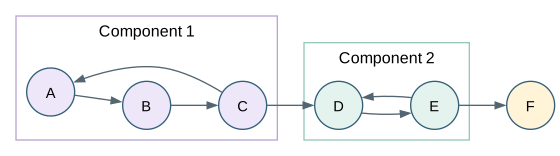
A, B and C form one strongly connected component; D and E form another; F is a singleton. Inside each nontrivial component every vertex can reach every other. The arrows between groups only move forward, so collapsing each group would produce a DAG. These groups are authored explicitly, not discovered by the cluster attribute.
Try changing: Add F to A and determine which components would merge.
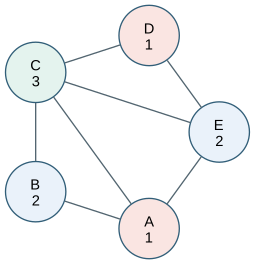
Adjacent vertices must use different classes. Numbers repeat the color classes so the solution is readable in monochrome. A, B and C form a triangle, requiring at least three classes; the displayed assignment uses exactly three for the entire graph. circo arranges the vertices, while the author supplies and checks the coloring.
Try changing: Add an edge between A and D and decide whether three classes still suffice.
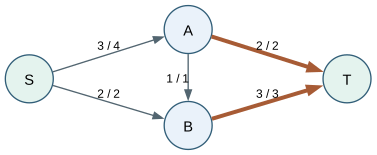
Each label is flow / capacity. Three units enter A and leave as two to T plus one to B; B then sends three units to T. Total flow is five. The two highlighted edges into T have combined capacity five, proving that this feasible flow is maximal. All values are authored calculations; Graphviz does not run a flow algorithm.
Try changing: Raise the capacity of B-T to four and find whether the remaining network can carry a sixth unit.
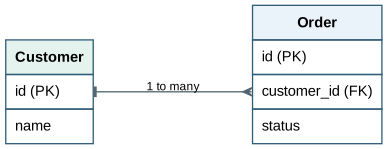
HTML-like table labels name fields and expose ports for the relationship. The tee and crow marks, reinforced by the text, mean one Customer may be related to many Orders. The arrow connects the identifier to the foreign-key field rather than to the table center. This compact convention omits optionality and other schema constraints.
Try changing: Add an OrderLine entity and connect it to the order identifier.
digraphexample{graph[rankdir=LR,fontname="Helvetica",fontsize=12];node[shape=box,style="rounded,filled",fillcolor="#eaf2fa",color="#315e78",fontname="Helvetica",fontsize=11];edge[color="#526570",fontname="Helvetica",fontsize=9,arrowsize=0.7];graph[ranksep=1.1];node[shape=plain,style=""];customer[label=<<TABLEBORDER="0"CELLBORDER="1"CELLSPACING="0"CELLPADDING="6"><TR><TDBGCOLOR="#e4f3ee"><B>Customer</B></TD></TR><TR><TDPORT="id"ALIGN="LEFT">id(PK)</TD></TR><TR><TDALIGN="LEFT">name</TD></TR></TABLE>>];orders[label=<<TABLEBORDER="0"CELLBORDER="1"CELLSPACING="0"CELLPADDING="6"><TR><TDBGCOLOR="#eaf2fa"><B>Order</B></TD></TR><TR><TDPORT="id"ALIGN="LEFT">id(PK)</TD></TR><TR><TDPORT="customer"ALIGN="LEFT">customer_id(FK)</TD></TR><TR><TDALIGN="LEFT">status</TD></TR></TABLE>>];customer:id:e->orders:customer:w[dir=both,arrowtail=tee,arrowhead=crow,label="1 to many"];}
Record fields separate a stored value from its next pointer. Named ports make each arrow leave the pointer field and enter the next value field. The head reference and NULL terminator describe a singly linked list with three nodes. Record labels use their own braces and port syntax, which differs from HTML-like table labels.
Try changing: Insert a new record between 17 and 23 by changing only the relevant next pointers.
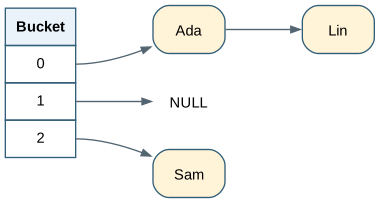
The table provides one port per bucket. Bucket 0 points to a two-entry chain, bucket 1 is empty, and bucket 2 points to one entry. This snapshot illustrates collision handling by chaining; it does not define a hash function or claim these names naturally hash to those bucket numbers.
Try changing: Add a second collision in bucket 2 and keep the empty bucket explicit.
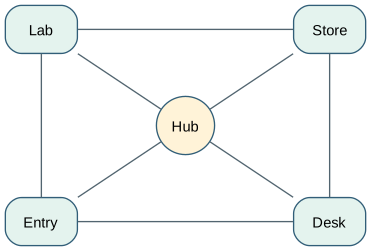
pos supplies node centers in inches for this neato input, and the exclamation mark pins each node. The drawing preserves a deliberately chosen room-like arrangement instead of deriving ranks. overlap=true avoids an overlap-removal pass that could move coordinates, so the author must leave enough space between nodes. The positions are illustrative, not a measured floor plan.
Try changing: Move Hub to 1.5,1.5 and inspect both node clearance and the new edge routes.
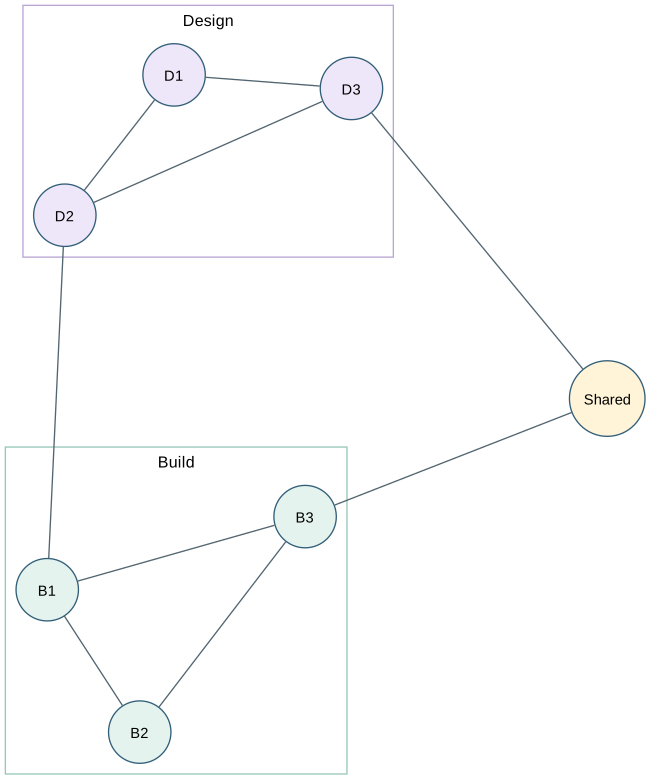
fdp uses a force-directed layout and supports clustered undirected graphs. Two clusters name collaborating groups, while a shared node sits outside them. The integer start value makes the initial layout repeatable for a given setup; it does not guarantee identical geometry across Graphviz versions. Edges mean collaboration and have no chronological direction.
Try changing: Add one cross-group connection and compare how the clusters reposition.
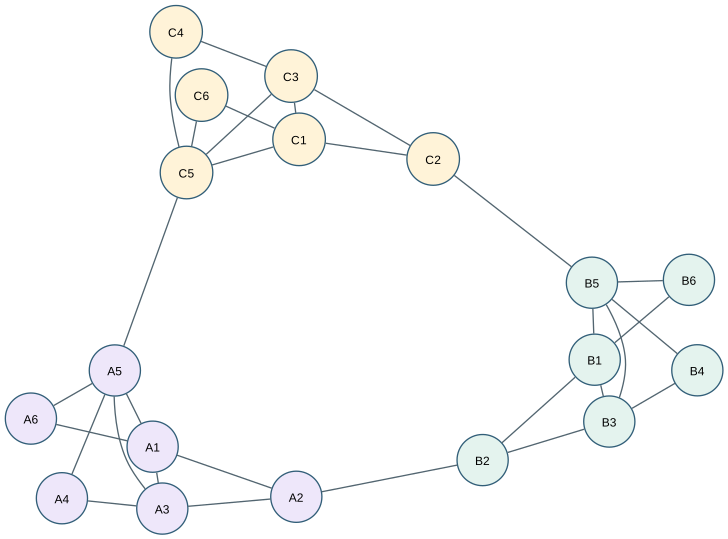
sfdp is a multilevel force-directed engine intended for larger graphs; this small eighteen-node example makes its structure easy to inspect. Dense local connections and sparse bridges separate three neighborhoods. Colors and letter prefixes are supplied group labels, not community detection results. Unlike a workflow, this undirected graph has no start or finish.
Try changing: Add three bridges between the A and C groups and compare their separation.