No matching examples. Try another query or clear the filters.
Copy link A visual reference · SPARQL
SPARQL,
Ask useful questions of an RDF graph. Start with one triple pattern, then
add joins, optional facts, paths, groups and named graphs. Finish with updates
whose effects are checked by a separate query.
Every example uses original, fictional local data and the real RDFLib
SPARQL 1.1 engine. Complete queries, actual typed results and source-and-data
downloads travel together. The final PDF is available for offline reading.
Last changes: 2026-11-03. Expanded edition: 80 executable examples in 13 chapters. Every example identifies its result type, view and export formats. A new chapter compares table, chart, network, timeline and map views and links complete Wikidata counterparts.
80 worked examples
13 topic families
1 canonical Org source
Copy link Reading the tour
From triples to a useful answer
Dataset
Read the same small research graph throughout. Four researchers, two labs,
three projects and two named review graphs make each join inspectable.
Query
Copy the complete SPARQL query with its PREFIX declarations. Clause tables
explain the feature introduced at each step; stable SPQ IDs link comparisons.
Actual result
Compare typed bindings, unbound cells, boolean answers and constructed triples.
For an update, read the separate inspection query and the result after that update.
Each source + dataset + runner ZIP runs independently after installing its
pinned RDFLib requirement. Unzip it, run python -m pip install -r requirements.txt,
then use the command in README.txt. Query IRIs are identifiers; the bundled
queries do not fetch their namespaces. Results come from local matching.
Copy link A small RDF dataset
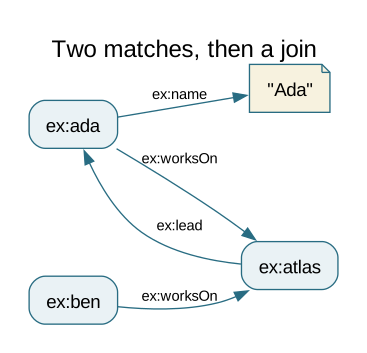
The teaching namespace ex: expands to https://example.org/lab/. An IRI
such as ex:ada identifies a resource; a literal such as "Ada" supplies a
value. A triple connects subject, predicate and object. Unlike a table row,
a resource can have several values for one predicate and no value for another.
Person
Age
Lab
Recorded email
Ada
36
North
ada@example.org
Ben
28
North
no email triple
Cora
42
South
cora@example.net
Dani
31
South
no email triple
Atlas has two titles, two keywords and two participating researchers. Ada
works on Atlas and Beacon; Cora and Dani work on Cedar. Project budgets are
1000, 2500 and 1500 arbitrary teaching units. The 2024 review graph contains
Atlas and Beacon; the 2025 review graph contains Atlas and Cedar.
The diagram shows selected triples, not the complete dataset. Following
ex:worksOn/ex:lead joins each project to its lead. Download the complete
TriG dataset for all triples, prefixes and named graph boundaries.
TriG extends Turtle with graph blocks; a block without a graph name is the
default graph in this file.
Copy link Read results as RDF terms
Result cells use Turtle-style RDF term notation. ex:ada is an IRI, "Ada"
is a string literal, "River Atlas"@en has a language tag, and
"36"^^xsd:integer has a datatype. The engine normalizes some lexical forms;
displaying a number as a typed literal preserves its RDF identity.
An unbound cell means that the variable has no binding in that solution.
It is neither an empty string nor an RDF term called NULL. An empty table
means zero solutions. ASK returns one boolean. CONSTRUCT returns a graph,
whose triple order is not meaningful; the tour sorts it only for display.
Blank-node labels are local identifiers, not persistent resource names.
Every example labels its actual result type and dimensions, its selected view
and the standard formats available for download. Update examples label the
result of their inspection query. See chapter 13 for paired views and Wikidata.
All examples that teach a row sequence state ORDER BY. A single-row result
needs no tie-breaker. A SELECT result can contain duplicates; an RDF graph
contains each triple only once. Neither duplicate elimination nor missing
data should be inferred from the shape of a spreadsheet.
Standard exports have different preservation rules. SPARQL JSON (.srj) retains
RDF types and language tags and represents an unbound variable by omitting its
binding. TSV retains RDF term notation and uses an empty field for unbound;
an empty literal is written as two quote characters. CSV exports lexical values
and drops datatype/language information; it also cannot distinguish an empty
literal from an unbound field. Turtle exports the result graph of CONSTRUCT.
The separate Tour record JSON download is the guide's own compact representation.
These formats follow the W3C SPARQL JSON and
CSV/TSV result-format specifications.
Copy link Dataset and engine boundaries
This edition targets SPARQL 1.1 Query and Update and is executed with RDFLib
7.6.0. The runner loads a fresh in-memory Dataset with default_union=False
for every example. Named graphs are queried with GRAPH. An endpoint can
choose a different default dataset, so confirm its graph configuration before
comparing its answers to these local results.
Matching here does not enable RDFS or OWL reasoning. Although the fixture
declares a subclass relationship, both of Cora's type triples are explicitly
stored. Absence of a matching triple is a statement about this dataset;
RDF's open-world interpretation does not turn it into a universal negative.
DESCRIBE returns an implementation-defined description of resources, so
this tour uses CONSTRUCT when an exact portable output graph matters.
FROM and FROM NAMED specify a query dataset; this runner instead loads the
bundled TriG file. SERVICE delegates a graph pattern to another service and
introduces endpoint availability, access and federation concerns. It is not
needed by these reproducible local examples. CLEAR GRAPH, CREATE, DROP,
COPY, MOVE and ADD are graph-management operations beyond the six focused
updates demonstrated here; LOAD may read an external document.
Copy link SPQ-01-001 Find all researchers The predicate rdf:type connects a resource to a class. The dataset explicitly types four resources as researchers. ORDER BY fixes their display order.
Result SELECT · 1 column · 4 solutions
View Table
Exports SPARQL JSON, CSV, TSV Returned bindings: ?person: IRI
Complete SPARQL query PREFIX ex : <https://example.org/lab/>
PREFIX rdf : <http://www.w3.org/1999/02/22-rdf-syntax-ns#>
SELECT ?person WHERE {
?person rdf : type ex : Researcher .
}
ORDER BY ?person
Actual RDFLib result 4 solution(s)
Clause or feature Meaning in this example rdf:typeMatch an explicitly stored class membership; this query does not turn on inference.
Download: Query · SPARQL JSON · CSV · TSV · Tour record JSON · Source + dataset + runner ZIP
Copy link SPQ-01-002 Fix the subject Replace the subject variable with one IRI. Only Ada's name can bind ?name; ex:ada is an identifier, while "Ada" is a literal value.
Result SELECT · 1 column · 1 solution
View Table
Exports SPARQL JSON, CSV, TSV Returned bindings: ?name: xsd:string
Complete SPARQL query PREFIX ex : <https://example.org/lab/>
SELECT ?name WHERE {
ex : ada ex : name ?name .
}
Actual RDFLib result 1 solution(s)
Clause or feature Meaning in this example ex:adaA fixed subject restricts the triple pattern to one resource.
Download: Query · SPARQL JSON · CSV · TSV · Tour record JSON · Source + dataset + runner ZIP
Copy link SPQ-01-003 Use the type abbreviation The keyword a abbreviates rdf:type in a triple pattern. It changes the spelling of the first query, not its meaning.
Compare with SPQ-01-001 .
Result SELECT · 1 column · 4 solutions
View Table
Exports SPARQL JSON, CSV, TSV Returned bindings: ?person: IRI
Complete SPARQL query PREFIX ex : <https://example.org/lab/>
SELECT ?person WHERE {
?person a ex : Researcher .
}
ORDER BY ?person
Actual RDFLib result 4 solution(s)
Clause or feature Meaning in this example aThe RDF type predicate, not a new variable or a class inference rule.
Download: Query · SPARQL JSON · CSV · TSV · Tour record JSON · Source + dataset + runner ZIP
Copy link SPQ-01-004 Read two properties of the same person A semicolon keeps the same subject for the next predicate. A solution needs both a name and an age for that person.
Result SELECT · 2 columns · 4 solutions
View Table
Exports SPARQL JSON, CSV, TSV Returned bindings: ?name: xsd:string · ?age: xsd:integer
Complete SPARQL query PREFIX ex : <https://example.org/lab/>
SELECT ?name ?age WHERE {
?person a ex : Researcher ;
ex : name ?name ;
ex : age ?age .
}
ORDER BY ?name
Actual RDFLib result 4 solution(s)
Clause or feature Meaning in this example ;Reuse ?person as the subject of each following predicate-object pair.
Download: Query · SPARQL JSON · CSV · TSV · Tour record JSON · Source + dataset + runner ZIP
Copy link SPQ-01-005 Join a researcher to a lab label The first pattern binds ?lab to an IRI. The second uses that IRI as its subject, joining researchers to lab labels.
Result SELECT · 2 columns · 4 solutions
View Table
Exports SPARQL JSON, CSV, TSV Returned bindings: ?name: xsd:string · ?label: xsd:string
Complete SPARQL query PREFIX ex : <https://example.org/lab/>
SELECT ?name ?label WHERE {
?person ex : name ?name ; ex : lab ?lab .
?lab ex : label ?label .
}
ORDER BY ?name
Actual RDFLib result 4 solution(s)
Clause or feature Meaning in this example ?labA shared variable must have the same RDF term in both matching patterns.
Download: Query · SPARQL JSON · CSV · TSV · Tour record JSON · Source + dataset + runner ZIP
Copy link SPQ-01-006 Follow a relationship to another name Bind the person reached through ex:knows, then read that person's name. Cora has no outgoing ex:knows triple, so this required pattern produces no row for her.
Result SELECT · 2 columns · 3 solutions
View Table
Exports SPARQL JSON, CSV, TSV Returned bindings: ?name: xsd:string · ?friendName: xsd:string
Complete SPARQL query PREFIX ex : <https://example.org/lab/>
SELECT ?name ?friendName WHERE {
?person ex : name ?name ; ex : knows ?friend .
?friend ex : name ?friendName .
}
ORDER BY ?name ?friendName
Actual RDFLib result 3 solution(s)
Clause or feature Meaning in this example ?friendJoin the object of one triple to the subject of another.
Download: Query · SPARQL JSON · CSV · TSV · Tour record JSON · Source + dataset + runner ZIP
Copy link SPQ-02-001 See duplicate projected values Four people produce four solutions. Keeping only ?lab hides their different person IRIs, but does not remove repeated labs.
Result SELECT · 1 column · 4 solutions
View Table
Exports SPARQL JSON, CSV, TSV Returned bindings: ?lab: IRI
Complete SPARQL query PREFIX ex : <https://example.org/lab/>
SELECT ?lab WHERE {
?person a ex : Researcher ; ex : lab ?lab .
}
ORDER BY ?lab ?person
Actual RDFLib result 4 solution(s)
Clause or feature Meaning in this example SELECT ?labProject one variable while retaining the multiplicity of the matched solutions.
Download: Query · SPARQL JSON · CSV · TSV · Tour record JSON · Source + dataset + runner ZIP
Copy link SPQ-02-002 Keep each projected lab once DISTINCT applies to the projected solution. The two identical north bindings and the two identical south bindings collapse to two rows.
Compare with SPQ-02-001 .
Result SELECT · 1 column · 2 solutions
View Table
Exports SPARQL JSON, CSV, TSV Returned bindings: ?lab: IRI
Complete SPARQL query PREFIX ex : <https://example.org/lab/>
SELECT DISTINCT ?lab WHERE {
?person a ex : Researcher ; ex : lab ?lab .
}
ORDER BY ?lab
Actual RDFLib result 2 solution(s)
Clause or feature Meaning in this example DISTINCTRemove duplicate bindings after projection.
Download: Query · SPARQL JSON · CSV · TSV · Tour record JSON · Source + dataset + runner ZIP
Copy link SPQ-02-003 Sort by descending numeric age Ages are xsd:integer literals in the fixture. DESC sorts their numeric values from largest to smallest; the name breaks any tie.
Result SELECT · 2 columns · 4 solutions
View Table
Exports SPARQL JSON, CSV, TSV Returned bindings: ?name: xsd:string · ?age: xsd:integer
Complete SPARQL query PREFIX ex : <https://example.org/lab/>
SELECT ?name ?age WHERE {
?person ex : name ?name ; ex : age ?age .
}
ORDER BY DESC ( ?age ) ?name
Actual RDFLib result 4 solution(s)
Clause or feature Meaning in this example DESC(?age)Reverse the ascending order for this sort expression.
Download: Query · SPARQL JSON · CSV · TSV · Tour record JSON · Source + dataset + runner ZIP
Copy link SPQ-02-004 Take the first two names LIMIT keeps two solutions from the explicitly ordered sequence. Without ORDER BY, the selected pair would have no portable ordering guarantee.
Result SELECT · 1 column · 2 solutions
View Table
Exports SPARQL JSON, CSV, TSV Returned bindings: ?name: xsd:string
Complete SPARQL query PREFIX ex : <https://example.org/lab/>
SELECT ?name WHERE {
?person a ex : Researcher ; ex : name ?name .
}
ORDER BY ?name
LIMIT 2
Actual RDFLib result 2 solution(s)
Clause or feature Meaning in this example LIMIT 2Keep at most two solutions after ordering.
Download: Query · SPARQL JSON · CSV · TSV · Tour record JSON · Source + dataset + runner ZIP
Copy link SPQ-02-005 Read the next page OFFSET skips the first two ordered solutions. Names are unique in this fixture, so the order is total and the next two names are stable.
Compare with SPQ-02-004 .
Result SELECT · 1 column · 2 solutions
View Table
Exports SPARQL JSON, CSV, TSV Returned bindings: ?name: xsd:string
Complete SPARQL query PREFIX ex : <https://example.org/lab/>
SELECT ?name WHERE {
?person a ex : Researcher ; ex : name ?name .
}
ORDER BY ?name
LIMIT 2
OFFSET 2
Actual RDFLib result 2 solution(s)
Clause or feature Meaning in this example OFFSET 2Skip two solutions before taking the limited page.
Download: Query · SPARQL JSON · CSV · TSV · Tour record JSON · Source + dataset + runner ZIP
Copy link SPQ-02-006 Return an empty solution sequence A valid query can match nothing. No researcher in this dataset has age greater than 100. An empty result is different from a row with an unbound variable.
Result SELECT · 1 column · 0 solutions
View Table
Exports SPARQL JSON, CSV, TSV Returned bindings: ?name: no values returned
Complete SPARQL query PREFIX ex : <https://example.org/lab/>
SELECT ?name WHERE {
?person ex : name ?name ; ex : age ?age .
FILTER ( ?age > 100 )
}
ORDER BY ?name
Actual RDFLib result 0 solution(s)
Clause or feature Meaning in this example FILTER(?age > 100)Keep solutions satisfying the expression; here none do.
Download: Query · SPARQL JSON · CSV · TSV · Tour record JSON · Source + dataset + runner ZIP
Copy link SPQ-03-001 Apply a numeric threshold The age pattern binds an integer before FILTER tests it. Ada and Cora satisfy the threshold.
Result SELECT · 2 columns · 2 solutions
View Table
Exports SPARQL JSON, CSV, TSV Returned bindings: ?name: xsd:string · ?age: xsd:integer
Complete SPARQL query PREFIX ex : <https://example.org/lab/>
SELECT ?name ?age WHERE {
?person ex : name ?name ; ex : age ?age .
FILTER ( ?age >= 35 )
}
ORDER BY ?name
Actual RDFLib result 2 solution(s)
Clause or feature Meaning in this example >= 35Compare numeric values, rather than alphabetic spellings of the ages.
Download: Query · SPARQL JSON · CSV · TSV · Tour record JSON · Source + dataset + runner ZIP
Copy link SPQ-03-002 Combine two conditions Both comparisons must be true for the same binding. The interval includes age 30 and excludes age 40.
Result SELECT · 1 column · 2 solutions
View Table
Exports SPARQL JSON, CSV, TSV Returned bindings: ?name: xsd:string
Complete SPARQL query PREFIX ex : <https://example.org/lab/>
SELECT ?name WHERE {
?person ex : name ?name ; ex : age ?age .
FILTER ( ?age >= 30 && ?age < 40 )
}
ORDER BY ?name
Actual RDFLib result 2 solution(s)
Clause or feature Meaning in this example &&Require both boolean expressions to be true.
Download: Query · SPARQL JSON · CSV · TSV · Tour record JSON · Source + dataset + runner ZIP
Copy link SPQ-03-003 Match one of several literal values IN compares the name binding with the listed RDF literals. The surrounding double quotes distinguish names from resource IRIs.
Result SELECT · 1 column · 2 solutions
View Table
Exports SPARQL JSON, CSV, TSV Returned bindings: ?name: xsd:string
Complete SPARQL query PREFIX ex : <https://example.org/lab/>
SELECT ?name WHERE {
?person ex : name ?name .
FILTER ( ?name IN ( "Ada" , "Cora" ))
}
ORDER BY ?name
Actual RDFLib result 2 solution(s)
Clause or feature Meaning in this example INAccept a binding equal to at least one listed value.
Download: Query · SPARQL JSON · CSV · TSV · Tour record JSON · Source + dataset + runner ZIP
Copy link SPQ-03-004 Search names with a regular expression The dollar sign anchors the pattern at the end of the string. The i flag ignores case, so both Ada and Cora match a final a.
Result SELECT · 1 column · 2 solutions
View Table
Exports SPARQL JSON, CSV, TSV Returned bindings: ?name: xsd:string
Complete SPARQL query PREFIX ex : <https://example.org/lab/>
SELECT ?name WHERE {
?person ex : name ?name .
FILTER ( REGEX ( STR ( ?name ), "a$" , "i" ))
}
ORDER BY ?name
Actual RDFLib result 2 solution(s)
Clause or feature Meaning in this example REGEXMatch a SPARQL regular expression against the lexical string.
Download: Query · SPARQL JSON · CSV · TSV · Tour record JSON · Source + dataset + runner ZIP
Copy link SPQ-03-005 Use a literal substring search CONTAINS treats its second argument as ordinary text. LCASE makes this case-insensitive for the simple names used here; no regex syntax is involved.
Result SELECT · 1 column · 3 solutions
View Table
Exports SPARQL JSON, CSV, TSV Returned bindings: ?name: xsd:string
Complete SPARQL query PREFIX ex : <https://example.org/lab/>
SELECT ?name WHERE {
?person ex : name ?name .
FILTER ( CONTAINS ( LCASE ( STR ( ?name )), "a" ))
}
ORDER BY ?name
Actual RDFLib result 3 solution(s)
Clause or feature Meaning in this example CONTAINSTest for a literal substring; a dot or star would have no regex meaning.
Download: Query · SPARQL JSON · CSV · TSV · Tour record JSON · Source + dataset + runner ZIP
Copy link SPQ-03-006 Match a blank-node address The square-bracket pattern requires an address resource with a city. It can match a blank node without naming its implementation-specific identifier.
Result SELECT · 2 columns · 2 solutions
View Table
Exports SPARQL JSON, CSV, TSV Returned bindings: ?name: xsd:string · ?city: xsd:string
Complete SPARQL query PREFIX ex : <https://example.org/lab/>
SELECT ?name ?city WHERE {
?person ex : name ?name ;
ex : address [ ex : city ?city ] .
}
ORDER BY ?name
Actual RDFLib result 2 solution(s)
Clause or feature Meaning in this example [ ex:city ?city ]Match a resource with the stated property; do not hard-code a blank-node label.
Download: Query · SPARQL JSON · CSV · TSV · Tour record JSON · Source + dataset + runner ZIP
Copy link SPQ-04-001 Keep people without an email triple OPTIONAL preserves all four people. Ben and Dani have no email triple in this dataset, so their ?email variable is unbound.
Result SELECT · 2 columns · 4 solutions
View Table
Exports SPARQL JSON, CSV, TSV Returned bindings: ?name: xsd:string · ?email: unbound, xsd:string
Complete SPARQL query PREFIX ex : <https://example.org/lab/>
SELECT ?name ?email WHERE {
?person a ex : Researcher ; ex : name ?name .
OPTIONAL { ?person ex : email ?email . }
}
ORDER BY ?name
Actual RDFLib result 4 solution(s)
Clause or feature Meaning in this example OPTIONALAdd a compatible binding when one exists, without requiring it.
Download: Query · SPARQL JSON · CSV · TSV · Tour record JSON · Source + dataset + runner ZIP
Copy link SPQ-04-002 Require the email instead Moving the email triple out of OPTIONAL makes it a required graph pattern. Only Ada and Cora have matching triples.
Compare with SPQ-04-001 .
Result SELECT · 2 columns · 2 solutions
View Table
Exports SPARQL JSON, CSV, TSV Returned bindings: ?name: xsd:string · ?email: xsd:string
Complete SPARQL query PREFIX ex : <https://example.org/lab/>
SELECT ?name ?email WHERE {
?person a ex : Researcher ; ex : name ?name ;
ex : email ?email .
}
ORDER BY ?name
Actual RDFLib result 2 solution(s)
Clause or feature Meaning in this example Required tripleA solution must bind an email to match this pattern.
Download: Query · SPARQL JSON · CSV · TSV · Tour record JSON · Source + dataset + runner ZIP
Copy link SPQ-04-003 Keep only bound email variables BOUND distinguishes a bound RDF term from an unbound variable. It does not ask whether a string is nonempty.
Result SELECT · 1 column · 2 solutions
View Table
Exports SPARQL JSON, CSV, TSV Returned bindings: ?name: xsd:string
Complete SPARQL query PREFIX ex : <https://example.org/lab/>
SELECT ?name WHERE {
?person a ex : Researcher ; ex : name ?name .
OPTIONAL { ?person ex : email ?email . }
FILTER ( BOUND ( ?email ))
}
ORDER BY ?name
Actual RDFLib result 2 solution(s)
Clause or feature Meaning in this example BOUND(?email)Return true when this variable has a binding in the current solution.
Download: Query · SPARQL JSON · CSV · TSV · Tour record JSON · Source + dataset + runner ZIP
Copy link SPQ-04-004 Find missing email bindings Negating BOUND selects people whose optional email pattern found no match. This describes the local graph, not every possible fact about those people.
Compare with SPQ-04-003 .
Result SELECT · 1 column · 2 solutions
View Table
Exports SPARQL JSON, CSV, TSV Returned bindings: ?name: xsd:string
Complete SPARQL query PREFIX ex : <https://example.org/lab/>
SELECT ?name WHERE {
?person a ex : Researcher ; ex : name ?name .
OPTIONAL { ?person ex : email ?email . }
FILTER ( ! BOUND ( ?email ))
}
ORDER BY ?name
Actual RDFLib result 2 solution(s)
Clause or feature Meaning in this example !BOUND(?email)Keep solutions in which the optional variable is unbound.
Download: Query · SPARQL JSON · CSV · TSV · Tour record JSON · Source + dataset + runner ZIP
Copy link SPQ-04-005 Filter inside OPTIONAL Only an email ending in .org can extend a solution. Cora remains in the result, but her .net email does not bind ?email inside this optional pattern.
Result SELECT · 2 columns · 4 solutions
View Table
Exports SPARQL JSON, CSV, TSV Returned bindings: ?name: xsd:string · ?email: unbound, xsd:string
Complete SPARQL query PREFIX ex : <https://example.org/lab/>
SELECT ?name ?email WHERE {
?person a ex : Researcher ; ex : name ?name .
OPTIONAL {
?person ex : email ?email .
FILTER ( STRENDS ( STR ( ?email ), ".org" ))
}
}
ORDER BY ?name
Actual RDFLib result 4 solution(s)
Clause or feature Meaning in this example FILTER inside OPTIONALRestrict the optional match while retaining the original person solution.
Download: Query · SPARQL JSON · CSV · TSV · Tour record JSON · Source + dataset + runner ZIP
Copy link SPQ-04-006 Move that filter outside OPTIONAL The outer filter removes both the .net email and solutions with an unbound ?email. An expression error from an unbound argument does not pass FILTER.
Compare with SPQ-04-005 .
Result SELECT · 2 columns · 1 solution
View Table
Exports SPARQL JSON, CSV, TSV Returned bindings: ?name: xsd:string · ?email: xsd:string
Complete SPARQL query PREFIX ex : <https://example.org/lab/>
SELECT ?name ?email WHERE {
?person a ex : Researcher ; ex : name ?name .
OPTIONAL { ?person ex : email ?email . }
FILTER ( STRENDS ( STR ( ?email ), ".org" ))
}
ORDER BY ?name
Actual RDFLib result 1 solution(s)
Clause or feature Meaning in this example FILTER outside OPTIONALTest the entire joined solution, removing it if the expression is false or an error.
Download: Query · SPARQL JSON · CSV · TSV · Tour record JSON · Source + dataset + runner ZIP
Copy link SPQ-05-001 Build a display label Join the lab label before combining two strings. The computed label is a result binding; no ex:display triple is stored.
Result SELECT · 1 column · 4 solutions
View Table
Exports SPARQL JSON, CSV, TSV Returned bindings: ?display: xsd:string
Complete SPARQL query PREFIX ex : <https://example.org/lab/>
SELECT ?display WHERE {
?person ex : name ?name ; ex : lab ?lab .
?lab ex : label ?label .
BIND ( CONCAT ( ?name , " @ " , ?label ) AS ?display )
}
ORDER BY ?display
Actual RDFLib result 4 solution(s)
Clause or feature Meaning in this example BIND(... AS ?display)Assign an expression result to a new variable in each solution.
Download: Query · SPARQL JSON · CSV · TSV · Tour record JSON · Source + dataset + runner ZIP
Copy link SPQ-05-002 Change the case of a result string UCASE transforms the name used in the projection. The original name triples stay unchanged.
Result SELECT · 1 column · 4 solutions
View Table
Exports SPARQL JSON, CSV, TSV Returned bindings: ?upper: xsd:string
Complete SPARQL query PREFIX ex : <https://example.org/lab/>
SELECT ( UCASE ( ?name ) AS ?upper ) WHERE {
?person a ex : Researcher ; ex : name ?name .
}
ORDER BY ?upper
Actual RDFLib result 4 solution(s)
Clause or feature Meaning in this example AS ?upperName the computed projection so it can appear as an output column.
Download: Query · SPARQL JSON · CSV · TSV · Tour record JSON · Source + dataset + runner ZIP
Copy link SPQ-05-003 Measure a string length STRLEN returns the number of characters. The result is a typed integer, rather than the text spelling of that number.
Result SELECT · 2 columns · 4 solutions
View Table
Exports SPARQL JSON, CSV, TSV Returned bindings: ?name: xsd:string · ?length: xsd:integer
Complete SPARQL query PREFIX ex : <https://example.org/lab/>
SELECT ?name ( STRLEN ( ?name ) AS ?length ) WHERE {
?person a ex : Researcher ; ex : name ?name .
}
ORDER BY ?name
Actual RDFLib result 4 solution(s)
Clause or feature Meaning in this example STRLENCount characters in the string value.
Download: Query · SPARQL JSON · CSV · TSV · Tour record JSON · Source + dataset + runner ZIP
Copy link SPQ-05-004 Choose a value conditionally IF tests the numeric age and returns one of two strings. These age bands are teaching labels, not a stored career classification.
Result SELECT · 2 columns · 4 solutions
View Table
Exports SPARQL JSON, CSV, TSV Returned bindings: ?name: xsd:string · ?band: xsd:string
Complete SPARQL query PREFIX ex : <https://example.org/lab/>
SELECT ?name ?band WHERE {
?person ex : name ?name ; ex : age ?age .
BIND ( IF ( ?age >= 35 , "35+" , "under 35" ) AS ?band )
}
ORDER BY ?name
Actual RDFLib result 4 solution(s)
Clause or feature Meaning in this example IF(test, yes, no)Evaluate the branch selected by the condition.
Download: Query · SPARQL JSON · CSV · TSV · Tour record JSON · Source + dataset + runner ZIP
Copy link SPQ-05-005 Supply a display value for missing data COALESCE chooses the first expression that evaluates without error. An unbound ?email falls back to the string "missing"; an empty bound string would be retained.
Result SELECT · 2 columns · 4 solutions
View Table
Exports SPARQL JSON, CSV, TSV Returned bindings: ?name: xsd:string · ?contact: xsd:string
Complete SPARQL query PREFIX ex : <https://example.org/lab/>
SELECT ?name ( COALESCE ( ?email , "missing" ) AS ?contact ) WHERE {
?person a ex : Researcher ; ex : name ?name .
OPTIONAL { ?person ex : email ?email . }
}
ORDER BY ?name
Actual RDFLib result 4 solution(s)
Clause or feature Meaning in this example COALESCEChoose a fallback for expression errors such as an unbound variable.
Download: Query · SPARQL JSON · CSV · TSV · Tour record JSON · Source + dataset + runner ZIP
Copy link SPQ-05-006 Calculate a new number without updating Adding one produces a new integer binding. Re-running the original age query still returns 36 for Ada, since SELECT performs no update.
Result SELECT · 2 columns · 4 solutions
View Table
Exports SPARQL JSON, CSV, TSV Returned bindings: ?name: xsd:string · ?next: xsd:integer
Complete SPARQL query PREFIX ex : <https://example.org/lab/>
SELECT ?name ( ?age + 1 AS ?next ) WHERE {
?person ex : name ?name ; ex : age ?age .
}
ORDER BY ?name
Actual RDFLib result 4 solution(s)
Clause or feature Meaning in this example ?age + 1Calculate a result value while leaving the stored literal unchanged.
Download: Query · SPARQL JSON · CSV · TSV · Tour record JSON · Source + dataset + runner ZIP
Copy link SPQ-06-001 Select English-language titles Project Atlas has both English and German titles. LANG selects the @en value; the output retains its language tag.
Result SELECT · 2 columns · 3 solutions
View Table
Exports SPARQL JSON, CSV, TSV Returned bindings: ?project: IRI · ?title: text@en
Complete SPARQL query PREFIX ex : <https://example.org/lab/>
SELECT ?project ?title WHERE {
?project a ex : Project ; ex : title ?title .
FILTER ( LANG ( ?title ) = "en" )
}
ORDER BY ?project
Actual RDFLib result 3 solution(s)
Clause or feature Meaning in this example LANG(?title)Read a language tag; do not silently discard it from the RDF term.
Download: Query · SPARQL JSON · CSV · TSV · Tour record JSON · Source + dataset + runner ZIP
Copy link SPQ-06-002 Match a language range LANGMATCHES applies a language-range test. The dataset contains one German title; a range such as de can also match a more specific German language tag.
Result SELECT · 1 column · 1 solution
View Table
Exports SPARQL JSON, CSV, TSV Returned bindings: ?title: text@de
Complete SPARQL query PREFIX ex : <https://example.org/lab/>
SELECT ?title WHERE {
ex : atlas ex : title ?title .
FILTER ( LANGMATCHES ( LANG ( ?title ), "de" ))
}
Actual RDFLib result 1 solution(s)
Clause or feature Meaning in this example LANGMATCHESMatch a language tag against a basic language range.
Download: Query · SPARQL JSON · CSV · TSV · Tour record JSON · Source + dataset + runner ZIP
Copy link SPQ-06-003 Inspect the datatype of an age DATATYPE returns an IRI identifying the literal's datatype. The bare number 36 in TriG was parsed as an xsd:integer literal.
Result SELECT · 1 column · 1 solution
View Table
Exports SPARQL JSON, CSV, TSV Returned bindings: ?datatype: IRI
Complete SPARQL query PREFIX ex : <https://example.org/lab/>
SELECT ( DATATYPE ( ?age ) AS ?datatype ) WHERE {
ex : ada ex : age ?age .
}
Actual RDFLib result 1 solution(s)
Clause or feature Meaning in this example DATATYPEReturn the datatype IRI of a literal.
Download: Query · SPARQL JSON · CSV · TSV · Tour record JSON · Source + dataset + runner ZIP
Copy link SPQ-06-004 Separate value equality from term identity The integer and decimal denote equal numeric values. sameTerm additionally requires the same RDF term, so a decimal is not the integer literal 1.
Result SELECT · 2 columns · 2 solutions
View Table
Exports SPARQL JSON, CSV, TSV Returned bindings: ?equal: xsd:boolean · ?identical: xsd:boolean
Complete SPARQL query PREFIX xsd : <http://www.w3.org/2001/XMLSchema#>
SELECT ( ?value = 1 AS ?equal )
( sameTerm ( ?value , 1 ) AS ?identical ) WHERE {
VALUES ?value { "1" ^^ xsd : integer "1" ^^ xsd : decimal }
}
ORDER BY ?identical
Actual RDFLib result 2 solution(s)
Clause or feature Meaning in this example sameTermTest RDF-term identity rather than numeric value equality.
Download: Query · SPARQL JSON · CSV · TSV · Tour record JSON · Source + dataset + runner ZIP
Copy link SPQ-06-005 Tell an IRI from a literal ex:ada and "Ada" are different kinds of RDF term. Their roles are explicit even if a user interface could display both with a similar label.
Result SELECT · 2 columns · 2 solutions
View Table
Exports SPARQL JSON, CSV, TSV Returned bindings: ?iri: xsd:boolean · ?literal: xsd:boolean
Complete SPARQL query PREFIX ex : <https://example.org/lab/>
SELECT ( isIRI ( ?value ) AS ?iri )
( isLiteral ( ?value ) AS ?literal ) WHERE {
VALUES ?value { ex : ada "Ada" }
}
ORDER BY ?iri
Actual RDFLib result 2 solution(s)
Clause or feature Meaning in this example isIRI / isLiteralTest the RDF term category rather than its displayed characters.
Download: Query · SPARQL JSON · CSV · TSV · Tour record JSON · Source + dataset + runner ZIP
Copy link SPQ-06-006 Extract a year from a typed date The fixture uses xsd:dateTime values. YEAR reads the calendar year from that datatype; it is not a substring operation on an arbitrary string.
Result SELECT · 2 columns · 3 solutions
View Table
Exports SPARQL JSON, CSV, TSV Returned bindings: ?project: IRI · ?year: xsd:integer
Complete SPARQL query PREFIX ex : <https://example.org/lab/>
SELECT ?project ( YEAR ( ?created ) AS ?year ) WHERE {
?project a ex : Project ; ex : created ?created .
}
ORDER BY ?project
Actual RDFLib result 3 solution(s)
Clause or feature Meaning in this example YEARExtract the year component of a compatible dateTime literal.
Download: Query · SPARQL JSON · CSV · TSV · Tour record JSON · Source + dataset + runner ZIP
Copy link SPQ-07-001 Limit the query with VALUES The inline table provides two person IRIs. Joining those bindings to ex:name selects only those people.
Result SELECT · 1 column · 2 solutions
View Table
Exports SPARQL JSON, CSV, TSV Returned bindings: ?name: xsd:string
Complete SPARQL query PREFIX ex : <https://example.org/lab/>
SELECT ?name WHERE {
VALUES ?person { ex : ada ex : cora }
?person ex : name ?name .
}
ORDER BY ?name
Actual RDFLib result 2 solution(s)
Clause or feature Meaning in this example VALUES ?personIntroduce a finite set of variable bindings into the query.
Download: Query · SPARQL JSON · CSV · TSV · Tour record JSON · Source + dataset + runner ZIP
Copy link SPQ-07-002 Provide two inline columns Each VALUES row binds a person and a teaching tag together. The two columns remain paired when the name pattern joins the row.
Result SELECT · 2 columns · 2 solutions
View Table
Exports SPARQL JSON, CSV, TSV Returned bindings: ?name: xsd:string · ?tag: xsd:string
Complete SPARQL query PREFIX ex : <https://example.org/lab/>
SELECT ?name ?tag WHERE {
VALUES ( ?person ?tag ) {
( ex : ada "first" )
( ex : dani "second" )
}
?person ex : name ?name .
}
ORDER BY ?name
Actual RDFLib result 2 solution(s)
Clause or feature Meaning in this example VALUES (... ...)Supply a table of related bindings instead of independent value lists.
Download: Query · SPARQL JSON · CSV · TSV · Tour record JSON · Source + dataset + runner ZIP
Copy link SPQ-07-003 Combine alternative patterns The first branch matches the North lab; the second matches age above 40. Both bind ?person before its name is read. DISTINCT makes the intended set explicit if the branches overlap after an edit.
Result SELECT · 1 column · 3 solutions
View Table
Exports SPARQL JSON, CSV, TSV Returned bindings: ?name: xsd:string
Complete SPARQL query PREFIX ex : <https://example.org/lab/>
SELECT DISTINCT ?name WHERE {
{ ?person ex : lab ex : north . }
UNION
{ ?person ex : age ?age . FILTER ( ?age > 40 ) }
?person ex : name ?name .
}
ORDER BY ?name
Actual RDFLib result 3 solution(s)
Clause or feature Meaning in this example UNIONCombine solutions from either branch; UNION alone does not remove duplicates.
Download: Query · SPARQL JSON · CSV · TSV · Tour record JSON · Source + dataset + runner ZIP
Copy link SPQ-07-004 Require a related match with EXISTS The inner pattern uses the current ?person binding. EXISTS tests whether any outgoing relationship matches without adding ?other to the projected solutions.
Result SELECT · 1 column · 3 solutions
View Table
Exports SPARQL JSON, CSV, TSV Returned bindings: ?name: xsd:string
Complete SPARQL query PREFIX ex : <https://example.org/lab/>
SELECT ?name WHERE {
?person a ex : Researcher ; ex : name ?name .
FILTER EXISTS { ?person ex : knows ?other . }
}
ORDER BY ?name
Actual RDFLib result 3 solution(s)
Clause or feature Meaning in this example FILTER EXISTSTest an inner graph pattern using the current outer bindings.
Download: Query · SPARQL JSON · CSV · TSV · Tour record JSON · Source + dataset + runner ZIP
Copy link SPQ-07-005 Find absence with NOT EXISTS Cora is the only researcher with no outgoing ex:knows triple in this local graph. This is a query over recorded facts, not proof that Cora knows nobody.
Compare with SPQ-07-004 .
Result SELECT · 1 column · 1 solution
View Table
Exports SPARQL JSON, CSV, TSV Returned bindings: ?name: xsd:string
Complete SPARQL query PREFIX ex : <https://example.org/lab/>
SELECT ?name WHERE {
?person a ex : Researcher ; ex : name ?name .
FILTER NOT EXISTS { ?person ex : knows ?other . }
}
ORDER BY ?name
Actual RDFLib result 1 solution(s)
Clause or feature Meaning in this example FILTER NOT EXISTSKeep an outer solution when its correlated pattern has no match.
Download: Query · SPARQL JSON · CSV · TSV · Tour record JSON · Source + dataset + runner ZIP
Copy link SPQ-07-006 Subtract compatible solutions with MINUS The patterns share ?person, so people with email triples are removed. MINUS and NOT EXISTS are not general replacements for one another, especially when their patterns share no variables.
Result SELECT · 1 column · 2 solutions
View Table
Exports SPARQL JSON, CSV, TSV Returned bindings: ?name: xsd:string
Complete SPARQL query PREFIX ex : <https://example.org/lab/>
SELECT ?name WHERE {
?person a ex : Researcher ; ex : name ?name .
MINUS { ?person ex : email ?email . }
}
ORDER BY ?name
Actual RDFLib result 2 solution(s)
Clause or feature Meaning in this example MINUSRemove solutions compatible with an inner solution on shared variables.
Download: Query · SPARQL JSON · CSV · TSV · Tour record JSON · Source + dataset + runner ZIP
Copy link SPQ-08-001 Follow a two-edge sequence Starting from each person, follow a worked-on project and then its lead. Ada works on two projects and therefore reaches two leads, including herself.
Result SELECT · 2 columns · 5 solutions
View Table
Exports SPARQL JSON, CSV, TSV Returned bindings: ?name: xsd:string · ?leadName: xsd:string
Complete SPARQL query PREFIX ex : <https://example.org/lab/>
SELECT ?name ?leadName WHERE {
?person ex : name ?name ;
ex : worksOn / ex : lead ?lead .
?lead ex : name ?leadName .
}
ORDER BY ?name ?leadName
Actual RDFLib result 5 solution(s)
Clause or feature Meaning in this example ex:worksOn/ex:leadCompose the two predicates through an intermediate node.
Download: Query · SPARQL JSON · CSV · TSV · Tour record JSON · Source + dataset + runner ZIP
Copy link SPQ-08-002 Traverse a predicate in reverse ex:lead points from a project to its lead. The inverse path starts at Ada and finds a project whose lead is Ada.
Result SELECT · 1 column · 1 solution
View Table
Exports SPARQL JSON, CSV, TSV Returned bindings: ?project: IRI
Complete SPARQL query PREFIX ex : <https://example.org/lab/>
SELECT ?project WHERE {
ex : ada ^ ex : lead ?project .
}
ORDER BY ?project
Actual RDFLib result 1 solution(s)
Clause or feature Meaning in this example ^ex:leadReverse the direction in which a predicate is matched.
Download: Query · SPARQL JSON · CSV · TSV · Tour record JSON · Source + dataset + runner ZIP
Copy link SPQ-08-003 Choose either of two path expressions From Atlas, follow its lead or an inverse worksOn edge. Ada can be reached both ways; DISTINCT retains one binding per reached person.
Result SELECT · 1 column · 2 solutions
View Table
Exports SPARQL JSON, CSV, TSV Returned bindings: ?person: IRI
Complete SPARQL query PREFIX ex : <https://example.org/lab/>
SELECT DISTINCT ?person WHERE {
ex : atlas ( ex : lead | ^ ex : worksOn ) ?person .
}
ORDER BY ?person
Actual RDFLib result 2 solution(s)
Clause or feature Meaning in this example Alternative pathThe vertical bar accepts either path expression.
Download: Query · SPARQL JSON · CSV · TSV · Tour record JSON · Source + dataset + runner ZIP
Copy link SPQ-08-004 Follow one or more relationships Ada reaches Ben in one hop and Cora in two. The plus path excludes a zero-hop match to Ada herself; this fixture has no cycle returning to Ada.
Result SELECT · 1 column · 2 solutions
View Table
Exports SPARQL JSON, CSV, TSV Returned bindings: ?person: IRI
Complete SPARQL query PREFIX ex : <https://example.org/lab/>
SELECT ?person WHERE {
ex : ada ex : knows + ?person .
}
ORDER BY ?person
Actual RDFLib result 2 solution(s)
Clause or feature Meaning in this example ex:knows+Match one or more edges, returning reachable endpoints rather than routes.
Download: Query · SPARQL JSON · CSV · TSV · Tour record JSON · Source + dataset + runner ZIP
Copy link SPQ-08-005 Include the zero-length match The star path adds Ada to the reachable endpoints because zero edges are allowed. The result does not imply that a self-relationship triple is stored.
Compare with SPQ-08-004 .
Result SELECT · 1 column · 3 solutions
View Table
Exports SPARQL JSON, CSV, TSV Returned bindings: ?person: IRI
Complete SPARQL query PREFIX ex : <https://example.org/lab/>
SELECT ?person WHERE {
ex : ada ex : knows * ?person .
}
ORDER BY ?person
Actual RDFLib result 3 solution(s)
Clause or feature Meaning in this example ex:knows*Match zero or more edges, including the start node.
Download: Query · SPARQL JSON · CSV · TSV · Tour record JSON · Source + dataset + runner ZIP
Copy link SPQ-08-006 Allow at most one edge The question-mark path allows zero or one edge. It includes Ada and her direct contact Ben, but not the two-hop endpoint Cora.
Compare with SPQ-08-005 .
Result SELECT · 1 column · 2 solutions
View Table
Exports SPARQL JSON, CSV, TSV Returned bindings: ?person: IRI
Complete SPARQL query PREFIX ex : <https://example.org/lab/>
SELECT ?person WHERE {
ex : ada ex : knows ? ?person .
}
ORDER BY ?person
Actual RDFLib result 2 solution(s)
Clause or feature Meaning in this example ex:knows?Match either a zero-length path or one predicate edge.
Download: Query · SPARQL JSON · CSV · TSV · Tour record JSON · Source + dataset + runner ZIP
Copy link SPQ-09-001 Count explicitly typed researchers One type triple matches each researcher. COUNT(*) counts those four solutions, independent of how many other triples each person has.
Result SELECT · 1 column · 1 solution
View Table
Exports SPARQL JSON, CSV, TSV Returned bindings: ?count: xsd:integer
Complete SPARQL query PREFIX ex : <https://example.org/lab/>
SELECT ( COUNT ( * ) AS ?count ) WHERE {
?person a ex : Researcher .
}
Actual RDFLib result 1 solution(s)
Clause or feature Meaning in this example COUNT(*)Count all solutions matched by the group pattern.
Download: Query · SPARQL JSON · CSV · TSV · Tour record JSON · Source + dataset + runner ZIP
Copy link SPQ-09-002 Compare solution count with bound-value count OPTIONAL retains four solutions, but only two bind ?email. COUNT(?email) ignores unbound variables; it does not count a missing email as a value.
Result SELECT · 2 columns · 1 solution
View Table
Exports SPARQL JSON, CSV, TSV Returned bindings: ?people: xsd:integer · ?emails: xsd:integer
Complete SPARQL query PREFIX ex : <https://example.org/lab/>
SELECT ( COUNT ( * ) AS ?people ) ( COUNT ( ?email ) AS ?emails ) WHERE {
?person a ex : Researcher .
OPTIONAL { ?person ex : email ?email . }
}
Actual RDFLib result 1 solution(s)
Clause or feature Meaning in this example COUNT(?email)Count bound expression values rather than every solution.
Download: Query · SPARQL JSON · CSV · TSV · Tour record JSON · Source + dataset + runner ZIP
Copy link SPQ-09-003 Count researchers in each lab GROUP BY partitions the four matched people by lab IRI. Each lab has two explicitly typed researchers.
Result SELECT · 2 columns · 2 solutions
View Table
Exports SPARQL JSON, CSV, TSV Returned bindings: ?lab: IRI · ?count: xsd:integer
Complete SPARQL query PREFIX ex : <https://example.org/lab/>
SELECT ?lab ( COUNT ( ?person ) AS ?count ) WHERE {
?person a ex : Researcher ; ex : lab ?lab .
}
GROUP BY ?lab
ORDER BY ?lab
Actual RDFLib result 2 solution(s)
Clause or feature Meaning in this example GROUP BY ?labCreate one aggregate group for each lab binding.
Download: Query · SPARQL JSON · CSV · TSV · Tour record JSON · Source + dataset + runner ZIP
Copy link SPQ-09-004 Sum project budgets The fixture stores one budget per project. Their values 1000, 2500 and 1500 sum to 5000 teaching units. Joining titles first would duplicate Atlas because it has two titles.
Result SELECT · 1 column · 1 solution
View Table
Exports SPARQL JSON, CSV, TSV Returned bindings: ?total: xsd:integer
Complete SPARQL query PREFIX ex : <https://example.org/lab/>
SELECT ( SUM ( ?budget ) AS ?total ) WHERE {
?project a ex : Project ; ex : budget ?budget .
}
Actual RDFLib result 1 solution(s)
Clause or feature Meaning in this example SUM(?budget)Add numeric values over the actual matched solutions.
Download: Query · SPARQL JSON · CSV · TSV · Tour record JSON · Source + dataset + runner ZIP
Copy link SPQ-09-005 Find the minimum and maximum age MIN and MAX summarize the integer values. They return values, not the people associated with those values; join a subquery when the resource is also needed.
Result SELECT · 2 columns · 1 solution
View Table
Exports SPARQL JSON, CSV, TSV Returned bindings: ?youngest: xsd:integer · ?oldest: xsd:integer
Complete SPARQL query PREFIX ex : <https://example.org/lab/>
SELECT ( MIN ( ?age ) AS ?youngest ) ( MAX ( ?age ) AS ?oldest ) WHERE {
?person a ex : Researcher ; ex : age ?age .
}
Actual RDFLib result 1 solution(s)
Clause or feature Meaning in this example MIN / MAXReturn the smallest and largest values in the group.
Download: Query · SPARQL JSON · CSV · TSV · Tour record JSON · Source + dataset + runner ZIP
Copy link SPQ-09-006 Filter completed groups with HAVING Ada has two distinct worked-on projects. The other people have one each. HAVING tests the aggregate after grouping by person and name.
Result SELECT · 2 columns · 1 solution
View Table
Exports SPARQL JSON, CSV, TSV Returned bindings: ?name: xsd:string · ?projects: xsd:integer
Complete SPARQL query PREFIX ex : <https://example.org/lab/>
SELECT ?name ( COUNT ( ?project ) AS ?projects ) WHERE {
?person ex : name ?name ; ex : worksOn ?project .
}
GROUP BY ?person ?name
HAVING ( COUNT ( ?project ) >= 2 )
ORDER BY ?name
Actual RDFLib result 1 solution(s)
Clause or feature Meaning in this example HAVINGFilter aggregate groups; FILTER would instead operate on individual pre-group solutions.
Download: Query · SPARQL JSON · CSV · TSV · Tour record JSON · Source + dataset + runner ZIP
Copy link SPQ-10-001 Ask whether a matching triple exists ASK returns true when the graph pattern has at least one solution. It does not return a row for each match.
Result ASK · boolean true
View Boolean
Exports SPARQL JSON Complete SPARQL query PREFIX ex : <https://example.org/lab/>
ASK WHERE {
ex : atlas ex : lead ex : ada .
}
Clause or feature Meaning in this example ASKReturn one boolean for the existence of any matching solution.
Download: Query · SPARQL JSON · Tour record JSON · Source + dataset + runner ZIP
Copy link SPQ-10-002 Ask about a pattern with no match The dataset has no project led by Dani. ASK returns false for this pattern in this dataset; that result is not a universal claim about Dani.
Result ASK · boolean false
View Boolean
Exports SPARQL JSON Complete SPARQL query PREFIX ex : <https://example.org/lab/>
ASK WHERE {
?project a ex : Project ; ex : lead ex : dani .
}
Actual RDFLib result false
Clause or feature Meaning in this example falseThe supplied graph pattern has no solution in the selected dataset.
Download: Query · SPARQL JSON · Tour record JSON · Source + dataset + runner ZIP
Copy link SPQ-10-003 Construct a reverse relationship Each project-to-lead match fills a new lead-to-project triple. The ex:leads predicate belongs to the constructed output; the input dataset remains unchanged.
Result CONSTRUCT · RDF graph · 3 triples
View RDF triples
Exports Turtle Complete SPARQL query PREFIX ex : <https://example.org/lab/>
CONSTRUCT { ?person ex : leads ?project . }
WHERE { ?project a ex : Project ; ex : lead ?person . }
Actual RDFLib result 3 triples
ex : ada ex : leads ex : atlas .
ex : ben ex : leads ex : beacon .
ex : cora ex : leads ex : cedar .
Clause or feature Meaning in this example CONSTRUCT templateFill a triple template for each solution and return the resulting RDF graph.
Download: Query · Turtle · Tour record JSON · Source + dataset + runner ZIP
Copy link SPQ-10-004 Construct only active-project relationships The boolean true matches Atlas and Cedar. Beacon is inactive and contributes no constructed triple. An RDF graph is a set of triples, unlike a SELECT sequence that can retain duplicate rows.
Compare with SPQ-10-003 .
Result CONSTRUCT · RDF graph · 2 triples
View RDF triples
Exports Turtle Complete SPARQL query PREFIX ex : <https://example.org/lab/>
CONSTRUCT { ?person ex : leads ?project . }
WHERE {
?project a ex : Project ; ex : lead ?person ;
ex : active true .
}
Actual RDFLib result 2 triples
ex : ada ex : leads ex : atlas .
ex : cora ex : leads ex : cedar .
Clause or feature Meaning in this example ex:active trueRestrict the template-filling solutions before constructing the output graph.
Download: Query · Turtle · Tour record JSON · Source + dataset + runner ZIP
Copy link SPQ-10-005 Join the maximum budget back to its project The subquery exports one ?budget binding. The outer query matches the project with that budget, its English title and its lead's name. Equal maximum budgets could produce several projects.
Result SELECT · 3 columns · 1 solution
View Table
Exports SPARQL JSON, CSV, TSV Returned bindings: ?name: xsd:string · ?title: text@en · ?budget: xsd:integer
Complete SPARQL query PREFIX ex : <https://example.org/lab/>
SELECT ?name ?title ?budget WHERE {
{ SELECT ( MAX ( ?value ) AS ?budget ) WHERE {
?project a ex : Project ; ex : budget ?value .
} }
?project ex : budget ?budget ; ex : lead ?lead ; ex : title ?title .
?lead ex : name ?name .
FILTER ( LANG ( ?title ) = "en" )
}
ORDER BY ?name ?title
Actual RDFLib result 1 solution(s)
Clause or feature Meaning in this example Subquery projectionOnly ?budget is exported from the inner SELECT; its ?project variable is not exported.
Download: Query · SPARQL JSON · CSV · TSV · Tour record JSON · Source + dataset + runner ZIP
Copy link SPQ-10-006 Compare each age with the overall average The inner aggregate exports the average age, 34.25. The outer patterns bind each person's own age and retain Ada and Cora above that average.
Result SELECT · 2 columns · 2 solutions
View Table
Exports SPARQL JSON, CSV, TSV Returned bindings: ?name: xsd:string · ?age: xsd:integer
Complete SPARQL query PREFIX ex : <https://example.org/lab/>
SELECT ?name ?age WHERE {
{ SELECT ( AVG ( ?value ) AS ?average ) WHERE {
?researcher a ex : Researcher ; ex : age ?value .
} }
?person a ex : Researcher ; ex : name ?name ; ex : age ?age .
FILTER ( ?age > ?average )
}
ORDER BY ?name
Actual RDFLib result 2 solution(s)
Clause or feature Meaning in this example ?averageJoin an aggregate subquery result to each outer solution.
Download: Query · SPARQL JSON · CSV · TSV · Tour record JSON · Source + dataset + runner ZIP
Copy link SPQ-11-001 Query the default graph only Scores are stored only in named graphs. A bare triple pattern searches this dataset's default graph, where no score triple is present.
Result SELECT · 2 columns · 0 solutions
View Table
Exports SPARQL JSON, CSV, TSV Returned bindings: ?project: no values returned · ?score: no values returned
Complete SPARQL query PREFIX ex : <https://example.org/lab/>
SELECT ?project ?score WHERE {
?project ex : score ?score .
}
ORDER BY ?project
Actual RDFLib result 0 solution(s)
Clause or feature Meaning in this example Default graphWithout GRAPH, match the active default graph; this runner sets default_union=False.
Download: Query · SPARQL JSON · CSV · TSV · Tour record JSON · Source + dataset + runner ZIP
Copy link SPQ-11-002 Choose one named graph GRAPH changes the active graph for its enclosed pattern. The Atlas score in the 2024 review graph is 4.
Result SELECT · 1 column · 1 solution
View Table
Exports SPARQL JSON, CSV, TSV Returned bindings: ?score: xsd:integer
Complete SPARQL query PREFIX ex : <https://example.org/lab/>
SELECT ?score WHERE {
GRAPH ex : reviews2024 { ex : atlas ex : score ?score . }
}
Actual RDFLib result 1 solution(s)
Clause or feature Meaning in this example GRAPH ex:reviews2024Match this pattern in the explicitly named graph.
Download: Query · SPARQL JSON · CSV · TSV · Tour record JSON · Source + dataset + runner ZIP
Copy link SPQ-11-003 Return the matching graph name A graph variable enumerates named graphs that match the enclosed pattern. Atlas has a different score in each review snapshot.
Result SELECT · 2 columns · 2 solutions
View Table
Exports SPARQL JSON, CSV, TSV Returned bindings: ?graph: IRI · ?score: xsd:integer
Complete SPARQL query PREFIX ex : <https://example.org/lab/>
SELECT ?graph ?score WHERE {
GRAPH ?graph { ex : atlas ex : score ?score . }
}
ORDER BY ?graph
Actual RDFLib result 2 solution(s)
Clause or feature Meaning in this example GRAPH ?graphBind the name of each named graph supplying a match.
Download: Query · SPARQL JSON · CSV · TSV · Tour record JSON · Source + dataset + runner ZIP
Copy link SPQ-11-004 Restrict graph selection with VALUES VALUES chooses the later review graph before the GRAPH pattern runs. Only Atlas and Cedar have scores there.
Result SELECT · 2 columns · 2 solutions
View Table
Exports SPARQL JSON, CSV, TSV Returned bindings: ?project: IRI · ?score: xsd:integer
Complete SPARQL query PREFIX ex : <https://example.org/lab/>
SELECT ?project ?score WHERE {
VALUES ?graph { ex : reviews2025 }
GRAPH ?graph { ?project ex : score ?score . }
}
ORDER BY ?project
Actual RDFLib result 2 solution(s)
Clause or feature Meaning in this example VALUES + GRAPHJoin allowed graph names with graph-pattern matches.
Download: Query · SPARQL JSON · CSV · TSV · Tour record JSON · Source + dataset + runner ZIP
Copy link SPQ-11-005 Join default metadata to a named review graph The project title is read from the default graph, while its status is read from the 2024 named graph. The shared ?project IRI joins those two sources.
Result SELECT · 2 columns · 2 solutions
View Table
Exports SPARQL JSON, CSV, TSV Returned bindings: ?title: text@en · ?status: xsd:string
Complete SPARQL query PREFIX ex : <https://example.org/lab/>
SELECT ?title ?status WHERE {
?project a ex : Project ; ex : title ?title .
FILTER ( LANG ( ?title ) = "en" )
GRAPH ex : reviews2024 { ?project ex : status ?status . }
}
ORDER BY ?project
Actual RDFLib result 2 solution(s)
Clause or feature Meaning in this example ?projectJoin bindings across graph scopes while keeping each pattern's active graph explicit.
Download: Query · SPARQL JSON · CSV · TSV · Tour record JSON · Source + dataset + runner ZIP
Copy link SPQ-11-006 Aggregate independently per named graph Each review graph contains two score triples. Grouping by graph keeps the snapshots separate rather than combining their scores.
Result SELECT · 2 columns · 2 solutions
View Table
Exports SPARQL JSON, CSV, TSV Returned bindings: ?graph: IRI · ?reviews: xsd:integer
Complete SPARQL query PREFIX ex : <https://example.org/lab/>
SELECT ?graph ( COUNT ( ?project ) AS ?reviews ) WHERE {
GRAPH ?graph { ?project ex : score ?score . }
}
GROUP BY ?graph
ORDER BY ?graph
Actual RDFLib result 2 solution(s)
Clause or feature Meaning in this example GROUP BY ?graphAggregate the matches separately for each named graph.
Download: Query · SPARQL JSON · CSV · TSV · Tour record JSON · Source + dataset + runner ZIP
Copy link SPQ-12-001 Insert one concrete triple INSERT DATA adds an explicit nickname triple to the default graph. The inspection query confirms its value; the source TriG file is never rewritten.
Result UPDATE → SELECT · 1 column · 1 solution (inspection)
View Table
Exports SPARQL JSON, CSV, TSV Returned bindings: ?nickname: xsd:string
SPARQL update PREFIX ex : <https://example.org/lab/>
INSERT DATA { ex : ada ex : nickname "A" . }
Result after the update 1 solution(s)
Query used to inspect the update PREFIX ex : <https://example.org/lab/>
SELECT ?nickname WHERE { ex : ada ex : nickname ?nickname . }
Clause or feature Meaning in this example INSERT DATAInsert the stated concrete triples into the default graph.
Download: Update · Inspection query · SPARQL JSON · CSV · TSV · Tour record JSON · Source + dataset + runner ZIP
Copy link SPQ-12-002 Delete one concrete triple DELETE DATA removes only the water keyword from Atlas. Its other keyword, maps, remains available to the inspection query.
Result UPDATE → SELECT · 1 column · 1 solution (inspection)
View Table
Exports SPARQL JSON, CSV, TSV Returned bindings: ?keyword: xsd:string
SPARQL update PREFIX ex : <https://example.org/lab/>
DELETE DATA { ex : atlas ex : keyword "water" . }
Result after the update 1 solution(s)
Query used to inspect the update PREFIX ex : <https://example.org/lab/>
SELECT ?keyword WHERE { ex : atlas ex : keyword ?keyword . }
ORDER BY ?keyword
Clause or feature Meaning in this example DELETE DATADelete the exact stated triple, leaving other values of the predicate alone.
Download: Update · Inspection query · SPARQL JSON · CSV · TSV · Tour record JSON · Source + dataset + runner ZIP
Copy link SPQ-12-003 Replace a value using a matched binding The WHERE pattern binds Atlas's old budget. BIND computes 1200, then the request deletes the old triple and inserts the new one using those bindings.
Result UPDATE → SELECT · 1 column · 1 solution (inspection)
View Table
Exports SPARQL JSON, CSV, TSV Returned bindings: ?budget: xsd:integer
SPARQL update PREFIX ex : <https://example.org/lab/>
DELETE { ex : atlas ex : budget ?old . }
INSERT { ex : atlas ex : budget ?new . }
WHERE {
ex : atlas ex : budget ?old .
BIND ( ?old + 200 AS ?new )
}
Result after the update 1 solution(s)
Query used to inspect the update PREFIX ex : <https://example.org/lab/>
SELECT ?budget WHERE { ex : atlas ex : budget ?budget . }
Clause or feature Meaning in this example DELETE / INSERT / WHEREUse the WHERE solutions to instantiate both the deletion and insertion templates.
Download: Update · Inspection query · SPARQL JSON · CSV · TSV · Tour record JSON · Source + dataset + runner ZIP
Copy link SPQ-12-004 Delete all matching values of one predicate DELETE WHERE uses its pattern as the deletion template. Removing Beacon's active triple does not insert an opposite boolean; the inspection ASK finds no active value at all.
Result UPDATE → ASK · boolean false (inspection)
View Boolean
Exports SPARQL JSON SPARQL update PREFIX ex : <https://example.org/lab/>
DELETE WHERE { ex : beacon ex : active ?value . }
Result after the update false
Query used to inspect the update PREFIX ex : <https://example.org/lab/>
ASK WHERE { ex : beacon ex : active ?value . }
Clause or feature Meaning in this example DELETE WHEREDelete the triples matched by this pattern, whatever their object values.
Download: Update · Inspection query · SPARQL JSON · Tour record JSON · Source + dataset + runner ZIP
Copy link SPQ-12-005 Insert triples derived from a query The request adds an explicit age-band flag for Ada and Cora, who satisfy age >= 35. A derived triple is stored only because this is INSERT, unlike an earlier BIND in SELECT.
Result UPDATE → SELECT · 1 column · 2 solutions (inspection)
View Table
Exports SPARQL JSON, CSV, TSV Returned bindings: ?person: IRI
SPARQL update PREFIX ex : <https://example.org/lab/>
INSERT { ?person ex : age35plus true . }
WHERE {
?person a ex : Researcher ; ex : age ?age .
FILTER ( ?age >= 35 )
}
Result after the update 2 solution(s)
Query used to inspect the update PREFIX ex : <https://example.org/lab/>
SELECT ?person WHERE { ?person ex : age35plus true . }
ORDER BY ?person
Clause or feature Meaning in this example INSERT ... WHEREInsert template triples for every matched solution.
Download: Update · Inspection query · SPARQL JSON · CSV · TSV · Tour record JSON · Source + dataset + runner ZIP
Copy link SPQ-12-006 Update a named graph with WITH WITH selects the named graph used by the unqualified DELETE, INSERT and WHERE patterns in this request. Atlas's 2024 status becomes accepted; its score and the 2025 graph remain untouched.
Result UPDATE → SELECT · 1 column · 1 solution (inspection)
View Table
Exports SPARQL JSON, CSV, TSV Returned bindings: ?status: xsd:string
SPARQL update PREFIX ex : <https://example.org/lab/>
WITH ex : reviews2024
DELETE { ex : atlas ex : status ?old . }
INSERT { ex : atlas ex : status "accepted" . }
WHERE { ex : atlas ex : status ?old . }
Result after the update 1 solution(s)
Query used to inspect the update PREFIX ex : <https://example.org/lab/>
SELECT ?status WHERE {
GRAPH ex : reviews2024 { ex : atlas ex : status ?status . }
}
Clause or feature Meaning in this example WITHChoose the graph for the unqualified templates and WHERE pattern in this request.
Download: Update · Inspection query · SPARQL JSON · CSV · TSV · Tour record JSON · Source + dataset + runner ZIP
Copy link 13 - Result views and Wikidata
An answer has three separate descriptions: its SPARQL result type, a view of
that result, and a file format for exporting it. SELECT supplies bindings;
ASK supplies a boolean; CONSTRUCT supplies an RDF graph. UPDATE changes a
graph store, and this tour records the answer to its subsequent inspection query.
The Result / View / Exports strip on every example reports the actual result
shape. Returned bindings list their observed RDF types, including unbound
variables. An empty result has a known column list but no observed value types.
View
Required bindings
Reading task
Table
Any projected variables
Inspect exact values, types and missing bindings.
BarChart
A category and a numeric literal
Compare magnitudes; the example starts its value scale at zero.
Graph
Source and target IRIs, with labels
Follow directed relationships without turning SELECT into CONSTRUCT.
Timeline
A label and an xsd:dateTime literal
Place events on a time axis.
Map
A label and geo:wktLiteral POINT(longitude latitude)
Locate coordinates; longitude comes first.
Four pairs below use identical local bindings in two views. Their query texts
only differ in the #defaultView: comment. The query engine treats that line
as a comment. The tour's view metadata selects the local SVG rendering.
Mapping tables state which projected variable supplies each visual role.
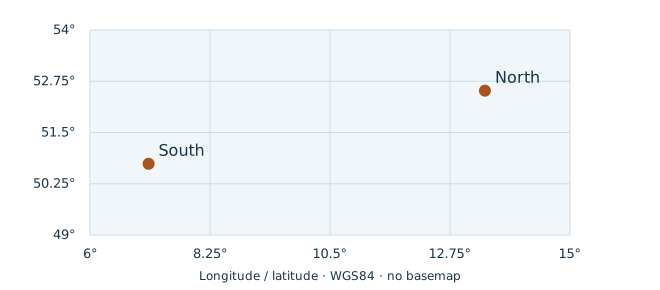
The local map is a WGS84 longitude/latitude coordinate plot with a graticule.
Its two example lab locations are invented bindings supplied by VALUES. The
Wikidata Map counterpart displays real city coordinates on the WDQS basemap.
The other local views also render entirely from captured bindings and work offline.
Each pair includes complete counterparts for the Wikidata Query Service.
They query a few explicit Wikidata entities: country populations, capitals,
birth dates, or city coordinates. These use live Wikidata data when you run
them. The local figures and expected results are based on the bundled teaching
data. The language filters select English labels without a label-service call.
In WDQS, #defaultView:BarChart, #defaultView:Graph,
#defaultView:Timeline and #defaultView:Map select interface views.
WDQS recognizes item IRIs, numeric/date types and geographic literals, then
maps their returned columns to visual roles. For charts, column order matters;
check the projected labels and numbers. Graph displays link the first item to
following items in a row. ImageGrid, an additional WDQS view, needs recognized
Commons image values. Consult the WDQS result-view reference for its mappings and options.
Copy link SPQ-13-001 Count researchers as a table Read each category and its exact integer count. The live Wikidata counterpart returns country labels and population numbers.
Result SELECT · 2 columns · 2 solutions
View Table
Exports SPARQL JSON, CSV, TSV Returned bindings: ?labLabel: xsd:string · ?count: xsd:integer
Complete SPARQL query #defaultView:Table
PREFIX ex : <https://example.org/lab/>
SELECT ?labLabel ( COUNT ( ?person ) AS ?count ) WHERE {
?person a ex : Researcher ; ex : lab ?lab .
?lab ex : label ?labLabel .
}
GROUP BY ?lab ?labLabel
ORDER BY ?labLabel
Actual RDFLib result 2 solution(s)
Local query and view Clause or feature Meaning in this example #defaultView:TableA WDQS interface hint carried in a SPARQL comment; result bindings are unchanged by the comment. TableKeep the complete variable bindings visible before selecting another view.
SPQ-13-001 · Wikidata counterpart Runs against live Wikidata data. The local preview uses the bundled research dataset. Inspect the returned bindings when running the live query.
Open in Wikidata Query Service · Download Wikidata query
Complete Wikidata counterpart #defaultView:Table
PREFIX wd : <http://www.wikidata.org/entity/>
PREFIX wdt : <http://www.wikidata.org/prop/direct/>
PREFIX rdfs : <http://www.w3.org/2000/01/rdf-schema#>
SELECT ?countryLabel ?population WHERE {
VALUES ?country { wd : Q183 wd : Q142 wd : Q38 }
?country wdt : P1082 ?population ; rdfs : label ?countryLabel .
FILTER ( LANG ( ?countryLabel ) = "en" )
}
ORDER BY ?countryLabel
Download: Query · SPARQL JSON · CSV · TSV · Tour record JSON · Source + dataset + runner ZIP
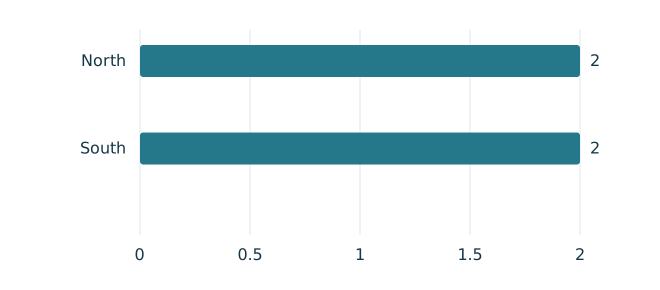
Copy link SPQ-13-002 Compare the two lab counts as a bar chart The same two counts become bars. The category is ?labLabel and bar length is ?count; neither the grouping nor the result bindings changes.
Compare with SPQ-13-001 .
Result SELECT · 2 columns · 2 solutions
View Bar chart
Exports SPARQL JSON, CSV, TSV Returned bindings: ?labLabel: xsd:string · ?count: xsd:integer
Complete SPARQL query #defaultView:BarChart
PREFIX ex : <https://example.org/lab/>
SELECT ?labLabel ( COUNT ( ?person ) AS ?count ) WHERE {
?person a ex : Researcher ; ex : lab ?lab .
?lab ex : label ?labLabel .
}
GROUP BY ?lab ?labLabel
ORDER BY ?labLabel
Actual RDFLib result Bar chart · rendered from the returned bindings Same result as a table 2 solution(s)
Local query and view Clause or feature Meaning in this example #defaultView:BarChartA WDQS interface hint carried in a SPARQL comment; result bindings are unchanged by the comment. category?labLabel supplies this visual role. value?count supplies this visual role.
SPQ-13-002 · Wikidata counterpart Runs against live Wikidata data. The local preview uses the bundled research dataset. Inspect the returned bindings when running the live query.
WDQS view mapping: category → ?countryLabel (text) · value → ?population (numeric literal)
Open in Wikidata Query Service · Download Wikidata query
Complete Wikidata counterpart #defaultView:BarChart
PREFIX wd : <http://www.wikidata.org/entity/>
PREFIX wdt : <http://www.wikidata.org/prop/direct/>
PREFIX rdfs : <http://www.w3.org/2000/01/rdf-schema#>
SELECT ?countryLabel ?population WHERE {
VALUES ?country { wd : Q183 wd : Q142 wd : Q38 }
?country wdt : P1082 ?population ; rdfs : label ?countryLabel .
FILTER ( LANG ( ?countryLabel ) = "en" )
}
ORDER BY ?countryLabel
Download: Query · SPARQL JSON · CSV · TSV · View SVG · Tour record JSON · Source + dataset + runner ZIP
Copy link SPQ-13-003 Read worked-on projects as a table Each row connects one person IRI to one project IRI and supplies labels for both. The Wikidata counterpart connects countries to their capitals.
Result SELECT · 4 columns · 5 solutions
View Table
Exports SPARQL JSON, CSV, TSV Returned bindings: ?person: IRI · ?personLabel: xsd:string · ?project: IRI · ?projectLabel: text@en
Complete SPARQL query #defaultView:Table
PREFIX ex : <https://example.org/lab/>
SELECT ?person ?personLabel ?project ?projectLabel WHERE {
?person ex : name ?personLabel ; ex : worksOn ?project .
?project ex : title ?projectLabel .
FILTER ( LANG ( ?projectLabel ) = "en" )
}
ORDER BY ?person ?project
Actual RDFLib result 5 solution(s)
Local query and view Clause or feature Meaning in this example #defaultView:TableA WDQS interface hint carried in a SPARQL comment; result bindings are unchanged by the comment. TableKeep the complete variable bindings visible before selecting another view.
SPQ-13-003 · Wikidata counterpart Runs against live Wikidata data. The local preview uses the bundled research dataset. Inspect the returned bindings when running the live query.
Open in Wikidata Query Service · Download Wikidata query
Complete Wikidata counterpart #defaultView:Table
PREFIX wd : <http://www.wikidata.org/entity/>
PREFIX wdt : <http://www.wikidata.org/prop/direct/>
PREFIX rdfs : <http://www.w3.org/2000/01/rdf-schema#>
SELECT ?country ?countryLabel ?capital ?capitalLabel WHERE {
VALUES ?country { wd : Q183 wd : Q142 wd : Q38 }
?country wdt : P36 ?capital ; rdfs : label ?countryLabel .
?capital rdfs : label ?capitalLabel .
FILTER ( LANG ( ?countryLabel ) = "en" && LANG ( ?capitalLabel ) = "en" )
}
ORDER BY ?country ?capital
Download: Query · SPARQL JSON · CSV · TSV · Tour record JSON · Source + dataset + runner ZIP
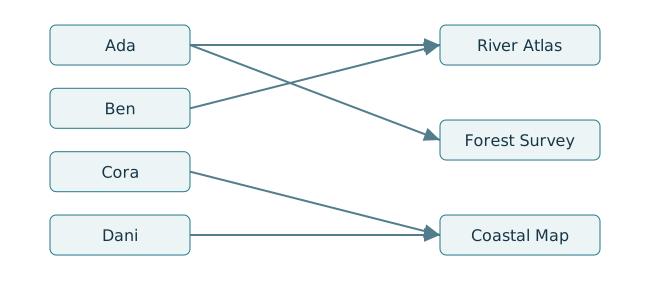
Copy link SPQ-13-004 Follow the same relationships as a network The first resource is the arrow source and the second is its target. This is still a SELECT result; the network is a view over its rows.
Compare with SPQ-13-003 .
Result SELECT · 4 columns · 5 solutions
View Network
Exports SPARQL JSON, CSV, TSV Returned bindings: ?person: IRI · ?personLabel: xsd:string · ?project: IRI · ?projectLabel: text@en
Complete SPARQL query #defaultView:Graph
PREFIX ex : <https://example.org/lab/>
SELECT ?person ?personLabel ?project ?projectLabel WHERE {
?person ex : name ?personLabel ; ex : worksOn ?project .
?project ex : title ?projectLabel .
FILTER ( LANG ( ?projectLabel ) = "en" )
}
ORDER BY ?person ?project
Actual RDFLib result Network · rendered from the returned bindings Same result as a table 5 solution(s)
Local query and view Clause or feature Meaning in this example #defaultView:GraphA WDQS interface hint carried in a SPARQL comment; result bindings are unchanged by the comment. source?person supplies this visual role. sourceLabel?personLabel supplies this visual role. target?project supplies this visual role. targetLabel?projectLabel supplies this visual role.
SPQ-13-004 · Wikidata counterpart Runs against live Wikidata data. The local preview uses the bundled research dataset. Inspect the returned bindings when running the live query.
WDQS view mapping: source → ?country (Wikidata item IRI) · sourceLabel → ?countryLabel (text) · target → ?capital (Wikidata item IRI) · targetLabel → ?capitalLabel (text)
Open in Wikidata Query Service · Download Wikidata query
Complete Wikidata counterpart #defaultView:Graph
PREFIX wd : <http://www.wikidata.org/entity/>
PREFIX wdt : <http://www.wikidata.org/prop/direct/>
PREFIX rdfs : <http://www.w3.org/2000/01/rdf-schema#>
SELECT ?country ?countryLabel ?capital ?capitalLabel WHERE {
VALUES ?country { wd : Q183 wd : Q142 wd : Q38 }
?country wdt : P36 ?capital ; rdfs : label ?countryLabel .
?capital rdfs : label ?capitalLabel .
FILTER ( LANG ( ?countryLabel ) = "en" && LANG ( ?capitalLabel ) = "en" )
}
ORDER BY ?country ?capital
Download: Query · SPARQL JSON · CSV · TSV · View SVG · Tour record JSON · Source + dataset + runner ZIP
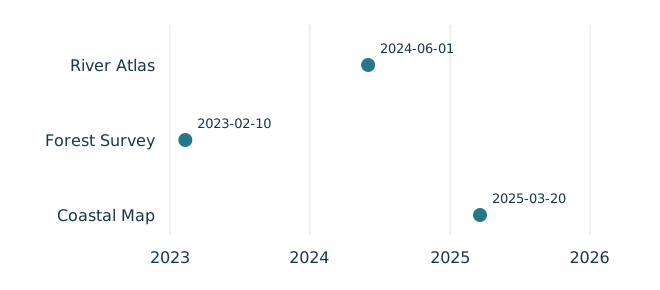
Copy link SPQ-13-005 Read project dates as a table Keep full dateTime values beside the project labels before deciding how to draw them. The Wikidata counterpart reads the birth dates of Einstein and Curie.
Result SELECT · 3 columns · 3 solutions
View Table
Exports SPARQL JSON, CSV, TSV Returned bindings: ?project: IRI · ?projectLabel: text@en · ?date: xsd:dateTime
Complete SPARQL query #defaultView:Table
PREFIX ex : <https://example.org/lab/>
SELECT ?project ?projectLabel ?date WHERE {
?project a ex : Project ; ex : title ?projectLabel ;
ex : created ?date .
FILTER ( LANG ( ?projectLabel ) = "en" )
}
ORDER BY ?project
Actual RDFLib result 3 solution(s)
Local query and view Clause or feature Meaning in this example #defaultView:TableA WDQS interface hint carried in a SPARQL comment; result bindings are unchanged by the comment. TableKeep the complete variable bindings visible before selecting another view.
SPQ-13-005 · Wikidata counterpart Runs against live Wikidata data. The local preview uses the bundled research dataset. Inspect the returned bindings when running the live query.
Open in Wikidata Query Service · Download Wikidata query
Complete Wikidata counterpart #defaultView:Table
PREFIX wd : <http://www.wikidata.org/entity/>
PREFIX wdt : <http://www.wikidata.org/prop/direct/>
PREFIX rdfs : <http://www.w3.org/2000/01/rdf-schema#>
SELECT ?person ?personLabel ?date WHERE {
VALUES ?person { wd : Q937 wd : Q7186 }
?person wdt : P569 ?date ; rdfs : label ?personLabel .
FILTER ( LANG ( ?personLabel ) = "en" )
}
ORDER BY ?date ?person
Download: Query · SPARQL JSON · CSV · TSV · Tour record JSON · Source + dataset + runner ZIP
Copy link SPQ-13-006 Place the same dates on a timeline Each date locates one project on a time axis. The numeric year alone would lose the month and day; this view uses the complete xsd:dateTime binding.
Compare with SPQ-13-005 .
Result SELECT · 3 columns · 3 solutions
View Timeline
Exports SPARQL JSON, CSV, TSV Returned bindings: ?project: IRI · ?projectLabel: text@en · ?date: xsd:dateTime
Complete SPARQL query #defaultView:Timeline
PREFIX ex : <https://example.org/lab/>
SELECT ?project ?projectLabel ?date WHERE {
?project a ex : Project ; ex : title ?projectLabel ;
ex : created ?date .
FILTER ( LANG ( ?projectLabel ) = "en" )
}
ORDER BY ?project
Actual RDFLib result Timeline · rendered from the returned bindings Same result as a table 3 solution(s)
Local query and view Clause or feature Meaning in this example #defaultView:TimelineA WDQS interface hint carried in a SPARQL comment; result bindings are unchanged by the comment. label?projectLabel supplies this visual role. date?date supplies this visual role.
SPQ-13-006 · Wikidata counterpart Runs against live Wikidata data. The local preview uses the bundled research dataset. Inspect the returned bindings when running the live query.
WDQS view mapping: label → ?personLabel (text) · date → ?date (xsd:dateTime)
Open in Wikidata Query Service · Download Wikidata query
Complete Wikidata counterpart #defaultView:Timeline
PREFIX wd : <http://www.wikidata.org/entity/>
PREFIX wdt : <http://www.wikidata.org/prop/direct/>
PREFIX rdfs : <http://www.w3.org/2000/01/rdf-schema#>
SELECT ?person ?personLabel ?date WHERE {
VALUES ?person { wd : Q937 wd : Q7186 }
?person wdt : P569 ?date ; rdfs : label ?personLabel .
FILTER ( LANG ( ?personLabel ) = "en" )
}
ORDER BY ?date ?person
Download: Query · SPARQL JSON · CSV · TSV · View SVG · Tour record JSON · Source + dataset + runner ZIP
Copy link SPQ-13-007 Inspect geographic literals as a table VALUES supplies two invented lab coordinates. The datatype is geo:wktLiteral; the point text lists longitude before latitude. The Wikidata counterpart reads city coordinates.
Result SELECT · 3 columns · 2 solutions
View Table
Exports SPARQL JSON, CSV, TSV Returned bindings: ?lab: IRI · ?labLabel: xsd:string · ?coord: geo:wktLiteral
Complete SPARQL query #defaultView:Table
PREFIX ex : <https://example.org/lab/>
PREFIX geo : <http://www.opengis.net/ont/geosparql#>
SELECT ?lab ?labLabel ?coord WHERE {
VALUES ( ?lab ?coord ) {
( ex : north "Point(13.405 52.52)" ^^ geo : wktLiteral )
( ex : south "Point(7.099 50.737)" ^^ geo : wktLiteral )
}
?lab ex : label ?labLabel .
}
ORDER BY ?lab
Actual RDFLib result 2 solution(s)
Local query and view Clause or feature Meaning in this example #defaultView:TableA WDQS interface hint carried in a SPARQL comment; result bindings are unchanged by the comment. TableKeep the complete variable bindings visible before selecting another view.
SPQ-13-007 · Wikidata counterpart Runs against live Wikidata data. The local preview uses the bundled research dataset. Inspect the returned bindings when running the live query.
Open in Wikidata Query Service · Download Wikidata query
Complete Wikidata counterpart #defaultView:Table
PREFIX wd : <http://www.wikidata.org/entity/>
PREFIX wdt : <http://www.wikidata.org/prop/direct/>
PREFIX rdfs : <http://www.w3.org/2000/01/rdf-schema#>
SELECT ?place ?placeLabel ?coord WHERE {
VALUES ?place { wd : Q64 wd : Q90 wd : Q220 }
?place wdt : P625 ?coord ; rdfs : label ?placeLabel .
FILTER ( LANG ( ?placeLabel ) = "en" )
}
ORDER BY ?place
Download: Query · SPARQL JSON · CSV · TSV · Tour record JSON · Source + dataset + runner ZIP
Copy link SPQ-13-008 Plot the same coordinates on a map Plot the returned point bindings on a longitude/latitude graticule. This local coordinate map is available offline; WDQS supplies its own map background for the live city query.
Compare with SPQ-13-007 .
Result SELECT · 3 columns · 2 solutions
View Coordinate map
Exports SPARQL JSON, CSV, TSV Returned bindings: ?lab: IRI · ?labLabel: xsd:string · ?coord: geo:wktLiteral
Complete SPARQL query #defaultView:Map
PREFIX ex : <https://example.org/lab/>
PREFIX geo : <http://www.opengis.net/ont/geosparql#>
SELECT ?lab ?labLabel ?coord WHERE {
VALUES ( ?lab ?coord ) {
( ex : north "Point(13.405 52.52)" ^^ geo : wktLiteral )
( ex : south "Point(7.099 50.737)" ^^ geo : wktLiteral )
}
?lab ex : label ?labLabel .
}
ORDER BY ?lab
Actual RDFLib result Coordinate map · rendered from the returned bindings Same result as a table 2 solution(s)
Local query and view Clause or feature Meaning in this example #defaultView:MapA WDQS interface hint carried in a SPARQL comment; result bindings are unchanged by the comment. label?labLabel supplies this visual role. coordinate?coord supplies this visual role.
SPQ-13-008 · Wikidata counterpart Runs against live Wikidata data. The local preview uses the bundled research dataset. Inspect the returned bindings when running the live query.
WDQS view mapping: label → ?placeLabel (text) · coordinate → ?coord (geo:wktLiteral)
Open in Wikidata Query Service · Download Wikidata query
Complete Wikidata counterpart #defaultView:Map
PREFIX wd : <http://www.wikidata.org/entity/>
PREFIX wdt : <http://www.wikidata.org/prop/direct/>
PREFIX rdfs : <http://www.w3.org/2000/01/rdf-schema#>
SELECT ?place ?placeLabel ?coord WHERE {
VALUES ?place { wd : Q64 wd : Q90 wd : Q220 }
?place wdt : P625 ?coord ; rdfs : label ?placeLabel .
FILTER ( LANG ( ?placeLabel ) = "en" )
}
ORDER BY ?place
Download: Query · SPARQL JSON · CSV · TSV · View SVG · Tour record JSON · Source + dataset + runner ZIP
Example and command index